
Hotpoint TB 3977B BF
Hotpoint Induction TB 3977B BF Hob User Manual
Model: TB 3977B BF
Introduction
Thank you for choosing the Hotpoint Induction Hob TB 3977B BF. This manual provides essential information for the safe and efficient use of your new appliance. Please read these instructions carefully before installation and operation, and keep them for future reference.
Important Safety Information
WARNING: Failure to follow these safety instructions could result in electric shock, fire, or injury.
- Ensure the appliance is installed by a qualified technician in accordance with local regulations.
- Do not operate the hob if the glass surface is cracked or broken. Disconnect from the power supply immediately.
- Keep children away from the appliance during operation and when it is cooling down. The surface remains hot after use.
- Do not store flammable materials on or near the hob.
- Use only suitable cookware for induction hobs.
- Never leave cooking unattended, especially when using high heat settings.
- Clean the hob regularly to prevent grease build-up, which can be a fire hazard.
- Individuals with pacemakers or similar medical devices should consult their doctor before using an induction hob.
Product Overview
The Hotpoint TB 3977B BF is a black induction glass-ceramic hob featuring four induction cooking zones and intuitive touch controls. It is designed for efficient and precise cooking.
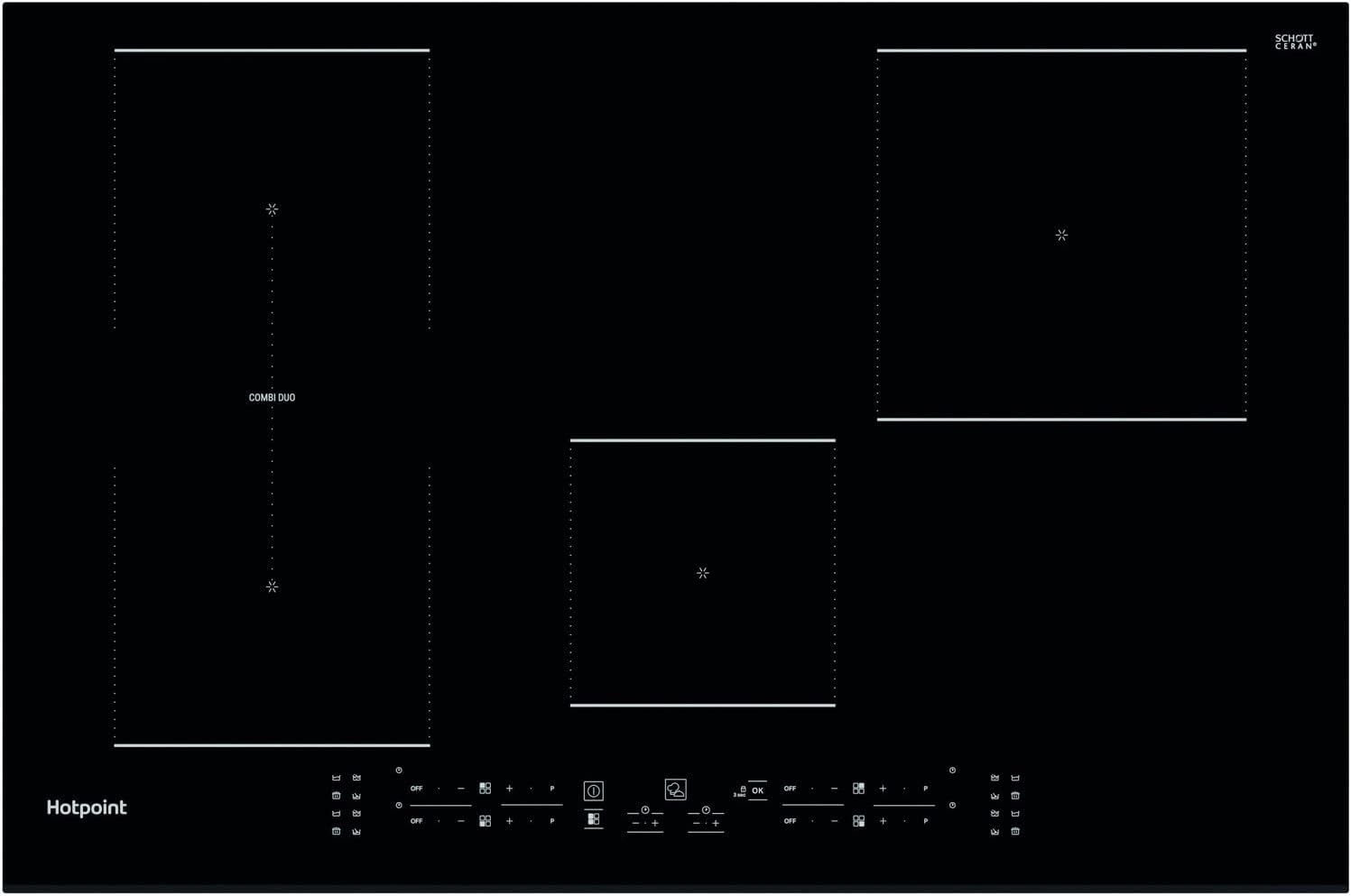
Figure 1: Front view of the Hotpoint Induction Hob TB 3977B BF. This image displays the sleek black glass-ceramic surface with four distinct cooking zones and the integrated touch control panel at the front.
Key Features:
- Four Induction Zones: Provides rapid and precise heating.
- Touch Control: Easy and intuitive operation of all functions.
- My Menu: Four automatic cooking functions for convenience.
- Combi Duo: Combines two zones for larger cookware.
- Booster Zone: Delivers extra power for faster heating.
- Glass-Ceramic Surface: Durable and easy to clean.
Installation and Setup
Installation of this appliance must be carried out by a qualified electrician or authorized service technician in accordance with all local and national electrical codes and regulations. Incorrect installation can lead to hazards.
Pre-Installation Checks:
- Verify that the power supply voltage and frequency match the specifications listed on the appliance rating plate.
- Ensure adequate ventilation around the hob.
- Confirm that the countertop material is heat-resistant.
Electrical Connection:
The hob requires a dedicated electrical circuit. Refer to the wiring diagram provided with the appliance for specific connection details. Always ensure the appliance is properly earthed.
Mounting:
Carefully place the hob into the prepared cutout in the countertop. Secure it using the provided mounting brackets according to the installation template.
Operating Instructions
The Hotpoint Induction Hob features intuitive touch controls. Ensure your hands are clean and dry when operating the controls.

Figure 2: Top-down view of the Hotpoint Induction Hob, highlighting the four cooking zones and the central touch control panel. The "Combi Duo" zone is visible on the left.
Powering On/Off:
- To turn on: Touch the Power On/Off symbol (a circle with a vertical line) for a few seconds.
- To turn off: Touch the Power On/Off symbol again.
Selecting a Cooking Zone and Adjusting Heat:
- Place suitable cookware on the desired cooking zone.
- Touch the corresponding zone selection symbol.
- Use the '+' and '-' symbols to adjust the heat level from 1 (low) to 9 (high).
My Menu Automatic Functions:
The hob offers four automatic cooking functions to simplify common tasks. These are typically accessed via dedicated symbols on the control panel.
- Select the desired cooking zone.
- Touch the My Menu symbol (often represented by a chef's hat or similar icon).
- Select one of the four automatic functions (e.g., melting, simmering, boiling, keeping warm) as indicated on the display.
Combi Duo Feature:
The Combi Duo function allows you to combine two cooking zones into one large zone, ideal for oversized pots or griddle pans.
- Place large cookware over the designated Combi Duo zones (usually the two zones on the left).
- Select one of the Combi Duo zones.
- Touch the Combi Duo symbol (often two interlocking circles or a bridge icon). The two zones will now operate as a single unit.
- Adjust the heat level for the combined zone using the '+' and '-' symbols.
Booster Zone:
The Booster function provides maximum power to a selected zone for rapid heating, such as boiling water quickly.
- Select the desired cooking zone.
- Touch the Booster symbol (often a 'P' or a lightning bolt icon). The zone will operate at maximum power for a set period or until manually deactivated.
Timer Function:
Each cooking zone can be set with a timer to automatically switch off after a specified duration.
- Select the cooking zone you wish to time.
- Touch the Timer symbol.
- Use the '+' and '-' symbols to set the desired cooking time.
- The zone will switch off automatically when the timer expires.
Child Lock:
To prevent accidental operation, the control panel can be locked.
- To activate: Touch and hold the Lock symbol (often a key or padlock icon) for a few seconds. An indicator light will confirm activation.
- To deactivate: Touch and hold the Lock symbol again until the indicator light turns off.
Maintenance and Cleaning
Regular cleaning and maintenance will ensure the longevity and optimal performance of your hob.
Daily Cleaning:
- Always ensure the hob is cool before cleaning.
- Wipe the glass-ceramic surface with a soft cloth or sponge and a mild detergent.
- For stubborn stains, use a specialized ceramic hob cleaner.
- Rinse thoroughly and dry with a clean cloth to prevent water marks.
Removing Burnt-on Food:
- For burnt-on food, use a hob scraper designed for glass-ceramic surfaces. Hold the scraper at a shallow angle to avoid scratching.
- Apply a small amount of ceramic hob cleaner and rub gently with a paper towel.
- Wipe clean with a damp cloth and dry.
Do Not Use:
- Abrasive sponges or scouring pads.
- Harsh chemical cleaners, oven sprays, or stain removers.
- Steam cleaners.
Troubleshooting
Before contacting customer service, please refer to the following table for common issues and their solutions.
| Problem | Possible Cause | Solution |
|---|---|---|
| Hob does not turn on. | No power supply; child lock activated. | Check circuit breaker; deactivate child lock. |
| Cooking zone not heating. | Unsuitable cookware; cookware not centered; zone not selected. | Use induction-compatible cookware; center cookware; select zone. |
| Display shows an error code (e.g., 'E0', 'F1'). | Internal fault; overheating. | Turn off hob, wait a few minutes, then restart. If error persists, contact service. |
| Hob makes a humming or buzzing noise. | Normal operation of induction technology; cookware material. | This is usually normal. Some cookware may amplify the sound. |
| Hob switches off unexpectedly. | Overheating protection; liquid spilled on controls. | Allow hob to cool; clean and dry control panel. |
Specifications
| Feature | Detail |
|---|---|
| Brand | Hotpoint |
| Model Number | TB 3977B BF |
| Color | Black |
| Product Dimensions (D x W x H) | 20.1 x 30.3 x 2.1 cm |
| Item Weight | 11.1 Kilograms |
| Power / Wattage | 3000000 watts |
| Voltage | 230 Volts |
| Material | Glass-Ceramic |
| Heating Elements | 4 Induction Zones |
| Burner Type | Induction |
| Ignition System Type | Electronic |
Warranty and Support
This Hotpoint appliance comes with a manufacturer's warranty. Please refer to the warranty card included with your purchase for specific terms and conditions, including the warranty period and coverage details.
For technical assistance, spare parts, or to schedule a service appointment, please contact Hotpoint customer support. Contact details can typically be found on the Hotpoint official website or in the documentation supplied with your appliance.
When contacting support, please have your appliance model number (TB 3977B BF) and serial number ready. The serial number is usually located on a label on the underside of the hob or within the appliance compartment.
Related documentsTB 3977B BF


Ask a question about this manual
Ask about setup, troubleshooting, compatibility, parts, safety, or missing instructions. Manuals+ will review the question and use this page’s manual context to help answer it.