
1. Introduction
This manual provides detailed instructions for the setup, operation, maintenance, and troubleshooting of your Victrola Journey+ Bluetooth Suitcase Record Player. Please read this manual thoroughly before using the product to ensure proper function and longevity.
2. Package Contents
Verify that all items are present in the package:
- Victrola Journey+ Bluetooth Suitcase Record Player
- Matching Bridge Stand
- Power Adapter
- 45 RPM Adapter
- Instruction Manual (this document)
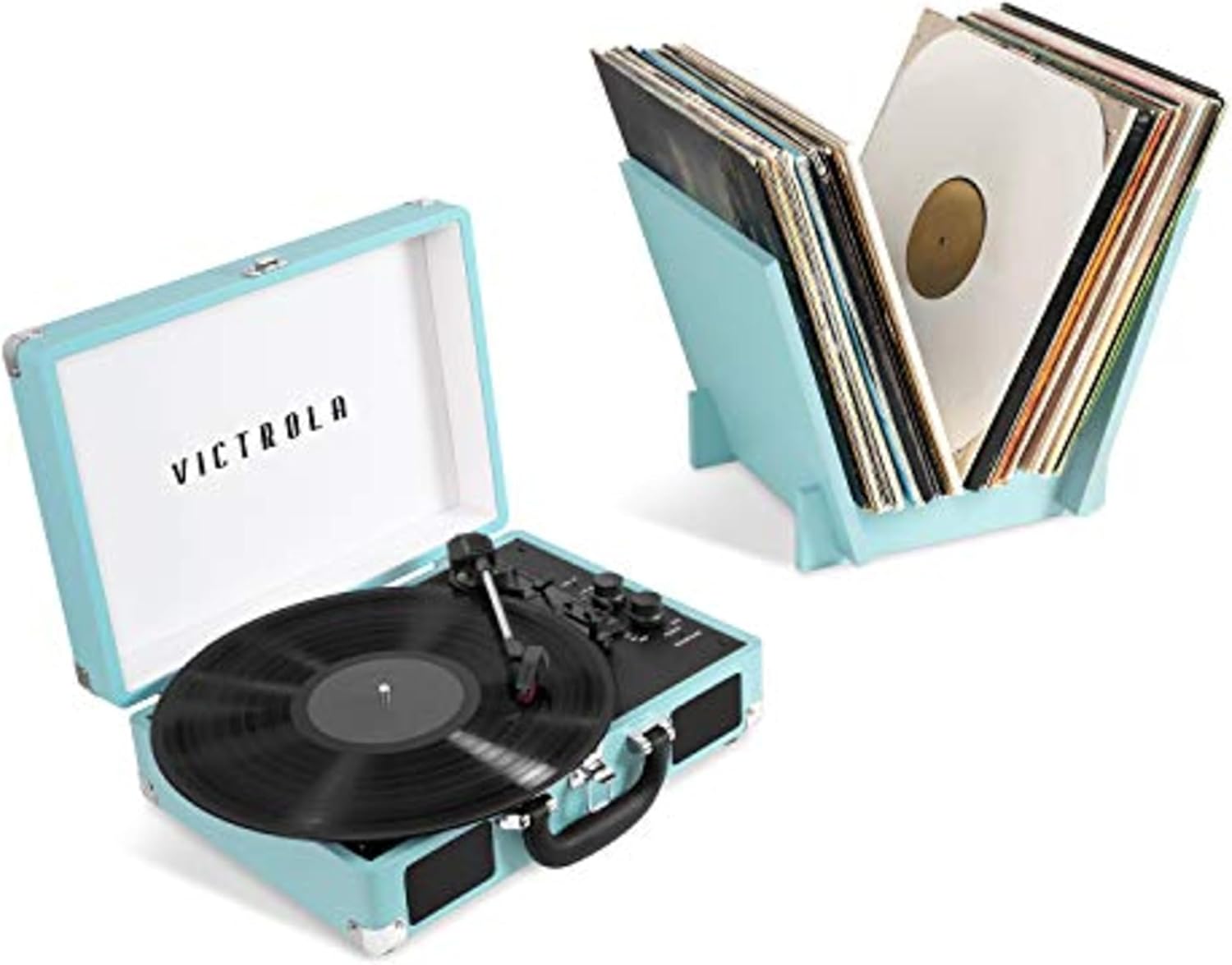
Image: Victrola Journey+ Record Player and Matching Stand.
3. Product Overview
Familiarize yourself with the components and controls of your record player.

Image: Key features of the Victrola Journey+ Record Player.
- Turntable Platter: Where records are placed.
- Tonearm: Holds the stylus (needle).
- Stylus: Reads the grooves of the record.
- Speed Selector: Adjusts playback speed (33 1/3, 45, 78 RPM).
- Power/Volume Knob: Turns the unit on/off and controls speaker volume.
- Function Knob: Selects input mode (Phono, Bluetooth, AUX).
- Auto Stop Switch: Enables or disables automatic platter stop at the end of a record.
- Built-in Speakers: For direct audio playback.
- RCA Output Jacks: For connecting to external amplified speakers.
- AUX Input Jack: For connecting external audio devices via a 3.5mm cable.
- Headphone Jack: For private listening.
- Bluetooth Connectivity: For streaming music to the player or streaming vinyl playback to external Bluetooth speakers (Vinyl Stream).
4. Setup
4.1 Unpacking and Placement
- Carefully remove the record player and all accessories from the packaging.
- Place the unit on a flat, stable, and level surface to prevent vibrations and ensure proper playback.
- Remove the protective stylus cover and any packing materials from the turntable platter and tonearm.
4.2 Power Connection
- Connect the power adapter to the DC IN jack on the back of the unit.
- Plug the power adapter into a standard wall outlet.
4.3 Stand Assembly (Optional)
If your model includes a matching bridge stand, assemble it according to the separate instructions provided with the stand. The stand is designed for convenient record storage.
5. Operating Instructions
5.1 Power On/Off and Volume Control
- Turn the Power/Volume Knob clockwise to power on the unit and increase volume.
- Turn the Power/Volume Knob counter-clockwise to decrease volume and power off the unit.
5.2 Playing Vinyl Records (PHONO Mode)
- Lift the lid of the record player.
- Turn the Function Knob to PHONO mode.
- Place a vinyl record on the turntable platter.
- Select the appropriate speed (33 1/3, 45, or 78 RPM) using the Speed Selector switch. Use the 45 RPM adapter for records with larger center holes.
- Lift the tonearm using the cue lever.
- Position the tonearm over the desired track of the record.
- Gently lower the tonearm onto the record using the cue lever. Playback will begin.
- At the end of the record, if the Auto Stop Switch is ON, the platter will stop spinning. If it is OFF, the platter will continue to spin.
- When finished, lift the tonearm, return it to the tonearm rest, and secure it with the clip.

Image: Turntable supporting 3 versatile speeds.
5.3 Bluetooth Input (Streaming from a Smart Device)
You can stream audio wirelessly from your smartphone or other Bluetooth-enabled device to the record player's built-in speakers.
- Turn the Function Knob to BLUETOOTH mode. The Bluetooth indicator light will flash.
- Enable Bluetooth on your smart device and search for "Victrola Journey+".
- Select "Victrola Journey+" to pair. Once paired, the indicator light will stop flashing and remain solid.
- You can now play music from your device through the record player's speakers. Adjust volume using both your device and the record player's Power/Volume Knob.

Image: Bluetooth connectivity for wireless music streaming.
5.4 Bluetooth Output (Vinyl Stream to External Bluetooth Speaker)
The Vinyl Stream feature allows you to stream your vinyl playback wirelessly to an external Bluetooth speaker.
- Ensure your external Bluetooth speaker is in pairing mode.
- Turn the Function Knob to PHONO mode.
- Press and hold the Bluetooth pairing button (refer to your unit's specific button, often combined with the Function Knob or a dedicated button) until the Bluetooth indicator light flashes rapidly.
- The record player will search for and connect to the nearest Bluetooth speaker. Once connected, the indicator light will become solid.
- Begin playing a vinyl record. The audio will now stream to your external Bluetooth speaker.
- Note: When streaming via Bluetooth output, the volume control on the record player may be bypassed. Adjust volume directly on your external Bluetooth speaker.
5.5 RCA Output Connection
Connect the record player to an external amplifier or powered speakers using RCA cables (not included).
- Connect the red RCA plug to the R (right) output jack on the record player.
- Connect the white RCA plug to the L (left) output jack on the record player.
- Connect the other end of the RCA cables to the corresponding input jacks on your amplifier or powered speakers.
- Ensure your external audio system is set to the correct input.
5.6 Headphone Jack Usage
For private listening, plug any standard 3.5mm headphones into the headphone jack on the unit. The built-in speakers will automatically mute.
5.7 AUX Input Usage
Connect external audio devices (e.g., CD player, MP3 player) using a 3.5mm AUX cable (not included).
- Connect one end of the 3.5mm AUX cable to the AUX IN jack on the record player.
- Connect the other end to the headphone output or AUX output of your external audio device.
- Turn the Function Knob to AUX mode.
- Play audio from your external device. Adjust volume using both your device and the record player's Power/Volume Knob.
6. Care and Maintenance
6.1 Stylus Care
- Handle the stylus gently. Avoid touching the stylus tip with your fingers.
- Clean the stylus regularly using a soft brush, brushing from back to front.
- Replace the stylus approximately every 200-300 hours of playback for optimal sound quality and to prevent damage to your records.
6.2 Cleaning the Unit
- Wipe the exterior of the record player with a soft, dry cloth.
- Do not use harsh chemicals, cleaning sprays, or abrasive cloths, as these can damage the finish.
- Keep the lid closed when not in use to protect the turntable from dust.
6.3 Record Care
- Handle records by their edges or the center label to avoid transferring oils from your skin.
- Store records vertically in their sleeves in a cool, dry place.
- Clean records regularly with a dedicated record cleaning brush or solution to remove dust and static.
7. Troubleshooting Guide
If you experience issues with your record player, consult the table below for common problems and solutions.
| Problem | Possible Cause | Solution |
|---|---|---|
| No power | Power adapter not connected; Power outlet not active; Power/Volume knob off. | Ensure power adapter is securely connected to unit and outlet. Check if outlet is working. Turn Power/Volume knob clockwise. |
| Record skipping | Dirty or scratched record; Stylus worn or dirty; Unit not on a level surface; Excessive vibration. | Clean record. Clean or replace stylus. Place unit on a stable, level surface. Avoid placing near speakers or vibrating objects. |
| Poor sound quality / Distortion | Dirty stylus; Incorrect speed selected; External speakers not connected properly (RCA); Bluetooth volume settings. | Clean or replace stylus. Verify correct speed (33 1/3, 45, 78 RPM). Check RCA cable connections. Adjust volume on both record player and connected Bluetooth device/speaker. |
| Bluetooth not pairing | Unit not in Bluetooth pairing mode; Device too far; Interference. | Ensure Function Knob is set to BLUETOOTH (for input) or hold pairing button (for output). Move device closer. Reduce interference from other wireless devices. |
If the problem persists after trying these solutions, please contact Victrola Customer Support.
8. Product Specifications
| Feature | Detail |
|---|---|
| Model Number | VSC-400SBV-TRQ-SDF |
| Brand | Victrola |
| Product Dimensions | 8.74 x 17.24 x 13.31 inches |
| Item Weight | 8 pounds |
| Turntable Speeds | 33 1/3, 45, 78 RPM |
| Motor Type | DC Motor |
| Connectivity | Bluetooth (Input & Vinyl Stream Output), RCA Output, 3.5mm AUX Input, Headphone Jack |
| Special Features | Built-in Speakers, Portable Design, Auto Stop Switch |
| Material | Plastic |
| Included Components | Turntable, Matching Stand |
9. Warranty Information and Customer Support
9.1 Warranty
Victrola products are designed and manufactured to the highest quality standards. For specific warranty details, including coverage period and terms, please refer to the warranty card included with your product or visit the official Victrola website. Keep your proof of purchase for warranty claims.
9.2 Customer Support
If you have any questions, require technical assistance, or need to report an issue, please contact Victrola Customer Support. You can find contact information and additional resources on the official Victrola website:
Visit the Official Victrola Store on Amazon
For the most up-to-date support information, please visit the Victrola corporate website.


