1. Introduction
Thank you for choosing the CREATE Warm Towel Pro Electric Towel Warmer. This manual provides essential information for the safe and efficient operation of your new appliance. Please read it thoroughly before installation and use, and retain it for future reference.
2. Important Safety Instructions
- Read all instructions before using this appliance.
- This appliance is intended for domestic use only.
- Do not immerse the appliance in water or other liquids.
- Ensure the power supply voltage matches the rating label on the appliance.
- Do not operate the appliance with a damaged cord or plug.
- Keep the appliance away from flammable materials.
- Do not cover the appliance while in operation to prevent overheating.
- This appliance is rated IPX4, meaning it is protected against splashing water from any direction. However, avoid direct water jets.
- Children should be supervised to ensure they do not play with the appliance.
- Disconnect from power supply before cleaning or maintenance.
3. Package Contents
Verify that all components are present and undamaged:
- CREATE Warm Towel Pro Electric Towel Warmer (Main Unit)
- Wall Mounting Kit (screws, anchors)
- Remote Control
- User Manual
4. Product Overview
Familiarize yourself with the main components of your towel warmer:

Figure 4.1: Front view of the CREATE Warm Towel Pro Electric Towel Warmer, showing the heating bars and the control panel at the bottom.
- Heating Bars: Aluminum bars for warming and drying towels.
- Ceramic Heater (PTC): Located at the bottom, provides rapid room heating.
- Control Panel: Digital display and touch buttons for operation.
- Power Cord: For connecting to the electrical outlet.
- Wall Mount Brackets: For secure installation.

Figure 4.2: Close-up view of the control panel and the ceramic heater grille at the base of the unit, with a towel draped over a bar above.
5. Setup and Installation
The CREATE Warm Towel Pro is designed for wall-mounted installation. Ensure the installation location is suitable for a bathroom environment (IPX4 rated) and has a power outlet within reach.
5.1. Choosing a Location
- Select a wall surface that can support the weight of the unit (approx. 7.96 kg) plus towels.
- Ensure there is sufficient clearance around the unit for air circulation and towel placement.
- Avoid installing directly above or too close to water sources (e.g., shower, bathtub) to minimize splashing.
- The unit is suitable for rooms up to 12 m².
5.2. Mounting the Unit
- Carefully unpack the towel warmer and all accessories.
- Using the provided template (if included) or by measuring the unit's mounting points, mark the drilling positions on the wall.
- Drill holes at the marked positions and insert the wall anchors.
- Secure the mounting brackets to the wall using the provided screws.
- Carefully lift the towel warmer and attach it to the wall mounting brackets, ensuring it is securely fastened.
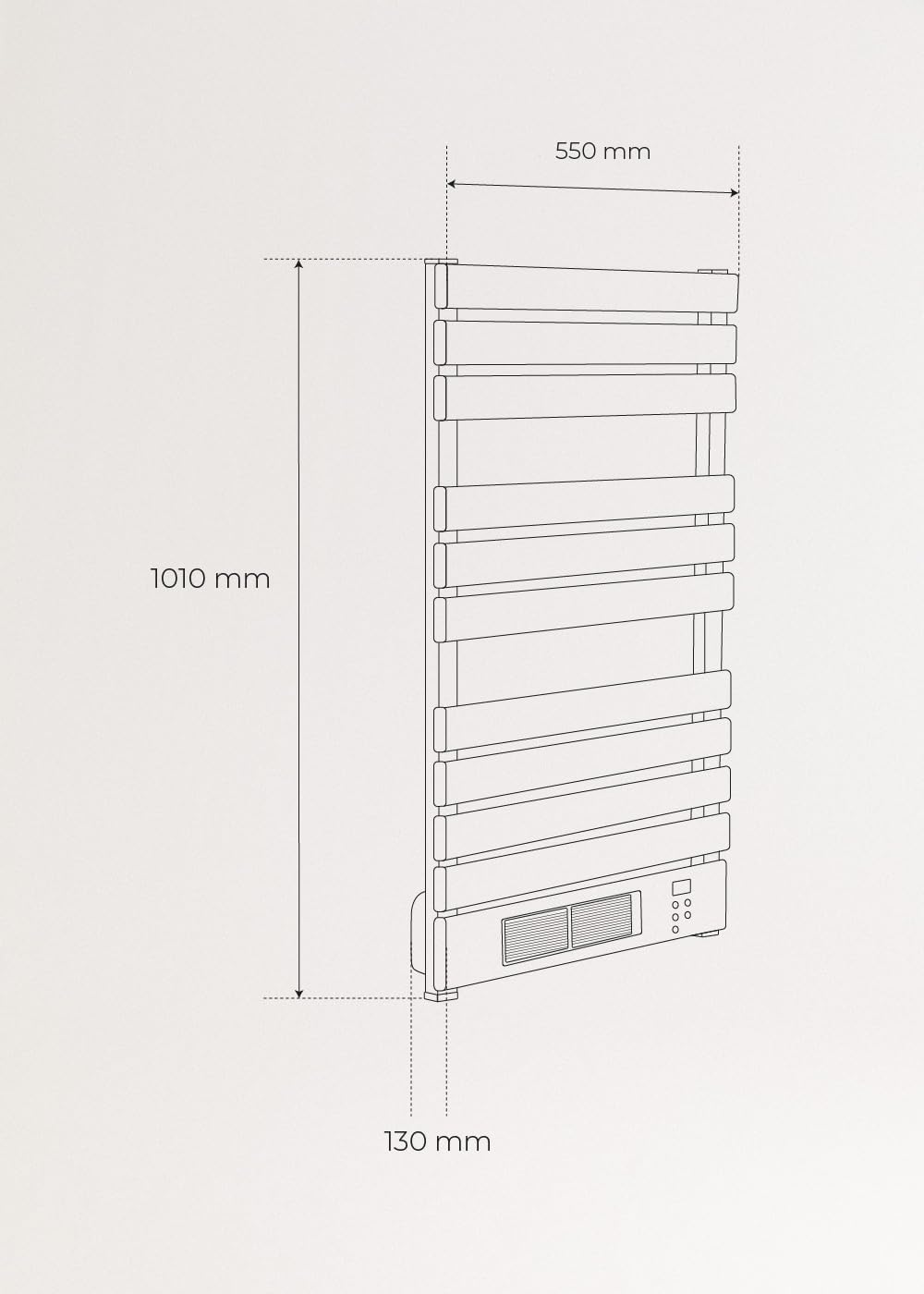
Figure 5.1: Technical drawing illustrating the dimensions of the CREATE Warm Towel Pro: 1010 mm height, 550 mm width, and 130 mm depth from the wall.
5.3. Electrical Connection
- Plug the power cord into a suitable electrical outlet. Ensure the outlet is properly grounded.
- Do not use extension cords or adapters unless absolutely necessary and rated for the appliance's power.
6. Operating Instructions
The Warm Towel Pro can be operated via its integrated control panel, remote control, or Wi-Fi connectivity.
6.1. Control Panel Overview
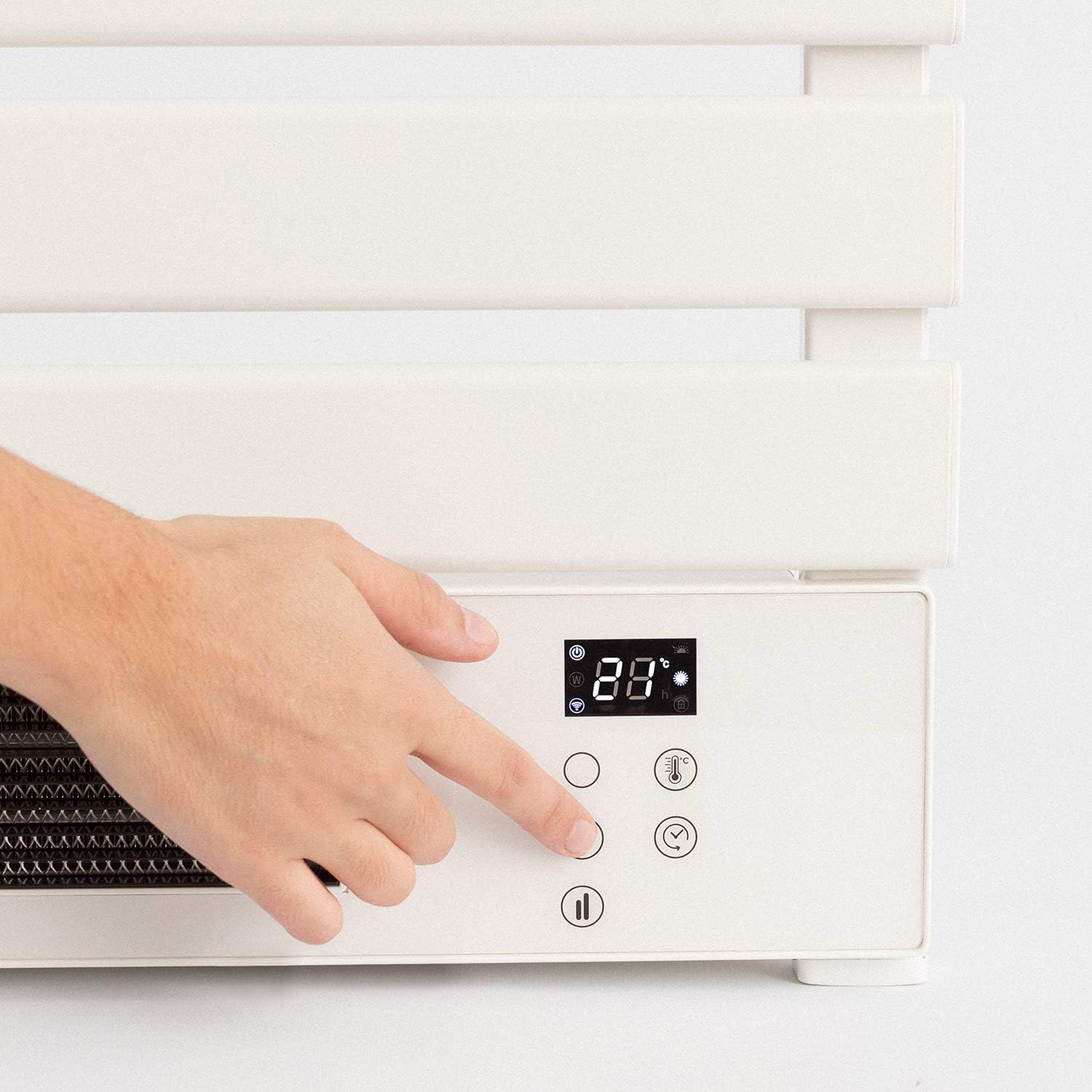
Figure 6.1: A hand interacting with the digital control panel, showing the temperature display and various function buttons.
The control panel typically includes:
- Power Button: To turn the unit ON/OFF.
- Temperature Adjustment Buttons: To increase or decrease the desired temperature (up to 40°C).
- Mode Button: To cycle through different operating modes (e.g., Low Power 500W for towel warming, High Power 1500W for room heating).
- Timer Button: To set the 24-hour weekly timer.
- Wi-Fi Indicator: Shows Wi-Fi connection status.
6.2. Basic Operation
- Power On: Press the Power button on the control panel or remote. The display will show the current room temperature.
- Set Temperature: Use the temperature adjustment buttons to set your desired temperature. The unit will heat until this temperature is reached.
- Select Mode: Press the Mode button to switch between 500W (towel warming) and 1500W (room heating) modes.
- Set Timer: Use the Timer button to program specific operating times for each day of the week. Refer to the detailed timer section in the full manual for advanced settings.
- Power Off: Press the Power button again to turn off the unit.
6.3. Wi-Fi Connectivity and App Control
The Warm Towel Pro features Wi-Fi connectivity, allowing control via a smartphone application.

Figure 6.2: A hand holding a smartphone, demonstrating the mobile application interface for controlling the towel warmer remotely.
- Download App: Download the official CREATE smart home application from your device's app store.
- Register/Login: Create an account or log in to the application.
- Add Device: Follow the in-app instructions to add your Warm Towel Pro. This typically involves putting the device into pairing mode (refer to the full manual for specific steps) and connecting it to your home Wi-Fi network (2.4 GHz only).
- Control: Once connected, you can control all functions of the towel warmer from your smartphone, including power, temperature, modes, and timer settings.
7. Maintenance and Cleaning
Regular maintenance ensures optimal performance and longevity of your towel warmer.
- Before Cleaning: Always unplug the appliance from the power outlet and allow it to cool completely.
- Exterior Cleaning: Wipe the exterior surfaces with a soft, damp cloth. Do not use abrasive cleaners, solvents, or harsh chemicals, as these can damage the finish.
- Do Not Immerse: Never immerse the appliance in water or spray water directly onto it.
- Storage: If storing the unit for an extended period, clean it thoroughly and store it in a dry, dust-free place.
8. Troubleshooting
If you encounter issues with your CREATE Warm Towel Pro, refer to the following common problems and solutions:
| Problem | Possible Cause | Solution |
|---|---|---|
| Unit does not turn on. | No power supply; power cord not plugged in; circuit breaker tripped. | Check power connection; ensure outlet is functional; reset circuit breaker. |
| No heat output. | Temperature setting too low; unit in standby mode; fan blocked. | Increase desired temperature; check operating mode; ensure air intake/outlet is clear. |
| Wi-Fi connection fails. | Incorrect Wi-Fi password; router too far; 5 GHz network used; device not in pairing mode. | Verify password; move unit closer to router; ensure 2.4 GHz network is used; re-enter pairing mode. |
| Unit overheats and shuts off. | Air vents blocked; internal safety mechanism activated. | Ensure no towels or objects are blocking the air vents; allow unit to cool down before restarting. |
If the problem persists after attempting these solutions, please contact CREATE customer support.
9. Technical Specifications
| Feature | Specification |
|---|---|
| Brand | CREATE |
| Model | Warm Towel Pro |
| Color | White |
| Dimensions (L x W x H) | 55 x 13 x 101 cm |
| Weight | 7.96 kg |
| Power Output | 500W (towel warming), 1500W (ceramic heater) |
| Material | Aluminum |
| Heating Technology | PTC Ceramic |
| Connectivity | Wi-Fi (2.4 GHz) |
| Features | Temperature Regulation, Remote Control, 24-hour Weekly Timer, IPX4 Water Protection |
10. Warranty and Support
CREATE products are manufactured to high-quality standards. For information regarding warranty terms, technical support, or spare parts availability, please refer to the warranty card included with your product or visit the official CREATE website. Please retain your proof of purchase for warranty claims.
Contact Information: Please refer to the contact details provided in your product packaging or on the official CREATE website for customer service.


