1. Introduction
The EZVIZ C8C is an advanced 360-degree outdoor security camera designed to provide comprehensive surveillance for your home. Featuring high-definition video, AI-powered person detection, versatile night vision modes, and a weatherproof design, the C8C ensures reliable protection in all conditions. It integrates seamlessly with smart home ecosystems like Alexa and Google Assistant, offering convenient monitoring and control.

Figure 1.1: EZVIZ C8C Camera with Live View on Smartphone
This image shows the EZVIZ C8C camera mounted outdoors, with a smartphone displaying its live feed, highlighting its 360-degree visual coverage.
2. Package Contents
Verify that all components are present in your EZVIZ C8C package:
- EZVIZ C8C 360° Outdoor Security Camera
- Mounting Base and Screws
- Power Adapter
- Drill Template Sticker
- Quick Start Guide
- Waterproof Connector Kit
3. Setup
3.1 Physical Installation
The EZVIZ C8C camera is designed for outdoor installation. Use the provided drill template to mark and pre-drill holes for the mounting base. Ensure the camera is mounted securely with cables directed upwards to prevent water ingress.

Figure 3.1: Weatherproof Design and Mounting
This image illustrates the EZVIZ C8C camera's IP65 weatherproof rating, showing it mounted on a wall with water droplets, indicating its resilience to outdoor elements.
3.2 App Installation & Configuration
Download the EZVIZ app from the Apple App Store or Google Play Store. Create an account and follow the in-app instructions to add your device. Scan the QR code located on the camera or its quick start guide to initiate the pairing process. Ensure your Wi-Fi router is close to the camera for a stable connection during setup.
Video 3.1: EZVIZ Outdoor Security PT Camera-C8C Setup Guide
This video provides a comprehensive guide on setting up the EZVIZ C8C camera, including physical installation and app configuration steps.
4. Operating the Camera
4.1 360-Degree Vision (Pan & Tilt)
Utilize the EZVIZ app to remotely control the camera's pan (horizontal) and tilt (vertical) movements, providing a full 360-degree field of view. This ensures no blind spots in your surveillance area.

Figure 4.1: Pan & Tilt Functionality
This image demonstrates the camera's extensive pan (352°) and tilt (95°) capabilities, allowing for comprehensive 360-degree coverage controlled via the mobile app.
4.2 AI Person Detection
The C8C features advanced AI-powered person detection, distinguishing human shapes from other moving objects. This reduces false alarms and ensures you receive relevant notifications when someone enters your customized detection zones.

Figure 4.2: AI Person Detection
This image illustrates the camera's AI person detection feature, showing a person highlighted in the camera's view with a corresponding alert notification on a smartphone.
4.3 Night Vision Modes
Choose from three night vision modes: full-color, black & white, or smart night vision. Smart night vision automatically switches to color when motion is detected, providing detailed footage even in low-light conditions.

Figure 4.3: Three Night Vision Modes
This image displays the three available night vision modes: full-color for vibrant nighttime surveillance, black-and-white for traditional infrared viewing, and smart night vision which intelligently switches between modes based on detected motion.
4.4 24/7 Recording
The C8C supports continuous 24/7 recording, ensuring constant monitoring of your property. Footage can be stored locally on a microSD card or securely in the cloud.

Figure 4.4: 24/7 Recording Timeline
This image shows a user interacting with the EZVIZ app on a smartphone, viewing a timeline of 24/7 recorded footage, indicating continuous surveillance capability.
4.5 Smart Home Integration
The EZVIZ C8C camera is compatible with Amazon Alexa and Google Assistant, allowing for voice-controlled monitoring and integration into your existing smart home setup.
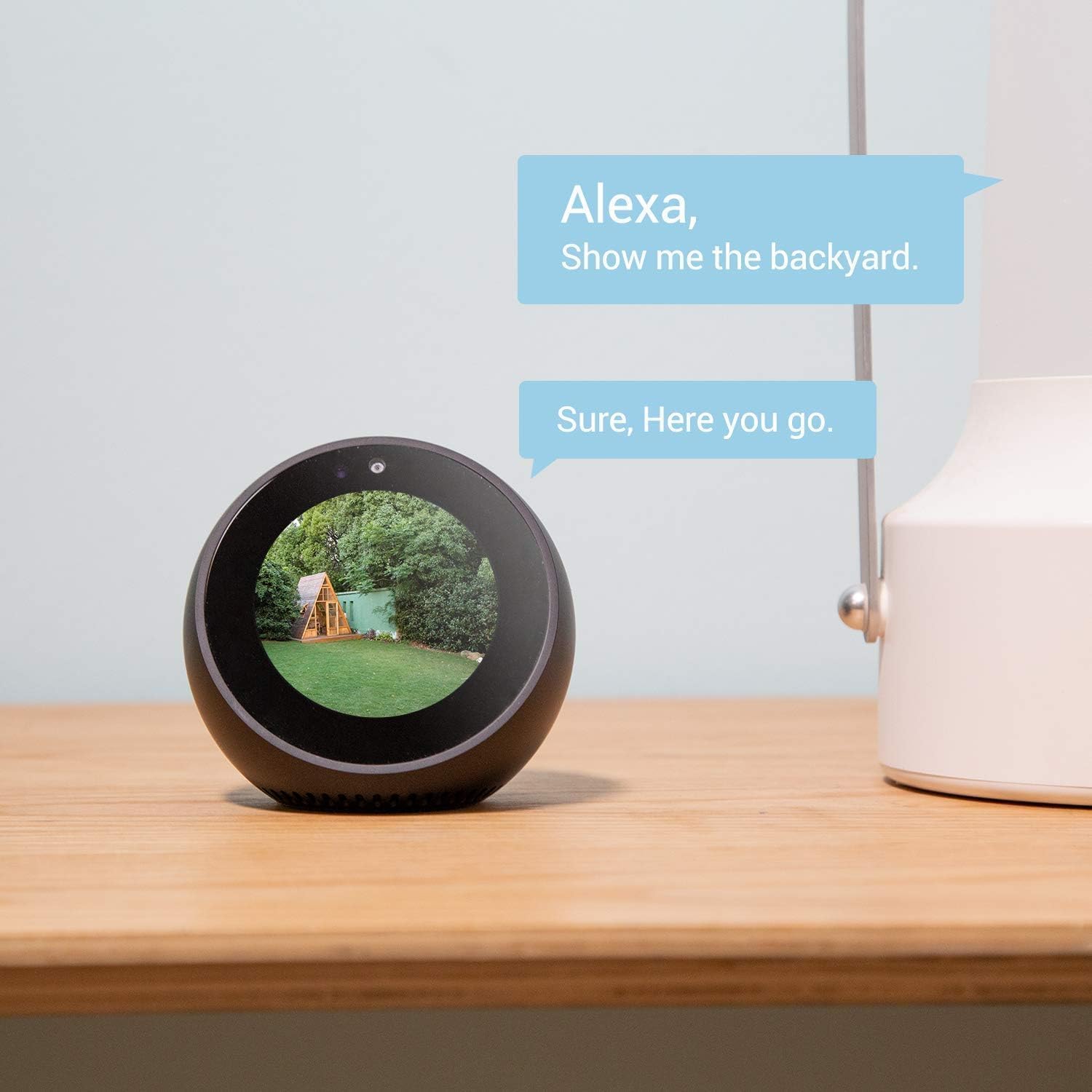
Figure 4.5: Alexa Integration
This image depicts the EZVIZ C8C's compatibility with smart home devices, showing an Amazon Echo Show displaying the camera's live feed in response to a voice command.
4.6 Storage Options
Store your video recordings either locally on a microSD card (up to 256GB) or subscribe to the EZVIZ CloudPlay service for secure, encrypted cloud storage.
5. Maintenance
5.1 Weatherproof Design
The C8C is built with an IP65 weatherproof design, ensuring continuous operation in various weather conditions. Regularly check the camera for any debris or obstructions that might affect its performance.
5.2 Cleaning
Gently wipe the camera lens and body with a soft, damp cloth to remove dust or dirt. Avoid using harsh chemicals or abrasive materials that could damage the camera's surface or lens.
6. Troubleshooting
6.1 Wi-Fi Connectivity Issues
Some users have reported challenges with Wi-Fi range and connection stability, particularly with 5GHz networks. Ensure your router supports 2.4GHz Wi-Fi, as the C8C primarily uses this band. Position the camera closer to the router or consider a Wi-Fi extender for optimal signal strength.
6.2 Power Over Ethernet (PoE)
Note that despite having a network cable connection, the EZVIZ C8C is NOT PoE compatible. It requires a separate power source via the included power adapter.
6.3 Night Vision Sensitivity
The camera's night vision sensors are highly sensitive. Avoid placing the camera where direct outdoor lights shine onto the sensor, as this can cause image washout. Position the camera to see the desired area without direct light interference.
7. Specifications
| Feature | Specification |
|---|---|
| Model Number | OB02441 |
| Video Capture Resolution | 1080p |
| Viewing Angle | 360 Degrees |
| Night Vision Range | 100 Feet |
| Connectivity Protocol | Wi-Fi |
| Power Source | Corded Electric |
| Water Resistance Level | Waterproof (IP65) |
| Flash Memory Supported Size | 256 GB |
| Item Weight | 1.12 pounds |
| Item Dimensions (LxWxH) | 6.22 x 6.18 x 5.87 inches |
8. Warranty and Support
For warranty information and technical support, please refer to the official EZVIZ website or contact their customer service. Keep your purchase receipt for warranty claims.


