
Candy CSO44 1285TE/2-S
Candy Smart Pro CSO44 1285TE/2-S Washing Machine User Manual
Model: CSO44 1285TE/2-S | Brand: Candy
Introduction
This manual provides essential information for the safe and efficient operation of your Candy Smart Pro CSO44 1285TE/2-S washing machine. Please read it thoroughly before installation, use, or maintenance. Proper use and care will ensure optimal performance and extend the lifespan of your appliance.

Figure 1: Front view of the Candy Smart Pro CSO44 1285TE/2-S washing machine, showcasing its sleek white design and control panel.
Safety Information
Always follow basic safety precautions when using electrical appliances to reduce the risk of fire, electric shock, or injury to persons.
- Ensure the appliance is properly grounded.
- Do not operate the washing machine if it has a damaged cord or plug, or if it is not working properly.
- Keep children and pets away from the appliance during operation.
- Do not wash items that are soiled with flammable liquids.
- Unplug the appliance before cleaning or performing any maintenance.
Setup and Installation
1. Unpacking
Carefully remove the washing machine from its packaging. The package includes the device and this instruction manual. Inspect the appliance for any damage during transit. Report any damage immediately to your retailer.
2. Removing Transit Bolts
Before operating the washing machine, it is crucial to remove all transit bolts located at the rear of the appliance. These bolts secure the drum during transport and must be removed to prevent damage during operation. Refer to the diagram below for bolt locations.

Figure 2: Rear view of the washing machine, indicating the positions of the transit bolts that must be removed before first use.
3. Placement
Place the washing machine on a firm, level surface. Ensure there is adequate space around the appliance for ventilation and connections. The dimensions of the product are approximately 46.9 cm (depth) x 60 cm (width) x 85 cm (height).
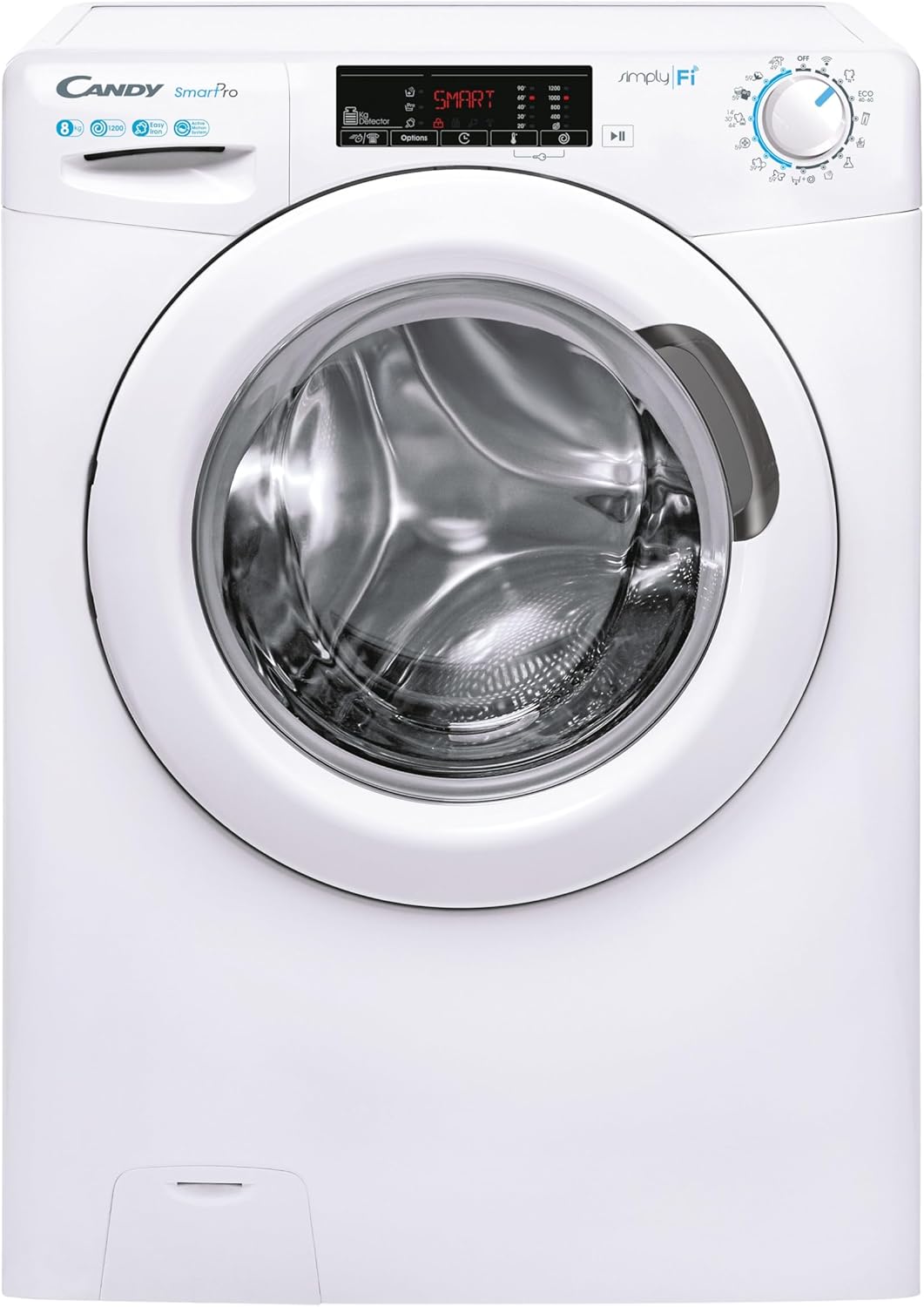
Figure 3: Example of the washing machine installed in a residential setting, demonstrating typical space requirements.
4. Water and Drainage Connections
Connect the water inlet hose to a cold water tap and the appliance's inlet valve. Ensure all connections are tight to prevent leaks. Position the drain hose into a suitable standpipe or sink, ensuring it is securely fastened to prevent displacement during the drain cycle.
5. Electrical Connection
Plug the power cord into a grounded electrical outlet. Verify that the voltage and frequency match the specifications on the appliance's rating label.
Operating Instructions
1. Control Panel Overview
The control panel features a program selector dial, a digital display, and touch buttons for various functions such as temperature, spin speed, delay start, and special options like Easy Iron and steam.
2. Loading Laundry
Open the washing machine door and load laundry into the drum. Do not overload the machine; the maximum capacity is 8 kg. Ensure items are evenly distributed to prevent imbalance during the spin cycle.

Figure 4: The washing machine with its large porthole door open, providing easy access to the drum for loading and unloading laundry.
3. Adding Detergent
Pull out the detergent drawer and add the appropriate amount of detergent and fabric softener to the designated compartments. Refer to your detergent packaging for recommended dosages.
4. Selecting a Program
Turn the program selector dial to choose the desired wash program based on the fabric type and soil level. The digital display will show the default settings for the selected program.
- Easy Iron Function: This special function uses steam to reduce wrinkles, making ironing easier.
- Smart Operation (Wi-Fi & Bluetooth): Connect your washing machine to the Candy simply-Fi app on your smartphone via Wi-Fi or Bluetooth. This allows you to remotely control the machine, download additional programs, and access smart features.
5. Starting a Cycle
Press the Start/Pause button to begin the wash cycle. The machine will automatically proceed through the selected program.
Maintenance
Regular maintenance ensures the longevity and efficiency of your washing machine.
1. Cleaning the Exterior
Wipe the exterior surfaces with a soft, damp cloth. Do not use abrasive cleaners or solvents.
2. Cleaning the Detergent Drawer
Periodically remove and clean the detergent drawer under running water to prevent residue buildup.
3. Cleaning the Filter
The washing machine is equipped with a filter to collect lint and small objects. It should be cleaned regularly to ensure proper drainage. Locate the filter access panel at the bottom front of the machine, open it, and carefully remove the filter for cleaning.

Figure 5: Close-up view of the drain filter compartment, showing the removable filter for easy cleaning.
4. Anti-Calc Cycle
The smart system may alert you when an anti-calc (descaling) cycle is recommended. Follow the instructions in the app or on the display to perform this cycle, which helps prevent limescale buildup and maintains performance.
Troubleshooting
Before contacting service, review the following common issues and their solutions:
| Problem | Possible Cause | Solution |
|---|---|---|
| Machine does not start | Power cord unplugged; door not closed properly; program not selected. | Check power connection; ensure door is latched; select a program and press Start. |
| Excessive vibration/noise | Transit bolts not removed; machine not level; uneven load. | Remove transit bolts (see Setup); adjust leveling feet; redistribute laundry. |
| Water not draining | Drain hose kinked or blocked; filter clogged. | Check drain hose; clean the drain filter (see Maintenance). |
| Detergent residue in drawer | Insufficient water pressure; drawer clogged. | Check water supply; clean detergent drawer. |
For more detailed troubleshooting and diagnostic information, refer to the Candy simply-Fi app or the manufacturer's website.
Specifications
| Feature | Specification |
|---|---|
| Model Number | CSO44 1285TE/2-S |
| Capacity | 8 kg |
| Spin Speed | 0-1200 rpm |
| Dimensions (H x W x D) | 85 x 60 x 46.9 cm |
| Connectivity | Wi-Fi, Bluetooth |
| Special Functions | Easy Iron (Steam), Smart Operation |
| Color | White |
| Material | Stainless Steel (drum), other materials for casing |
| Controls Type | Push Button |
| Loading Type | Front Load |
Warranty and Support
Your Candy Smart Pro CSO44 1285TE/2-S washing machine comes with a manufacturer's warranty. Please refer to the warranty card included with your purchase for specific terms and conditions. Keep your proof of purchase for warranty claims.
For technical assistance, spare parts, or to schedule a service appointment, please contact Candy customer support. Contact details can typically be found on the manufacturer's official website or in the warranty documentation.
Note: No official product videos were available for embedding based on the provided data.
Ask a question about this manual
Ask about setup, troubleshooting, compatibility, parts, safety, or missing instructions. Manuals+ will review the question and use this page’s manual context to help answer it.