
Introduction
This user manual provides comprehensive instructions for the Dcorn 4.3" LCD Digital Microscope (Model: xcvf-5555). This versatile digital microscope offers a magnification range of 10X to 1000X, a high-definition 4.3-inch LCD display, and adjustable LED illumination, making it suitable for various applications including coin observation, plant and insect study, textile inspection, gemology, circuit board repair, and educational purposes. Please read this manual thoroughly before operating the device to ensure proper use and optimal performance.

Figure 1: Dcorn 4.3" LCD Digital Microscope
Package Contents
Upon opening the package, please verify that all the following items are included:
- 1 x 4.3-inch Digital Microscope
- 1 x User Manual
- 1 x USB Cable
- 1 x CD (Software/Drivers)
- 1 x Adjustable Bracket
- 1 x Aluminum Alloy Base

Figure 2: Included Components
Setup
Follow these steps to set up your Dcorn Digital Microscope:
- Assemble the Stand: Insert the adjustable bracket into the aluminum alloy base. Ensure it is securely fitted.
- Attach the Microscope: Carefully attach the microscope unit to the adjustable bracket. The microscope should slide into place and be held firmly.
- Power On: Connect the microscope to a power source using the provided USB cable. The device is powered by a built-in Lithium Ion battery (included).
- Initial Charge: For first-time use, it is recommended to fully charge the microscope's battery.


Figure 3: Easy Installation and Height Adjustment
Operating Instructions
1. Basic Operation
- Power Button: Press and hold the power button to turn the microscope on or off.
- LCD Display: The 4.3-inch high-definition LCD display will show the live view from the microscope.
- Focus Adjustment: Use the focus knob on the side of the microscope to achieve a clear image of your specimen.
- Height Adjustment: Adjust the height of the microscope on its stand to change the working distance and overall magnification.
2. Magnification (10X-1000X)
The Dcorn microscope offers a magnification range from 10X to 1000X. The displayed magnification on the screen corresponds to the size of the monitor, allowing for detailed observation of even minute details.

Figure 4: Digital Magnification Capability
3. Adjustable LED Lights
The microscope features 8 built-in adjustable LED lights. Rotate the brightness adjustment knob to control the intensity of the illumination, ensuring optimal lighting for your specimen in various environments.
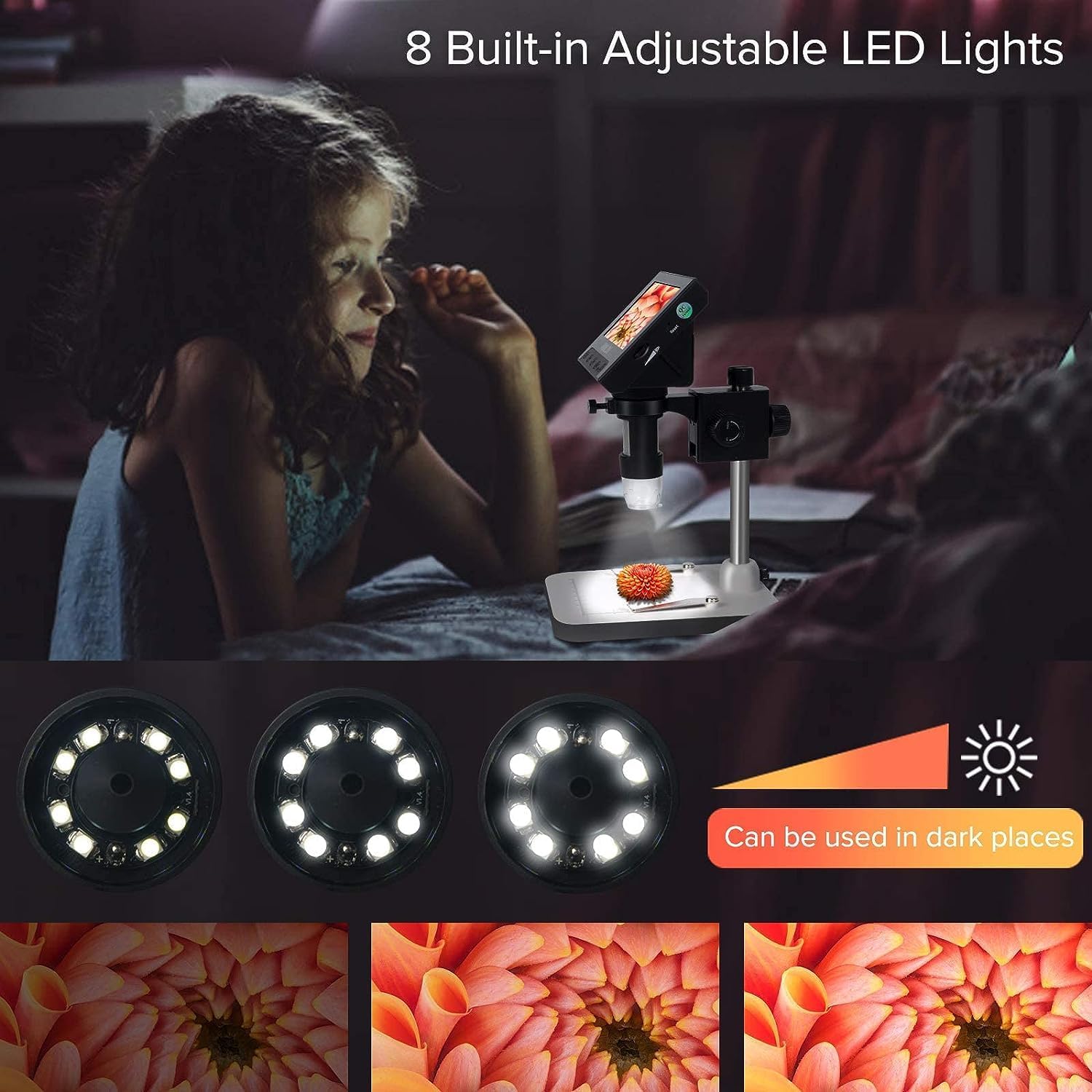
Figure 5: Adjustable LED Illumination
4. Photos and Videos Functions
The Dcorn microscope can capture still images and record videos of your observations. Use the dedicated buttons on the device to switch between photo and video modes and to initiate capture.

Figure 6: Photo and Video Recording
5. PC Connection for Larger Images
For a wider field of view and sharper image quality, connect the microscope to a PC using the provided USB cable. Install the necessary software/drivers from the included CD.
Note: This digital microscope is not compatible with iMac or MacBook devices.

Figure 7: Connecting to a PC
6. Applications
The Dcorn Digital Microscope is a versatile tool suitable for a wide range of applications:
- Coin Observation
- Plant and Insect Observation
- Textile Inspection
- Gem Observation
- Circuit Board (PCB) Soldering and Inspection
- Clock Repair
- Skin Inspection
- Reading
- Educational Tool for children and students

Figure 8: Diverse Applications
Maintenance
Proper maintenance ensures the longevity and optimal performance of your Dcorn Digital Microscope.
- Cleaning: Use a soft, dry cloth to clean the exterior of the microscope. For the lens and LCD screen, use a specialized lens cleaning cloth and solution to avoid scratches. Do not use abrasive cleaners or solvents.
- Storage: Store the microscope in a cool, dry place away from direct sunlight and extreme temperatures. When not in use for extended periods, ensure the battery is partially charged (around 50%) before storage.
- Handling: Handle the microscope with care. Avoid dropping or subjecting it to strong impacts, which can damage internal components.
- Battery Care: Avoid fully discharging the battery frequently. Recharge the battery when the low battery indicator appears.
Troubleshooting
If you encounter issues with your Dcorn Digital Microscope, refer to the following common troubleshooting steps:
| Problem | Possible Cause | Solution |
|---|---|---|
| Device does not power on. | Battery is depleted or not charged. | Connect the microscope to a power source using the USB cable and allow it to charge. Ensure the power adapter (if used) is functioning. |
| Image is blurry or out of focus. | Incorrect focus adjustment or working distance. | Adjust the focus knob until the image is clear. Adjust the height of the microscope on its stand to change the working distance. Ensure the specimen is flat. |
| Screen is too dark or too bright. | LED light brightness is not optimized. | Rotate the LED brightness adjustment knob to increase or decrease illumination. |
| Cannot connect to PC. | Incorrect cable, missing drivers, or incompatible operating system. | Ensure the USB cable is securely connected. Install drivers from the included CD. Remember, the device is not compatible with iMac or MacBook. Try a different USB port. |
| Cannot capture photos/videos. | No SD card inserted or card is full/corrupted. | Insert a compatible SD card. Check if the SD card has sufficient free space. Format the SD card if necessary (this will erase all data). |
If the problem persists after attempting these solutions, please contact Dcorn customer support for further assistance.
Specifications
| Feature | Detail |
|---|---|
| Brand | Dcorn |
| Model Name | 4.3 inch LCD Digital Microscope |
| Item Model Number | xcvf-5555 |
| Magnification Range | 10X-1000X |
| Display Screen | 4.3-inch High-definition LCD |
| Light Source | 8 Adjustable LED Lights |
| Power Source | 1 Lithium Ion battery (included) |
| Voltage | 3.7 Volts (DC) |
| Material | ABS, Metal |
| Product Dimensions | 8.86 x 6.3 x 4.72 inches (22.5 x 16 x 12 cm) |
| Item Weight | 1.3 pounds (0.59 kg) |
| Compatible Devices | Laptop, Personal Computer (Not compatible with iMac/MacBook) |
| Date First Available | November 12, 2020 |
Support
For additional support, frequently asked questions, or to download the latest drivers and software, please refer to the official Dcorn website or the provided User Manual PDF:
Download User Manual (PDF)
You can also visit the official Dcorn store on Amazon for more product information and contact options:
Visit Dcorn Store
For direct customer service inquiries, please contact Dcorn support through the contact information provided on their official website or product packaging.
