
ASTRO A9916-PPHB
Astro Men's Digital Watch User Manual
Model: A9916-PPHB | Brand: ASTRO
Introduction
Welcome to the user manual for your new Astro Men's Digital Watch, model A9916-PPHB. This guide provides comprehensive instructions on how to set up, operate, and maintain your watch to ensure optimal performance and longevity. Please read this manual carefully before using your watch.
Product Overview and Button Functions
Your Astro digital watch features a clear display and intuitive button controls for various functions.
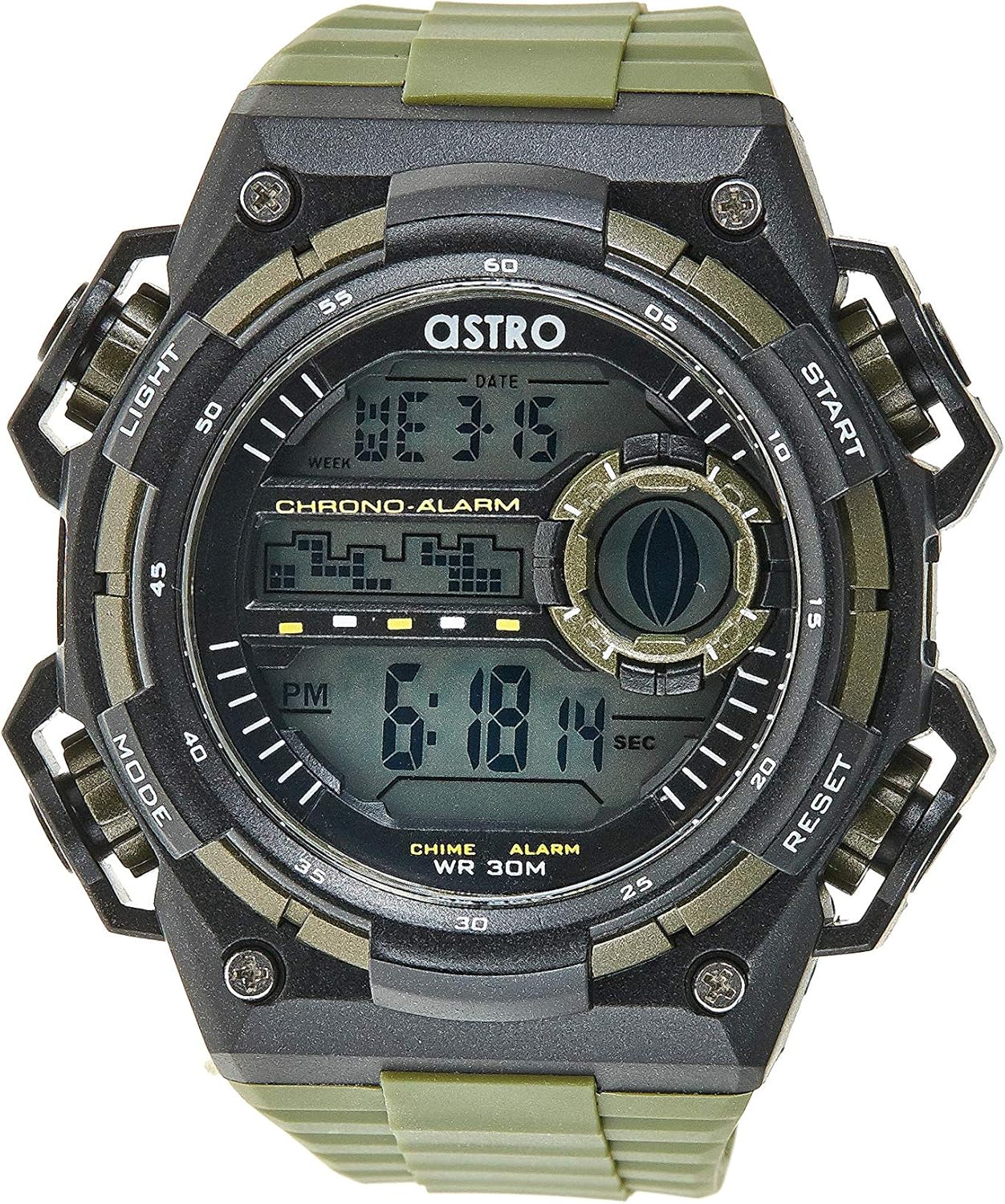
Figure 1: Front View of the Watch. This image displays the watch face, highlighting the digital display and the four primary control buttons: LIGHT (top left), MODE (bottom left), START (top right), and RESET (bottom right). The display shows the time, day of the week, and date, along with indicators for chronograph and alarm functions.

Figure 2: Side View of the Watch. This image provides a profile view of the watch, clearly showing the placement and design of the "LIGHT" and "MODE" buttons on the left side of the watch case. These buttons are essential for navigating through the watch's functions and activating the backlight.

Figure 3: Back View of the Watch. This image shows the reverse side of the watch, featuring the stainless steel case back secured by four screws. The durable olive green plastic strap, with its buckle closure, is also visible, indicating the watch's robust construction.
Button Functions:
- LIGHT Button (Top Left): Activates the backlight for viewing the display in low-light conditions.
- MODE Button (Bottom Left): Cycles through different modes: Time Display, Alarm Setting, Chronograph (Stopwatch), and Date Setting.
- START Button (Top Right): Used to start/stop the chronograph, adjust values during setting, or activate the alarm.
- RESET Button (Bottom Right): Used to reset the chronograph, confirm settings, or switch between 12/24-hour format.
Setup and Initial Configuration
1. Unboxing and Inspection
Upon receiving your watch, carefully unbox it and inspect for any visible damage. Ensure all components, including the watch and any accompanying documentation (like the guarantee card), are present.

Figure 4: Watch Packaging and Guarantee Card. This image shows the watch's protective tin packaging and the included guarantee card, which is important for warranty claims.
2. Setting the Time and Date
- From the normal time display mode, press the MODE button three times to enter the time setting mode. The seconds digits will begin to flash.
- Press the RESET button to cycle through the settings: Seconds → Hour → Minute → Month → Date → Day of the Week.
- While a digit is flashing, press the START button to increase the value. Hold the START button to rapidly advance the digits.
- Once all settings are adjusted, press the MODE button to exit the setting mode and return to the normal time display.
3. 12/24-Hour Format Selection
In the normal time display mode, press the RESET button to toggle between 12-hour (with 'AM'/'PM' indicator) and 24-hour formats.
Operating Instructions
1. Alarm Function
- From the normal time display, press the MODE button once to enter the Alarm mode. The alarm time will be displayed.
- Press the RESET button to select the hour or minute to set. The selected digit will flash.
- Press the START button to adjust the flashing digit.
- To activate/deactivate the alarm, press the START button while in Alarm mode (without any digits flashing). An alarm icon will appear/disappear on the display.
- Press the MODE button to return to the normal time display.
2. Hourly Chime
To activate or deactivate the hourly chime (which beeps at the top of every hour):
- In Alarm mode, press the RESET button to toggle the hourly chime on/off. A chime icon will appear/disappear on the display.
3. Chronograph (Stopwatch)
- From the normal time display, press the MODE button twice to enter the Chronograph mode. The display will show "00:00:00".
- Press the START button to begin timing.
- Press the START button again to pause timing.
- Press the RESET button while paused to reset the chronograph to "00:00:00".
- Press the MODE button to return to the normal time display.
4. Backlight Function
Press the LIGHT button (top left) at any time to illuminate the display for a few seconds, making it visible in dark environments.
Maintenance and Care
1. Cleaning Your Watch
To keep your watch looking its best, wipe it regularly with a soft, dry cloth. For stubborn dirt, a slightly damp cloth can be used, followed by immediate drying. Avoid using harsh chemicals or abrasive materials.
2. Water Resistance (WR 30M)
Your Astro watch is water resistant up to 30 meters (3 ATM). This means it is suitable for daily use and can withstand splashes or brief immersion in water, such as during hand washing or light rain. It is NOT suitable for showering, swimming, diving, or any water sports. Do not operate buttons when the watch is wet.
3. Battery Replacement
When the display becomes dim or functions become erratic, it may be time to replace the battery. Battery replacement should ideally be performed by a qualified watch technician to ensure proper sealing and water resistance integrity.
Troubleshooting
| Problem | Possible Cause | Solution |
|---|---|---|
| Display is blank or dim. | Low battery. | Replace the battery. |
| Time is incorrect. | Time not set correctly or accidental button press. | Refer to "Setting the Time and Date" section to reset the time. |
| Buttons are unresponsive. | Watch may be in a frozen state or battery is extremely low. | Try pressing all buttons simultaneously for a few seconds to reset. If problem persists, replace battery. |
| Alarm does not sound. | Alarm is not activated. | Ensure the alarm icon is displayed on the screen. Refer to "Alarm Function" section. |
Specifications
- Model Number: A9916-PPHB
- Display Type: Digital
- Strap Material: Plastic
- Case Material: Plastic / Stainless Steel Back
- Water Resistance: 30 Meters (3 ATM)
- Functions: Time (12/24-hour), Date, Day, Alarm, Hourly Chime, Chronograph, Backlight
- Manufacturer: Astro
Warranty and Support
Your Astro A9916-PPHB watch comes with a manufacturer's guarantee. Please refer to the included guarantee card (Figure 4) for specific terms and conditions of your warranty. Keep your purchase receipt and guarantee card in a safe place as proof of purchase.
For technical support, warranty claims, or any inquiries not covered in this manual, please contact your retailer or the official Astro customer service channel as indicated on your guarantee card or product packaging.
Related documentsA9916-PPHB


Ask a question about this manual
Ask about setup, troubleshooting, compatibility, parts, safety, or missing instructions. Manuals+ will review the question and use this page’s manual context to help answer it.