
Introduction
This manual provides detailed instructions for the installation, operation, and maintenance of your Infinity PRIMUS3000A Primus Amplifier. Please read this manual thoroughly before attempting to install or operate the amplifier to ensure proper function and to prevent damage.
The Infinity PRIMUS3000A is a compact mono amplifier designed to deliver 300W of power. It features full on-board protection and input level control for optimal audio performance.
Safety Information
- Always disconnect the vehicle's negative battery terminal before beginning any installation.
- Ensure all wiring is properly routed and secured to prevent damage from sharp edges or moving parts.
- Use appropriate gauge wiring for power and ground connections to prevent overheating and potential fire hazards.
- Install the amplifier in a location that allows for adequate ventilation to prevent overheating.
- Do not expose the amplifier to moisture or extreme temperatures.
- If you are unsure about any part of the installation process, consult a qualified professional.
Package Contents
Verify that all items are present in the package:
- Infinity PRIMUS3000A Primus Amplifier
- User Manual
Product Overview
The Infinity PRIMUS3000A amplifier is designed for reliable performance in a compact form factor. Key features include:
- Compact Footprint: Allows for flexible installation in various vehicle types.
- Full On-Board Protection: Safeguards the amplifier against short circuits, over-voltage, under-voltage, and thermal overload.
- Input Level Control: Adjustable input sensitivity to match the output of your head unit.
Amplifier Layout
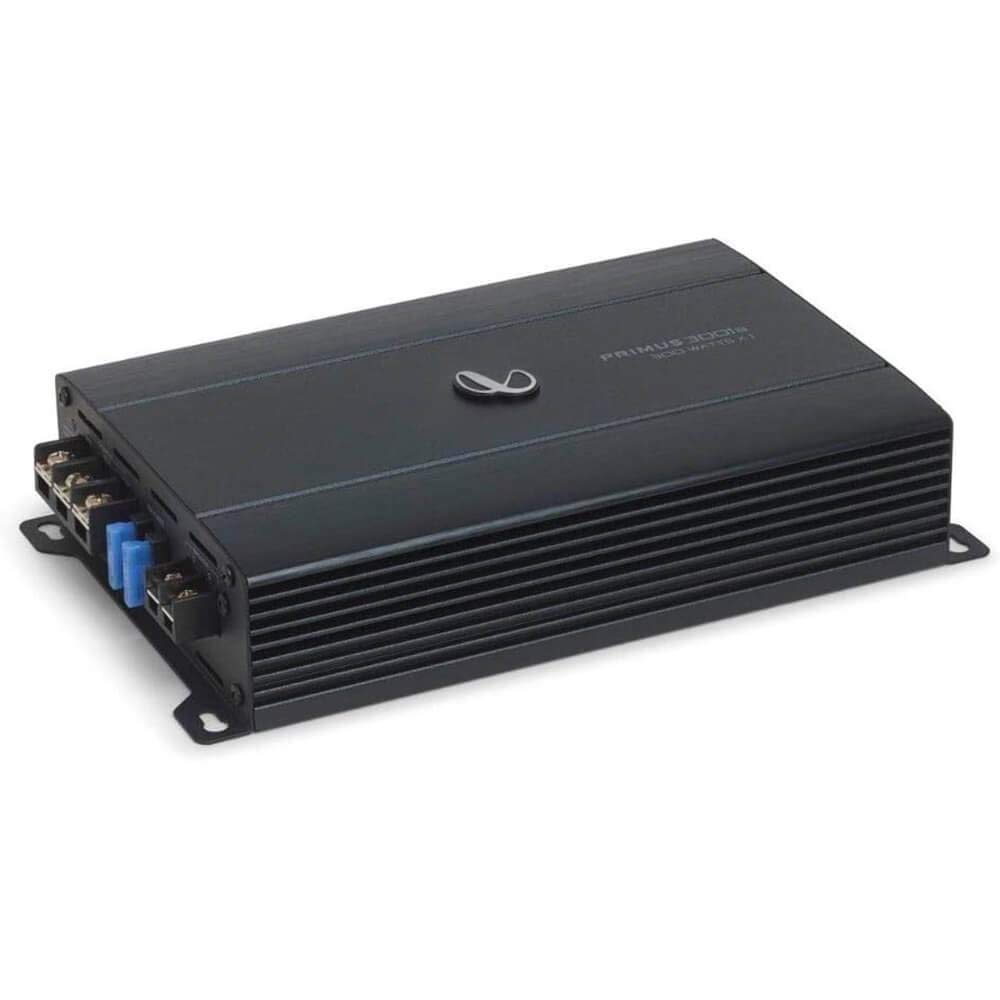
Figure 1: Top view of the Infinity PRIMUS3000A Primus Amplifier. This image displays the overall compact design of the amplifier, featuring the Infinity logo and model designation on the top panel.

Figure 2: Control panel of the Infinity PRIMUS3000A Primus Amplifier. This view shows the input section with High Input and Line Input terminals, along with adjustable controls for Gain, Level, Frequency (FREQ), Low-Pass Filter (LPF), and Phase.

Figure 3: Power and speaker connection terminals of the Infinity PRIMUS3000A Primus Amplifier. This image highlights the GND (Ground), REM (Remote), +12V (Power), and Speaker output terminals, along with the dual 15A fuses for protection.
Setup and Installation
Proper installation is crucial for optimal performance and safety. Follow these general guidelines:
1. Mounting Location
- Choose a dry, well-ventilated location away from direct sunlight and heat sources.
- Ensure the mounting surface is sturdy enough to support the amplifier's weight.
- Allow sufficient space around the amplifier for air circulation.
2. Wiring Connections
Before making any connections, disconnect the vehicle's negative battery terminal.
- Power (+12V): Connect a suitable gauge power cable directly from the vehicle's positive battery terminal to the amplifier's "+12V" terminal. Install an in-line fuse holder (not supplied) within 18 inches (45 cm) of the battery.
- Ground (GND): Connect a suitable gauge ground cable from the amplifier's "GND" terminal to a clean, unpainted metal surface on the vehicle's chassis. Ensure a good electrical connection.
- Remote (REM): Connect a remote turn-on wire from your head unit's remote output to the amplifier's "REM" terminal. This wire turns the amplifier on and off with your head unit.
- Audio Input:
- Line Input (RCA): Connect RCA cables from your head unit's pre-amp output to the amplifier's "LINE INPUT" jacks.
- High Input (Speaker Level): If your head unit does not have RCA outputs, connect the speaker output wires from your head unit to the amplifier's "HIGH INPUT" terminals.
- Speaker Output: Connect your subwoofer(s) to the amplifier's "SPEAKER" terminals. Ensure correct polarity (+ to + and - to -). Refer to your subwoofer's specifications for proper impedance matching.
Operating Instructions
Once the amplifier is installed and wired, follow these steps for initial setup and operation:
- Initial Power-Up: Reconnect the vehicle's negative battery terminal. Turn on your head unit. The amplifier should power on (indicated by an LED, if present).
- Gain/Level Adjustment:
- Set the amplifier's "GAIN" or "LEVEL" control to its minimum position.
- Play a familiar piece of music at a moderate volume on your head unit (around 75% of maximum).
- Slowly increase the amplifier's gain control until you hear distortion, then back it off slightly until the sound is clear.
- Low-Pass Filter (LPF): The LPF control allows you to set the upper frequency limit for the subwoofer. Adjust this control (e.g., between 40Hz and 120Hz) to blend the subwoofer's output smoothly with your main speakers.
- Phase Control: The "PHASE" switch (0°/180°) helps to align the subwoofer's output with the main speakers. Experiment with both settings to find the one that provides the most impactful and cohesive bass response.
Maintenance
- Cleaning: Periodically wipe the amplifier's exterior with a soft, dry cloth. Do not use harsh chemicals or abrasive cleaners.
- Inspection: Regularly check all wiring connections for tightness and signs of corrosion or damage. Ensure adequate ventilation around the amplifier.
- Fuses: The amplifier is equipped with two 15A fuses. If a fuse blows, replace it only with a fuse of the same type and rating. Never use a higher-rated fuse.
Troubleshooting
| Problem | Possible Cause | Solution |
|---|---|---|
| No power / Amplifier not turning on |
|
|
| No sound output |
|
|
| Distorted sound |
|
|
| Amplifier goes into protection mode |
|
|
Specifications
| Model Number | PRIMUS3000A |
| Brand | Infinity |
| Power Output | 300W x 1 (Mono) |
| Product Dimensions (L x W x H) | 12.5 x 7.6 x 3.9 inches |
| Item Weight | 3.75 Pounds |
| Maximum Supply Voltage | 14.4 Volts (DC) |
| Mounting Type | Surface Mount |
Warranty and Support
This product is covered by a manufacturer's warranty. For specific warranty terms and conditions, please refer to the documentation included with your purchase or visit the official Infinity website. For technical support or service inquiries, please contact Infinity customer service.
As this is a renewed product, please also refer to the Amazon Renewed Guarantee for details regarding replacement or refund options, as mentioned in the product description.


