
1. Introduction
Thank you for choosing the House of Marley Rebel True Wireless Earbuds. This manual provides essential information for the proper setup, operation, and maintenance of your earbuds. Please read it thoroughly before use.

Image: The House of Marley Rebel True Wireless Earbuds, showcasing their design with bamboo accents.
2. Package Contents
Ensure all items are present in the package:
- House of Marley Rebel Bluetooth Earbuds
- Charging Case
- USB-C Charging Cable
- Ear Tips (various sizes)
- Quick Start Guide
- Warranty Booklet
- Welcome Card
- Sticker

Image: An illustration showing the various components included in the House of Marley Rebel Earbuds package, such as the earbuds, charging case, USB-C cable, and documentation.
3. Setup
3.1 Initial Charging
Before first use, fully charge the earbuds and the charging case. Connect the provided USB-C cable to the charging case and a power source. The LED indicators on the case will show charging status.

Image: The House of Marley Rebel charging case open, with earbuds inside, illustrating the charging process and indicating 8 hours of battery life with in-case charging.

Image: A detailed view of the House of Marley Rebel charging case, highlighting its construction from sustainable materials, compact wireless charging capability, USB-C charging port, and compatibility with iOS and Android devices.
3.2 Bluetooth Pairing
- Ensure the earbuds are charged and placed inside the charging case.
- Open the charging case. The earbuds will automatically enter pairing mode.
- On your device (smartphone, tablet, etc.), go to Bluetooth settings and enable Bluetooth.
- Select "House of Marley Rebel" from the list of available devices.
- Once connected, a confirmation sound will play, and the earbuds will be ready for use.
3.3 Ear Tip Selection and Fit
For optimal sound quality and comfort, select the ear tips that provide a secure and comfortable seal in your ear canal. Experiment with different sizes to find the best fit.

Image: A man wearing a House of Marley Rebel earbud, demonstrating a snug and comfortable fit in the ear.
4. Operating Instructions
4.1 Power On/Off
- Power On: Open the charging case, or remove the earbuds from the case. They will automatically power on.
- Power Off: Place the earbuds back into the charging case and close the lid. They will automatically power off and begin charging.
4.2 Touch Controls
The Rebel earbuds feature integrated touch controls for managing audio playback, calls, and voice assistant activation.

Image: The House of Marley Rebel Earbuds, highlighting features such as touch control, Echo Noise Cancellation, EQ settings (Bass Boost & Signature EQ), and sweatproof/weather-resistant design.
| Action | Function |
|---|---|
| Single Tap (Left/Right) | Play/Pause, Answer/End Call |
| Double Tap (Right) | Next Track |
| Double Tap (Left) | Previous Track |
| Triple Tap (Right) | Volume Up |
| Triple Tap (Left) | Volume Down |
| Press and Hold (Left/Right) | Activate Voice Assistant / Reject Call |
4.3 Audio Playback and EQ Modes
The earbuds deliver a crisp, balanced audio experience. You can switch between different EQ modes, including a Bass Boost mode, to customize your listening experience.

Image: A man wearing House of Marley Rebel Earbuds, illustrating the experience of crisp, balanced audio.
Refer to the Quick Start Guide for specific instructions on how to cycle through the available EQ modes using the touch controls.
4.4 Making and Receiving Calls
The Rebel earbuds are equipped with an Echo Noise Cancelling microphone for clear hands-free calling.
- Answer Call: Single tap either earbud.
- End Call: Single tap either earbud during a call.
- Reject Call: Press and hold either earbud.
5. Maintenance
5.1 Cleaning
Regular cleaning helps maintain performance and hygiene.
- Gently wipe the earbuds and charging case with a soft, dry, lint-free cloth.
- Remove ear tips and clean them with mild soap and water, then dry thoroughly before reattaching.
- Ensure charging contacts on both earbuds and case are clean and free of debris.
5.2 Water Resistance
The earbuds are IPX5 sweat-proof and water-resistant, making them suitable for active lifestyles. However, they are not designed for submersion in water. Avoid exposing them to excessive moisture or liquids.
5.3 Storage
When not in use, store the earbuds in their charging case to protect them and ensure they remain charged.
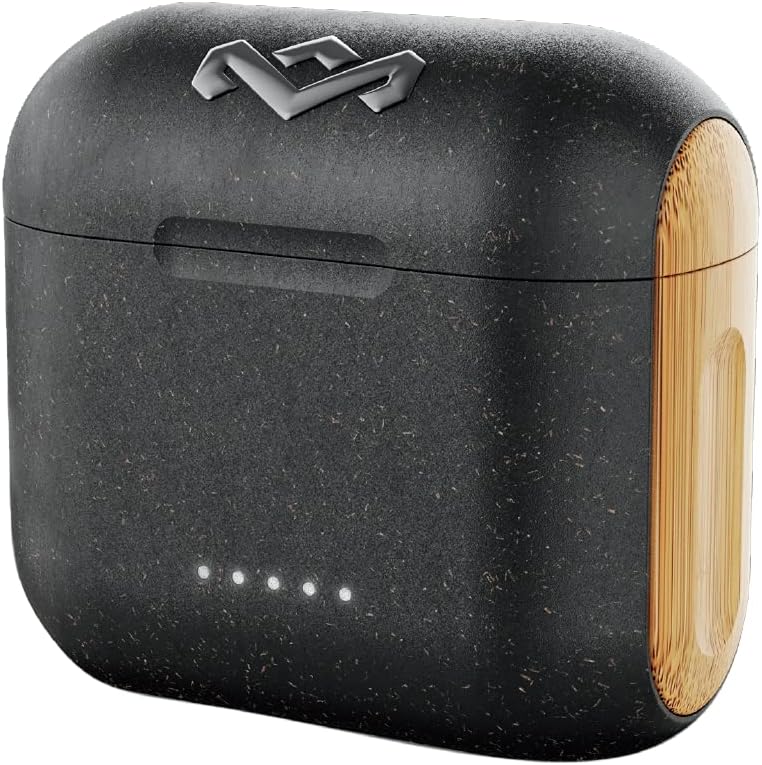
Image: The closed House of Marley Rebel charging case, ready for storage or transport.
6. Troubleshooting
6.1 Earbuds Not Pairing
- Ensure both earbuds are fully charged.
- Place earbuds back in the case, close the lid, wait 5 seconds, then open the lid again.
- On your device, forget or delete "House of Marley Rebel" from your Bluetooth device list.
- Restart your device and attempt the pairing process again.
6.2 No Sound or Low Volume
- Check the volume level on both your connected device and the earbuds.
- Ensure earbuds are properly seated in your ears and the ear tips provide a good seal.
- Confirm the earbuds are connected to the correct audio output on your device.
- Clean any debris from the earbud speaker grilles.
6.3 Charging Issues
- Verify the USB-C cable is securely connected to both the case and the power source.
- Ensure the charging contacts on the earbuds and inside the case are clean.
- Try a different USB-C cable or power adapter.
- Confirm the earbuds are correctly placed in the charging case.
7. Specifications
| Feature | Detail |
|---|---|
| Model Name | EM-JE121-SB |
| Connectivity Technology | Wireless (Bluetooth 5.0) |
| Bluetooth Range | 10 Meters |
| Battery Life (Earbuds) | Up to 8 Hours |
| Charging Case Material | Bamboo and Wood Fiber |
| Water Resistance Level | IPX5 (Sweat and Water Resistant) |
| Noise Control | Sound Isolation, Echo Noise Cancelling Microphone |
| Control Type | Integrated Touch Control |
| Included Components | Earbuds, Charging Case, USB-C Cable, Ear Tips, Documentation |
8. Warranty Information
Your House of Marley Rebel True Wireless Earbuds are covered by a manufacturer's warranty. Please refer to the included Warranty Booklet for detailed terms, conditions, and registration information. Keep your proof of purchase for warranty claims.
9. Support
For further assistance, technical support, or to view frequently asked questions, please visit the official House of Marley website or contact their customer service department. Contact details can be found in the Warranty Booklet or on the official website.
Website: www.thehouseofmarley.com


