
GLOBE 51726
GLOBE Electric Celestia 2-Light Wall Sconce Instruction Manual
Model: 51726 | Brand: GLOBE
Introduction
Thank you for purchasing the GLOBE Electric Celestia 2-Light Wall Sconce. This modern glam fixture, featuring a matte brass finish and frosted glass globe shades, is designed to provide a warm and inviting glow to your living space. This manual provides detailed instructions for safe installation, operation, and maintenance to ensure optimal performance and longevity of your product.
Important Safety Information
WARNING: Risk of Electric Shock. Disconnect power at the fuse or circuit breaker before installing or servicing.
- Read all instructions carefully before beginning installation.
- Ensure the electrical supply is disconnected at the main circuit breaker or fuse box before installation.
- All electrical connections must be in accordance with local codes, ordinances, or the National Electric Code (NEC). If you are unfamiliar with proper electrical wiring connections, obtain the services of a qualified electrician.
- Use only bulbs of the specified wattage and type (2x E26/Medium Base 60W Max Bulbs).
- Do not exceed the maximum wattage.
- Handle glass shades with care.
- Keep packaging materials away from children.
Package Contents
Verify that all components are present before beginning installation:
- Wall Sconce fixture (1)
- Frosted Glass Shade (2)
- Mounting Hardware Kit (screws, wire nuts, mounting plate)
- Instruction Sheet (this manual)
Product Specifications
| Feature | Detail |
|---|---|
| Brand | GLOBE |
| Model Name | Celestia |
| Part Number | 51726 |
| UPC | 058219517260 |
| Color | Celestia (Gold) |
| Material | Metal |
| Light Fixture Form | Sconce |
| Product Dimensions | 19.5"L x 7"W x 6.25"H |
| Item Weight | 3.3 Pounds |
| Indoor/Outdoor Usage | Indoor |
| Power Source | Corded Electric |
| Installation Type | Semi Flush Mount |
| Special Feature | Dimmable |
| Light Source Type | E26/Medium Base (Compatible with LED, Incandescent, Halogen) |
| Shade Material | Glass |
| Number of Light Sources | 2 |
| Voltage | 120 Volts |
| Wattage | 60 watts (Max per bulb) |
| Bulb Base | E26 |
| Controller Type | Push Button |
| Water Resistance Level | Not Water Resistant |
| Assembly Required | No |
Setup and Installation
Follow these steps carefully to install your Celestia Wall Sconce. It is recommended to have a second person assist during installation.
Tools Required (Not Included):
- Screwdriver (Phillips and Flathead)
- Wire Strippers
- Electrical Tape
- Safety Glasses
- Ladder (if necessary)
Installation Steps:
1. Prepare for Installation:
Before starting, ensure the power to the circuit you are working on is turned off at the circuit breaker or fuse box. Clear the work area and gather all necessary tools and components.
2. Attach Mounting Plate:
Secure the mounting plate to the electrical junction box in the wall using the provided screws. Ensure the plate is firmly attached and level.

Image: Close-up view of the sconce's mounting bracket, showing the central rod and connection points, indicating where it attaches to the wall.
3. Make Electrical Connections:
Carefully connect the electrical wires. Connect the black wire from the fixture to the black (hot) wire from the junction box using a wire nut. Connect the white wire from the fixture to the white (neutral) wire from the junction box using a wire nut. Connect the ground wire from the fixture to the ground wire from the junction box (or to the green ground screw on the mounting plate). Ensure all connections are secure and covered with wire nuts and electrical tape if necessary.
4. Mount the Fixture:
Carefully align the fixture with the mounting plate and secure it using the provided screws. Ensure the fixture is flush against the wall and stable.

Image: The Celestia 2-Light Wall Sconce, showcasing its matte brass finish and two frosted glass globe shades, ready for installation.
5. Install Glass Shades and Bulbs:
Gently attach the frosted glass shades to the fixture. Insert two E26/Medium Base 60W Max bulbs (sold separately) into the sockets. Compatible with LED, Incandescent, and Halogen bulbs. Dimmable LED or Incandescent bulbs are recommended for dimming functionality.

Image: Detailed view of one of the frosted glass shades and the bulb socket, illustrating how bulbs are inserted.
6. Restore Power:
Once installation is complete and all connections are secure, restore power at the circuit breaker or fuse box. Test the light fixture to ensure proper operation.
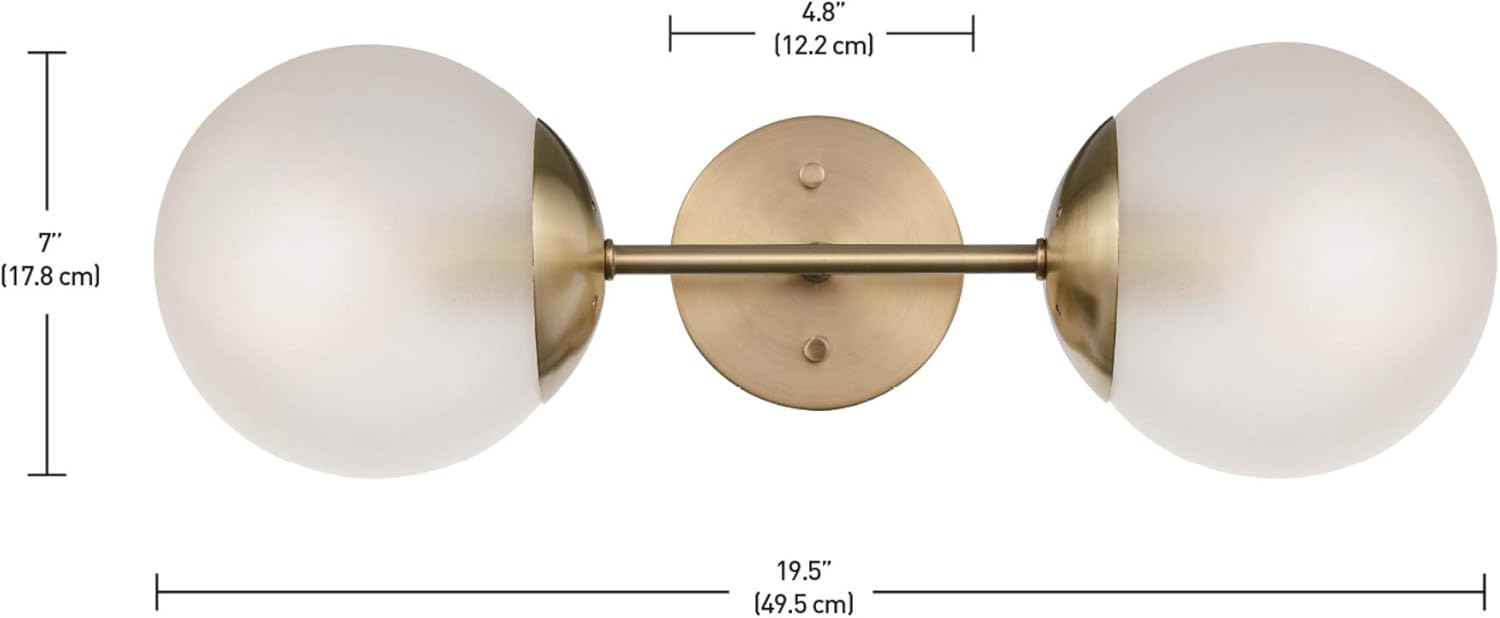
Image: Dimensional drawing of the Celestia Wall Sconce, indicating its length (19.5 inches), height (7 inches), and depth (6.25 inches).
Operating Instructions
The GLOBE Electric Celestia Wall Sconce is designed for simple operation once installed.
- Power On/Off: Control the light fixture using your standard wall switch connected to the circuit.
- Dimming Functionality: If you have installed dimmable LED or Incandescent bulbs and connected the fixture to a compatible dimmer switch (sold separately), you can adjust the light intensity by operating the dimmer switch.
- Versatile Placement: This fixture can be mounted horizontally or vertically to suit your aesthetic and lighting needs.
Care and Maintenance
Regular maintenance will help preserve the appearance and functionality of your wall sconce.
- Cleaning: To clean the fixture, ensure power is off. Wipe the metal parts with a soft, dry cloth. For the glass shades, use a soft cloth dampened with a mild glass cleaner. Avoid abrasive cleaners or solvents that may damage the finish.
- Bulb Replacement: Always turn off power at the circuit breaker before replacing bulbs. Allow bulbs to cool completely before handling. Replace bulbs with the same type and wattage (E26/Medium Base, 60W Max).
- Inspection: Periodically check all connections and mounting hardware to ensure they remain secure.
Troubleshooting
If you encounter issues with your wall sconce, refer to the following common problems and solutions:
| Problem | Possible Cause | Solution |
|---|---|---|
| Light does not turn on. | No power to the fixture. Bulb is loose or burned out. Incorrect wiring. | Check circuit breaker/fuse. Ensure wall switch is on. Tighten or replace bulb. Verify wiring connections are secure and correct (refer to Installation Steps). |
| Light flickers. | Loose bulb. Incompatible dimmer switch/bulb. Loose wiring connection. | Tighten bulb. Ensure dimmer switch and bulbs are compatible for dimming. Check wiring connections. |
| Fixture is unstable after installation. | Mounting screws not tightened. Mounting plate not secure. | Ensure all mounting screws are fully tightened. Verify mounting plate is securely attached to the junction box. |
| Glass shade is loose. | Shade not properly secured. | Gently re-secure the glass shade according to installation instructions. |
If problems persist, consult a qualified electrician or contact GLOBE Electric customer support.
Warranty and Support
As per the product information, there is no specific warranty description provided for this product. For any product inquiries, technical assistance, or support, please contact GLOBE Electric customer service directly through their official website or the retailer where the product was purchased.
For more information about GLOBE Electric products, visit: www.globe-electric.com
Related documents51726


Ask a question about this manual
Ask about setup, troubleshooting, compatibility, parts, safety, or missing instructions. Manuals+ will review the question and use this page’s manual context to help answer it.