
Important Safety Information
Please read all instructions carefully before assembly and use. Keep this manual for future reference.
- Ensure all parts are present and undamaged before beginning assembly. Contact customer support if any parts are missing or damaged.
- Assemble the desk on a soft, clean surface to prevent scratches.
- Do not overtighten screws during assembly, as this may damage the threads or components.
- Periodically check all fasteners to ensure they remain tight.
- Do not stand or sit on the desk.
- Distribute weight evenly across the desk surface. Avoid placing heavy items on one side only.
- Keep small parts away from children during assembly to prevent choking hazards.
Package Contents
Verify that all components listed below are included in your package. If any items are missing or damaged, please contact LAVIEVERT customer support.

Image: Overview of desk components including desktop panels, steel frame, monitor stand, and adjustable foot pads.
- A. Desktop Panels (L-shaped sections)
- B. Steel Frame Legs (Z-shaped and straight supports)
- C. Monitor Stand
- D. Connecting Brackets
- E. Adjustable Foot Pads
- F. Screws and Fasteners (various sizes)
- G. Assembly Tool (Hex Key/Allen Wrench)
Setup and Assembly Instructions
Follow these steps carefully to assemble your LAVIEVERT L-Shaped Computer Desk. It is recommended to have two people for assembly.
Step 1: Prepare the Workspace and Identify Parts
Unpack all components and lay them out on a soft, clean surface. Identify each part using the "Package Contents" section. Ensure you have the included assembly tool.
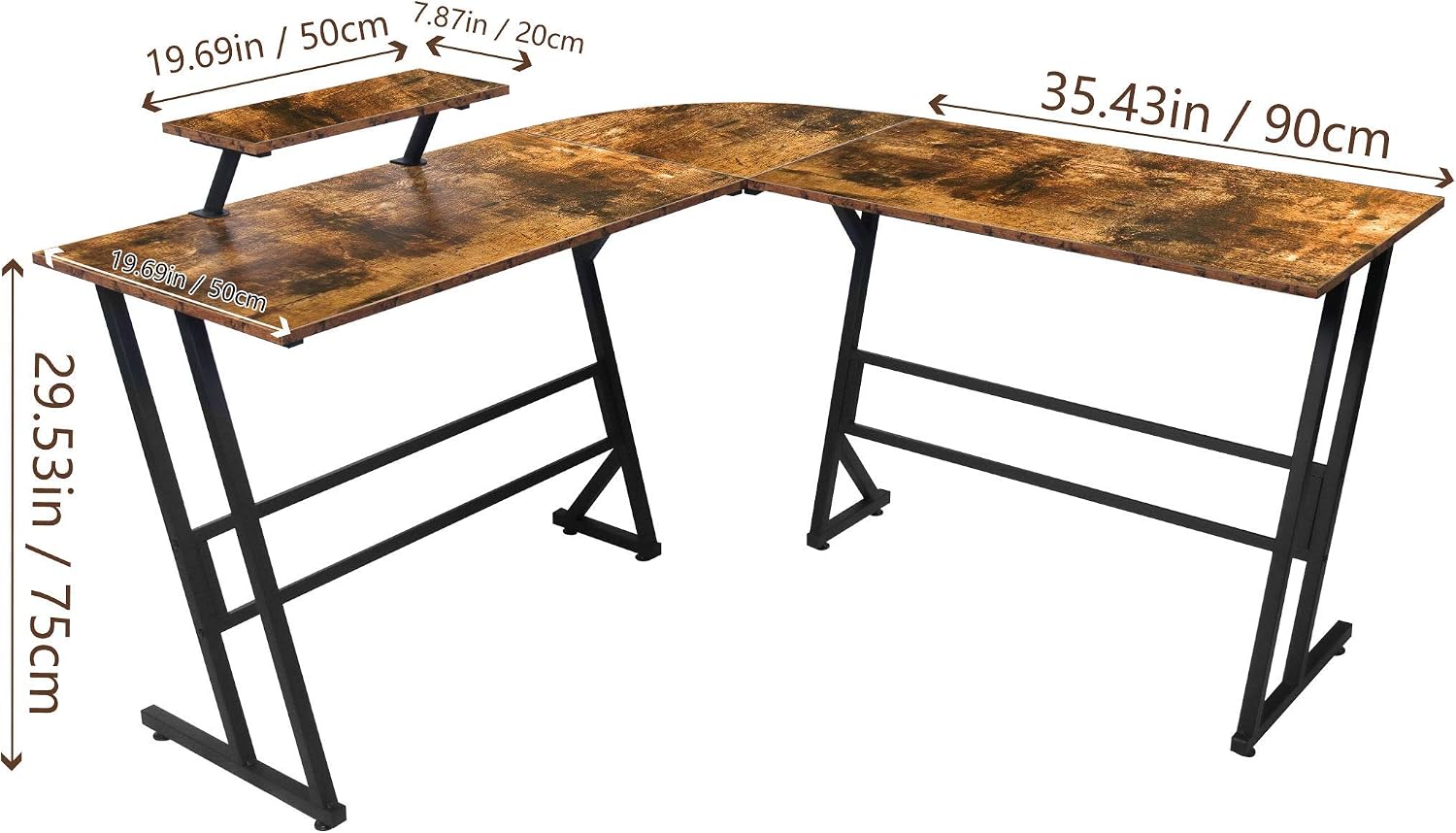
Image: Desk dimensions showing 55.12"D x 55.12"W x 29.53"H, with monitor stand dimensions.
Step 2: Assemble the Steel Frame
Attach the Z-shaped and straight steel frame legs (B) to the connecting brackets (D) using the provided screws (F). Do not fully tighten screws until all frame components are loosely connected.

Image: Illustration of the right-angle semi-enclosed design of the desk frame, highlighting the 90-degree corner.
Step 3: Attach Desktop Panels
Carefully place the desktop panels (A) onto the assembled steel frame. Align the pre-drilled holes on the desktop with the holes on the frame. Secure the desktop panels to the frame using the appropriate screws (F). Once all screws are in place, gradually tighten all screws on the frame and desktop until secure.
Step 4: Install Adjustable Foot Pads
Screw the adjustable foot pads (E) into the bottom of each leg of the steel frame. These pads help stabilize the desk on uneven floors and protect your flooring.
Step 5: Attach the Monitor Stand
The monitor stand (C) is removable and can be installed on either end of the L-shaped desk. Position the monitor stand on the desired desktop section and secure it using the designated fasteners. Ensure it is stable before placing a monitor on it.

Image: Detail of the removable monitor stand attachment mechanism.

Image: The LAVIEVERT L-Shaped Computer Desk fully assembled and in use.
Operating Instructions
- Placement: Position the L-shaped desk in a corner or against two walls to maximize space efficiency.
- Monitor Stand Usage: The monitor stand elevates your screen to an ergonomic viewing height. It can be moved to either side of the desk to suit your preference.
- Adjustable Foot Pads: If the desk wobbles, adjust the foot pads at the bottom of the legs by twisting them clockwise or counter-clockwise until the desk is stable and level.
- Weight Capacity: Avoid exceeding the desk's weight capacity. Distribute heavy items evenly.
Maintenance
- Cleaning: Wipe the desk surfaces with a soft, damp cloth. Avoid harsh chemicals or abrasive cleaners, which can damage the finish.
- Spills: Clean up spills immediately to prevent staining or damage to the engineered wood.
- Fastener Checks: Periodically (e.g., every 3-6 months) check all screws and bolts to ensure they are tight. Retighten if necessary to maintain stability.
- Avoid Direct Sunlight: Prolonged exposure to direct sunlight can cause fading or damage to the desk's finish.
- Heat Protection: Use coasters or protective pads under hot items to prevent heat damage to the desktop.
Troubleshooting
| Problem | Possible Cause | Solution |
|---|---|---|
| Desk is wobbly or uneven. | Uneven floor surface; loose fasteners. | Adjust the foot pads at the bottom of the legs until the desk is stable. Check and tighten all assembly screws. |
| Parts do not fit together. | Incorrect orientation of parts; manufacturing defect. | Review the assembly instructions and diagrams carefully to ensure parts are oriented correctly. Do not force parts. If issues persist, contact customer support. |
| Missing hardware or damaged parts. | Packaging error; shipping damage. | Do not proceed with assembly. Contact LAVIEVERT customer support immediately with your product model and a description of the missing/damaged items. |
Specifications
- Brand: LAVIEVERT
- Model: WGDNZ
- Shape: L-Shape
- Product Dimensions: 55.12"D x 55.12"W x 29.53"H (140cm D x 140cm W x 75cm H)
- Color: Rustic Brown
- Top Material: Engineered Wood
- Base Material: Steel
- Special Feature: Removable Monitor Stand, Adjustable Foot Pads
- Assembly Required: Yes
- Room Type: Home Office, Dormitory
Warranty and Customer Support
LAVIEVERT products are designed for quality and durability. For specific warranty information, please refer to the warranty card included with your purchase or visit the official LAVIEVERT website.
If you encounter any issues, have questions about assembly, or require replacement parts, please contact our customer support team:
- Customer Support: Refer to the contact information provided in your product packaging or on the LAVIEVERT official website.
- Online Resources: Product Page on Amazon
