
HMS LOOP08
HMS LOOP08 Electric Treadmill User Manual
Model: LOOP08
1. Introduction
Thank you for choosing the HMS LOOP08 Electric Treadmill. This manual provides essential information for the safe and effective operation, maintenance, and troubleshooting of your new treadmill. Please read this manual thoroughly before using the product and keep it for future reference.
The HMS LOOP08 is designed for home use, offering a compact and intuitive fitness solution. Its modern design integrates a digital display directly into the running surface, eliminating bulky frames and armrests for a sleek profile.
2. Safety Information
Before operating the treadmill, please observe the following safety precautions:
- Always consult with a physician before starting any new exercise program.
- Place the treadmill on a flat, stable surface with adequate clearance around it (at least 2 meters behind and 0.6 meters on each side).
- Ensure the power cord is not pinched or damaged and is connected to a grounded outlet.
- Do not allow children or pets near the treadmill while it is in operation.
- Wear appropriate athletic footwear and clothing.
- Do not step on or off the treadmill while the belt is moving.
- If you feel faint, dizzy, or experience pain, stop exercising immediately.
- The maximum user weight capacity for this treadmill is 100 kg. Do not exceed this limit.
- Always use the handrail for stability, especially when starting or stopping the treadmill.
3. What's in the Box
Carefully unpack all components and ensure you have received the following items:
- HMS LOOP08 Electric Treadmill Unit
- Handrail
- Transport wheels (integrated)
- Power cord
- User Manual (this document)
4. Setup and Assembly
The HMS LOOP08 treadmill is designed for minimal assembly. Follow these steps to set up your treadmill:
- Remove the treadmill from its packaging and place it on a flat, stable surface.
- Unfold the treadmill to its operational position. The compact design allows for easy unfolding.
- Raise the integrated handrail. The handrail features a telescopic mechanism that locks it into the correct position and prevents uncontrolled lowering. Ensure it is securely locked before use.
- Connect the power cord to the treadmill's power input and then to a grounded electrical outlet.
- Ensure all connections are secure and the treadmill is stable before proceeding.

Figure 1: HMS LOOP08 Treadmill in operational position with handrail extended.
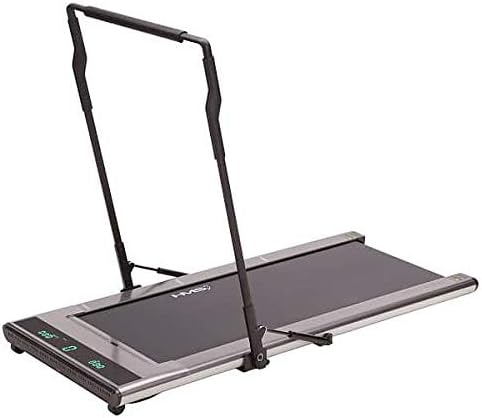
Figure 2: Another view of the HMS LOOP08 Treadmill, highlighting its compact design.
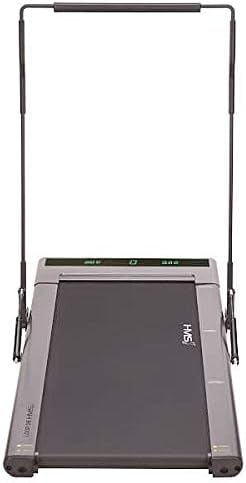
Figure 3: Top view of the HMS LOOP08 Treadmill, showing the running surface and integrated display.
5. Operating Instructions
The LOOP08 features an intuitive operating system:
- Power On: Plug in the treadmill. The integrated digital display will illuminate.
- Start Training: Simply step onto the running belt to activate the treadmill. It will begin moving at a low speed.
- Speed Control:
- To increase speed, move towards the front of the treadmill, closer to the display.
- To decrease speed, move towards the rear of the treadmill.
- Display Information: The integrated display shows real-time data including:
- Distance covered
- Training time
- Number of steps
- Current speed
- Calories burned (estimated)
- Stopping the Treadmill: To stop, simply step off the treadmill. The belt will gradually slow down and stop.
Note: The treadmill operates quietly with a noise level of approximately 65dB.
6. Features
The HMS LOOP08 Electric Treadmill incorporates several advanced features for an enhanced user experience:
- Intelligent Training Start System: The treadmill activates automatically when you step onto the running belt.
- Modern Speed Control Mechanism: Speed adjusts intuitively based on your position on the running surface.
- Shock Absorption System: Designed to absorb impacts during running, reducing strain on joints.
- Integrated Digital Display: A thin running surface with an embedded display shows key workout metrics without a bulky console.
- Compact and Portable Design: When stored vertically, the treadmill occupies only 0.06m2. It is lightweight and features transport wheels for easy relocation.
- Telescopic Handrail: Provides additional safety and comfort, especially during faster speeds, and locks securely into place.
- Quiet Operation: Operates at a low noise level of approximately 65dB.
7. Maintenance
Regular maintenance ensures the longevity and optimal performance of your treadmill:
- Cleaning: Wipe down the treadmill surfaces with a damp cloth after each use. Do not use abrasive cleaners or solvents.
- Belt Lubrication: The running belt may require periodic lubrication. Refer to the specific instructions provided with your treadmill's lubrication kit (if included) or consult the manufacturer's guidelines for recommended lubrication frequency and type.
- Belt Tension and Alignment: Periodically check the running belt for proper tension and alignment. If the belt slips or drifts to one side, adjust it according to the instructions in the troubleshooting section or consult customer support.
- Storage: When not in use, the treadmill can be folded and stored vertically to save space. Ensure it is stored in a dry, clean environment.
8. Troubleshooting
If you encounter issues with your treadmill, refer to the following common problems and solutions:
| Problem | Possible Cause | Solution |
|---|---|---|
| Treadmill does not power on. | Power cord not connected; outlet issue; circuit breaker tripped. | Ensure power cord is securely plugged into treadmill and a working, grounded outlet. Check household circuit breaker. |
| Running belt slips or hesitates. | Belt too loose; belt needs lubrication. | Adjust belt tension (refer to specific instructions for adjustment screws, usually at the rear of the treadmill). Lubricate the belt if necessary. |
| Belt drifts to one side. | Belt alignment issue. | Adjust belt alignment screws (usually at the rear of the treadmill) until the belt is centered. Run the treadmill at a low speed to check alignment. |
| Unusual noise during operation. | Loose components; belt friction; motor issue. | Check for any loose screws or parts. Lubricate the belt if friction is suspected. If noise persists, contact customer support. |
If the problem persists after attempting these solutions, please contact HMS customer support.
9. Specifications
Detailed technical specifications for the HMS LOOP08 Electric Treadmill:
| Feature | Specification |
|---|---|
| Model | LOOP08 |
| Color | Grey |
| Motor Power (HP) | 0.5 HP |
| Speed Range | 1 – 8 km/h |
| Running Belt Dimensions (L x W) | 1200 mm x 460 mm |
| Display Type | LED (Integrated) |
| Displayed Metrics | Time, Distance, Steps, Speed, Calories |
| Noise Level | Approx. 65dB |
| Maximum User Weight | 100 kg |
| Unfolded Dimensions (L x W x H) | Approx. 160 cm x 70 cm x 120 cm (estimated) |
| Folded Storage Area | 0.06 m2 (when stored vertically) |
| Product Weight | 31 kg |
| Power Source | Corded Electric |
| Material | Plastic, Metal, Aluminum Frame |
10. Warranty and Support
HMS products are manufactured to high-quality standards. For warranty information, technical support, or service inquiries, please contact your local HMS distributor or visit the official HMS website. Please have your product model number (LOOP08) and purchase details ready when contacting support.
For further assistance, you may visit the HMS official website: www.hms-sport.com
Related documentsLOOP08

Ask a question about this manual
Ask about setup, troubleshooting, compatibility, parts, safety, or missing instructions. Manuals+ will review the question and use this page’s manual context to help answer it.