
R-MUSIC Booster S (RM301891)
R-MUSIC High Power Wireless Bluetooth Speaker - Booster S
Model: RM301891
1. Introduction
Thank you for choosing the R-MUSIC Booster S High Power Wireless Bluetooth Speaker. This manual provides important information regarding the setup, operation, and maintenance of your new speaker. Please read this manual thoroughly before using the product to ensure proper function and to prevent damage.
2. Package Contents
Please check the package contents upon unboxing. If any items are missing or damaged, contact your retailer.
- R-MUSIC Booster S Speaker Unit
- Power Adapter/Charging Cable
- Wired Microphone (if included with your model)
- User Manual

Image: Wired Microphone. This microphone is typically included for karaoke or public address functions.
3. Product Features
The R-MUSIC Booster S speaker is designed for powerful and versatile audio playback. Key features include:
- High Power Audio Output (40 Watts Max)
- Wireless Bluetooth Connectivity
- USB Port for MP3 Playback
- MicroSD Card Reader for MP3 Playback
- 3.5mm AUX Input for Wired Connections
- Microphone Input with Echo Control
- Integrated LED Display
- Dynamic LED Light Show
- Portable Design with Integrated Handle

Image: Front view of the R-MUSIC Booster S speaker, highlighting the speaker grille and LED lighting.

Image: Angled view of the speaker, showcasing its compact yet powerful design.
4. Controls and Connections
Familiarize yourself with the control panel located on the rear of the speaker.
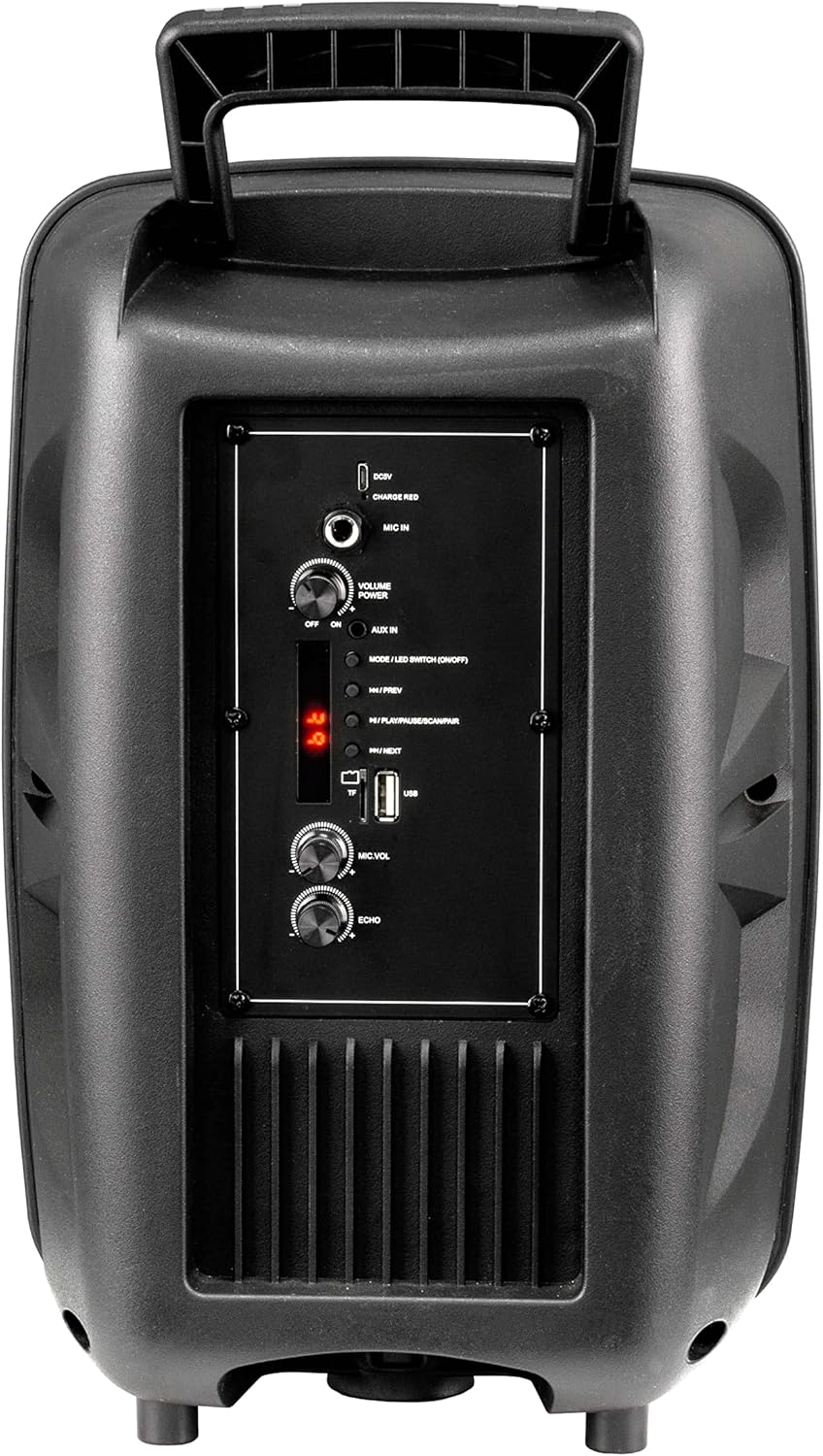
Image: Rear Control Panel Overview.
- DC 5V Input: Power input for charging the speaker.
- CHARGE RED Indicator: Lights up red when charging.
- MIC IN: 6.35mm jack for connecting a wired microphone.
- VOLUME POWER (OFF/ON): Rotary knob to turn the speaker ON/OFF and adjust the master volume.
- AUX IN: 3.5mm audio input for connecting external audio devices.
- MODE / LED SWITCH (ON/OFF): Press to switch between input modes (Bluetooth, USB, MicroSD, AUX). Press and hold to turn the LED light show ON/OFF.
- |<< / PREV: Press to go to the previous track.
- >>| / NEXT: Press to go to the next track.
- >|| / PLAY/PAUSE / SCAN/PAIR: Press to play or pause audio. In FM mode, press and hold to scan for stations. In Bluetooth mode, press and hold to initiate pairing.
- TF (MicroSD) Card Slot: Insert a MicroSD card for MP3 playback.
- USB Port: Insert a USB flash drive for MP3 playback.
- MIC.VOL: Rotary knob to adjust the microphone volume.
- ECHO: Rotary knob to adjust the microphone echo effect.
5. Setup
5.1. Charging the Speaker
Before first use, fully charge the speaker. Connect the provided charging cable to the DC 5V input on the rear panel and plug the other end into a suitable USB power source (e.g., USB wall adapter, computer USB port). The "CHARGE RED" indicator will light up during charging and turn off when fully charged.
5.2. Powering On/Off
Rotate the "VOLUME POWER" knob clockwise to turn the speaker ON. Rotate it counter-clockwise until it clicks to turn the speaker OFF.
6. Operating Instructions
6.1. Bluetooth Mode
- Turn on the speaker. It will automatically enter Bluetooth pairing mode, indicated by a flashing "BLUE" on the LED display.
- Enable Bluetooth on your mobile device (smartphone, tablet, computer).
- Search for "R-MUSIC BOOSTER S" (or similar name) in your device's Bluetooth list and select it to pair.
- Once successfully paired, the speaker will emit a confirmation tone, and the "BLUE" indicator will stop flashing.
- You can now play audio from your device through the speaker. Use the speaker's control buttons or your device to control playback.
6.2. USB / MicroSD Card Playback
- Insert a USB flash drive or MicroSD card (pre-loaded with MP3 audio files) into the respective port.
- The speaker will automatically switch to USB or TF (MicroSD) mode and begin playing the first compatible audio file.
- Use the "|<<" and ">>|" buttons to navigate between tracks. Use the ">||" button to play or pause.
6.3. AUX Input Mode
- Connect one end of a 3.5mm audio cable (not included) to the AUX IN port on the speaker.
- Connect the other end to the headphone jack or audio output of your external device (e.g., MP3 player, laptop).
- Press the "MODE" button until "AUX" is displayed on the LED screen.
- Play audio from your external device. Volume can be controlled via the speaker's master volume knob or your external device.
6.4. Microphone Usage
- Connect a wired microphone to the "MIC IN" jack.
- Adjust the microphone volume using the "MIC.VOL" knob.
- Adjust the echo effect using the "ECHO" knob.
6.5. LED Light Show
Press and hold the "MODE / LED SWITCH" button to toggle the dynamic LED light show ON or OFF.
7. Maintenance
- Clean the speaker with a soft, dry cloth. Do not use abrasive cleaners or solvents.
- Keep the speaker away from water, moisture, and extreme temperatures.
- Do not block the ventilation openings.
- Store the speaker in a cool, dry place when not in use for extended periods.
8. Troubleshooting
| Problem | Possible Cause | Solution |
|---|---|---|
| No power | Battery is depleted; Power knob is off. | Charge the speaker; Rotate the VOLUME POWER knob clockwise to turn on. |
| No sound | Volume too low; Incorrect mode selected; Device not paired (Bluetooth); Cable not connected (AUX). | Increase volume; Press MODE button to select correct input; Re-pair Bluetooth device; Check AUX cable connection. |
| Bluetooth pairing failed | Speaker not in pairing mode; Device too far; Interference. | Ensure speaker is in Bluetooth mode (flashing BLUE); Move device closer; Turn off other Bluetooth devices. |
| USB/MicroSD not playing | Unsupported file format; Corrupted files; Card/drive not inserted correctly. | Ensure files are MP3 format; Try another USB/MicroSD; Re-insert card/drive. |
9. Specifications
- Model: RM301891 (Booster S)
- Brand: R-MUSIC
- Connectivity: Bluetooth, USB, MicroSD, 3.5mm AUX
- Maximum Output Power: 40 Watts
- Speaker Type: Subwoofer (as per product data, likely refers to bass capability)
- Mounting Type: Floor Standing
- Dimensions (Packaging): 44.4 x 30.1 x 22.6 cm (approx. 17.5 x 11.8 x 8.9 inches)
- Weight (Packaging): 1.9 Kilograms (approx. 4.2 lbs)
- Power Input: DC 5V
10. Safety Information
- Do not disassemble or modify the speaker. This may cause electric shock, fire, or product damage.
- Do not expose the speaker to rain, moisture, or extreme temperatures.
- Avoid dropping or subjecting the speaker to strong impacts.
- Keep out of reach of children.
- Use only the specified charging cable and power adapter.
- Prolonged listening at high volume levels may cause hearing damage.
11. Warranty and Support
R-MUSIC products are designed and manufactured to the highest quality standards. For warranty information and technical support, please refer to the warranty card included with your product or contact your local retailer. Keep your purchase receipt as proof of purchase.
For further assistance, you may visit the official R-MUSIC website or contact their customer service department.
Related documentsBooster S (RM301891)


Ask a question about this manual
Ask about setup, troubleshooting, compatibility, parts, safety, or missing instructions. Manuals+ will review the question and use this page’s manual context to help answer it.