1. Introduction
Thank you for choosing the KESIEME TWS F-9 Wireless Bluetooth Earphones. These earphones are designed to provide a high-quality audio experience with true wireless stereo sound and advanced features for convenience and comfort. This manual will guide you through the setup, operation, and maintenance of your new earphones.

Image: The KESIEME TWS F-9 Wireless Bluetooth Earphones, showcasing both earbuds securely placed within their sleek charging case. The case features a digital display indicating battery level, and a smartphone is shown in the background, demonstrating the case's ability to act as a power bank.
Key Features:
- Automatic Pairing: Seamless connection upon removal from the charging case.
- True Wireless Stereo (TWS): Enjoy high-fidelity (HIFI) sound without tangled wires.
- Versatile Use: Earbuds can be used individually or as a pair.
- Bluetooth 5.0: Ensures stable connection and ultra-low power consumption.
- Extended Battery Life: Up to 4-5 hours of listening time per charge, with the charging case providing up to 25 additional charges.
- CVC8.0 Noise Reduction: Enhances call clarity by minimizing background noise.
- Water-Repellent Design: Suitable for various activities, including sports and travel.
2. Setup and First Use
Follow these steps to set up your KESIEME TWS F-9 earphones for the first time.
Pairing Instructions:
- Charge the Case: Before first use, ensure the charging case is fully charged. Connect the provided USB cable to the charging port on the case and a power source. The digital display will indicate the charging status.
- Remove Earbuds: Open the charging case and remove both the left (L) and right (R) earbuds. They will automatically power on and attempt to connect to each other.
- Activate Bluetooth: On your mobile device (smartphone, tablet, etc.), go to the Bluetooth settings and turn on Bluetooth.
- Select Device: In the list of available Bluetooth devices, locate and select the name of your earphones (e.g., "TWS F-9" or similar).
- Confirm Connection: Once selected, the earphones will pair with your device. A voice prompt or indicator light on the earbuds may confirm the successful connection.
- Automatic Reconnection: After the initial pairing, the earphones will automatically connect to your device when removed from the charging case, provided Bluetooth is enabled on your device.
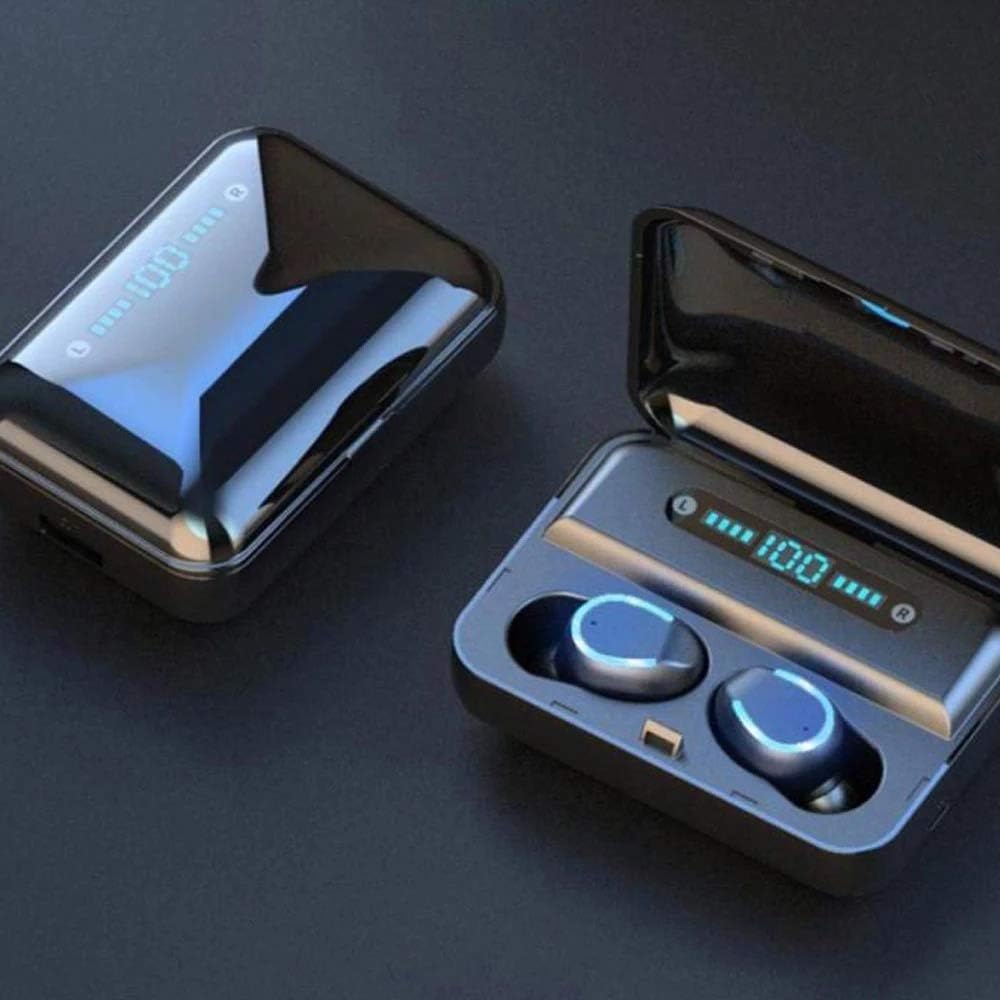
Image: A close-up view of the TWS F-9 earbuds resting in their open charging case, displaying a digital battery percentage. This illustrates the ready-to-pair state of the earphones.
3. Operating Your Earphones
The KESIEME TWS F-9 earphones feature intuitive touch controls for easy management of your audio and calls.
Touch Controls:
| Action | Function |
|---|---|
| Single Tap (Left/Right Earbud) | Play/Pause music, Answer/End call |
| Double Tap (Left Earbud) | Previous track |
| Double Tap (Right Earbud) | Next track |
| Triple Tap (Left/Right Earbud) | Activate Voice Assistant (Siri, Google Assistant) |
| Long Press (Left/Right Earbud) | Reject call |
| Long Press (Left Earbud) | Decrease Volume |
| Long Press (Right Earbud) | Increase Volume |
Wearing the Earphones:
For optimal sound quality and comfort, ensure the earbuds are properly seated in your ears. The TWS F-9 features a design for a secure and comfortable fit.

Image: A diagram illustrating the ergonomic design of the earbud for a secure fit, highlighting the "Upper snap-in style," "Three-point support," and "Lateral rear fit" for enhanced comfort and stability during use.
Charging the Earbuds and Case:
- Earbud Charging: Place the earbuds back into the charging case. They will automatically begin charging. The indicator lights on the earbuds will show their charging status.
- Case Charging: Connect the USB charging cable to the charging port on the case and a 5V/1A power adapter. The digital display on the case will show the current battery percentage during charging. A full charge for the case takes approximately 5 hours.
- Power Bank Function: The charging case can also be used as a power bank to charge your smartphone or other small devices. Connect your device to the USB output port on the charging case.
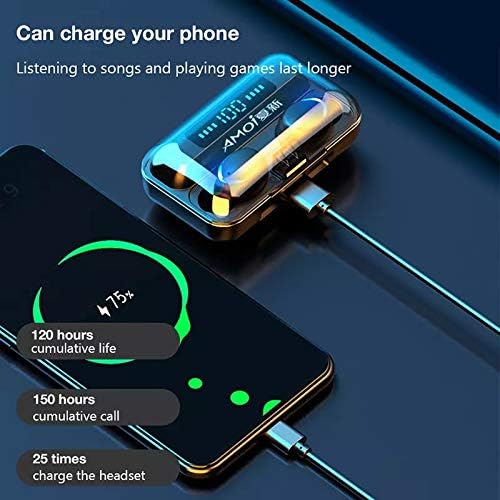
Image: The KESIEME TWS F-9 charging case connected via a USB cable to a smartphone, demonstrating its power bank capability. The phone screen shows a charging indicator, and text highlights the cumulative life and charging capacity of the case.
4. Maintenance and Care
Proper maintenance will extend the lifespan of your KESIEME TWS F-9 earphones.
- Cleaning: Regularly clean the earbuds and charging case with a soft, dry, lint-free cloth. Do not use abrasive cleaners or solvents. For earwax buildup, gently clean the earbud mesh with a small, soft brush.
- Water Resistance: The earphones are water-repellent. This means they can withstand splashes and light rain, making them suitable for sports. However, they are not designed for submersion in water or use during swimming. Avoid exposing them to excessive moisture.
- Storage: When not in use, always store the earbuds in their charging case to protect them and keep them charged. Store the case in a cool, dry place away from direct sunlight and extreme temperatures.
- Battery Care: To preserve battery health, avoid fully discharging the case and earbuds frequently. Charge them regularly, even if not in constant use.
5. Troubleshooting
If you encounter any issues with your earphones, refer to the following common problems and solutions.
- Earbuds not pairing with each other or with the device:
- Ensure both earbuds are fully charged.
- Place both earbuds back into the charging case, close the lid, wait a few seconds, then remove them again. This often resets the pairing.
- On your device, forget or unpair the earphones from the Bluetooth list, then repeat the pairing process from Section 2.
- Ensure no other Bluetooth devices are interfering nearby.
- No sound from one earbud:
- Check if both earbuds are charged.
- Place both earbuds back in the case and remove them to force re-sync.
- Clean the charging contacts on both the earbuds and inside the case.
- Earbuds not charging:
- Ensure the charging case itself is charged.
- Verify that the earbuds are correctly seated in the charging slots.
- Clean the charging contacts on both the earbuds and inside the case.
- Try a different charging cable and power adapter.
- Poor sound quality or disconnections:
- Ensure your device is within the 10-meter Bluetooth range.
- Reduce obstacles between your device and the earphones.
- Check for interference from other wireless devices.
- Clean any debris from the earbud speakers.
6. Specifications
| Feature | Detail |
|---|---|
| Brand | KESIEME |
| Model Name | TWS f 9 |
| Connectivity Technology | Wireless Bluetooth |
| Bluetooth Version | 5.0 |
| Wireless Range | Up to 10 meters (without obstacles) |
| Earbud Playtime | Approx. 4-5 hours (listening) |
| Charging Case Capacity | 2000 mAh |
| Earbud Charges from Case | Up to 25 times |
| Standby Time | Approx. 120 hours |
| Noise Reduction Technology | CVC8.0 |
| Control Method | Touch Control |
| Water Resistance Level | Water-repellent |
| Material | Plastic |
| Item Weight | 110 Grams |
| Frequency Range | 20 Hz - 20,000 Hz |
| Charging Time (Case) | Approx. 5 hours |
7. Warranty and Support
For any questions, technical support, or warranty inquiries regarding your KESIEME TWS F-9 Wireless Bluetooth Earphones, please refer to the retailer or manufacturer's official support channels. Keep your purchase receipt as proof of purchase for warranty claims.
Note: Specific warranty terms and conditions may vary by region and retailer.


