
1. Introduction
This manual provides essential information for the safe and efficient use of your Walfront H5055 Brushless DC Motor. Please read this manual thoroughly before installation and operation to ensure proper function and longevity of the product. This motor is designed for various applications including RC cars, drones, RC boats, and water sports equipment.
2. Safety Information
- Always disconnect power before performing any installation, maintenance, or troubleshooting.
- Ensure all connections are secure and correctly polarized to prevent damage to the motor or power source.
- Operate the motor within its specified voltage and current limits. Exceeding these limits can lead to overheating and permanent damage.
- Keep hands, hair, and loose clothing away from rotating parts during operation.
- Avoid operating the motor in wet or excessively dusty environments unless specifically designed for such conditions.
- Store the motor in a dry, cool place away from direct sunlight and corrosive materials.
3. Product Overview
The Walfront H5055 is a high-performance brushless DC motor featuring a robust design for demanding applications. It incorporates a Hall sensor for accurate positioning and smooth startup. The motor's multi-strand windings contribute to efficient heat dissipation, while curved magnets enhance magnetic attraction and reduce operational noise.

Figure 3.1: Walfront H5055 Brushless DC Motor with its integrated power and sensor cables. The motor features a black casing and a silver shaft, with a braided sleeve protecting the main power wires.

Figure 3.2: Rear view of the Walfront H5055 Brushless DC Motor, highlighting the sensor port and the '5055/200KV' model designation on the casing. The motor's robust construction is visible.
4. Specifications
| Parameter | Value |
|---|---|
| Brand | Walfront |
| Model | H5055 |
| Voltage | 36 Volts DC |
| Power | 1380 Watts |
| KV Rating | 200KV |
| Speed | 1380 RPM (at nominal voltage) |
| Item Weight | 516 Grams |
| Motor Length | Approx. 55.5mm / 2.2in |
| Motor Diameter | Approx. 49.5mm / 1.9in |
| Sensor Wire Length | 370mm (approx.) |
| Motor Phase Wire Length | 300mm (approx.) |
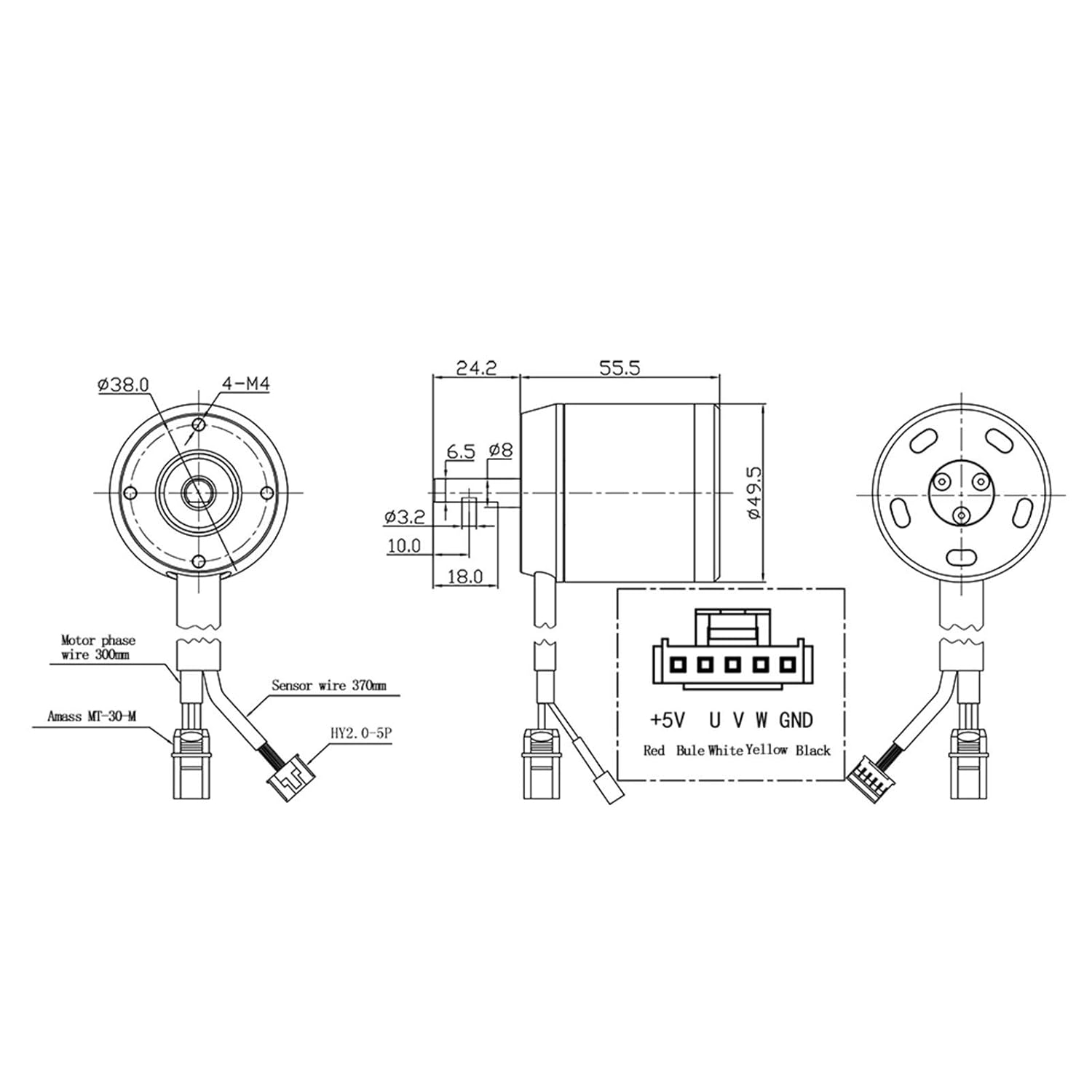
Figure 4.1: Detailed technical drawing showing the dimensions of the motor and its shaft, along with the wiring diagram for the motor phase wires (U, V, W) and the Hall sensor wires (+5V, U, V, W, GND).

Figure 4.2: The Walfront H5055 Brushless DC Motor with its approximate length (55.5mm) and diameter (49.5mm) clearly indicated.
5. Setup
5.1 Component Identification
- Motor Body: The main housing of the brushless motor.
- Motor Shaft: The rotating output shaft for connecting to propellers, wheels, or other mechanisms.
- Phase Wires: Three thick wires (typically yellow, blue, red) for connecting to the Electronic Speed Controller (ESC).
- Hall Sensor Wire: A multi-pin connector with thinner wires (typically red, blue, white, yellow, black) for connecting to a compatible ESC or controller that utilizes Hall sensor feedback.
5.2 Installation Steps
- Mounting the Motor: Securely mount the motor to your application's frame or chassis using appropriate screws and mounting holes. Refer to Figure 4.1 for mounting hole dimensions (4-M4). Ensure the motor is firmly attached to prevent vibration and misalignment.
- Connecting Phase Wires: Connect the three phase wires from the motor to the corresponding output terminals on your Electronic Speed Controller (ESC). The order of connection may affect the motor's rotation direction. If the motor spins in the wrong direction, swap any two of the phase wires.
- Connecting Hall Sensor Wires: Connect the Hall sensor wire connector from the motor to the dedicated Hall sensor port on your ESC or motor controller. Ensure the pin assignments (+5V, U, V, W, GND) match between the motor and the controller. Incorrect connection can damage the sensor or controller.
- Power Supply: Connect your battery or power supply to the ESC according to the ESC's instructions. Ensure the voltage matches the motor's specified 36V DC.
- Initial Test: Before full operation, perform a low-power test to verify correct motor rotation and smooth operation.

Figure 5.1: Illustration demonstrating the correct installation of a Hall sensor within the motor core for precise positioning and accurate temperature detection, contrasting it with less accurate sensor placements.
6. Operating Instructions
Once the motor is correctly installed and wired, follow these general operating guidelines:
- Controller Compatibility: Use an Electronic Speed Controller (ESC) that is compatible with brushless DC motors and supports Hall sensor input for optimal performance. The ESC should be rated for the motor's voltage and current requirements.
- Smooth Acceleration: Avoid sudden, full-throttle acceleration, especially during initial runs. Gradually increase power to allow the motor and connected components to adapt.
- Monitoring Temperature: Periodically check the motor's temperature during operation. Excessive heat can indicate overloading or insufficient cooling. The motor is designed with good heat dissipation, but external factors can still cause overheating.
- Environmental Conditions: Operate the motor within reasonable temperature and humidity ranges. Avoid prolonged exposure to extreme conditions.

Figure 6.1: Examples of wide applications for the Walfront H5055 Brushless DC Motor, demonstrating its versatility in RC vehicles and water sports.
7. Maintenance
Regular maintenance helps ensure the longevity and performance of your motor:
- Cleaning: Keep the motor free from dust, dirt, and debris. Use a soft brush or compressed air to clean the exterior. Avoid using liquids that could enter the motor.
- Inspecting Connections: Periodically check all electrical connections (phase wires, sensor wires) for looseness, corrosion, or damage. Secure any loose connections.
- Shaft and Bearings: Inspect the motor shaft for any signs of bending or damage. The bearings are typically sealed and maintenance-free, but listen for unusual noises during operation which could indicate bearing wear.
- Physical Damage: Regularly inspect the motor casing for cracks, dents, or other physical damage that could compromise its integrity.
8. Troubleshooting
If you encounter issues with your Walfront H5055 motor, consider the following:
| Problem | Possible Cause | Solution |
|---|---|---|
| Motor does not spin | No power to ESC; Incorrect wiring; Faulty ESC; Damaged motor. | Check battery connection and charge; Verify all wire connections; Test with a known good ESC; Inspect motor for physical damage. |
| Motor spins in wrong direction | Incorrect phase wire connection. | Swap any two of the three phase wires between the motor and ESC. |
| Motor stutters or runs roughly | Loose connections; Incorrect Hall sensor wiring; Sensor damage; ESC timing issues. | Check all connections; Verify Hall sensor wiring; Consult ESC manual for timing adjustments; Replace sensor if damaged. |
| Motor overheats | Overloading; Insufficient cooling; Incorrect ESC settings; Short circuit. | Reduce load; Ensure adequate airflow; Adjust ESC timing; Check for internal shorts. |
| Unusual noise during operation | Damaged bearings; Loose mounting; Foreign object in motor. | Inspect bearings; Tighten mounting screws; Remove any obstructions. |
9. Warranty and Support
Walfront products are manufactured to high-quality standards. For specific warranty information, please refer to the documentation provided at the time of purchase or contact your retailer. If you require technical assistance or have questions not covered in this manual, please contact Walfront customer support through their official channels.