
1. Important Safety Information
Please read all safety warnings and instructions carefully before installing and operating the Missyou 3D Hologram Fan. Failure to follow these instructions may result in electric shock, fire, or serious injury.

Figure 1: Missyou 3D Hologram Fan in operation, displaying a vibrant 3D dragon.
- Do Not Touch Rotating Blades: The fan blades rotate at high speed. Never touch the blades while the device is powered on or rotating. A warning sign is included in the packaging to remind users of this danger.
- Proper Installation: Ensure the device is securely mounted in a location where it cannot be easily accessed or tampered with, especially by children.
- Power Supply: Use only the provided power adapter. Ensure the power source matches the voltage requirements specified on the adapter.
- Ventilation: Do not block the ventilation openings on the device. Ensure adequate airflow to prevent overheating.
- Indoor Use Only: This device is designed for indoor use. Avoid exposure to moisture, direct sunlight, or extreme temperatures.
- Maintenance: Disconnect power before cleaning or performing any maintenance.
2. What's in the Box
Verify that all components listed below are present in your package:
- 3D Hologram Fan Unit
- Power Adapter
- Remote Control
- User Manual
- Screws for assembly
- Base (for mounting)
- TF Card (pre-installed or included separately)

Figure 2: Contents of the Missyou 3D Hologram Fan package, including the fan unit, power adapter, remote, manual, screws, and base.
3. Specifications
| Feature | Detail |
|---|---|
| Brand | Missyou |
| Model Number | MS5 |
| Item Weight | 1.32 pounds |
| Product Dimensions | 20.5 x 2 x 20.5 inches |
| Display Resolution | 1600 x 1200 |
| Connectivity Technology | Wireless, Bluetooth, Wi-Fi |
| Special Features | Built-In 3D, 3D-Ready |
| Recommended Uses | Education, Gaming, Business |
| Color | Black |
| Country of Origin | China |
4. Setup Guide
Follow these steps to assemble and prepare your 3D Hologram Fan for operation:
- Unpack Components: Carefully remove all items from the packaging. Identify the main unit, LED blades (two 'A' blades and two 'B' blades), power adapter, remote control, and screws.
- Attach LED Blades: The main unit has designated slots for 'A' and 'B' blades. Match the 'A' blades to the 'A' slots and 'B' blades to the 'B' slots. Gently snap each blade into its corresponding slot. Ensure they are firmly seated.
- Secure Blades with Screws: Once the blades are snapped in, use the provided screwdriver and screws to secure each blade to the main unit. There are two screw points per blade. This ensures stability during operation.
- Connect Power: Plug the power adapter into the main unit and then into a suitable power outlet. The LED blades should light up, indicating power.
- Mounting (Optional): If you plan to mount the fan, use the provided base and screws to secure it to a wall or a compatible tripod. Ensure the mounting surface is sturdy enough to support the device.

Figure 3: View of the main unit's base, showing the insulation protection cover and blade connection points (A and B labels are visible).
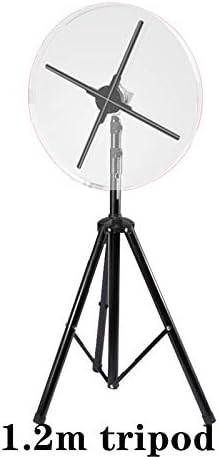
Figure 4: The 3D Hologram Fan can be mounted on a tripod for versatile placement.
Note: A customer video review demonstrates the unboxing and assembly process, showing how the LED blades snap into place and are secured with screws. It also shows the initial power-on sequence.
5. Operating Instructions
The Missyou 3D Hologram Fan offers multiple ways to control content and playback:
5.1. Remote Control Operation
The included remote control allows for basic functions such as power on/off and cycling through pre-loaded content or a set playlist.

Figure 5: The remote control provides convenient access to basic functions of the 3D Hologram Fan.
5.2. Mobile App Control (Wi-Fi)
For advanced content management and settings, use the dedicated mobile application. The app is compatible with both Android and iOS devices and connects via Wi-Fi.
- Download App: Scan the QR code in the physical user manual or search for the "Missyou Hologram Fan" app in your device's app store.
- Connect via Wi-Fi: Turn on the 3D Hologram Fan. On your smartphone, connect to the fan's Wi-Fi hotspot (SSID and password usually found on the device or in the manual).
- Upload Content: Use the app to easily upload new video materials (MP4 format supported) or images from your device to the fan's internal storage or TF card.
- Manage Playlists: Create and manage playlists of your content directly from the app.
- Timed Play: Set specific times for the fan to automatically power on/off and play designated content in a loop. This is ideal for business hours or scheduled events.

Figure 6: The mobile app allows for seamless content upload and management via Wi-Fi.

Figure 7: The timed play feature enables automatic content playback at scheduled intervals.
5.3. Bluetooth Connectivity
Enhance your holographic display by connecting external speakers via Bluetooth for a synchronized audio-visual experience.
- Pairing: Enable Bluetooth on your external speaker and on the 3D Hologram Fan (via app settings or remote, if available). Select the fan from your speaker's Bluetooth device list to pair.
- Audio Playback: Once paired, the fan will transmit audio from your content to the connected speaker.
Figure 8: Bluetooth functionality allows for audio transmission to external speakers, enhancing the immersive experience.
5.4. Content Library
The Missyou 3D Hologram Fan comes with access to a rich library of 1500+ free 3D video resources. Contact Missyou customer service after purchase to gain access to this library.

Figure 9: A selection of the 1500+ free 3D video resources available for the hologram fan.
6. Maintenance
To ensure the longevity and optimal performance of your 3D Hologram Fan, follow these maintenance guidelines:
- Cleaning: Always disconnect the power before cleaning. Use a soft, dry cloth to wipe the surface of the device. Do not use liquid cleaners or abrasive materials.
- Storage: When not in use for extended periods, store the fan in its original packaging in a cool, dry place away from direct sunlight and moisture.
- Blade Protection: Avoid placing objects near the rotating blades. The insulation protection cover on the base helps protect internal components.
Figure 10: The insulation cover helps protect the internal components of the fan.
7. Troubleshooting
If you encounter issues with your Missyou 3D Hologram Fan, refer to the following common problems and solutions:
| Problem | Possible Cause | Solution |
|---|---|---|
| Fan does not power on. | No power, loose connection, faulty adapter. | Check power outlet. Ensure all cables are securely connected. Use only the provided power adapter. |
| Image is distorted or incomplete. | Incorrect blade installation, damaged LED, incompatible video format. | Verify that all LED blades are correctly installed in their designated 'A' and 'B' slots and securely screwed in. Ensure video content is in a compatible format (e.g., MP4). |
| Cannot connect to Wi-Fi/App. | Incorrect Wi-Fi password, app issues, network interference. | Double-check the Wi-Fi password. Restart the fan and your mobile device. Ensure your device is connected to the fan's direct Wi-Fi hotspot. Try reinstalling the app if issues persist. |
| No sound from external speakers. | Bluetooth not paired, speaker volume low, incompatible speaker. | Ensure Bluetooth is enabled on both devices and they are properly paired. Check the volume on your external speaker. |
If the problem persists after trying these solutions, please contact Missyou customer support for further assistance.
8. Warranty and Support
Missyou stands by the quality of its 3D Hologram Fan. For any issues encountered during use, our dedicated customer service team is always ready to assist.
- Protection Plans: Extended protection plans (2-Year and 3-Year) are available for purchase separately to cover your device beyond the standard warranty.
- Contact Support: For technical support, troubleshooting, or warranty claims, please refer to the contact information provided in your product packaging or visit the official Missyou Hologram Fan store on Amazon.
- Customized Videos: Missyou also supports customized video content services. Contact the company for details.