
Introduction
Thank you for choosing the Diablo V-Commander Ergonomic Office Chair. This manual provides essential information for the safe assembly, operation, and maintenance of your new chair. Designed for optimal comfort and support, the V-Commander chair combines elegance with modern ergonomics, making it ideal for offices, workspaces, and conference rooms. Please read these instructions carefully before use to ensure proper functionality and longevity of your product.
Safety Warnings
- Assembly Required: This chair requires assembly. Please read all instructions thoroughly before beginning the assembly process.
- Weight Capacity: Do not exceed the maximum weight capacity of 200 kg (approximately 440 lbs) to ensure the stability and safety of the chair. Exceeding this limit may cause damage to the chair and potential injury.
- Regular Inspection: Periodically check all bolts and connections to ensure they are tight and secure. Loose components can affect stability and safety.
- Proper Use: Use the chair only for its intended purpose as an office chair. Avoid standing on the chair or using it as a ladder.
Setup and Assembly
The Diablo V-Commander chair is designed for straightforward assembly. Please ensure all components are present before you begin. Refer to the separate assembly instructions included in your product packaging for detailed, step-by-step guidance. The following image illustrates the fully assembled chair.

Figure 1: Fully assembled Diablo V-Commander ergonomic office chair.
Ensure all parts are securely fastened. The gas lift (Class 5 safety level) is designed to support up to 200 kg. The stable aluminum base with rubber wheels ensures safe gliding without scratching floors.
Operating Instructions (Adjustments)
The Diablo V-Commander chair offers multiple adjustment options to customize your seating experience for optimal ergonomics and comfort.
1. Seat Height Adjustment
Use the lever located under the seat to adjust the seat height. Pull the lever up to raise the seat; release it at the desired height. To lower, pull the lever up while seated.
2. Backrest Tilt and Recline Mechanism
The integrated tilt mechanism allows for dynamic movement and recline. Adjust the tension of the recline using the knob under the seat. The backrest can be locked in various positions, including upright (90°), relaxed (120°), and reclined (140°).

Figure 2: Backrest tilt positions (90°, 120°, 140°).
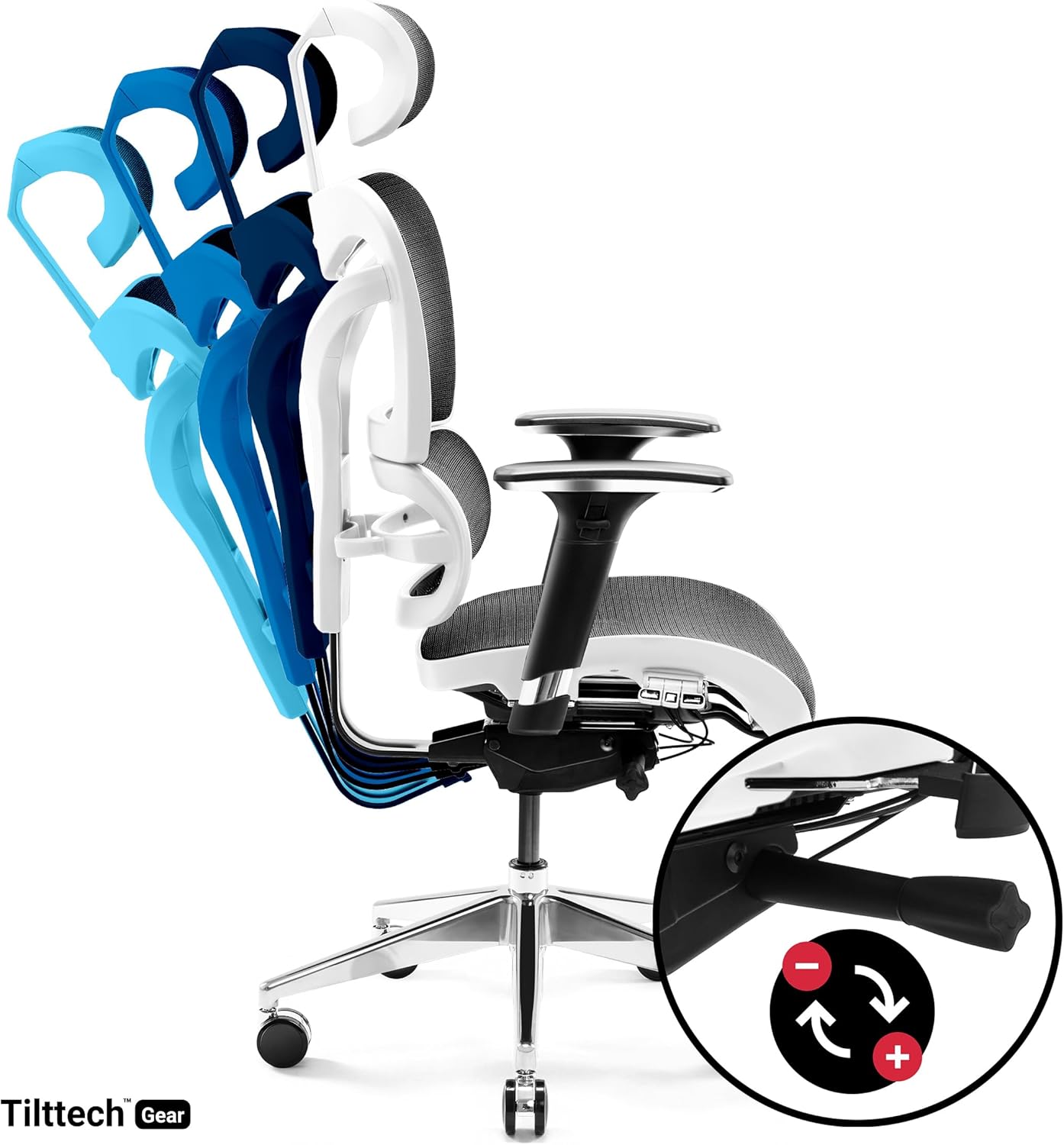
Figure 3: Tilt mechanism lever and tension adjustment.
3. 3D Armrest Adjustment
The armrests are adjustable in three dimensions: height (up and down), depth (forward and backward), and pivot (left and right). These adjustments help increase body stability and relieve pressure on the shoulders and arms.
- Height Adjustment: Press the button on the side of the armrest and move it up or down. Release the button to lock.
- Depth Adjustment: Slide the armrest pad forward or backward.
- Pivot Adjustment: Rotate the armrest pad left or right.
4. Lumbar Support and Backrest Height Adjustment
The flexible integrated lumbar support adapts to your back. The entire backrest can also be adjusted vertically to position the lumbar support optimally for your spine.

Figure 4: Backrest and lumbar support height adjustment.
5. Adjustable Headrest
The adjustable headrest provides solid neck support, stabilizing the cervical spine area and enhancing comfort. Adjust its height and angle to suit your preference.

Figure 5: Headrest height adjustment.
6. Seat Depth Adjustment
The seat depth can be adjusted to accommodate different leg lengths, ensuring proper thigh support and circulation.

Figure 6: Seat depth adjustment.
Maintenance
- Cleaning: The mesh fabric material is waterproof and durable. For general cleaning, use a soft, damp cloth. For stains, spot clean with a mild fabric cleaner. Avoid harsh chemicals or abrasive materials.
- Inspection: Periodically check all screws, bolts, and moving parts for tightness and proper function. Tighten any loose fasteners.
- Wheel Care: The rubber wheels are designed to prevent scratches. Keep them free of debris to ensure smooth gliding.
Troubleshooting
If you encounter any issues with your Diablo V-Commander chair, please refer to the following common problems and solutions:
- Chair is unstable or wobbly: Ensure all assembly screws and bolts are securely tightened. Check that the base and gas lift are correctly installed.
- Adjustments are not working smoothly: Check for any obstructions in the adjustment mechanisms. Ensure levers and knobs are fully engaged or disengaged as required. If an adjustment feels stiff, apply a small amount of silicone-based lubricant to the moving parts (avoiding fabric).
- Gas lift not holding height: This may indicate a faulty gas lift. Contact customer support for assistance.
- Armrests are loose or not holding position: Verify that the armrest attachment screws are tight. For 3D armrests, ensure the internal locking mechanisms are engaging properly.
- Unusual noises (squeaking, creaking): Check for loose connections and tighten them. Lubricate moving parts with a silicone-based spray if necessary.
If the problem persists after attempting these solutions, please contact customer support.
Specifications
| Brand | Diablo |
| Model Number | V-Commander |
| Color | White/Black |
| Material | Mesh Fabric, Aluminum Frame |
| Product Dimensions (L x W x H) | 72P x 58l x 51H centimeters (approx. 28.3 x 22.8 x 20.1 inches) |
| Item Weight | 25 Kilograms (approx. 55 lbs) |
| Maximum Load Capacity | 200 Kilograms (approx. 440 lbs) |
| Special Features | 3D Adjustable Armrests, Adjustable Headrest, Adjustable Backrest, Ergonomic Design, Seat Lock, Lumbar Support |
| Care Instructions | Spot clean |
Warranty Information
Information regarding the availability of spare parts is currently unavailable. For specific warranty details, please refer to the documentation included with your purchase or contact the seller directly. Standard consumer rights apply.
Support Information
For further assistance, technical support, or inquiries regarding your Diablo V-Commander Ergonomic Office Chair, please contact the seller or manufacturer directly. Please have your purchase details and model number (V-Commander) ready when contacting support.
Manufacturer: Diablo
Seller: Domator24
