
Introduction
This manual provides instructions for the safe and efficient operation of your Epson PowerLite 800F 3LCD Projector. Please read this manual thoroughly before using the projector and retain it for future reference.
Setup
Unpacking the Projector
Carefully remove all components from the packaging. Ensure all items listed in the packing list are present. Retain the original packaging for future transport or storage.
Component Identification

Image 1: Front view of the Epson PowerLite 800F 3LCD Projector. This image displays the projector's main body, lens, and ventilation grilles.
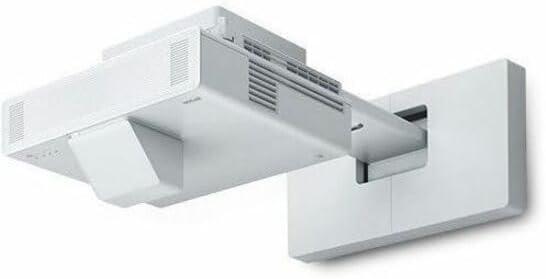
Image 2: Side view of the Epson PowerLite 800F 3LCD Projector, shown mounted on a wall bracket. This illustrates the projector's profile and potential installation configuration.
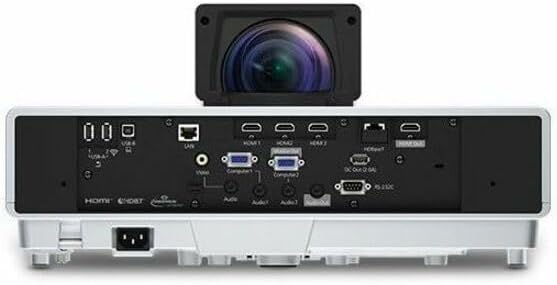
Image 3: Rear view of the Epson PowerLite 800F 3LCD Projector, highlighting the various input and output ports. These include HDMI, LAN, HDBaseT, and other connectivity options.
Connecting the Projector
- Power Connection: Connect the power cord to the projector's AC inlet and then to a grounded electrical outlet.
- Video Source: Connect your video source (e.g., computer, Blu-ray player) to the projector using an appropriate cable. The projector supports HDMI, HDBaseT, and wireless connectivity. Refer to Image 3 for port locations.
- Audio Connection (Optional): If your video source does not transmit audio via HDMI or if you prefer external audio, connect an audio cable from your source to the projector's audio input ports.
- Network Connection (Optional): For network control or content streaming, connect an Ethernet cable to the LAN port.
Placement and Adjustment
- Place the projector on a stable, level surface or mount it securely. Ensure adequate ventilation around the projector.
- Adjust the projector's position and lens to achieve the desired image size and focus on your screen or wall.
- Use the keystone correction feature (if available) to square the image if the projector is not perfectly perpendicular to the screen.
Operating Instructions
Powering On/Off
- To Power On: Press the power button on the projector or the remote control. The power indicator light will illuminate.
- To Power Off: Press the power button again. A confirmation message may appear; press the power button once more to confirm shutdown. Allow the projector to cool down before unplugging.
Selecting Input Source
Use the "Source Search" or dedicated input buttons on the projector or remote control to select the desired input source (e.g., HDMI 1, Computer 1, LAN).
Adjusting Image Settings
Access the projector's on-screen menu to adjust settings such as brightness, contrast, color, aspect ratio, and keystone correction. Navigate the menu using the arrow buttons and "Enter" button on the projector or remote.
Wireless Connectivity
The PowerLite 800F supports wireless connectivity. Refer to the on-screen menu for wireless setup options, including connecting to a Wi-Fi network or using screen mirroring features.
Maintenance
Cleaning the Projector
- Exterior: Wipe the projector's exterior with a soft, dry, lint-free cloth. Do not use liquid or abrasive cleaners.
- Lens: Gently clean the projector lens with a lens cleaning cloth or lens paper. Avoid touching the lens directly with your fingers.
- Air Filter: Regularly check and clean the air filter to prevent overheating and maintain optimal performance. Refer to the projector's specific instructions for air filter removal and cleaning.
Lamp/Light Source Replacement
The Epson PowerLite 800F uses a laser light source designed for long life (up to 20,000 hours in normal mode). Replacement is typically not required during the product's lifespan under normal usage. If service is needed, contact Epson support.
Troubleshooting
| Problem | Possible Cause | Solution |
|---|---|---|
| No image displayed |
|
|
| Image is blurry |
|
|
| Image is distorted (trapezoid shape) |
|
|
| Projector overheats or shuts down |
|
|
Specifications
| Feature | Detail |
|---|---|
| Model Number | 800F |
| Display Technology | 3LCD, 3-chip technology |
| Light Source | Laser |
| Light Source Life | Up to 20,000 hours (Normal Mode) |
| Brightness | 5000 lumens |
| Native Resolution | 1920 x 1080 (Full HD) |
| Connectivity | HDMI, HDBaseT, Wireless connectivity |
| Product Dimensions | 18 x 18 x 9 inches |
| Item Weight | 29.2 pounds |
| Manufacturer | Epson Corporation |
| Recommended Uses | Business, Education, Home Cinema |
Warranty Information
Epson provides a limited warranty for the PowerLite 800F projector. The warranty period and terms may vary based on region and point of purchase. Please refer to the warranty card included with your product or visit the official Epson website for detailed warranty information.
Important Note: Warranty coverage may be affected by the vendor from whom the product was purchased. Always verify warranty terms with Epson directly, especially when purchasing from third-party sellers.
Customer Support
For technical assistance, troubleshooting, or service inquiries, please contact Epson customer support. You can find contact information, FAQs, and driver downloads on the official Epson support website:
- Epson Support Website: epson.com/support
- Product Registration: Register your product online to receive updates and support.


