
1. Introduction
This manual provides essential information for the safe and efficient operation of your iCharger X12 1100W 30A 12S Balance Battery Charger. Please read all instructions carefully before use to ensure proper functionality and to prevent damage to the device or batteries.
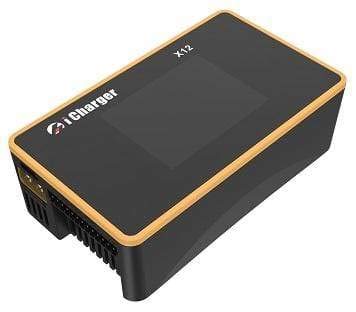
Figure 1: iCharger X12 1100W 30A 12S Balance Battery Charger. This image displays the compact design of the charger, featuring its display screen and control buttons.
2. Specifications
| Feature | Value |
|---|---|
| Display | 2.4" IPS LCD (320x240) |
| Net Weight | 230g (13.5 Ounces) |
| Dimensions (D x W x H) | 112 × 64 × 37 ± 0.5 mm (1.46"D x 2.52"W x 1.46"H) |
| Input Voltage Range | 11-53VDC |
| Maximum Input Current Limit | <35A |
| Maximum Charge/Discharge Current | 30A |
| Max. Output Voltage/Current for Digital Power Supply | 50V/30A |
| Maximum Charge Power Capacity | 1100W |
| Maximum Discharge Power Capacity (Built-in) | 50W |
| Maximum Regenerative Discharge Power Capacity | 1100W |
| Maximum Extra Discharge Power Capacity | 1500W@50V/40A |
| Maximum Current Drain for Balancing | >2.0A |
| Battery Cell Count (Balance Connector) | 1-12S (for LiHV/LiPo/LiFe/Lilon/Lixx, NiZn/NiCd/NiMH, Smart Battery, Lead Acid, Eneloop) |
| Safety Standard | UL, FCC |
| GTIN / UPC | 738956257789 |
3. Setup
3.1 Power Connection
Connect the iCharger X12 to a suitable DC power source. The input voltage range is 11-53VDC. Ensure your power supply can provide a maximum input current of at least 35A to utilize the charger's full capabilities.
3.2 Battery Connection
Connect your battery to the main output ports and the balance port of the iCharger X12. The charger supports 1-12S LiHV/LiPo/LiFe/Lilon/Lixx, NiZn/NiCd/NiMH, Smart Battery, Lead Acid, and Eneloop battery types. Always ensure correct polarity and secure connections to prevent damage or hazards.
4. Operating Instructions
4.1 Display and Navigation
The iCharger X12 features a 2.4" IPS LCD (320x240) display for clear visibility of charging parameters and settings. Use the navigation buttons to select battery types, set charge/discharge currents, and monitor cell voltages.
4.2 Charging and Discharging
The charger supports a maximum charge/discharge current of 30A and a maximum charge power capacity of 1100W. It also features a built-in 50W discharge capacity, 1100W regenerative discharge, and up to 1500W@50V/40A for extra discharge. The maximum current drain for balancing is >2.0A, ensuring efficient cell balancing.
4.3 Digital Power Supply Mode
The iCharger X12 can function as a digital power supply, providing a maximum output of 50V/30A for various applications.
5. Maintenance
5.1 General Care
- Do not disassemble this product.
- Do not expose this product to heat, fire, or any environment with temperatures above 60°C (140°F).
- Avoid storing it in direct sunlight.
- Do not short-circuit this product.
- Do not subject this product to mechanical shock.
5.2 Storage
Store the charger in a dry environment with a storage temperature between -20°C and 60°C. Always ensure batteries are stored at their recommended storage voltage to prolong their lifespan.
6. Troubleshooting
If you encounter issues, check the following common problems:


