
Collective Minds CM00114
Collective Minds Strike Pack Eliminator Mod Pack - PlayStation 4 Instruction Manual
Model: CM00114
Introduction
The Collective Minds Strike Pack Eliminator Mod Pack is an adapter designed to enhance your PlayStation 4 controller by adding four hyper-response, mappable rear buttons. This accessory allows you to keep your thumbs on the analog sticks and fingers on the triggers, potentially improving response time and gameplay. It also offers customizable digital mods and a high-performance grip, providing a competitive advantage.
Setup Instructions
- Unpack the Device: Carefully remove the Strike Pack Eliminator Mod Pack and the included 10-foot braided cable from its packaging.
- Attach to Controller: Align the Strike Pack with the bottom of your PlayStation 4 controller. Firmly push the Strike Pack onto the controller's USB port until it clicks securely into place. Ensure it is fully seated to establish a stable connection. Users have reported needing to push hard until a second click is felt.
- Connect USB Cable: Insert the provided 10-foot braided cable into the Strike Pack's USB port and connect the other end to your PlayStation 4 console.
- Power On: Power on your PlayStation 4 console. The Strike Pack should be recognized automatically.
- Headset Compatibility:
- For PlayStation 4 controllers model CUH-ZCT2U and later, 3.5mm headset audio is compatible.
- For original model CUH-ZCT1U controllers, 3.5mm headset audio is not supported. A USB headset is required for audio.
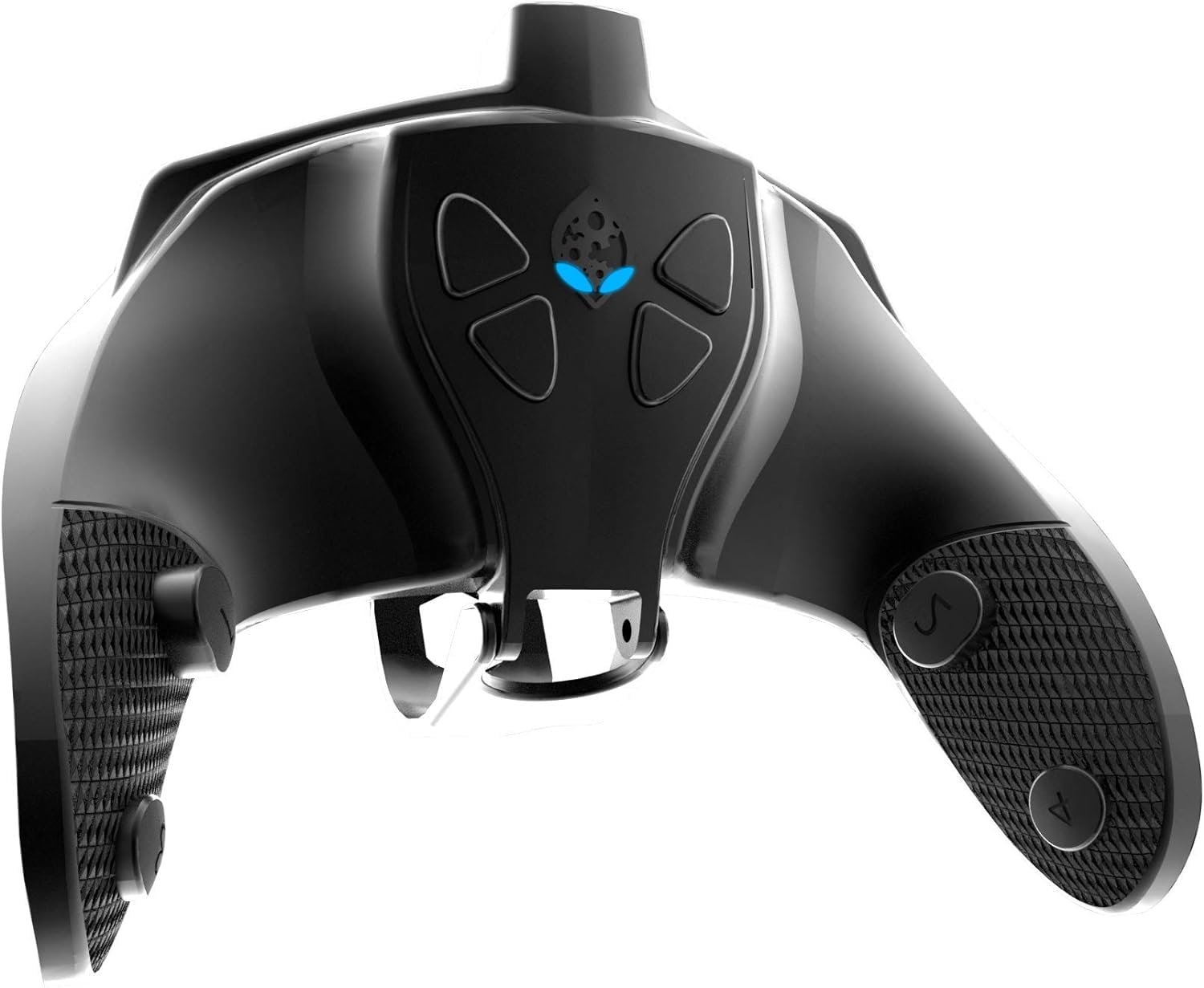
An image showing the Collective Minds Strike Pack Eliminator Mod Pack attached to the bottom of a white PlayStation 4 controller. The mod pack features four rear buttons and connects via a central USB port.
Operating Instructions
Button Mapping
The Strike Pack Eliminator allows for full mapping capability of all 17 standard controller functions to its four rear buttons. This enables you to assign face buttons, shoulder buttons, or other functions to the rear paddles for quicker access during gameplay.
- Enter Mapping Mode: Refer to the official Collective Minds website or the included quick start guide for specific button combinations to enter mapping mode.
- Select Button to Map: Press the controller button you wish to map (e.g., X, O, Square, Triangle).
- Assign to Paddle: Press the desired rear paddle to assign the selected function.
- Exit Mapping Mode: Follow the instructions to save your mapping and exit the mode.
Customizable Digital Mods
The Strike Pack Eliminator features customizable digital mods. These mods can provide various enhancements, such as rapid fire or anti-recoil, depending on the specific firmware and settings. For detailed information on available mods and how to activate and customize them, please consult the official Collective Minds software and documentation.
- Accessing Mods: Typically involves specific button presses or combinations on the Strike Pack itself.
- Configuration: Mods can often be configured for intensity or specific game profiles using the Collective Minds Mod Pass software (if applicable) or on-device controls.
Maintenance
- Cleaning: Use a soft, dry cloth to clean the Strike Pack. Avoid using harsh chemicals or abrasive materials.
- Storage: Store the device in a cool, dry place when not in use. Avoid extreme temperatures.
- Cable Care: Handle the braided USB cable with care. Avoid sharp bends or excessive pulling to prevent damage.
- Connection Integrity: Ensure the Strike Pack is securely attached to the controller and the USB cable is properly connected to prevent intermittent issues.
Troubleshooting
- Device Not Powering On/Connecting:
Ensure the Strike Pack is fully and firmly seated onto the PlayStation 4 controller's USB port. Sometimes a firm push until a second click is felt is necessary for a complete connection. Verify the USB cable is securely connected to both the Strike Pack and the console.
- Mapped Buttons Not Responding:
Re-enter mapping mode and re-map the desired buttons. Ensure you save the configuration before exiting mapping mode. Check for any firmware updates for the Strike Pack, as updates can resolve operational issues.
- Audio Issues with 3.5mm Headset:
Confirm your PlayStation 4 controller model. 3.5mm headset audio is only supported on CUH-ZCT2U and later models. If you have an original CUH-ZCT1U controller, a USB headset is required.
- General Malfunctions:
Try disconnecting and reconnecting the Strike Pack and its cable. Restart your PlayStation 4 console. If issues persist, visit the Collective Minds support website or contact their customer support.
For further assistance, please contact Collective Minds support at support@collectiveminds.ca.
Specifications
| Model Number | CM00114 |
| Compatibility | PlayStation 4 Controllers |
| Dimensions | 0.63 x 6.69 x 5.28 inches |
| Item Weight | 9.9 ounces |
| Included Components | Strike Pack Eliminator Adapter, 10FT Premium Braided Cable |
| Key Features | Four Hyper-response buttons, Full mapping capability (17 functions), Customizable digital mods, High-performance grip, Patented controller transferability |
| Release Date | November 24, 2020 |
Support and Warranty
For technical support, troubleshooting assistance, or warranty inquiries regarding your Collective Minds Strike Pack Eliminator Mod Pack, please contact Collective Minds customer support directly.
Email: support@collectiveminds.ca
Please refer to the official Collective Minds website for the most up-to-date support information and warranty details.
Related documentsCM00114


Ask a question about this manual
Ask about setup, troubleshooting, compatibility, parts, safety, or missing instructions. Manuals+ will review the question and use this page’s manual context to help answer it.