
Monster MH12003
Monster N-Lite 200 AirLinks Wireless Earbuds User Manual
Model: MH12003 | Brand: Monster
Introduction
Thank you for choosing the Monster N-Lite 200 AirLinks Wireless Earbuds. These lightweight in-ear headphones are designed for superior audio experience with premium deep bass, convenient wireless charging, and robust IPX5 waterproofing, making them ideal for sports and daily use. This manual provides essential information for setup, operation, maintenance, and troubleshooting to ensure you get the most out of your device.
Package Contents
- Monster N-Lite 200 AirLinks Wireless Earbuds (Left and Right)
- Charging Case
- USB-C Charging Cable
- Multiple sizes of Ear Tips (3 pairs: S, M, L - M size installed)
- Earbud Cleaning Sticks
- User Manual (this document)

Image: Contents of the Monster N-Lite 200 AirLinks package, including earbuds, charging case, USB-C cable, and ear tips.
Setup
1. Charging the Earbuds and Case
Before first use, fully charge the earbuds and the charging case. The case supports both wireless charging and USB-C cable charging.
- USB-C Charging: Connect the provided USB-C cable to the charging port on the case and the other end to a USB power source.
- Wireless Charging: Place the charging case on a compatible wireless charging pad.
The earbuds will charge automatically when placed inside the charging case. A full charge provides over 4.5 hours of playtime, with the charging case extending total playtime to 21 hours.

Image: The charging case demonstrating both USB-C and wireless charging options.
Note: High volume levels may reduce battery life.
2. One-Step Pairing
The earbuds feature one-step pairing for quick and easy connection to your device.
- Open the charging case and remove both earbuds. They will automatically power on and enter pairing mode.
- On your mobile device, go to Bluetooth settings.
- Select "Monster N-Lite 200 AirLinks" from the list of available devices.
- Once connected, you will hear an audible "Connected" prompt from the earbuds.
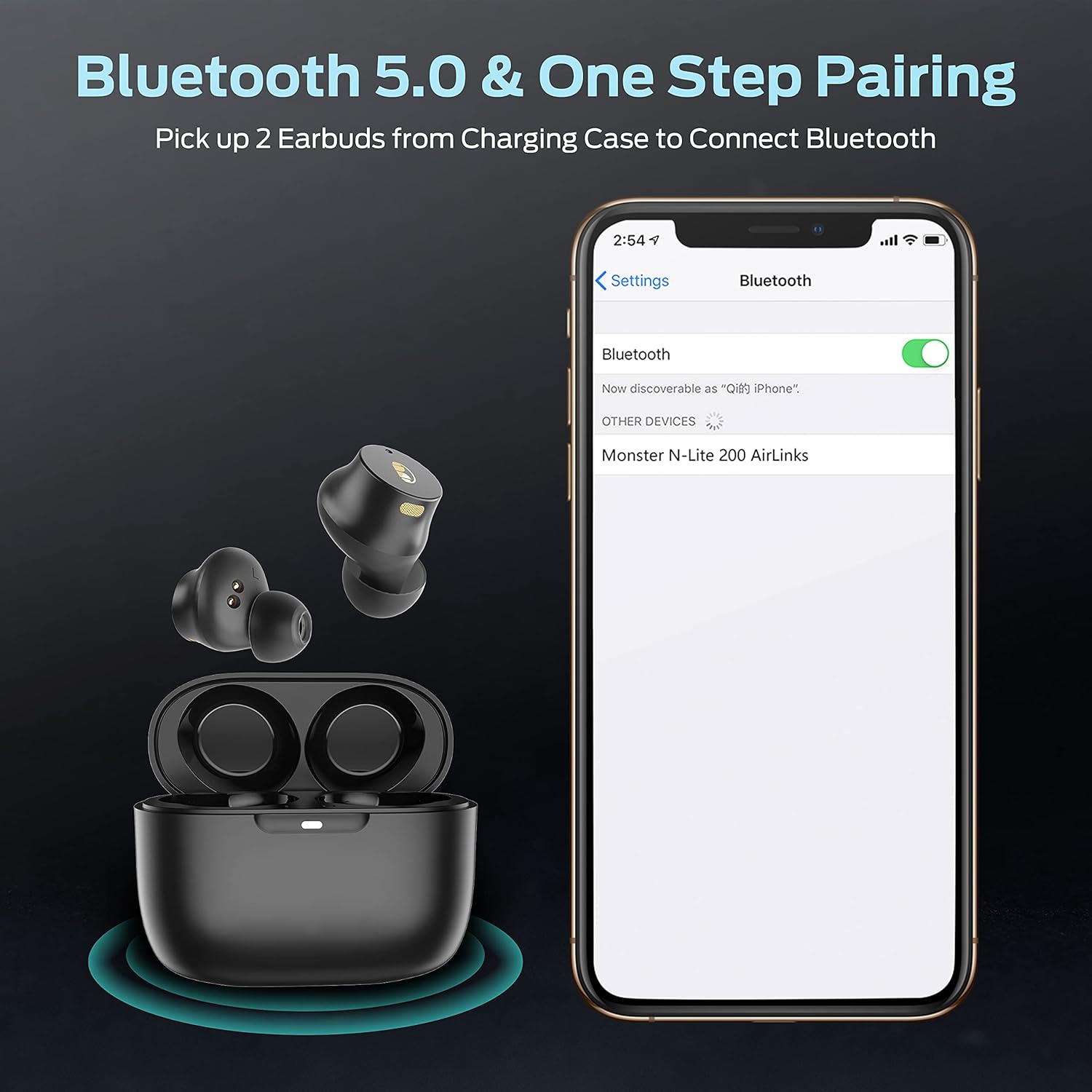
Image: Illustration of the one-step pairing process, showing earbuds being removed from the case and appearing in a phone's Bluetooth settings.
After the initial pairing, the earbuds will automatically connect to the last paired device when removed from the case.
Operating the Earbuds
Touch Controls
The Monster N-Lite 200 AirLinks feature high-sensitivity touch controls for easy management of music and calls.

Image: Diagram illustrating various touch control functions on the earbuds.
| Action | Control |
|---|---|
| Answer/End Call | Tap either earbud once |
| Reject Call | Long press either earbud for 2 seconds |
| Play/Pause Music | Tap either earbud once |
| Next Song | Double-tap right earbud |
| Previous Song | Double-tap left earbud |
| Volume Up | Triple-tap right earbud |
| Volume Down | Triple-tap left earbud |
| Activate Voice Assistant (Siri, Google Assistant) | Long press either earbud for 2 seconds |
Sound Quality and Modes
The earbuds are designed with 6mm composite diaphragm drivers for high-quality stereo sound and deep bass. Bluetooth 5.0 ensures a stable connection with minimal sound skipping and low latency.
- Stereo Mode: Use both earbuds for an immersive stereo audio experience.
- Mono Mode: Either earbud can be used independently for calls or music playback.
- Share Mode: Share one earbud with a friend while maintaining stereo separation.

Image: An exploded view diagram illustrating the components that contribute to Pure Monster Sound.

Image: Visual representation of the True Wireless Stereo (TWS) and Bluetooth 5.0 technology integrated into the earbuds.
Video: An official product video showcasing the Monster N-Lite 200 earbuds and their features.
Maintenance
Cleaning Your Earbuds
Regular cleaning helps maintain sound quality and hygiene. Use the provided cleaning sticks to gently remove any debris from the ear tips and speaker mesh.
- Gently remove the silicone ear tips from the earbuds.
- Use the cleaning stick to carefully clear any earwax or dust from the speaker mesh.
- Clean the silicone ear tips with a soft, damp cloth and allow them to dry completely before reattaching.
- Wipe the charging contacts on both the earbuds and the case with a dry, soft cloth.
Water Resistance
The Monster N-Lite 200 AirLinks earbuds are IPX5 water-resistant, meaning they can withstand splashes and sweat. This makes them suitable for workouts and outdoor activities.
Image: Earbuds shown with water splashes, illustrating their IPX5 water-resistant design.
Caution: The charging case is not water-resistant. Do not submerge the earbuds or expose them to running water for extended periods.
Troubleshooting
If you encounter issues with your Monster N-Lite 200 AirLinks earbuds, try the following steps:
- No Sound/Poor Sound Quality:
- Ensure earbuds are fully charged.
- Check Bluetooth connection on your device. Try disconnecting and re-pairing.
- Clean the earbud speaker mesh and ear tips.
- Adjust volume on both your device and the earbuds.
- Earbuds Not Pairing:
- Ensure both earbuds are removed from the charging case.
- Turn off Bluetooth on your device and turn it back on.
- Forget "Monster N-Lite 200 AirLinks" in your device's Bluetooth settings and attempt to pair again.
- Ensure earbuds are within Bluetooth range (approx. 10 meters/33 feet).
- Charging Issues:
- Verify the USB-C cable is securely connected to both the case and the power source.
- If using wireless charging, ensure the case is properly aligned on the charging pad.
- Clean the charging contacts on both the earbuds and inside the case.
Specifications
| Feature | Detail |
|---|---|
| Model Name | MH12003 |
| Connectivity Technology | Wireless (Bluetooth) |
| Bluetooth Version | 5.0 |
| Audio Driver Type | Dynamic Driver (6mm composite diaphragm) |
| Frequency Range | 20 Hz - 20,000 Hz |
| Control Type | Touch Control (Media Control) |
| Ear Placement | In Ear |
| Water Resistance Level | IPX5 Water Resistant |
| Playtime (Single Charge) | Over 4.5 hours |
| Total Playtime (with Charging Case) | Up to 21 hours |
| Charging Method | USB-C or Wireless Charging |
| Item Weight (Earbud) | 5 Grams |
| Product Dimensions | 6.5 x 5.12 x 1.81 inches |
| Material | Polyurethane (PU) |
Warranty and Support
Monster is committed to providing high-quality audio products. For detailed warranty information, product registration, and technical support, please refer to the official Monster website or the warranty card included in your product packaging. Keep your purchase receipt as proof of purchase for any warranty claims.
Monster has been a leader in audio technology for over four decades, continuously innovating to deliver superior sound experiences.
Related documentsMH12003


Ask a question about this manual
Ask about setup, troubleshooting, compatibility, parts, safety, or missing instructions. Manuals+ will review the question and use this page’s manual context to help answer it.