
1. Introduction
This manual provides essential instructions for the safe and effective use of your VESSEL Electric Ball Grip High Speed Screwdriver, Model 220USB-S1. This tool combines the convenience of an electric screwdriver with the reliability of a manual screwdriver, designed for precision and efficiency in various applications.

Image 1.1: The VESSEL Electric Ball Grip High Speed Screwdriver (Model 220USB-S1).
2. Safety Information
Caution: Please read this instruction manual thoroughly before use. Failure to follow these instructions may result in electric shock, short circuits, or damage to the tool or workpiece.
- Avoid short circuits and electric shocks. Ensure the tool is dry and not used in wet conditions.
- Overloading the screwdriver may cause damage to the tool or the screw. Do not exceed the specified torque limits.
- Keep the tool out of reach of children.
- Always use appropriate personal protective equipment, such as safety glasses.
- Do not attempt to disassemble or modify the tool. Repairs should only be performed by qualified personnel.
- Ensure the correct bit size is used for the screw to prevent stripping.
3. Package Contents
Verify that all items are present in the package:
- VESSEL Electric Ball Grip High Speed Screwdriver (Model 220USB-S1)
- 1 x Phillips Bit (+2 x 100 mm)
- 1 x USB Charging Cable (3.3 ft / 1 m)
- Instruction Manual (this document)
4. Product Overview
Familiarize yourself with the components and dimensions of your VESSEL Electric Ball Grip Screwdriver.

Image 4.1: Dimensions of the screwdriver (140mm length, 45mm grip diameter) and the included 100mm bit.

Image 4.2: Internal view highlighting key components such as the LED light, slide switch for operation, MicroUSB Type-B charging port, and the internal battery.
5. Specifications
| Feature | Detail |
|---|---|
| Model Number | 220USB-S1 |
| Grip Length | 5.5 inches (140 mm) |
| Grip Diameter | 1.8 inches (45 mm) |
| Weight | 5.6 oz (160 g) / 172 g |
| Sleeve Size | 0.2 inches (6.35 mm) Aluminum sleeve chuck |
| Battery Capacity | Li-Ion 3.6 V 800 mAh |
| No-load Rotation Speed | 1,200 min-1 |
| Electric Torque (Max) | 0.4 N.m |
| Manual Endurance Torque | 10 N.m |
| Charging Time | Approx. 60 minutes |
| Number of Charges | Approx. 500 times |
| Charging Method | MicroUSB Type-B |
| Compatible Screws | Up to M6 (+3 does not support M8) |
| Material (Body) | Nylon with glass fiber, elastomer |
| Material (Bit) | Special alloy steel |
| Country of Origin | Japan |
6. Setup
6.1. Initial Charging
Before first use, fully charge the screwdriver. The battery capacity is 3.6V 800mAh Li-Ion.
- Connect the provided MicroUSB charging cable to the charging port on the screwdriver.
- Connect the other end of the USB cable to a compatible USB power source (e.g., computer USB port, USB wall adapter).
- The battery charging lamp will indicate charging status. A full charge takes approximately 60 minutes.
- Disconnect the cable once charging is complete. The screwdriver supports approximately 500 charge cycles.
6.2. Bit Installation
The screwdriver features a 0.2 inch (6.35 mm) aluminum sleeve chuck for quick bit changes.
- Ensure the screwdriver is turned off.
- Insert the desired 6.35mm hex bit into the aluminum sleeve chuck until it clicks securely into place.
- To remove a bit, pull the sleeve forward and extract the bit.
7. Operating Instructions
The VESSEL Electric Ball Grip Screwdriver offers both electric and manual operation modes.
7.1. Electric Operation
Use the electric mode for fast tightening or loosening of screws with low torque requirements.
- Select the appropriate bit for your screw.
- Position the bit onto the screw head.
- Slide the switch forward for tightening or backward for loosening. The screwdriver will operate at a high speed of 1,200 min-1.
- The electric motor provides a maximum torque of 0.4 N.m. The tool is designed to stop when this torque is reached.
- For screws requiring higher torque, finish tightening manually (see 7.2).
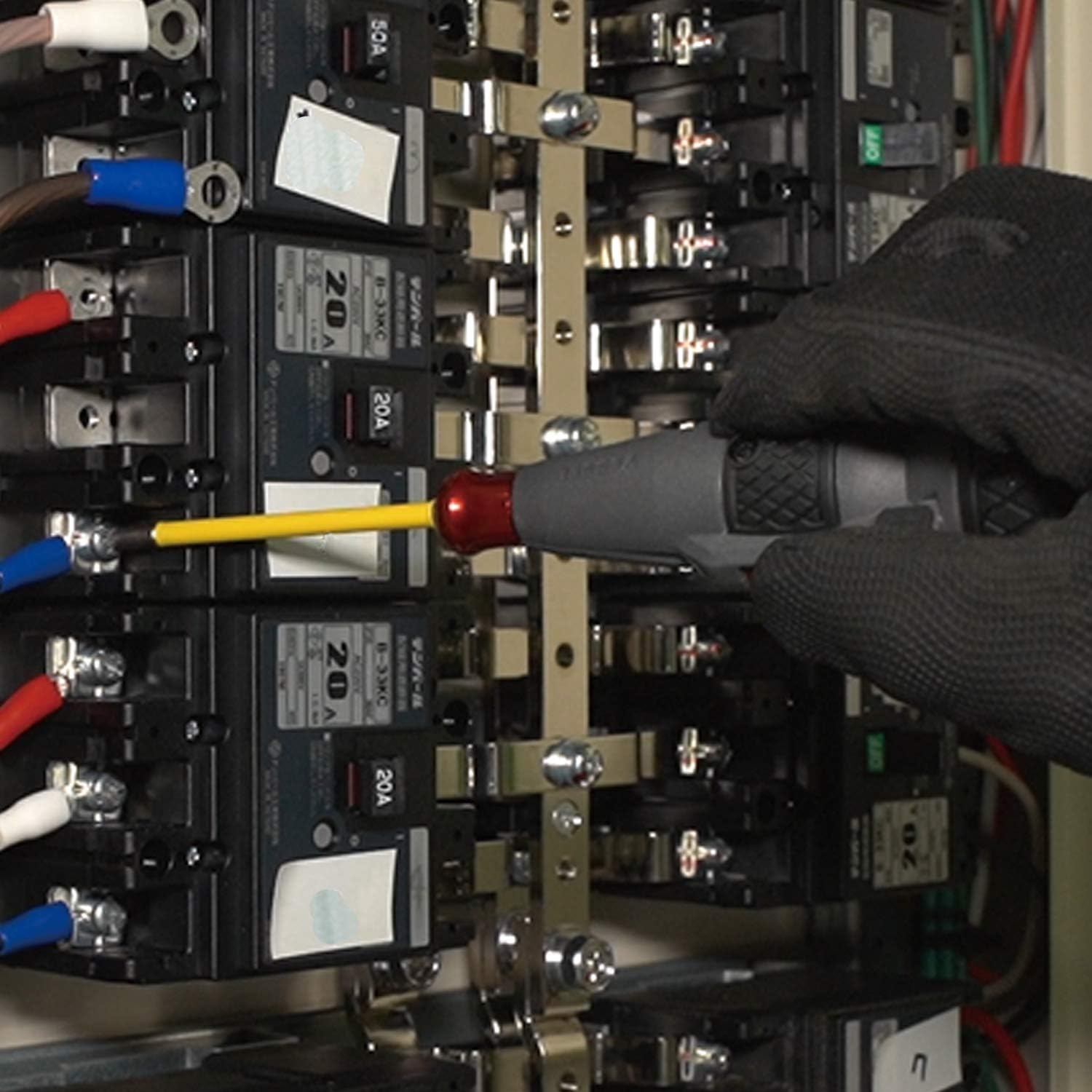
Image 7.1: Electric operation for tightening screws in an electrical panel.
7.2. Manual Operation
The screwdriver can be used manually for breaking free stubborn screws or for final tightening where higher torque (up to 10 N.m) is needed.
- For initial loosening of tight screws, apply manual force to break the screw free.
- After electric operation, if more torque is required, continue turning the screwdriver manually. The chuck locks when the motor is not engaged, allowing for manual force application.
- Ensure the tool is off when applying significant manual torque to prevent damage.

Image 7.2: Manual or electric operation for assembling electronics, such as a computer case.

Image 7.3: Application of the screwdriver for installing door hardware.
7.3. Recommended Uses
- Electronic terminal block work
- Power distribution board terminal work
- Light screw tightening
- Long screw tightening (where low torque is sufficient)
8. Maintenance
- Cleaning: Wipe the tool with a dry, soft cloth. Do not use solvents or abrasive cleaners.
- Storage: Store the screwdriver in a dry place, away from direct sunlight and extreme temperatures.
- Battery Care: To prolong battery life, avoid fully discharging the battery frequently. Charge the tool regularly, even if not in use for extended periods.
- Bit Care: Inspect bits regularly for wear. Replace worn or damaged bits to ensure optimal performance and prevent screw damage.
9. Troubleshooting
- Tool not turning on: Ensure the battery is charged. Connect to a USB power source and check the charging lamp.
- Screwdriver stops or blinks red during operation: This indicates an overload or low battery. Reduce the load on the screw, or charge the battery. For stubborn screws, use manual force to break them free before electric operation.
- Bit slipping from screw head: Ensure the correct bit size is used and that the bit is fully inserted into the chuck. Replace worn bits.
10. Warranty and Support
For warranty information, technical support, or service inquiries, please refer to the official VESSEL website or contact your local distributor.
Official Product Page: https://www.vessel.co.jp/sp/220usb/
Please retain your purchase receipt for warranty purposes.