
Introduction
The ROCAM 5000mAh Emergency Weather Radio is a versatile and essential device designed for emergency preparedness and outdoor activities. This multi-functional radio provides access to AM/FM/SW/NOAA weather bands, ensuring you stay informed during critical situations. It features multiple power options, including solar, hand crank, and rechargeable battery, along with a powerful flashlight, a reading lamp, and an SOS alarm. Its compact and durable design makes it an ideal companion for any adventure or emergency.
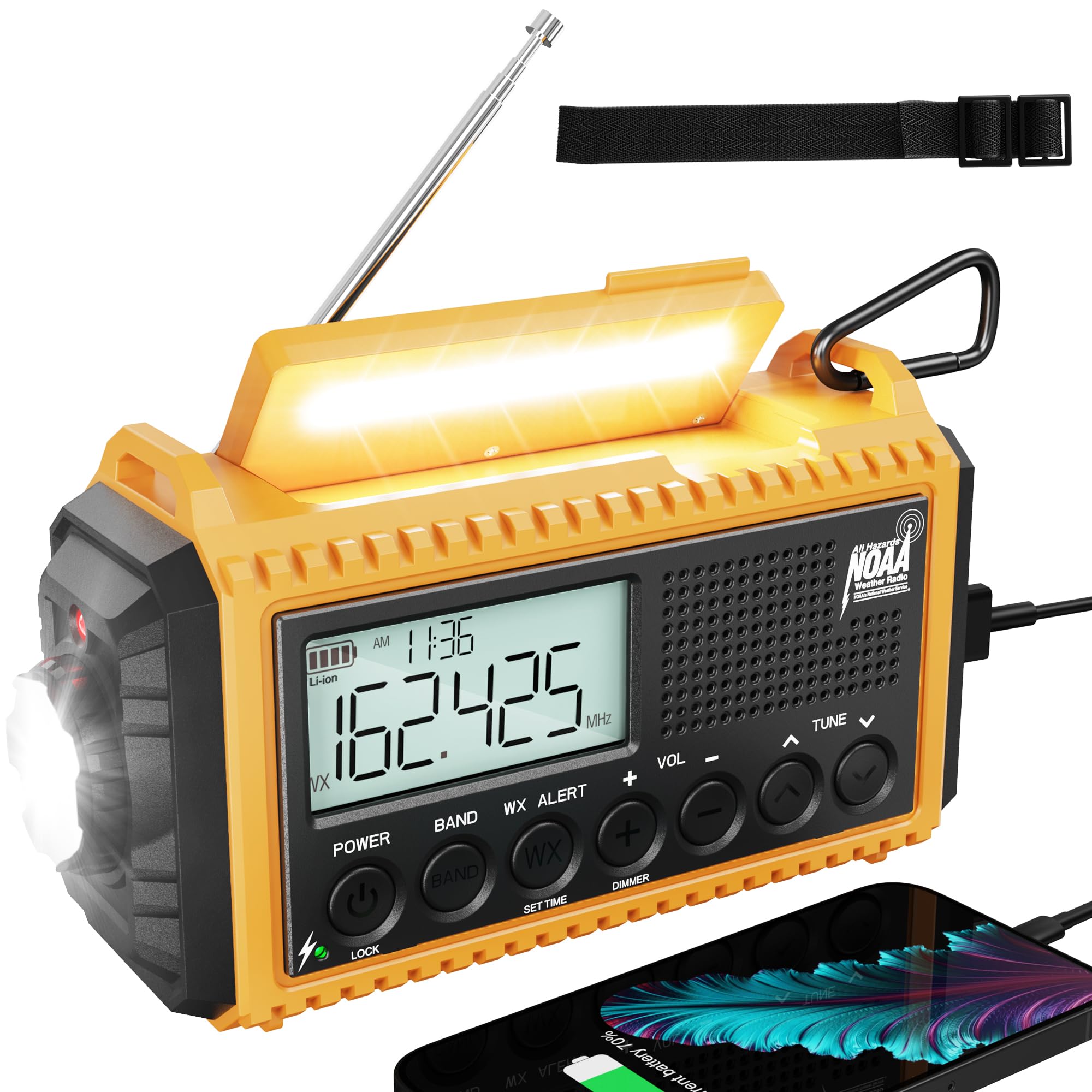
Image: ROCAM 5000mAh Emergency Weather Radio, front view.
Video: Overview of the ROCAM 5000mAh Emergency Weather Radio, highlighting its features and uses.
Setup
1. Initial Charging
Before first use, fully charge the internal 5000mAh rechargeable battery. It is recommended to charge the unit via a USB-C cable connected to a wall adapter for approximately 6 hours to ensure optimal performance.
2. Power Options
The radio offers 5 ways to power the device:
- Internal Rechargeable Battery: A stable 5000mAh battery provides long-lasting power.
- USB-C Input: Connect the included USB-C cable to a power source for fast charging.
- Solar Panel: Place the radio in direct sunlight to slowly charge the internal battery.
- Hand Crank: Rotate the hand crank for manual power generation. One minute of cranking can provide sufficient power for basic functions.
- AAA Batteries: For backup, install 3 AAA batteries (not included) in the designated compartment. These will be used when the internal rechargeable battery is depleted.

Image: Illustration of the five power options for the ROCAM Emergency Weather Radio.
Video: Demonstrating the hand crank and solar charging features of the emergency radio.
Operating Instructions
1. Power On/Off
Press the POWER button to turn the radio on or off. The large LCD display will illuminate, showing time, frequency, and battery status.
2. Radio Function (AM/FM/SW/NOAA)
Press the BAND button to cycle through AM, FM, SW (Shortwave), and WB (Weather Band) frequencies. Use the TUNE +/- buttons to manually adjust the frequency or use the one-click automatic scanning feature to find available stations. Extend the telescopic antenna for improved reception.
3. NOAA Weather Alert
The radio is NOAA-certified and can automatically trigger alarms for severe weather events. Press the WX ALERT button to activate or deactivate the weather alert function. The advanced chip technology detects warnings in just 0.5 seconds.
4. Flashlight
Press the dedicated flashlight button on the side of the unit to activate the 3W LED flashlight. Tap again to cycle through different brightness levels. This ultra-bright flashlight can illuminate up to 50 meters and lasts for 20 hours on a full charge.
5. Reading Lamp
Lift the solar panel to reveal the 2.5W warm reading lamp. Press the reading lamp button to turn it on. It offers different brightness settings for comfortable reading during power outages or in low-light conditions, lasting up to 40 hours.

Image: The radio displaying its reading lamp and flashlight features.
6. SOS Alarm
In an emergency, press and hold the SOS button to activate the 116dB siren and flashing light. This feature is designed to attract attention and signal for help.
Video: Demonstration of the SOS alarm feature, showing its loud siren and flashing light.
7. Phone Charging (Power Bank)
The 5000mAh internal battery can be used as a power bank to charge external devices like smartphones via the USB-A output port. Connect your device using a compatible USB cable.

Image: The radio functioning as a power bank, charging a smartphone.
8. Headphone Jack
A 3.5mm headphone jack is provided for private listening. Connect your headphones to enjoy radio broadcasts without disturbing others.

Image: A person using headphones with the ROCAM Emergency Radio.
Maintenance
- Battery Care: Regularly check the internal battery charge, especially if stored for extended periods. Recharge as needed to maintain battery health.
- Cleaning: Wipe the radio with a soft, dry cloth. Avoid using harsh chemicals or abrasive cleaners.
- Storage: Store the radio in a cool, dry place away from extreme temperatures and direct sunlight when not in use.
- Water Resistance: The radio is IPX6-rated waterproof, meaning it can withstand strong jets of water. However, it is not designed for submersion. Ensure all port covers are securely closed to maintain water resistance.
Troubleshooting
- No Power: Ensure the internal battery is charged or install fresh AAA batteries. Try charging via USB-C, solar, or hand crank.
- Poor Radio Reception: Extend the telescopic antenna fully and adjust its position. Try moving to an open area away from obstructions.
- Flashlight/Reading Lamp Not Working: Check battery level. Ensure the solar panel is fully lifted for the reading lamp.
- Phone Not Charging: Ensure the radio's internal battery has sufficient charge. Verify the USB cable is correctly connected to both the radio's output port and your device.
Specifications
| Product Dimensions | 7.48 x 3.46 x 4.72 inches (6.8"L x 2.48"W x 3.7"H) |
| Item Weight | 1.19 pounds |
| Model Number | ROCAM-CR1009-PRO |
| Brand | ROCAM |
| Power Source | Hand Crank, Solar Panel, Rechargeable Battery (5000mAh), USB-C input, 3 AAA Batteries |
| Radio Bands Supported | AM/FM/SW/NOAA Weather Alert |
| Special Features | Standby Mode, AUTO Scan, Smart Backlit LCD, 5-Way Power, 3W LED Flashlight, 2.5W Reading Lamp, 116dB SOS Alarm, Headphone Jack, USB Phone Charging |
| Connectivity Technology | USB |
| Water Resistance | IPX6 |
Warranty and Support
The ROCAM 5000mAh Emergency Weather Radio comes with a 12-month warranty. For any questions or assistance, please contact ROCAM customer support, available 24/7.

Image: The radio with its 12-month replacement promise and included accessories.


