
Alptop ONLYO112
Alptop Solar Powered Outdoor Security Camera User Manual
Model: ONLYO112
Introduction
This manual provides comprehensive instructions for the installation, operation, and maintenance of your Alptop 100% Wire-Free Wireless Rechargeable Battery Solar Powered Outdoor 1080P Pan Tilt WiFi Security Camera. Please read this manual thoroughly before using the product to ensure proper functionality and safety.
Product Features
- 100% Wire-Free & Non-stop Power Supply: Equipped with a 15600mAh rechargeable battery (6pcs 2600mAh included) and a solar panel for continuous power.
- Pan & Tilt & Digital Zoom: Features 1920*1080P resolution with 355° horizontal and 120° vertical rotation. Supports 1.0-4.0X digital zoom.
- Color Night Vision: Utilizes 2 Infrared LEDs and 4 floodlight LEDs for clear, colorful night vision.
- Smart PIR Motion Detection: High-sensitive PIR sensor (18ft detection distance) triggers app notifications for human or animal movement, reducing false alarms.
- SD Card Recording: Built-in micro SD card slot supports up to 64GB (not included) for motion-activated recording.
- Remotely Access & Two-Way Audio: Live view and playback via the free UBox app on iOS/Android. Built-in 38dB microphone and speaker with anti-noise technology for clear two-way communication.
- IP65 Weatherproof Rating: Durable metal housing designed to resist rain and dust, suitable for outdoor use.
Package Contents
Please check the package contents upon unboxing:
- Alptop Solar Powered Security Camera
- Solar Panel (integrated)
- Rechargeable Batteries (6pcs 2600mAh)
- Mounting Bracket
- Mounting Screws and Anchors
- USB Charging Cable
- User Manual (this document)

Image: The Alptop Solar Powered Security Camera, showing the main unit and the integrated solar panel.
Setup
1. Initial Charging and SD Card Installation
Before first use, fully charge the camera's internal batteries using the provided USB cable. Locate the SD card slot, typically protected by a rubber cover, and insert a compatible micro SD card (up to 64GB, not included) for local storage.

Image: A detailed diagram of the camera highlighting components such as the microphone, IR light, indicator light, PIR sensor, lens, dual antenna, speaker, and TF card slot.
2. App Download and Account Creation
Download the "UBox" app from your device's app store (iOS or Android). Follow the on-screen instructions to create a new account and log in.
3. Camera Pairing
- Open the UBox app and tap "Add Device".
- Power on the camera. The camera will enter pairing mode, indicated by a specific LED light pattern (refer to app for details).
- Follow the app's prompts to connect the camera to your Wi-Fi network. You may need to scan a QR code displayed on your phone screen with the camera's lens.
- Once connected, the camera will confirm successful pairing.

Image: A smartphone displaying the UBox app interface, showing a QR code for camera pairing and a live view of the camera's feed.
4. Mounting the Camera
Choose a mounting location that provides a clear view of the area you wish to monitor and receives ample direct sunlight for the solar panel. Use the provided mounting bracket, screws, and anchors to securely attach the camera to a wall or suitable surface. Ensure the solar panel is positioned to maximize sun exposure throughout the day.

Image: The Alptop camera mounted on a wall, illustrating its pan (320 degrees horizontal) and tilt (90 degrees vertical) capabilities, along with a smartphone displaying the live camera feed.
Operating Instructions
1. Live View and Control
Open the UBox app and select your camera from the device list to access the live view. Use the on-screen controls to pan (355° horizontal) and tilt (120° vertical) the camera. Pinch to zoom in or out digitally (1.0-4.0X).
2. Two-Way Audio
From the live view, tap the microphone icon to speak through the camera's speaker. Tap the speaker icon to listen to audio from the camera's microphone. This feature allows for real-time communication with visitors or to deter intruders.

Image: An illustration demonstrating the two-way audio feature, showing a person communicating with a delivery person at the door via the camera.
3. Motion Detection and Alerts
The camera uses a PIR sensor for smart motion detection. When motion is detected, you will receive instant notifications on your smartphone. You can adjust motion sensitivity settings within the UBox app to optimize performance and reduce false alarms.
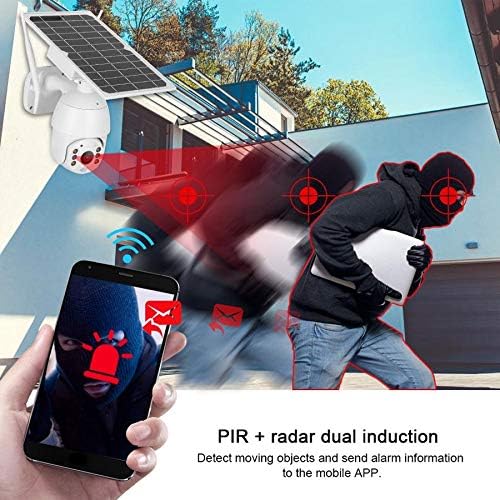
Image: An illustration depicting the PIR motion detection system, showing a person triggering an alert that is sent to a smartphone.
4. Night Vision
The camera automatically switches to night vision mode in low-light conditions. It supports both infrared (black and white) and full-color night vision using its floodlight LEDs.

Image: The Alptop camera with a light beam emanating from its lens, indicating its support for color night vision.
5. Recording and Playback
Recordings are stored on the inserted micro SD card or optionally in cloud storage (if subscribed). Access recorded footage through the "Playback" section in the UBox app. You can browse by date and time to review events.
Maintenance
- Cleaning: Regularly wipe the camera lens and solar panel with a soft, damp cloth to ensure clear images and efficient solar charging. Avoid abrasive cleaners.
- Battery Care: While solar-powered, ensure the camera receives adequate sunlight. If the battery level drops significantly, manually charge it via the USB port.
- Firmware Updates: Check the UBox app periodically for firmware updates. Keeping the firmware updated ensures optimal performance and security.
Troubleshooting
| Problem | Possible Solution |
|---|---|
| Camera not connecting to Wi-Fi | Ensure your Wi-Fi network is 2.4GHz (5GHz is not supported). Check Wi-Fi signal strength at the camera's location. Restart your router and the camera. Re-attempt pairing. |
| Poor image quality | Clean the camera lens. Ensure adequate lighting. Check your internet connection speed. |
| Battery not charging | Ensure the solar panel is clean and receives direct sunlight for several hours daily. Check the USB charging cable connection. |
| Frequent false motion alerts | Adjust the PIR motion detection sensitivity in the UBox app. Ensure the camera is not pointed at busy streets or areas with constant movement (e.g., tree branches swaying). |
| Two-way audio unclear | Ensure a strong Wi-Fi signal. Reduce background noise. Speak clearly and directly into your phone's microphone. |
Specifications
| Feature | Detail |
|---|---|
| Model Number | ONLYO112 |
| Video Resolution | 1080P (1920x1080) |
| Pan/Tilt Range | Horizontal 355°, Vertical 120° |
| Digital Zoom | 1.0-4.0X |
| Night Vision | Infrared & Color Night Vision |
| Power Source | 15600mAh Rechargeable Battery (6x 2600mAh), Solar Powered |
| Connectivity | Wi-Fi (2.4GHz only) |
| Storage | Micro SD Card (up to 64GB, not included), Cloud Storage (optional) |
| Audio | Two-Way Audio (Built-in Mic & Speaker) |
| Weatherproof Rating | IP65 |
| PIR Detection Distance | Up to 18ft |
| Dimensions (L x W x H) | 10 x 15 x 20 inches |
| Item Weight | 4.36 pounds (1.98 kg) |
Warranty and Support
For warranty information and technical support, please refer to the contact details provided with your product packaging or visit the official Alptop website. Protection plans may be available for extended coverage.
Ask a question about this manual
Ask about setup, troubleshooting, compatibility, parts, safety, or missing instructions. Manuals+ will review the question and use this page’s manual context to help answer it.