
BESTEK B0FJ823JDD
BESTEK 2000W Car Power Inverter User Manual
Model: B0FJ823JDD
1. Introduction
Thank you for choosing the BESTEK 2000W Car Power Inverter. This device converts 12V DC power from your vehicle's battery into 110V AC household power, along with USB-C PD30W and QC18W outputs, and standard USB ports. It is designed for use in cars, RVs, and during road trips to power various electronic devices. Please read this manual thoroughly before operation to ensure safe and efficient use.
2. Safety Instructions
Always observe the following safety precautions to prevent injury or damage to the inverter and connected devices:
- Do not open the inverter casing. There are no user-serviceable parts inside.
- Keep the inverter away from water, moisture, and extreme temperatures.
- Ensure proper ventilation around the inverter. Do not block cooling vents.
- Connect the inverter only to a 12V DC power source. Do not connect to 24V or higher.
- Do not exceed the inverter's rated power output (2000W).
- Always connect the inverter to the battery terminals directly using the provided cables for high-power applications. The cigarette lighter plug is for lower power devices only (typically up to 150W).
- Ensure all connections are secure and correct polarity is observed (red to positive, black to negative).
- Disconnect the inverter from the power source when not in use or before cleaning.
- This inverter is equipped with multiple protection features including overheating, under/over voltage, short circuit, and overload protection. If a protection mode is activated, the inverter may shut down.
3. Package Contents
Verify that all items are present in your package:
- BESTEK 2000W Power Inverter
- User Manual
- 24-inch Cigarette Lighter Cable (for low power use)
- Battery Clamp Cables (Red and Black)
- Remote Switch with Cable
- Spare Fuses
4. Product Features and Components

Figure 4.1: Overview of the BESTEK 2000W Car Power Inverter, showing its compact design, multiple AC outlets, USB ports, and the included battery clamp cables and remote switch for convenient operation.
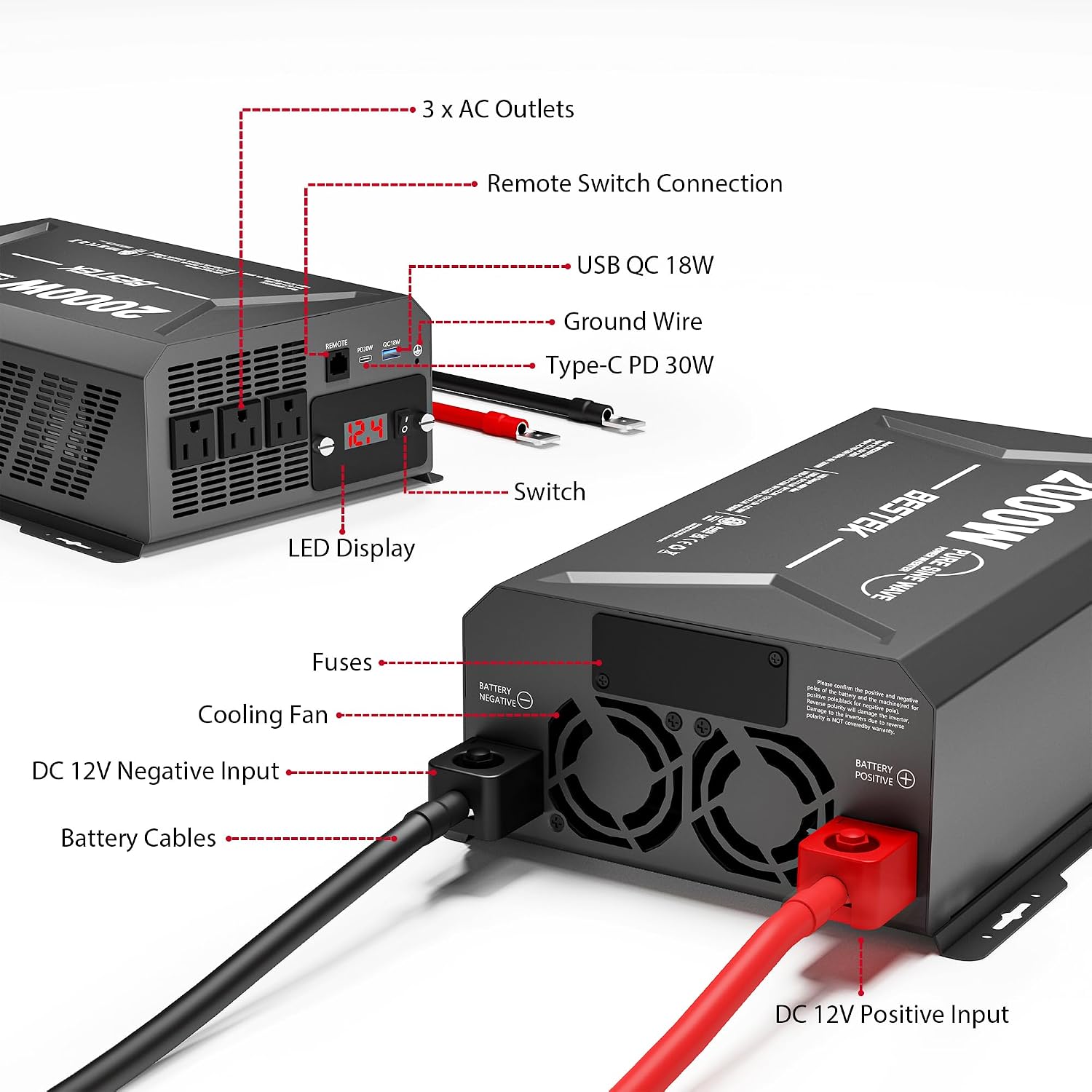
Figure 4.2: Detailed view highlighting key components: 3 x AC Outlets, Remote Switch Connection port, USB QC 18W port, Ground Wire terminal, Type-C PD 30W port, Power Switch, LED Display, Fuses, Cooling Fan, DC 12V Negative Input, DC 12V Positive Input, and Battery Cables.
Key Components:
- AC Outlets (x3): Standard 110V AC outlets for powering household appliances.
- USB-C PD30W Port: For fast charging compatible USB-C devices like smartphones, laptops, and tablets.
- USB QC18W Port: For fast charging compatible Quick Charge devices.
- Standard USB Ports (x2): For charging various USB-powered devices (0-2.4A, 4.8A total output).
- LED Display: Shows input voltage and other status indicators.
- Power Switch: Turns the inverter ON/OFF.
- Cooling Fan: Automatically activates to dissipate heat and maintain optimal operating temperature.
- DC 12V Input Terminals: Positive (Red) and Negative (Black) terminals for connecting to a 12V DC power source.
- Remote Switch Connection: Port for connecting the included remote control for convenient power management.
- Fuses: Internal protection against overcurrent.
5. Setup and Installation
Connecting to a 12V DC Power Source:
- Ensure the inverter's power switch is in the OFF position.
- For high-power applications (over 150W), use the provided battery clamp cables to connect directly to your vehicle's 12V battery.
- Connect the RED battery clamp cable to the positive (+) terminal of the inverter and then to the positive (+) terminal of the battery.
- Connect the BLACK battery clamp cable to the negative (-) terminal of the inverter and then to the negative (-) terminal of the battery.
- Ensure connections are tight and secure. Loose connections can cause overheating.
- For low-power applications (up to 150W), you may use the cigarette lighter cable.
- Insert the cigarette lighter plug into your vehicle's 12V cigarette lighter socket.
- Place the inverter in a well-ventilated area, away from direct sunlight, heat sources, and flammable materials.
Connecting Devices:
- Once the inverter is connected to the 12V DC source, you can connect your AC-powered devices to the 110V AC outlets. Ensure the total wattage of all connected AC devices does not exceed 2000W.
- Connect your USB-powered devices to the USB-C PD30W, USB QC18W, or standard USB ports.
- If using the remote switch, plug its cable into the "REMOTE" port on the inverter.
6. Operating Instructions
- After connecting the inverter to the 12V DC source and your devices, press the power switch on the inverter (or the remote switch) to the "ON" position.
- The LED display will illuminate, showing the input voltage from your vehicle's battery.
- Your connected AC and USB devices should now receive power.
- When finished, turn the inverter off by pressing the power switch to the "OFF" position. Disconnect devices and then disconnect the inverter from the 12V DC source.
Understanding the LED Display:
The LED display primarily shows the input DC voltage from your battery. This helps you monitor your vehicle's battery health. A typical 12V battery should read between 12.0V and 14.5V when the engine is running. If the voltage drops too low (e.g., below 10.5V), the inverter may shut down to protect your battery from over-discharge.
7. Maintenance
- Cleaning: Regularly wipe the exterior of the inverter with a dry, soft cloth. Do not use liquid cleaners or solvents. Ensure vents are free from dust and debris.
- Connections: Periodically check all electrical connections (battery clamps, cigarette lighter plug) to ensure they are tight and free from corrosion.
- Ventilation: Ensure the cooling fan and vents are not obstructed. The fan will automatically activate when the inverter heats up.
- Fuse Replacement: The inverter contains internal fuses for protection. If the inverter stops working and troubleshooting steps do not resolve the issue, it may indicate a blown fuse. Fuse replacement should ideally be performed by a qualified technician. Refer to the specifications for fuse ratings.
8. Troubleshooting
| Problem | Possible Cause | Solution |
|---|---|---|
| No power output / Inverter not turning on |
|
|
| Inverter shuts down frequently |
|
|
| Fan runs constantly or loudly |
|
|
9. Specifications
| Feature | Detail |
|---|---|
| Model | B0FJ823JDD |
| Brand | BESTEK |
| Rated Power | 2000 Watts |
| Input Voltage | DC 12V |
| Output Voltage | AC 110V |
| AC Outlets | 3 |
| USB-C Port | PD30W |
| USB-A Port (QC) | QC18W |
| Standard USB Ports | 2 (0-2.4A, 4.8A total) |
| Product Dimensions | 14.05 x 9 x 4.3 inches |
| Item Weight | 6 pounds |
| Color | Black |
| Protection Features | Overheating, Under/Over Voltage, Short Circuit, Overload, Overcharging |
10. Warranty and Support
BESTEK products are designed and manufactured to the highest quality standards. For warranty information, technical support, or any questions regarding your BESTEK 2000W Car Power Inverter, please contact BESTEK customer service through their official channels or the retailer where you purchased the product.
Please retain your proof of purchase for warranty claims.
Related documentsB0FJ823JDD


Ask a question about this manual
Ask about setup, troubleshooting, compatibility, parts, safety, or missing instructions. Manuals+ will review the question and use this page’s manual context to help answer it.