
1. Introduction
Thank you for purchasing the BESTISAN 28-inch Soundbar. This manual provides detailed instructions for setting up, operating, and maintaining your new soundbar to ensure optimal performance and an immersive audio experience. Please read this manual thoroughly before use and retain it for future reference.
2. Package Contents
Verify that all items listed below are included in your package:
- Soundbar
- Remote Control
- Power Adapter
- Digital Optical Cable
- Stereo RCA to 3.5mm Audio Cable
- User's Guide
- Mount Kits (Wall mount template, Mount screws, Wall mount brackets)

3. Product Overview
3.1. Front Panel Controls and Indicators

- Power Button: Short press to turn on, long press for 2 seconds to turn off. Short press to switch modes (BT-HDMI-AUX-OPT-BT).
- Volume + / Next Button: Short press to increase volume step by step, long press for the next song (in Bluetooth mode).
- Volume - / Previous Button: Short press to decrease volume step by step, long press for the previous song (in Bluetooth mode).
- Play / Pause Button: Short press to play/pause songs (in Bluetooth mode).
- Mode LED Indicator: Displays the current input mode (Standby, Bluetooth, Optical, ARC, AUX, USB).
3.2. Rear Panel Connections
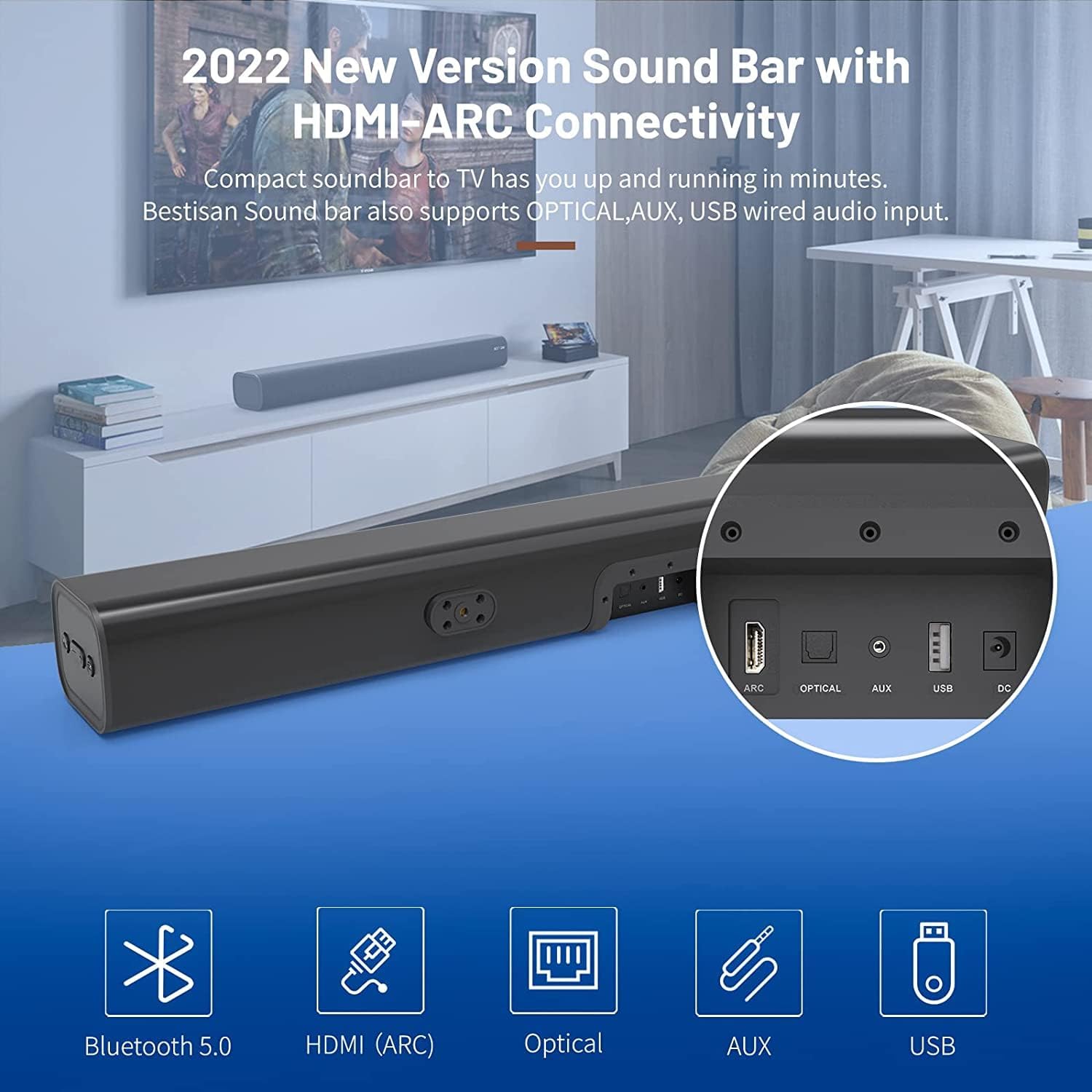
- HDMI ARC (TV): Connects to your TV's HDMI ARC port for high-quality audio transmission.
- OPTICAL: Digital optical audio input.
- AUX IN: 3.5mm auxiliary audio input.
- USB: USB input for media playback.
- DC IN: Power input for the soundbar.
4. Setup
4.1. Placement Options
The BESTISAN Soundbar offers flexible placement options to suit your home theater setup:
- Desktop Placement: Place the soundbar on a flat surface in front of your TV. Ensure it does not obstruct the TV's remote sensor.
- Wall Mounting: Use the included wall mount kit to securely attach the soundbar to the wall below your TV. A wall mounting template is provided for easy installation.


4.2. Power On
- Connect the power cord to the DC IN port on the back of the soundbar.
- Plug the other end of the power cord into an AC (mains) power outlet.
- Press the Power button on the soundbar or the remote control to turn it on. The LED indicator will light up.
Video 1: This video demonstrates the easy setup process for the soundbar, including connecting the power adapter and turning on the device. It highlights the various input options available on the back of the soundbar.
5. Connecting to Your TV
The soundbar offers multiple connection options for your TV. Choose the method that best suits your TV's available ports.
5.1. HDMI ARC Connection
- Connect one end of the HDMI cable (not included) to the HDMI ARC port on the soundbar.
- Connect the other end of the HDMI cable to your TV's HDMI ARC port.
- On your TV settings, set the audio output to "HDMI ARC" and the digital sound format to "PCM" or "Passthrough".
5.2. Optical Connection
- Connect one end of the Digital Optical Cable (included) to the OPTICAL port on the soundbar.
- Connect the other end of the Digital Optical Cable to your TV's optical audio output port.
- On your TV settings, set the audio output to "Optical" and the digital sound format to "PCM".
5.3. AUX Connection
- Connect one end of the Stereo RCA to 3.5mm Audio Cable (included) to the AUX IN port on the soundbar.
- Connect the RCA ends of the cable to your TV's RCA audio output ports (usually red and white).
- On your TV settings, ensure the audio output is set to "External Speakers" or "Headset".
5.4. Bluetooth Connection
- Turn on the soundbar and press the "BT" button on the remote or the mode button on the soundbar until the LED indicator flashes blue, indicating Bluetooth pairing mode.
- Enable Bluetooth on your mobile device (smartphone, tablet, etc.).
- Search for "BESTISAN" or "ST08" in the list of available Bluetooth devices and select it to pair.
- Once connected, the LED indicator will turn solid blue.
6. Operating the Soundbar
6.1. Using the Remote Control
The included remote control provides full functionality for your soundbar:
- Power: Turn the soundbar on/off.
- Mute: Mute/unmute the sound.
- Volume +/-: Adjust the volume level.
- Play/Pause: Play or pause audio (Bluetooth mode).
- Previous/Next: Skip to the previous or next track (Bluetooth mode).
- Mode Selection (OPT, BT, ARC, AUX, USB): Switch between input sources.
- Sound Modes (Movie, Music, Dialogue): Select optimized equalizer settings for different content types.
- Treble +/-: Adjust treble levels.
- Bass +/-: Adjust bass levels.
6.2. Sound Modes (DSP Technology)
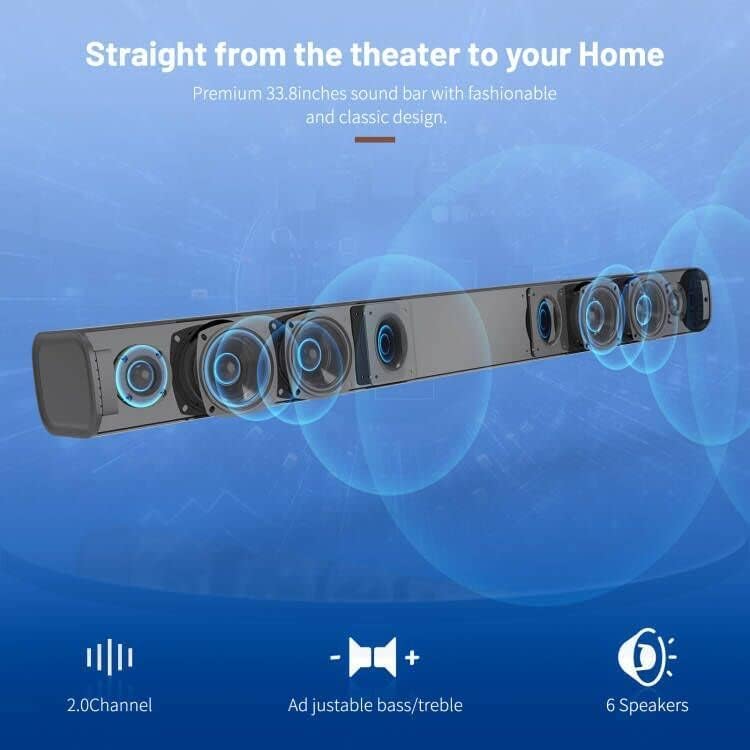
The soundbar features DSP (Digital Signal Processing) technology with three preset equalizer modes:
- Movie Mode: Enhances cinematic audio with dynamic range and impactful bass.
- Music Mode: Optimizes audio for music playback, providing balanced sound.
- Dialogue Mode: Clarifies speech, making conversations easier to understand.

7. Maintenance
- Clean the soundbar with a soft, dry cloth. Do not use liquid cleaners or aerosols.
- Avoid exposing the soundbar to extreme temperatures, humidity, or direct sunlight.
- Do not attempt to disassemble or repair the unit yourself. Contact customer support for assistance.
8. Troubleshooting
| Problem | Possible Solution |
|---|---|
| No power | Ensure the power adapter is securely connected to the soundbar and a working power outlet. |
| No sound |
|
| Bluetooth pairing issues |
|
| Remote control not working |
|
9. Specifications
- Brand: BESTISAN
- Model Name: ST08, SE08
- Speaker Type: Soundbar
- Connectivity Technology: HDMI (ARC), Optical, Aux, USB, Bluetooth 5.0
- Audio Output Mode: Stereo
- Speaker Maximum Output Power: 100 Watts
- Product Dimensions: 3.4"D x 33.79"W x 4.4"H
- Item Weight: 5.19 pounds
- Mounting Type: Wall Mount
- Special Feature: Bass Boost, DSP Technology (Dialogue, Movie, Music modes)
10. Warranty and Support
For warranty information, technical support, or customer service inquiries, please refer to the contact details provided in your User's Guide or visit the official BESTISAN website.
Manufacturer: Bestisan
Date First Available: November 3, 2020


