
Tilta TA-QRTH4-B
Tiltaing Adjustable Top Handle User Manual
Model: TA-QRTH4-B
Product Overview
The Tiltaing Adjustable Top Handle is a versatile accessory designed to enhance the handling and functionality of your camera setup, particularly compatible with RED Komodo camera cages. This handle offers multiple adjustment points for optimal positioning and features various mounting options for additional accessories.
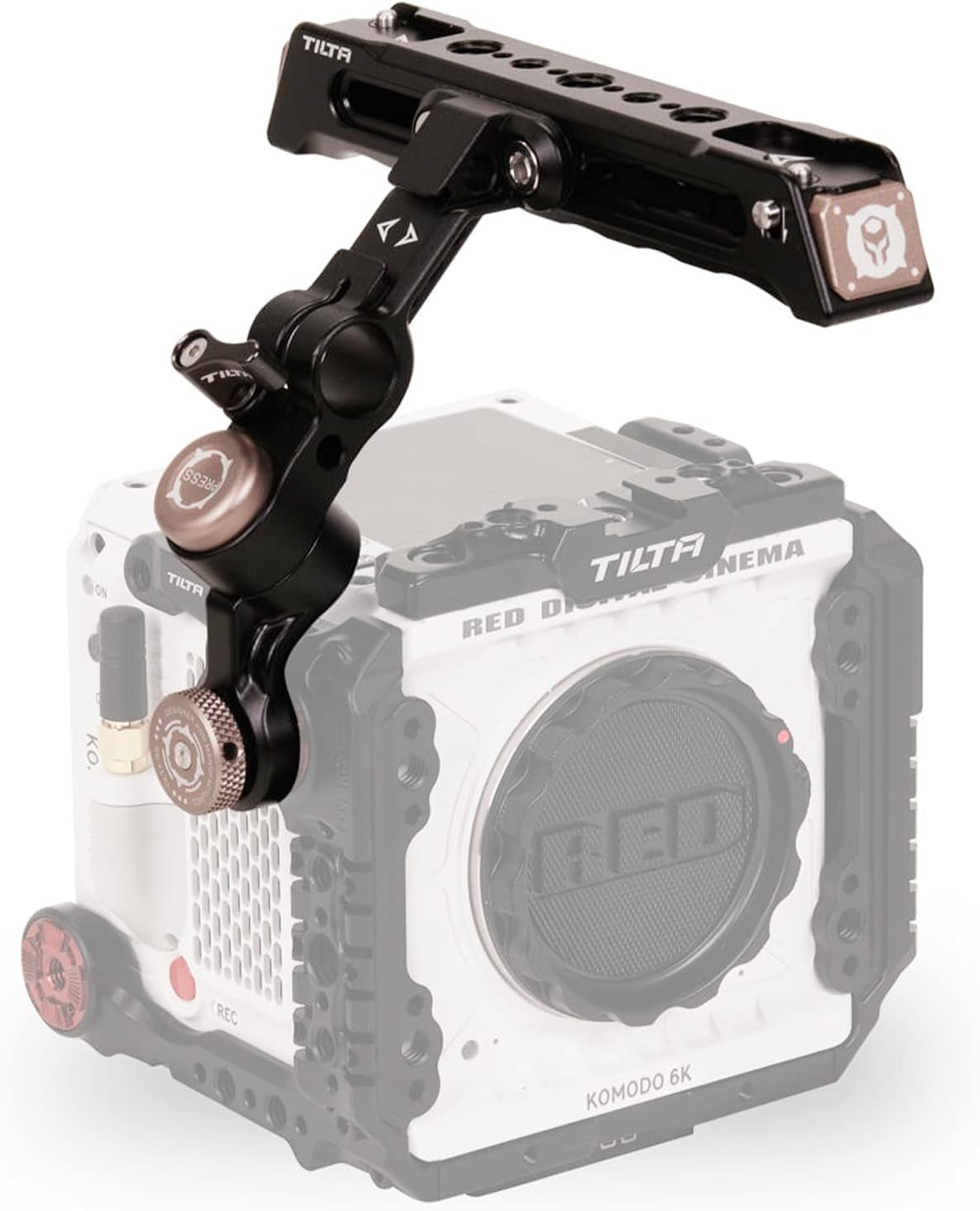
Figure 1: Tiltaing Adjustable Top Handle attached to a camera cage.

Figure 2: Detailed view of the Tiltaing Adjustable Top Handle components.
Package Contents
Verify that all items are present in the package:
- 1 x Adjustable Quick Release Top Handle for RED Komodo
Setup and Installation
Follow these steps to properly attach the Tiltaing Adjustable Top Handle to your camera cage:
- Identify Mounting Point: Locate an ARRI standard rosette mounting point on your camera cage. This handle is designed for secure attachment to such points.
- Attach Handle: Align the rosette on the handle with the rosette on the camera cage. Securely fasten the handle using the integrated locking mechanism. Ensure it is tightened to prevent rotation during use.
- Adjust Position (Rosette): The handle can be rotated at the rosette connection point to achieve the desired initial angle.
- Adjust Position (Articulating Center): For fine-tuning the handle's position, press the release button located at the articulating center joint. While holding the button, rotate the handle to your preferred angle. Release the button to lock the handle in place. This allows for quick adjustments, including positioning the handle to provide easy access to the RED Komodo's top screen.
- Adjust Forward/Backward: To achieve perfect balance with your camera setup, loosen the 1/4″-20 screw on the handle's main body. Slide the handle forward or backward along its rail, then re-tighten the screw to secure its position.

Figure 3: Secure connection via ARRI Standard Rosette Connection.

Figure 4: Handle adjusted for easy access to the RED Komodo top screen.
Operating and Accessory Mounting
The Tiltaing Adjustable Top Handle provides multiple points for attaching additional camera accessories:
- 1/4″-20 Threads: The handle features multiple 1/4″-20 threaded mounting points along its length. These are suitable for attaching small monitors, articulating arms, or other accessories.
- Cold Shoe Receiver: A cold shoe mounting point is integrated into the handle, ideal for attaching microphones, LED lights, or other cold shoe compatible accessories.
- 15mm Rod Mount: A single 15mm rod mount is available for attaching rod-based accessories, such as follow focus motors or external power solutions.

Figure 5: Accessory mounting points on the handle.
Maintenance
To ensure the longevity and optimal performance of your Tiltaing Adjustable Top Handle:
- Cleaning: Wipe the handle with a soft, dry cloth to remove dust and debris. For stubborn marks, use a slightly damp cloth and dry immediately. Avoid abrasive cleaners or solvents.
- Storage: Store the handle in a dry, cool environment away from direct sunlight and extreme temperatures.
- Inspection: Periodically inspect all screws and connections to ensure they are tight. Re-tighten as necessary.
Troubleshooting
| Problem | Possible Cause | Solution |
|---|---|---|
| Handle feels loose after attachment. | Rosette connection not fully tightened. | Ensure the rosette locking mechanism is fully engaged and tightened. |
| Handle does not lock in position after adjustment. | Release button not fully disengaged, or internal mechanism obstructed. | Ensure the release button is fully released. Check for any debris obstructing the locking mechanism. |
| Difficulty sliding handle forward/backward. | 1/4″-20 screw not sufficiently loosened. | Loosen the 1/4″-20 screw further before attempting to slide the handle. |
Specifications

Figure 6: Product Specifications.
| Feature | Detail |
|---|---|
| Model Number | TA-QRTH4-B |
| Product Dimensions | 6.89 x 4.53 x 4.72 inches (17.5 x 11.5 x 12 cm) |
| Item Weight | 12 ounces (0.34 Kilograms) |
| Materials | Aluminum-alloy, Stainless Steel |
| Color | Black |
| Compatible Devices | Camera (specifically RED Komodo cages) |
| Maximum Weight Recommendation | 10 Kilograms |
Warranty and Support
For warranty information and technical support, please refer to the official Tilta website or contact their customer service directly. Keep your purchase receipt as proof of purchase for any warranty claims.
Manufacturer: Tilta
Website: www.tilta.com (Note: This is a placeholder URL as no specific support link was provided in the product data. Please refer to the official Tilta website for accurate support information.)
Ask a question about this manual
Ask about setup, troubleshooting, compatibility, parts, safety, or missing instructions. Manuals+ will review the question and use this page’s manual context to help answer it.