
Introduction
The Retekess TT123 is a versatile 2.4G wireless microphone system designed for clear and stable audio transmission. It functions as both a headset and a handheld microphone, offering flexibility for various applications such as teaching, public speaking, tour guiding, and fitness instruction. This manual provides detailed instructions for setting up, operating, and maintaining your TT123 wireless microphone headset.
Package Contents
Please check the package to ensure all items are present:
- 1 x Retekess TT123 Transmitter (Headset Microphone)
- 1 x Retekess TT123 Receiver
- 1 x Double Head USB Charging Cable
- 1 x 6.35mm Converter
- 1 x English User Manual

Image: Contents of the Retekess TT123 package, showing the headset microphone, receiver, charging cable, 6.35mm converter, and user manual.
Product Overview
Familiarize yourself with the components of your Retekess TT123 wireless microphone system:
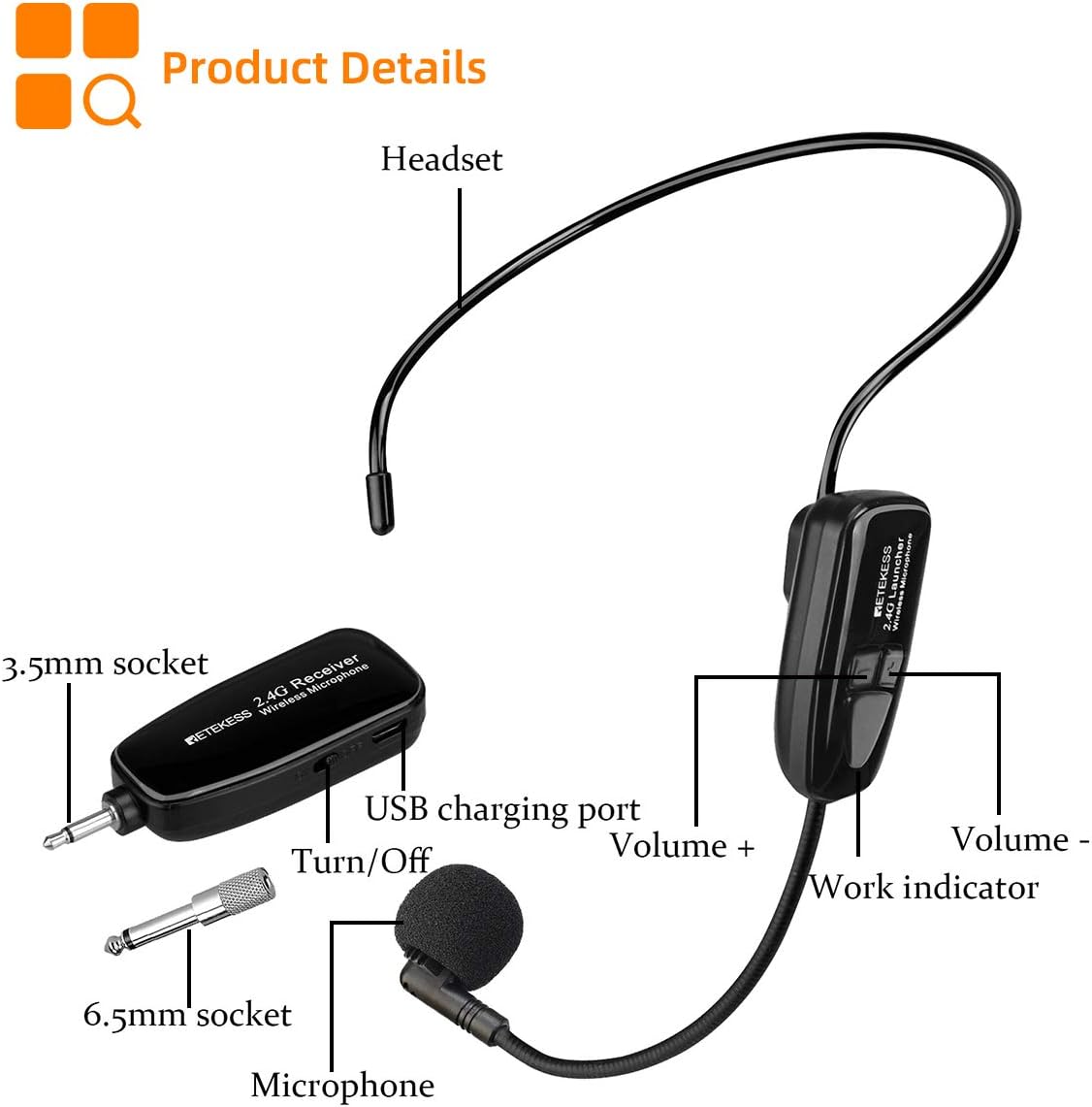
Image: Detailed view of the Retekess TT123 headset microphone and receiver, highlighting the microphone, headset, 3.5mm socket, USB charging port, volume controls, and work indicator.
- Headset: Ergonomically designed for comfortable wear.
- Microphone: High-quality microphone for clear voice capture.
- Transmitter: Integrated into the headset, features volume controls and a work indicator.
- Receiver: Compact unit with a 3.5mm jack, USB charging port, and power switch.
- 6.35mm Converter: For compatibility with devices requiring a larger audio input.
Setup Instructions
1. Charging the Device
Both the transmitter (headset) and receiver are equipped with built-in rechargeable lithium batteries. Ensure both units are fully charged before first use.
- Connect the double head USB charging cable to the charging ports on both the transmitter and receiver.
- Plug the USB end into a standard USB power adapter (not included) or a computer USB port.
- Charging typically takes 2-3 hours. A full charge provides approximately 6-8 hours of operation.

Image: Illustration showing the 400mAh rechargeable lithium battery, indicating 8 hours of work time and 2-3 hours for a full charge.
2. Connecting the Receiver to an Audio Device
The TT123 receiver is compatible with various audio devices. It is important to note that this system is not compatible with phones, laptops, or Bluetooth speakers.
- For devices with a 3.5mm mic jack: Directly plug the receiver into the 3.5mm microphone input of your voice amplifier, portable PA system, FM transmitter, or window speaker.
- For devices with a 6.35mm mic jack: Attach the included 6.35mm converter to the receiver, then plug it into the 6.35mm microphone input of your PA system, mixer, or home stage speakers.

Image: Diagram illustrating the wide compatibility of the Retekess TT123 with various audio devices like voice amplifiers, PA systems, and mixers, and explicitly stating incompatibility with phones, laptops, and Bluetooth speakers.
3. Automatic Pairing
The TT123 system utilizes 2.4G wireless transmission for automatic pairing.
- Turn on both the transmitter (headset) and the receiver.
- The units will automatically connect within a short distance (typically within 1 meter or 3.2 feet).
- Once connected, the work indicator light on the transmitter will confirm the connection.
- The system offers a stable wireless connection up to 164 feet (50 meters) in open areas.

Image: Visual representation of the 2.4G wireless transmission, showing the headset and receiver, transmission distance of 164ft, and notes on automatic pairing and high-quality sound.
Operating Instructions
1. Power On/Off
- To power on the transmitter (headset) and receiver, slide their respective power switches to the 'ON' position.
- To power off, slide the switches to the 'OFF' position.
2. Adjusting Volume
- Use the 'Volume +' and 'Volume -' buttons located on the transmitter (headset) to adjust the microphone's output level.
- Further volume adjustments can be made on your connected audio device (e.g., voice amplifier, PA system).
3. 2-in-1 Functionality
The TT123 offers flexible usage as both a headset and a handheld microphone.
- Headset Mode: Wear the headset for hands-free operation, ideal for presentations, teaching, or fitness instruction.
- Handheld Mode: The head bracket can be removed, allowing the microphone unit to be used as a compact handheld microphone for interviews or direct speaking.

Image: Demonstrates the 2-in-1 functionality of the Retekess TT123, showing a user wearing it as a headset and another user holding it as a handheld microphone.
4. Usage Scenarios
The Retekess TT123 is suitable for a variety of professional and personal applications:
- Teaching: For instructors in classrooms or lecture halls.
- Public Speaking: Ideal for presentations, conferences, and events.
- Tour Guiding: Ensures clear communication with groups.
- Fitness Instruction: Allows instructors to move freely while speaking.
- Voice Amplification: Connects to voice amplifiers for enhanced sound projection.

Image: Collage showing various applications of the Retekess TT123, including speech, teaching, conference, and tour guiding scenarios.
Maintenance and Care
- Cleaning: Use a soft, dry cloth to clean the microphone and receiver. Avoid using harsh chemicals or abrasive materials.
- Storage: Store the device in a cool, dry place away from direct sunlight and extreme temperatures.
- Battery Care: To prolong battery life, avoid fully discharging the units frequently. Charge them regularly, even if not in use for extended periods.
- Handling: Handle the microphone and receiver with care to prevent damage from drops or impacts.
Troubleshooting
| Problem | Possible Cause | Solution |
|---|---|---|
| No sound output |
|
|
| Sound is distorted or weak |
|
|
| Humming or feedback noise |
|
|
| Short battery life |
|
|
Specifications
| Feature | Detail |
|---|---|
| Model Name | FF9604A (TT123) |
| Connectivity Technology | 2.4G Wireless |
| Connector Type | 3.5mm Jack (with 6.35mm converter) |
| Compatible Devices | Voice Amplifier, Home Stage Speakers, Portable PA System, Mixer, FM Transmitter, Window Speaker |
| Incompatible Devices | Android phones, iPhones, MacBooks, Laptops, Bluetooth Speakers |
| Color | Black |
| Polar Pattern | Unidirectional |
| Audio Sensitivity | 10 Decibels |
| Power Source | Rechargeable Lithium Ion Battery (400mAh) |
| Charging Time | 2-3 hours |
| Operating Time | 6-8 hours |
| Wireless Range | Up to 164 feet (50 meters) in open area |
| Signal-to-Noise Ratio | 10 dB |
| Item Weight | 0.13 Kilograms |
| Item Dimensions | 1.18 x 0.71 x 8.66 inches (approximate) |
| Enclosure Material | Plastic |
Warranty and Support
Warranty Information
Retekess provides a 2-year warranty for the TT123 Wireless Microphone Headset and offers a 30-day no-reason return policy. Beyond the warranty period, maintenance services are available, with buyers responsible for associated costs. For any warranty claims or service requests, please contact Retekess customer support.
Customer Support
For technical assistance, troubleshooting, or any questions regarding your Retekess TT123 product, please contact Retekess customer service through the platform where you purchased the product. They aim to reply within 12 hours.