
1. Introduction
Thank you for choosing the FelixKing FK938 Ergonomic Office Chair. This manual provides essential information for the assembly, operation, and maintenance of your new chair. Please read these instructions carefully before use to ensure proper function and longevity of the product.
The FelixKing FK938 chair is designed for comfort and support, featuring a breathable mesh back, adjustable height, 360-degree swivel, 30-degree recline, and flip-up armrests. Its ergonomic design aims to reduce pressure and support the natural curve of your spine during extended periods of sitting.

Figure 1: FelixKing FK938 Ergonomic Office Chair
2. Safety Information
- Maximum Weight Capacity: This chair is designed to support a maximum weight of 150 kilograms (approximately 330 lbs). Do not exceed this limit.
- Ensure all screws and bolts are securely tightened before use. Periodically check and re-tighten as necessary.
- Do not stand on the chair or use it as a step stool.
- Avoid placing heavy objects on the chair's backrest or armrests.
- Keep children away from moving parts during adjustment.
- Use the chair on a flat, stable surface.
3. Package Contents
Before beginning assembly, please ensure all components are present and undamaged. All necessary parts and tools for assembly are included in the packaging.
If any parts are missing or damaged, please contact customer service immediately.
4. Assembly Instructions
Assembly of the FelixKing FK938 chair is designed to be straightforward and can typically be completed within 15 minutes using the provided English instructions and tools.
- Unpack all components and lay them out on a clean, soft surface to prevent scratches.
- Attach the casters to the chair base.
- Insert the gas lift cylinder into the center hole of the chair base.
- Attach the seat mechanism to the underside of the seat cushion using the provided screws.
- Connect the backrest to the seat assembly.
- Carefully place the assembled seat onto the gas lift cylinder.
- Ensure all connections are secure before using the chair.
For a visual guide on assembly and features, please refer to the official product video below:
Video 1: FelixKing Office Chair Features and Adjustments. This video demonstrates the chair's various adjustable features and provides a visual overview of its design.
5. Operating Instructions
5.1 Height Adjustment
To adjust the chair's height, pull the lever located under the seat upwards while applying or releasing body weight. Release the lever at the desired height.

Figure 2: Illustration of chair height adjustment mechanism.
5.2 Recline/Tilt Function
The chair features a 30-degree recline function. Pull the lever located under the seat outwards to enable tilting. Push the lever inwards to lock the chair in an upright position. The tension of the recline can also be adjusted using the knob under the seat.

Figure 3: Diagram showing the chair's recline mechanism and adjustment.
5.3 Flip-up Armrests
The armrests can be rotated 90 degrees upwards, allowing the chair to be pushed further under a desk for space-saving storage.

Figure 4: Illustration of the 90-degree flip-up armrest feature.
5.4 Lumbar Support
The chair's mesh back is designed with an ergonomic S-shaped curve to provide optimal lumbar support. The lumbar support component can be adjusted vertically to align with your lower back for personalized comfort.
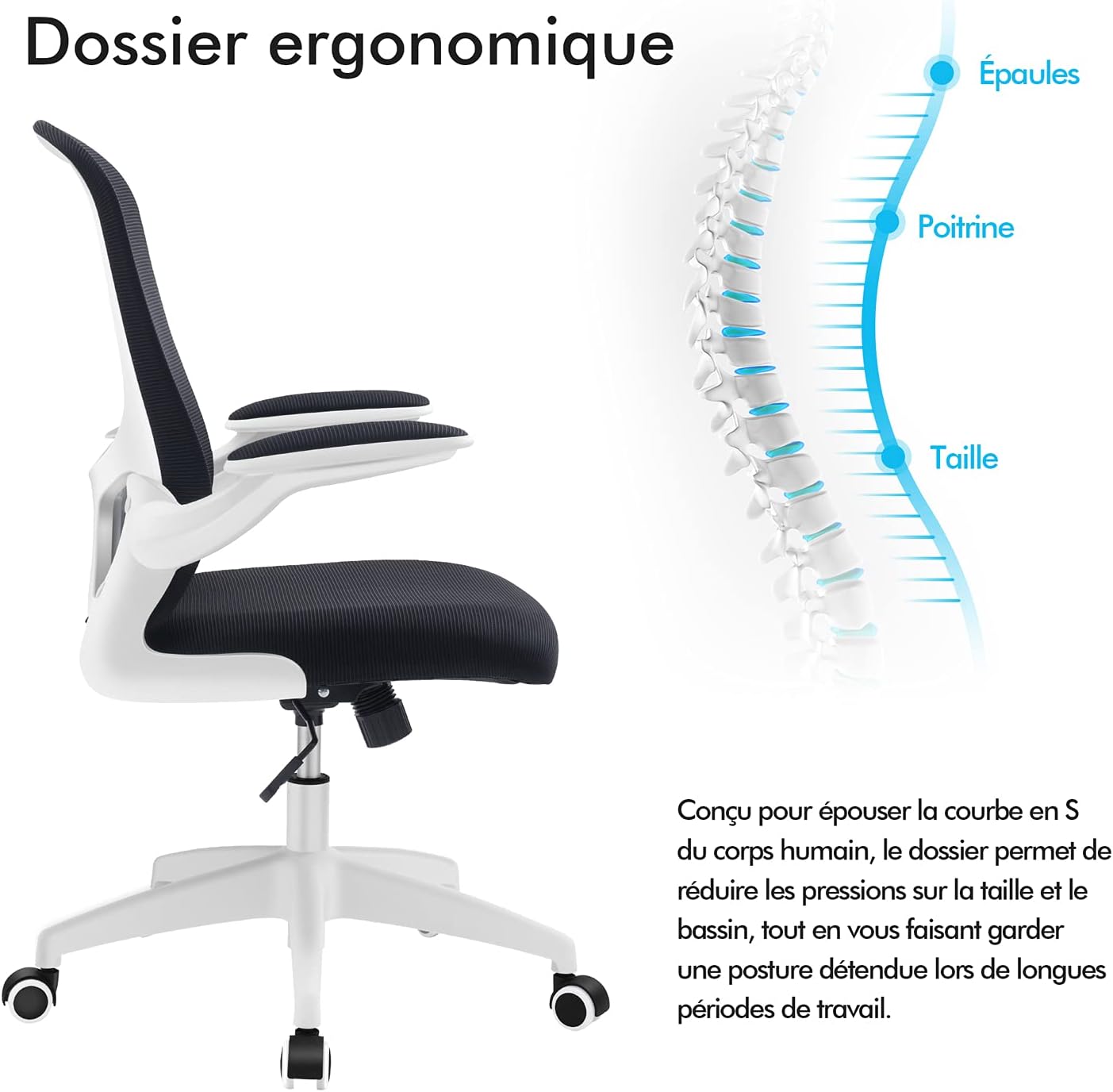
Figure 5: Depiction of the ergonomic backrest and adjustable lumbar support.
5.5 Swivel Function
The chair features a 360-degree swivel function, allowing for easy movement and access to your workspace.
6. Maintenance
- Cleaning: Wipe clean with a damp cloth. Avoid harsh chemicals or abrasive cleaners that may damage the mesh or frame.
- Inspection: Periodically check all screws and connections to ensure they remain tight. Re-tighten if necessary.
- Casters: Keep the casters free of debris (hair, dust, etc.) to ensure smooth movement.
7. Troubleshooting
If you encounter any issues with your FelixKing FK938 chair, please refer to the following common problems and solutions:
- Chair does not stay at desired height: This may indicate an issue with the gas lift cylinder. Ensure the height adjustment lever is fully engaged. If the problem persists, the gas lift may need replacement.
- Chair wobbles or feels unstable: Check all assembly screws, particularly those connecting the seat mechanism to the seat and the backrest. Re-tighten any loose screws. Ensure the chair is on a level surface.
- Casters do not roll smoothly: Inspect casters for trapped debris (hair, lint) and clean them thoroughly.
If these steps do not resolve the issue, please contact FelixKing customer service for further assistance.
8. Specifications
| Feature | Specification |
|---|---|
| Brand | FelixKing |
| Model Number | FK938 |
| Color | White (frame), Black (mesh/seat) |
| Material | Mesh, Sponge, Metal (frame) |
| Product Dimensions (D x W x H) | 20"D x 11"W x 21"H (approximate) |
| Maximum Weight Recommendation | 150 Kilograms |
| Rotation | 360-degree Swivel |
| Recline Angle | Up to 30 degrees |
| Arm Style | Flip-up Arms (90-degree rotation) |
| Assembly Required | Yes |

Figure 6: Detailed dimensions of the FelixKing FK938 Office Chair.
9. Warranty and Support
The FelixKing FK938 Ergonomic Office Chair comes with a one-year warranty from the date of purchase.
If you have any questions, concerns, or require assistance with your product, please do not hesitate to contact FelixKing customer service. Our team is dedicated to providing satisfactory solutions and support.
For customer service inquiries, please visit the FelixKing store on Amazon or refer to the contact information provided with your purchase.


