
1. Introduction
This manual provides essential instructions for the safe and effective use of your BORNMIO CS-CNF680BL replacement battery. This battery is specifically designed for compatibility with CINO 680BT, F680BT, and F780BT devices, and serves as a replacement for battery part number BT2100. Please read this manual thoroughly before installation and operation to ensure optimal performance and safety.
2. Safety Information
Your safety is paramount. Observe the following warnings and precautions:
- DO NOT ATTEMPT TO DISASSEMBLE, OPEN, OR SERVICE THE BATTERY PACK.
- REPLACE ONLY WITH THE BATTERY PACK DESIGNATED FOR THIS PRODUCT. Using an incompatible battery may pose a risk of fire or explosion.
- DO NOT CRUSH, PUNCTURE, SHORT EXTERNAL CONTACTS, OR DISPOSE OF IN FIRE OR WATER.
- DO NOT STORE ABOVE 60°C (140°F). High temperatures can damage the battery and pose a safety hazard.
- Keep the battery out of reach of children.
- Dispose of used batteries responsibly according to local regulations. Do not dispose of with household waste.
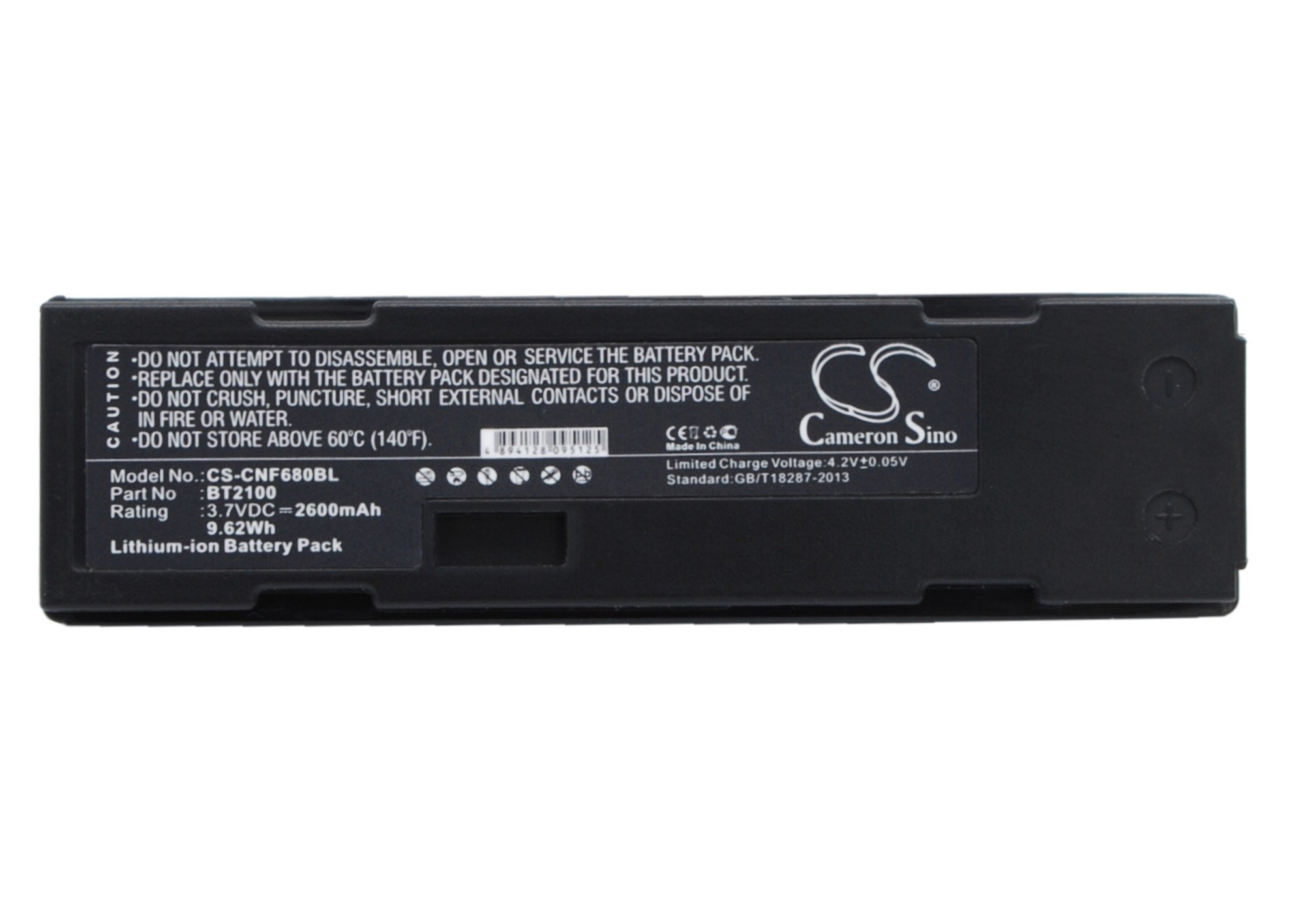
Image: The BORNMIO CS-CNF680BL battery showing its label with model number, specifications, and critical safety warnings.
3. Setup and Installation
Follow these steps to install your new replacement battery:
- Power Off Device: Ensure your CINO device (680BT, F680BT, F780BT) is completely powered off before beginning the installation.
- Locate Battery Compartment: Identify and open the battery compartment on your device. Refer to your device's original manual if you are unsure of its location.
- Remove Old Battery: Carefully remove the existing battery from the compartment.
- Insert New Battery: Insert the BORNMIO CS-CNF680BL replacement battery into the compartment. Ensure the battery contacts align correctly with the device's terminals. Do not force the battery into place.
- Close Compartment: Securely close the battery compartment cover.
- Initial Charge: It is highly recommended to fully charge the battery before its first use to optimize performance and lifespan.

Image: A side view of the BORNMIO replacement battery, showing its general shape and form factor.
4. Operating and Charging
Once installed, the battery is ready for use and charging:
- Power On: After installation, power on your CINO device. The device should recognize the new battery automatically.
- Charging: Use the original charger and charging cable provided with your CINO device to charge the battery. Connect the charger to the device and a power source. The device's indicator should show that it is charging.
- Full Charge: Allow the battery to charge until the device indicates a full charge. Overcharging is generally prevented by modern devices, but it is good practice to disconnect once fully charged.
- Usage: The battery provides power to your device for normal operation. Battery life will vary depending on device usage and settings.

Image: A different angle of the BORNMIO replacement battery, highlighting the electrical contacts.
5. Maintenance
Proper maintenance can extend the life of your battery:
- Storage: Store the battery in a cool, dry place, away from direct sunlight, moisture, and extreme temperatures. Ideal storage temperature is between 0°C and 25°C (32°F and 77°F).
- Long-Term Storage: If the battery will not be used for an extended period (e.g., more than one month), charge it to approximately 50-60% before storage. Recharge it every 3-6 months to prevent deep discharge, which can damage the battery.
- Cleaning: Keep the battery contacts clean and free from dust or debris. Use a dry, soft cloth to gently wipe the contacts if necessary.
- Avoid Deep Discharge: While modern devices often have protection, try to avoid completely draining the battery frequently, as this can reduce its overall lifespan.

Image: A third view of the BORNMIO replacement battery, providing a comprehensive look at the product.
6. Troubleshooting
If you encounter issues with your battery, consider the following:
- Battery Not Charging:
- Ensure the charger is properly connected to both the device and a working power outlet.
- Verify that the battery is correctly seated in the device's compartment and that contacts are clean.
- Try using a different charger or power outlet to rule out external issues.
- If the issue persists, the battery or device may require professional inspection.
- Short Battery Life:
- Ensure the battery has been fully charged before use.
- Check your device's settings for power-saving options or applications running in the background that may consume excessive power.
- Battery capacity naturally degrades over time with repeated charge cycles. If the battery is old, replacement may be necessary.
- Device Not Powering On:
- Confirm the battery is fully charged and correctly installed.
- If the device still does not power on, the issue may be with the device itself rather than the battery.
For persistent issues not resolved by these steps, please refer to the warranty and support section.
7. Specifications
| Model Number | CS-CNF680BL |
| Compatible Models | CINO 680BT, F680BT, F780BT |
| Compatible Part Number | BT2100 |
| Battery Type | Lithium Ion (Li-ion) |
| Capacity | 2600 mAh |
| Watt-Hours (Wh) | 9.62 Wh |
| Voltage | 3.7 V |
| Dimensions (L x W x H) | 70.7 x 19.75 x 20.35 mm (approx. 2.78 x 0.78 x 0.8 inches) |
| Weight | 148.9 Grams |
| Reusability | Rechargeable |
| Certifications | ISO9001, RoHS, CE, UN38.3, MSDS |
8. Warranty and Support
The BORNMIO CS-CNF680BL replacement battery is manufactured under strict quality control and holds ISO9001, RoHS, CE, UN38.3, and MSDS certifications, ensuring reliability and safety.
For any questions, concerns, or support regarding your battery, please contact the seller directly through the platform where you made your purchase. The seller offers a full refund or a free replacement without any reason, subject to their return policy. Please refer to your purchase documentation or the seller's storefront for specific contact details and warranty terms.
