
Introduction
This manual provides essential instructions for the safe and effective use of your BORNMIO CS-LI40B replacement battery. This battery is designed to be fully compatible with various Rollei camera models. Please read this manual thoroughly before use to ensure proper operation and longevity of your battery.
Important Safety Information
To prevent personal injury or damage to your device, observe the following safety precautions:
- Do not attempt to disassemble, open, or service the battery pack.
- Replace only with the battery pack designated for this product.
- Do not crush, puncture, short external contacts, or dispose of in fire or water.
- Do not store above 60°C (140°F).
- Keep out of reach of children.
- Dispose of used batteries according to local regulations.
All batteries are certified with ISO9001, RoHS, CE, UN38.3, and MSDS for quality assurance.
Compatible Models
This BORNMIO CS-LI40B replacement battery is compatible with the following camera models:
- Rollei Powerflex 440
- Rollei Flexline 140 inTouch
- Rollei Flexline 100 inTouch
- Rollei Flexline 200 inTouch
- Rollei Compactline CL-103
- Rollei Compactline 370 TS
- Rollei Compactline 390 SE
Compatible Battery Part Number: DS5370.
Before purchase, please confirm the compatible model and battery part number carefully to ensure correct fit.
Installation
Follow these steps to install the replacement battery into your compatible camera:
- Ensure your camera is powered off.
- Locate the battery compartment on your camera. This is typically on the bottom or side.
- Open the battery compartment cover.
- If an old battery is present, gently remove it.
- Insert the BORNMIO CS-LI40B battery into the compartment, ensuring the contacts align correctly with the camera's terminals. The battery is designed to fit in one orientation only.
- Close the battery compartment cover securely.

Image: Front view of the BORNMIO CS-LI40B replacement battery, displaying its model number, voltage, capacity, and essential safety warnings. Note the "Insert this direction" arrow.
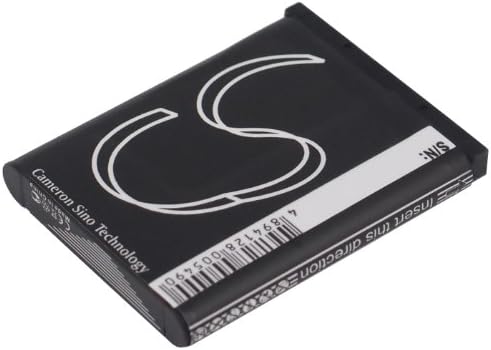
Image: Rear view of the BORNMIO CS-LI40B replacement battery, featuring the Cameron Sino Technology branding and a barcode.
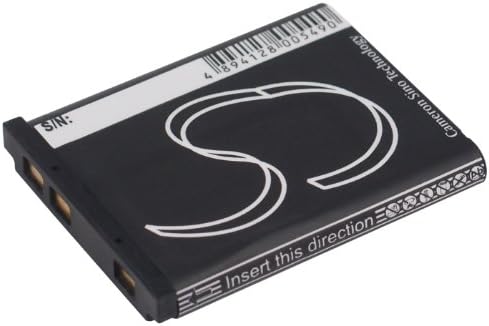
Image: Side view of the BORNMIO CS-LI40B replacement battery, showing the gold electrical contacts and the directional arrow for insertion.
Charging and Usage
Initial Charge
For optimal performance, fully charge the battery before its first use.
Charging Process
Use the original charger provided with your camera or a compatible charger to charge the battery.
- Connect the charger to a power source.
- Insert the battery into the charger, ensuring proper alignment.
- The charger's indicator light will typically show the charging status (e.g., red for charging, green for fully charged).
- Once fully charged, remove the battery from the charger.
Battery Life
Battery life varies depending on camera usage, settings, and environmental conditions.
To maximize battery life, consider:
- Reducing screen brightness.
- Limiting flash usage.
- Turning off Wi-Fi or GPS when not needed.
- Avoiding extreme temperatures.
Maintenance and Storage
Proper maintenance extends battery life and ensures safe operation:
- Keep battery contacts clean and dry. Use a clean, dry cloth to wipe off any dust or dirt.
- Store the battery in a cool, dry place, away from direct sunlight and extreme temperatures.
- If storing for extended periods, charge the battery to approximately 50% capacity. Avoid storing a fully charged or completely depleted battery.
- Do not expose the battery to moisture or liquids.
Troubleshooting
If you encounter issues with your battery, refer to the following common solutions:
Battery Not Charging
- Ensure the battery is correctly inserted into the charger.
- Verify the charger is properly connected to a power source.
- Check if the charger or charging cable is damaged. Try a different charger or cable if available.
- Clean the battery contacts and charger terminals with a dry cloth.
Camera Not Powering On
- Ensure the battery is fully charged and correctly inserted into the camera.
- Check if the battery compartment cover is securely closed.
- If possible, try another fully charged battery to rule out camera issues.
Short Battery Life
- Review camera settings that consume more power (e.g., screen brightness, video recording, continuous shooting, Wi-Fi).
- Ensure the battery has been fully charged.
- Battery performance naturally degrades over time and with usage cycles. If the battery is old, consider replacement.
If problems persist, please contact customer support.
Product Specifications
| Feature | Specification |
|---|---|
| Model Number | CS-LI40B |
| Battery Type | Li-ion |
| Capacity | 660mAh |
| Watt-Hours (Wh) | 2.44Wh |
| Voltage | 3.7V |
| Dimensions | 40.0 x 31.1 x 5.9 mm (1.57 x 1.22 x 0.23 inches) |
| Weight | 115.0 g (4.1 ounces) |
| Certifications | ISO9001, RoHS, CE, UN38.3, MSDS |
Warranty and Support
This product is backed by a quality guarantee. If you have any questions or experience issues, please contact our customer support. We offer a full refund or a free replacement without any reason for quality-related concerns.
For assistance, please refer to the contact information provided with your purchase or visit the BORNMIO official website.
