
Introduction
This manual provides essential instructions for the safe and effective use of your BORNMIO CS-LI40B replacement lithium-ion battery. This battery is designed to be compatible with various GE and General Imaging digital camera models.
Compatible Camera Models:
- GE: G3 WP, J1250, E1045, E1680W, E1410SW, E1486TW, E1450W, E1480, G3WP, E1486, G5WP, J1455, E1055W, E1255W, G5 WP, E1480W, E1045W, E1055
- General Imaging: A1255, A1255W
Compatible Battery Part Numbers:
- D016, DS5370, GB-10
Safety Information
WARNING: Failure to follow these safety instructions may result in fire, electric shock, injury, or damage to the battery or camera.
- Do not disassemble, open, crush, bend, deform, puncture, or shred the battery.
- Do not modify or remanufacture the battery, attempt to insert foreign objects into the battery, or immerse or expose it to water or other liquids.
- Do not expose the battery to fire, explosion, or other hazards.
- Avoid dropping the battery or subjecting it to severe impacts.
- Keep the battery away from children.
- Use only the battery for its intended purpose.
- Dispose of used batteries according to local regulations. Do not dispose of batteries in household waste.
- If the battery leaks, and you come into contact with the fluid, rinse thoroughly with water and seek medical attention immediately.
Setup: Battery Installation
Follow these steps to properly install the replacement battery into your compatible camera.
- Ensure your camera is powered off before attempting to install or remove the battery.
- Locate the battery compartment on your camera, typically on the bottom or side.
- Open the battery compartment cover.
- If an old battery is present, gently remove it.
- Align the new BORNMIO battery with the battery compartment, ensuring the contacts on the battery match the contacts in the camera. The battery is designed to fit in only one orientation.
- Carefully insert the battery until it clicks into place or is securely seated.
- Close the battery compartment cover firmly.
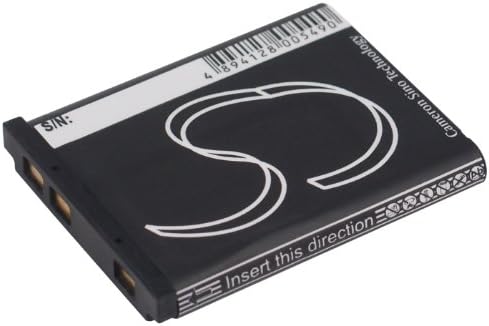
Image: Side view of the BORNMIO CS-LI40B battery, highlighting the electrical contact points for proper camera insertion.
Operating: Charging and Usage
For optimal performance, follow these guidelines for charging and using your battery.
Charging the Battery
- Use a charger compatible with your camera model and this battery type (Li-ion). Refer to your camera's original manual for charger specifications.
- Insert the battery into the charger according to the charger's instructions.
- Connect the charger to a power source.
- Allow the battery to charge fully before its first use. Charging indicators on your charger or camera will typically show when the battery is full.
- Do not overcharge the battery. Remove it from the charger once fully charged.
Battery Usage
- The battery is designed for use in compatible GE and General Imaging digital cameras.
- Operating temperature range: Use the battery within the temperature range specified by your camera manufacturer. Extreme temperatures can affect battery performance and lifespan.
- For best results, avoid completely draining the battery before recharging.

Image: Top view of the BORNMIO CS-LI40B battery, displaying its label with model information and safety warnings.
Maintenance
Proper maintenance extends the life and performance of your battery.
Storage
- Store the battery in a cool, dry place, away from direct sunlight and extreme temperatures.
- For long-term storage, it is recommended to store the battery with approximately a 50% charge.
- Avoid storing the battery fully charged or completely discharged for extended periods.
Cleaning
- If the battery contacts become dirty, gently wipe them with a clean, dry cloth. Do not use liquids or abrasive cleaners.
Disposal
- Do not dispose of the battery in general household waste.
- Recycle the battery at an authorized recycling center or return it to the point of purchase for proper disposal. Lithium-ion batteries contain materials that should be recycled responsibly.
Troubleshooting
If you encounter issues with your battery, refer to the following common problems and solutions.
- Problem: Battery not charging.
- Ensure the battery is correctly inserted into the charger.
- Verify the charger is properly connected to a working power outlet.
- Check if the charger is compatible with this battery model.
- Inspect battery contacts for dirt or damage; clean if necessary.
- If using a camera to charge, ensure the camera is powered off and connected correctly.
- Problem: Battery not holding charge or short operating time.
- Ensure the battery has been fully charged.
- Battery performance can degrade over time with repeated charge cycles.
- Extreme temperatures (hot or cold) can reduce battery efficiency.
- Check camera settings that might consume more power (e.g., screen brightness, Wi-Fi).
- Problem: Camera not turning on with the new battery.
- Confirm the battery is fully charged.
- Ensure the battery is correctly inserted into the camera compartment.
- Verify the battery is compatible with your specific camera model (refer to the "Introduction" section).
- Try reinserting the battery.
If problems persist after attempting these solutions, please contact customer support.
Specifications
| Model Number | CS-LI40B |
|---|---|
| Battery Type | Lithium-Ion (Li-ion) |
| Capacity | 660 mAh |
| Watt-Hours (Wh) | 2.44 Wh |
| Voltage | 3.7 V |
| Dimensions (L x W x H) | 40.0 x 31.1 x 5.9 mm (1.57 x 1.22 x 0.23 inches) |
| Weight | 115.0 g (4.1 ounces) |
| Certifications | ISO9001, RoHS, CE, UN38.3, MSDS |
Warranty and Support
BORNMIO stands behind the quality of its products. This battery has undergone strict quality inspection and is certified with ISO9001, RoHS, CE, UN38.3, and MSDS.
If you have any questions or encounter issues with your battery, please contact our customer support. We offer a full refund or a free replacement without any reason for quality-related concerns.
For support, please refer to the contact information provided by your retailer or on the product packaging.
