
Schellenberg 60924
Schellenberg 60924 Smart Drive XL Garage Door Motor Instruction Manual
Model: 60924 | Brand: Schellenberg
1. Introduction
This manual provides comprehensive instructions for the installation, operation, and maintenance of your Schellenberg 60924 Smart Drive XL Garage Door Motor. Please read these instructions carefully before beginning installation or operation to ensure safe and efficient use of the product.
2. Safety Information
Always prioritize safety during installation and operation. Failure to follow safety guidelines may result in injury or damage to property.
- Ensure the power supply is disconnected before any installation or maintenance work.
- Keep hands, clothing, and children clear of the garage door and motor mechanism during operation.
- The automatic safety cut-off feature is designed to prevent accidents; regularly test its functionality.
- Only use original Schellenberg accessories and spare parts.
- Do not attempt to repair the motor yourself; contact qualified personnel.
- This motor is designed for sectional or up-and-over garage doors up to 14 m² surface area.
3. Package Contents
Verify that all components are present in the package:
- 1x Motor head
- 1x Power supply unit
- 1x 2-channel remote control (868.4 MHz)
- 1x 4-channel remote control (868.4 MHz)
- 3x Guide rails (each 100 cm)
- 2x Connecting pieces for guide rails
- 1x Mounting instructions
- 1x Door fixing hardware
- 1x Wall fixing hardware
- 2x U-pieces
- 1x Emergency release for interiors
- 1x Slider
- 1x Door arm
- 2x Ceiling suspension brackets
- 1x Remote control frame
- 1x Interior push button
- 1x Photoelectric barrier

Image: All components included with the Schellenberg Smart Drive XL Garage Door Motor, including the motor head, remote controls, guide rails, and various mounting hardware.
4. Setup and Installation
Installation should be performed by a competent individual. Ensure all safety precautions are followed.
4.1. Mounting the Motor Head and Guide Rails
The motor head is mounted to the ceiling, and the guide rails are attached to the motor head and the garage door. Ensure the rails are straight and securely fastened.

Image: The motor head is shown installed on the ceiling with the guide rail extending towards the garage door.
The installation is designed to be manageable by a single person. The guide rails are assembled and then connected to the motor head.

Image: A person is shown installing the guide rail, demonstrating the single-person installation capability.
4.2. Electrical Connection
Connect the power supply unit to the motor head and a suitable power outlet. Ensure all connections are secure and comply with local electrical codes.

Image: A hand is shown plugging a spiral cable into the motor unit, indicating the electrical connection point.
4.3. Programming End Positions
The motor features semi-automatic end position adjustment. Follow the specific instructions in the included manual for programming the open and closed limits of your garage door. This typically involves pressing a 'SET' button and allowing the motor to run through its cycle to learn the positions.
4.4. Remote Control Pairing
To pair the remote controls:
- Press and hold the 'CODE' button on the motor unit until the LED indicator lights up.
- Press the desired button on your remote control. The LED on the motor unit will flash to confirm successful pairing.
- Repeat for additional remote controls or buttons.

Image: A hand holding a remote control inside a car, illustrating the convenience of remote operation.
4.5. Connecting Optional Accessories
The Smart Drive XL motor supports various optional Schellenberg accessories, such as additional remote controls, wall-mounted push buttons, or spiral power cables for charging electric vehicles in the garage.
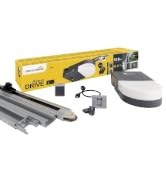
Image: A hand operating a wall-mounted key switch, an example of an optional accessory.
5. Operating Instructions
Once installed and programmed, operate the garage door using the provided remote controls or the interior push button.
- Press the designated button on the remote control to open or close the garage door.
- The motor will automatically stop at the programmed end positions.
- In case of a power outage, use the interior emergency release to manually open or close the door.
5.1. Safety Features
The Smart Drive XL motor includes important safety features:
- Automatic Safety Cut-off: If the door encounters an obstacle during closing, it will automatically reverse to prevent damage or injury.
- Overheating Protection: The motor is equipped with protection against overheating.
- Data Retention: Programmed data is retained even in the event of a power failure.
- Tamper-proof Radio Transmission: Ensures secure communication between remote controls and the motor.

Image: A toy car placed under a closing garage door, demonstrating the automatic safety cut-off feature upon obstacle detection.
6. Maintenance
Regular maintenance ensures the longevity and safe operation of your garage door motor.
- Monthly: Inspect the garage door for proper balance and smooth operation. Check all moving parts for wear and tear.
- Quarterly: Clean the motor housing and guide rails. Ensure the photoelectric barrier (if installed) is clean and unobstructed.
- Annually: Have a qualified technician inspect the entire system, including springs, cables, rollers, and the motor.
- Do not lubricate the guide rails or the drive chain unless specifically instructed by the manufacturer.
7. Troubleshooting
If you encounter issues, refer to the following common problems and solutions:
| Problem | Possible Cause | Solution |
|---|---|---|
| Motor does not respond to remote control. | Dead remote battery, remote not paired, power outage. | Replace remote battery, re-pair remote, check power supply. |
| Door reverses unexpectedly. | Obstacle in the path, misaligned photoelectric barrier, sensitivity setting. | Remove obstacle, clean/align sensors, adjust sensitivity (refer to full manual). |
| Door does not close completely. | End position not correctly programmed, obstruction. | Reprogram end position, check for obstructions. |
| Motor makes unusual noises. | Wear on moving parts, loose components. | Inspect and tighten components, contact technician if noise persists. |
For more detailed troubleshooting, please consult the complete manual provided with the product or visit the Schellenberg brand store.
8. Specifications
| Feature | Detail |
|---|---|
| Model Number | 60924 |
| Brand | Schellenberg |
| Manufacturer | Alfred Schellenberg GmbH |
| Max. Door Surface Area | 14 m² |
| Max. Pulling Force | 1000 N |
| Radio Frequency | 868 MHz |
| Dimensions (Product) | 323 x 20 x 12.5 cm |
| Product Weight | 15.3 kg |
| Material | Metal |
| Power Source | Hand operated (for emergency release) |
| Included Components | Motor head, power supply, 2x remote controls, guide rails, mounting hardware, emergency release, interior push button, photoelectric barrier. |

Image: Technical drawing showing the dimensions of the Schellenberg Smart Drive XL Garage Door Motor and its rail system.
9. Warranty and Support
Schellenberg products are known for their quality and durability. For any questions regarding your product, including installation, operation, or replacement parts, please contact Schellenberg customer service. Spare parts availability in the EU is guaranteed for 1 year.
Visit the official Schellenberg brand store for more information and support resources.
Related documents60924


Ask a question about this manual
Ask about setup, troubleshooting, compatibility, parts, safety, or missing instructions. Manuals+ will review the question and use this page’s manual context to help answer it.