
Introduction
The Orbegozo AP 4500 is a versatile 3-in-1 cyclonic vacuum cleaner designed for efficient home cleaning. It functions as an upright vacuum, a handheld vacuum, and a broom vacuum, adapting to various cleaning needs. This cordless unit features a 29V lithium battery, offering approximately 40 minutes of runtime in ECO mode, and a 300ml bagless tank for convenient emptying. Its Full Clean System with an articulable tube allows for easy access to difficult areas.
Important Safety Instructions
Please read all instructions carefully before using this appliance. Failure to follow these instructions may result in electric shock, fire, or serious injury.
- Do not use outdoors or on wet surfaces.
- Do not allow to be used as a toy. Close attention is necessary when used by or near children.
- Use only as described in this manual. Use only manufacturer's recommended attachments.
- Do not use with damaged cord or plug. If appliance is not working as it should, has been dropped, damaged, left outdoors, or dropped into water, return it to a service center.
- Do not pull or carry by cord, use cord as a handle, close a door on cord, or pull cord around sharp edges or corners. Do not run appliance over cord. Keep cord away from heated surfaces.
- Do not unplug by pulling on cord. To unplug, grasp the plug, not the cord.
- Do not handle plug or appliance with wet hands.
- Do not put any object into openings. Do not use with any opening blocked; keep free of dust, lint, hair, and anything that may reduce air flow.
- Keep hair, loose clothing, fingers, and all parts of body away from openings and moving parts.
- Do not pick up anything that is burning or smoking, such as cigarettes, matches, or hot ashes.
- Do not use to pick up flammable or combustible liquids, such as gasoline, or use in areas where they may be present.
- Do not pick up toxic material, such as chlorine bleach, ammonia, or drain cleaner.
- Do not use without dust bag and/or filters in place.
- Turn off all controls before unplugging.
- Use extra care when cleaning on stairs.
- Do not use to pick up hard or sharp objects such as glass, nails, screws, coins, etc.
- Prevent unintentional starting. Ensure the switch is in the off-position before connecting to battery pack, picking up or carrying the appliance.
- Recharge only with the charger specified by the manufacturer.
Product Components and Overview
Familiarize yourself with the main components of your Orbegozo AP 4500 vacuum cleaner.

Figure 1: The AP 4500 vacuum cleaner in its upright configuration, ready for floor cleaning. This shows the main body, extension tube, and motorized brush head.

Figure 2: An angled perspective of the AP 4500, highlighting its sleek design and the connection points for different configurations.

Figure 3: The AP 4500 demonstrating its Full Clean System, where the extension tube articulates to reach under furniture and into tight spaces without needing to bend down.
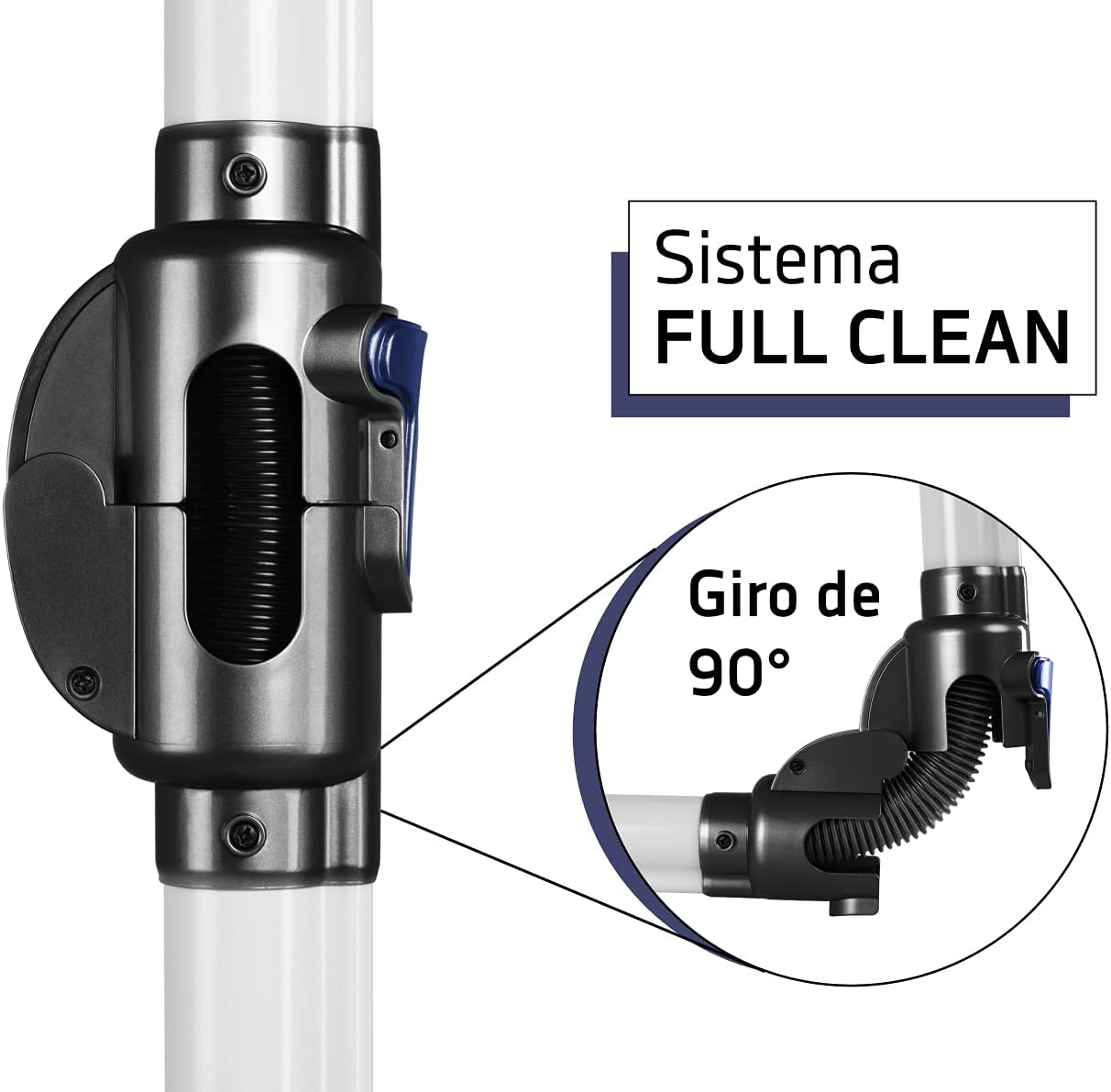
Figure 4: A detailed view of the Full Clean System's articulation joint, showing its ability to bend 90 degrees for enhanced maneuverability.

Figure 5: The main unit detached and configured as a handheld vacuum, equipped with the crevice tool for precise cleaning in narrow areas.

Figure 6: The standard accessories included with the AP 4500: an upholstery brush for fabrics, a small connector, and a crevice tool for tight spots.
Setup and Assembly
The AP 4500 offers three primary configurations: upright, handheld, and broom vacuum. Assembly is straightforward and tool-free.
1. Upright Vacuum Assembly:
- Insert the motorized brush head into the bottom end of the extension tube until it clicks securely.
- Attach the main vacuum body (containing the motor and dust tank) to the top end of the extension tube until it clicks securely.
- Ensure all connections are firm before use.
2. Handheld Vacuum Assembly:
- Detach the main vacuum body from the extension tube (if assembled).
- Select the desired accessory (crevice tool or upholstery brush).
- Attach the chosen accessory directly to the air inlet of the main vacuum body until it is firmly in place.
3. Broom Vacuum Assembly:
This configuration is similar to the upright, but often implies using the main body with a shorter extension or directly with an accessory for overhead cleaning.
- Attach the main vacuum body to the extension tube.
- Attach an accessory (like the crevice tool or upholstery brush) to the end of the extension tube instead of the motorized brush head. This is ideal for reaching high corners or cobwebs.
Initial Charging:
Before first use, fully charge the vacuum cleaner's 29V lithium battery. Connect the external battery charger to the charging port on the main unit and plug it into a power outlet. The LED battery status light will indicate charging progress and completion.
Operating Instructions
The AP 4500 is designed for ease of use with intuitive controls.
Powering On/Off:
- To turn on the vacuum, press the power button located on the main unit.
- To turn off, press the power button again.
Speed Selection:
The vacuum features two speed modes: ECO and Max.
- ECO Mode: Provides extended battery runtime (up to 40 minutes) for general cleaning tasks and lighter debris.
- Max Mode: Offers maximum suction power for stubborn dirt and deep cleaning. This mode will reduce battery runtime.
- Toggle between ECO and Max modes using the speed selection button on the main unit.
Full Clean System (Articulable Tube):
The articulable tube allows the vacuum to bend up to 90 degrees, making it easy to clean under furniture, beds, and other low-clearance areas without excessive bending. To activate, press the release button on the joint and adjust the angle as needed. Ensure the joint is locked in place before applying pressure.
LED Lights:
The motorized brush head is equipped with LED lights to illuminate the cleaning path, making less noticeable dirt visible, especially in dimly lit areas.
Battery Status Indicator:
The LED battery status light on the main unit indicates the remaining battery charge. Monitor this indicator to know when to recharge the vacuum.
Maintenance
Regular maintenance ensures optimal performance and extends the lifespan of your AP 4500 vacuum cleaner.
Emptying the Dust Tank:
- The AP 4500 has a 300ml bagless tank. It is recommended to empty the tank after each use or when the MAX fill line is reached.
- To empty, detach the main vacuum body. Locate the dust tank release button and press it to open the tank.
- Carefully empty the contents into a waste bin.
- Close the tank securely until it clicks.
Cleaning the Filter:
The cyclonic filter should be cleaned regularly to maintain suction power.
- Twist and remove the filter assembly from the dust tank.
- Tap the filter gently over a waste bin to remove loose dust.
- If necessary, rinse the filter under cold running water. Ensure the filter is completely dry before reinserting it into the vacuum. Do not use detergents or hot water.
- Reassemble the filter and dust tank, ensuring they are securely in place.
Cleaning the Motorized Brush Head:
- Periodically check the motorized brush head for tangled hair or debris.
- Turn off and unplug the vacuum before cleaning the brush.
- Use scissors or a brush to carefully remove any tangled hair or fibers from the brush roll.
Battery Charging:
- When the battery status indicator shows low charge, connect the external charger to the vacuum and a power outlet.
- Charge the battery fully to maximize runtime and battery life.
- Store the vacuum in a cool, dry place when not in use, and ensure it is charged periodically if stored for long periods.
Troubleshooting
Refer to this section for common issues and their solutions.
| Problem | Possible Cause | Solution |
|---|---|---|
| Vacuum does not turn on. | Battery is depleted. | Charge the battery fully. |
| Power button not pressed correctly. | Ensure the power button is pressed firmly. | |
| Reduced suction power. | Dust tank is full. | Empty the dust tank. |
| Filter is clogged. | Clean or replace the filter. | |
| Obstruction in nozzle, tube, or hose. | Check and clear any blockages. | |
| Motorized brush not spinning. | Brush roll is tangled with hair/debris. | Clean the brush roll. |
| Connection to main unit or tube is loose. | Ensure all connections are secure. | |
| Short battery runtime. | Using Max mode frequently. | Use ECO mode for longer runtime. |
| Battery not fully charged. | Ensure battery is fully charged before use. | |
| Battery nearing end of life. | Contact customer support for battery replacement options. |
Specifications
| Feature | Detail |
|---|---|
| Model Name | AP 4500 |
| Brand | Orbegozo |
| Type | 3-in-1 Cyclonic Vacuum Cleaner (Upright, Handheld, Broom) |
| Power Source | 29V Lithium Battery (Included) |
| Runtime | Up to 40 minutes (ECO mode) |
| Dust Tank Capacity | 0.3 Liters (Bagless) |
| Filter Type | Cyclonic |
| Speeds | 2 (ECO/Max) |
| Special Features | Full Clean System (180° articulable tube), Motorized Brush with LED Light, LED Battery Status Light, External Battery Charger |
| Included Accessories | Lance (Crevice Tool), Upholstery Brush |
| Product Dimensions | 7.87"L x 11.81"W x 9.84"H |
| Item Weight | 6.8 pounds |
| Noise Level | 44 dB |
Warranty and Support
For warranty information, technical support, or to purchase replacement parts, please contact Orbegozo customer service. Refer to the product packaging or the official Orbegozo website for the most current contact details and warranty terms applicable to your region.
It is recommended to keep your purchase receipt as proof of purchase for warranty claims.