
1. Introduction
The OttLite Entertain LED Speaker Lamp (Model S83WGW) is a versatile lighting and audio solution designed for various indoor environments. This device integrates an LED lamp with adjustable brightness and color modes, a Bluetooth speaker for wireless audio streaming, and a detachable emergency light feature. This manual provides detailed instructions for the proper setup, operation, and maintenance of your lamp.

Image 1.1: The OttLite Entertain LED Speaker Lamp, showcasing its integrated design.
2. Package Contents
Verify that all items are present in the package:
- OttLite Entertain LED Speaker Lamp (S83WGW)
- Power Cable
3. Setup
- Unpacking: Carefully remove all components from the packaging.
- Placement: Place the lamp on a stable, flat surface.
- Power Connection: Connect the provided power cable to the lamp's power input port and then plug it into a standard 120V AC wall outlet. The lamp's internal battery will begin charging automatically.
4. Operating Instructions
4.1. Light Functions
The lamp features touch-activated controls located on the top of the shade for easy adjustment of light settings.
- Power On/Off: Lightly touch the metallic button on the top center of the lamp shade to turn the light on or off.
- Adjust Brightness: With the light on, repeatedly touch the metallic button to cycle through three brightness levels.
- Change Color Mode: Press and hold the metallic button for approximately 2 seconds to switch between the three color temperature modes: warm white, bright white, and natural daylight. Release the button when the desired mode is active.
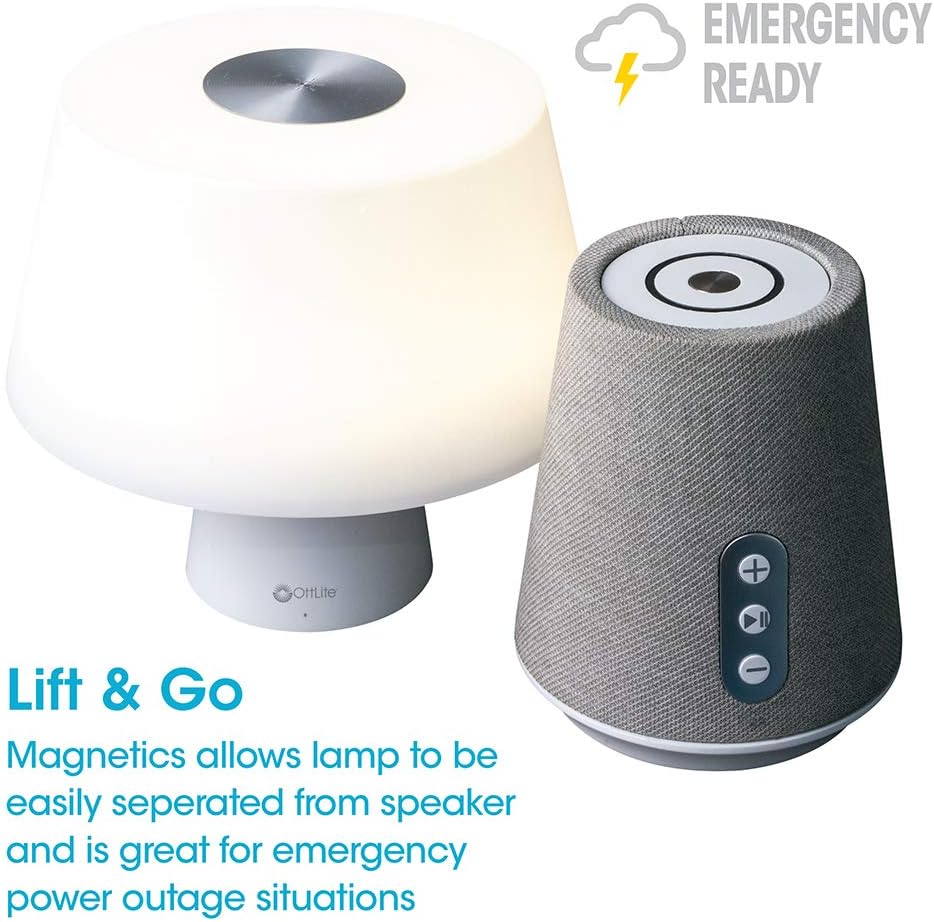
Image 4.1: Activating the lamp's light functions via the touch control on top of the shade.

Image 4.2: The lamp offers three distinct color temperature modes for varied lighting needs.
4.2. Bluetooth Speaker
The integrated Bluetooth speaker allows for wireless audio playback from compatible devices.
- Power On Speaker: Press the Play/Pause button on the front of the speaker base to turn the speaker on. A tone will indicate it is ready for pairing.
- Pairing: On your audio device (e.g., smartphone, tablet), enable Bluetooth and search for available devices. Select "OttLite Entertain" from the list. A confirmation tone will sound upon successful pairing.
- Audio Control:
- Press the + button to increase volume.
- Press the - button to decrease volume.
- Press the Play/Pause button to play or pause audio.
- Power Off Speaker: Press and hold the Play/Pause button for approximately 3 seconds to turn the speaker off.

Image 4.3: The speaker base with clearly labeled controls for volume and playback.

Image 4.4: The speaker base highlights its Bluetooth connectivity feature.
4.3. Emergency Light Feature (Lift & Go)
The lamp portion can be detached from the speaker base to function as a portable emergency light.
- Detaching the Light: Gently lift the lamp shade portion straight up from the speaker base. It is held in place by magnets.
- Using the Emergency Light: The detached light will operate on its internal rechargeable battery. Use the touch control on top of the shade to turn it on/off and adjust brightness as described in Section 4.1. The light can provide illumination for 5 to 30+ hours depending on the brightness setting.
- Recharging: To recharge the emergency light, simply place it back onto the speaker base. Ensure it is properly seated for charging to commence.

Image 4.5: The 'Lift & Go' feature allows the lamp to be used as a portable emergency light.
5. Maintenance
To ensure the longevity and optimal performance of your OttLite Entertain LED Speaker Lamp, follow these maintenance guidelines:
- Cleaning: Disconnect the lamp from the power source before cleaning. Use a soft, dry cloth to wipe down the exterior surfaces. Do not use abrasive cleaners, solvents, or harsh chemicals, as these may damage the finish.
- Storage: When not in use for extended periods, store the lamp in a cool, dry place away from direct sunlight and extreme temperatures.
- Battery Care: For the internal rechargeable battery, avoid fully discharging it frequently. Recharge the lamp regularly, even if not in constant use, to maintain battery health.
6. Troubleshooting
If you encounter issues with your lamp, refer to the following troubleshooting steps:
| Problem | Possible Cause | Solution |
|---|---|---|
| Lamp light does not turn on. | Not plugged in; power outage; internal battery depleted; faulty connection. | Ensure power cable is securely plugged in. Check power outlet. Recharge the lamp by placing it on the base. |
| Bluetooth speaker does not connect. | Speaker not in pairing mode; device Bluetooth off; already connected to another device. | Ensure speaker is on and in pairing mode. Turn Bluetooth on your device. Disconnect from other devices. |
| Emergency light does not work when detached. | Internal battery depleted. | Place the light back on the speaker base to recharge its internal battery. |
| Poor audio quality from speaker. | Device too far from speaker; interference; low battery. | Move device closer to speaker. Avoid obstacles. Ensure speaker is charged. |
7. Specifications
| Feature | Detail |
|---|---|
| Model Number | S83WGW |
| Brand | OttLite |
| Product Dimensions | 3.12"D x 3.12"W x 10.87"H |
| Item Weight | 2.6 Pounds |
| Light Source Type | LED |
| Wattage | 3 watts |
| Brightness | 337 Lumen |
| Color Temperature | 5000 Kelvin (Daylight) |
| Control Method | Touch |
| Power Source | Corded Electric (with rechargeable battery for emergency light) |
| Batteries | 1 Lithium Ion battery (included) |
| Material | Plastic |
| UPC | 761712019116 |
8. Warranty and Support
For warranty information or technical support, please refer to the official OttLite website or contact their customer service department. Keep your purchase receipt as proof of purchase for any warranty claims.
Contact Information: Please visit OttLite's official store page for current support options and contact details.


