
National Geographic 9080600
National Geographic 9080600 Weather Station User Manual
Model: 9080600 | Brand: National Geographic
Introduction
The National Geographic 9080600 Wi-Fi color weather station with a 7-in-1 professional sensor provides comprehensive weather data. This compact device reliably transmits measurements for wind speed, wind direction, humidity, temperature, precipitation, UV level, and light intensity to the base station. Its 5.7-inch color display shows current and historical data, and calculates a reliable 12-hour local weather forecast. The Wi-Fi function enables data sharing with platforms like Weather Underground and Weather Cloud, as well as time synchronization and firmware updates. Features include customizable alarms for maximum/minimum values, a frost/ice warning, an indoor climate indicator, moon phases, and an alarm clock with snooze. It can also connect to the Awekas portal for global data access and smart home integration.
Product Overview
The National Geographic 9080600 Weather Station consists of a main base station with a color display and a versatile 7-in-1 outdoor sensor. This system is designed to provide accurate and real-time weather information directly to your home and online.

Key Features
- Wireless weather station with clear 5.7" color display and LED backlight.
- Integrated Wi-Fi function for online data sharing and synchronization.
- 7-in-1 multi-sensor for comprehensive outdoor measurements.
- Measures wind speed, wind direction, humidity, temperature, precipitation, UV level, and light intensity.
- Features include historical precipitation memory, customizable high/low alarms, and frost/ice warning.
- Indoor climate indicator, atmospheric pressure display, dew point, Windchill, and heat index.
- Displays moon phases and includes an alarm clock with snooze function.
- Supports data sharing via Weather Underground, Weather Cloud, and AWEKAS portals.
Components
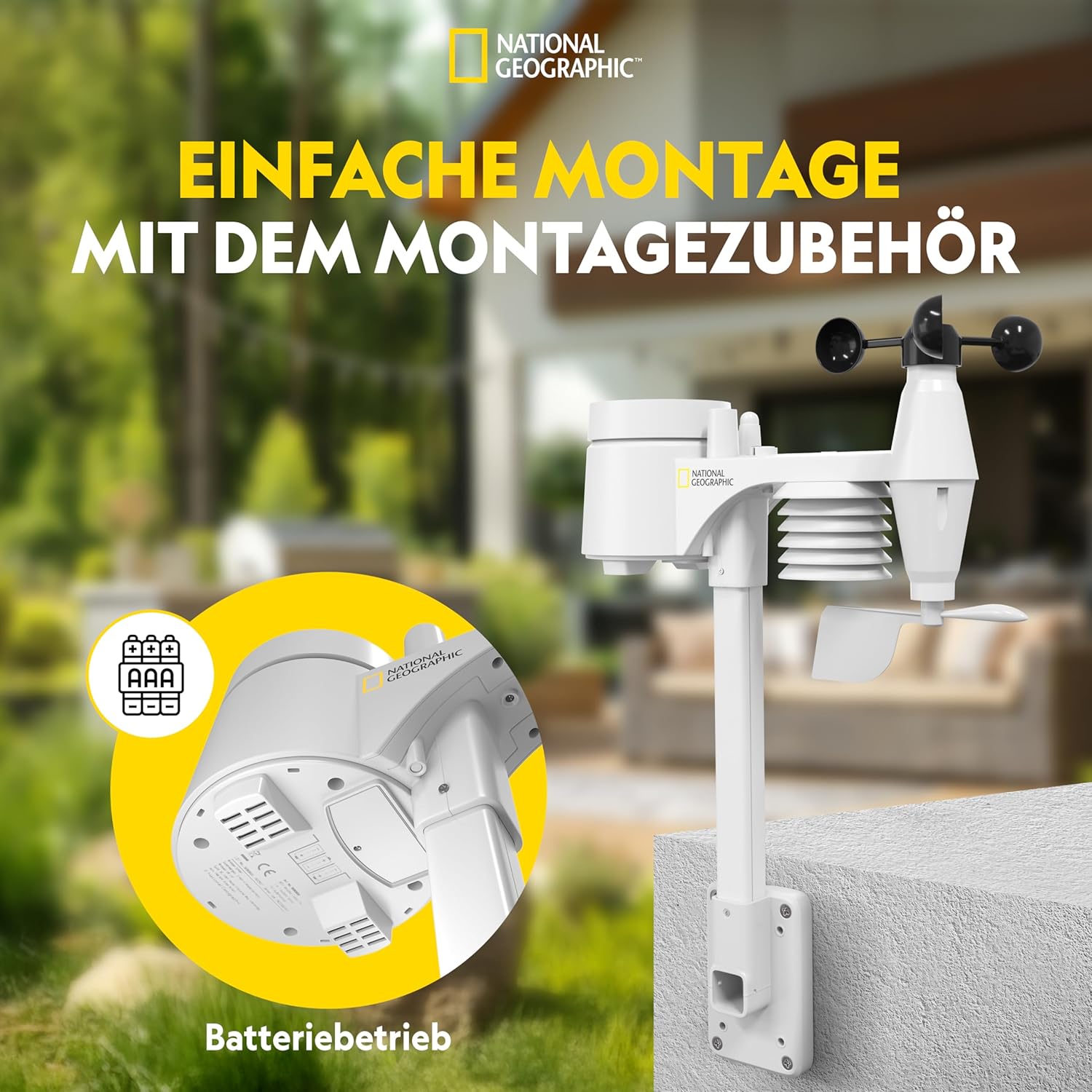
The weather station system comprises two main units: the indoor base station and the outdoor 7-in-1 multi-sensor. The multi-sensor integrates various measurement instruments into a single compact unit for easy installation.

The 7-in-1 sensor includes:
- Rain Collector: Measures precipitation.
- Antenna: For wireless communication with the base station.
- Wind Speed Cups: Measures wind speed.
- Bubble Level: Aids in proper horizontal installation.
- UV Sensor: Measures ultraviolet radiation.
- Mounting Pole: For secure installation.
- Thermo/Hygrometer: Measures outdoor temperature and humidity.
- Wind Vane: Determines wind direction.
Setup Guide
Unpacking and Initial Setup
Carefully unpack all components. Ensure you have the base station, the 7-in-1 outdoor sensor, mounting accessories, power supply, and cable. The base station requires 3 AA batteries for operation and a CR2032 button cell battery for memory retention (not strictly mandatory for basic function but highly recommended).
Sensor Installation
The 7-in-1 outdoor sensor should be mounted in an open area, free from obstructions, to ensure accurate readings for wind, rain, and sunlight. Use the provided mounting accessories to secure the sensor to a pole or suitable surface. Ensure the sensor is level using the integrated bubble level.
Base Station Placement
Place the base station indoors, away from direct sunlight or heat sources, to ensure accurate indoor temperature and humidity readings. Ensure it is within range of the outdoor sensor (868 MHz frequency).
Wi-Fi Configuration and Online Data Sharing
The Wi-Fi function allows you to share your local weather data with online platforms like Weather Underground, Weather Cloud, or AWEKAS. Follow these steps to configure Wi-Fi:
- Register on a Weather Portal: Before configuring your station, register an account on your preferred weather data portal (e.g., AWEKAS, Weather Underground). Note down your station ID and password/API key.
- Activate Wi-Fi Setup Mode: On the back of your base station, press and hold the Wi-Fi button for 6 seconds. "AP" will appear on the display, indicating Access Point mode.
- Connect to Station's Wi-Fi: Using your smartphone or tablet, go to your Wi-Fi settings and connect to the network named something like "PWS-xxxxx".
- Access Configuration Page: Open a web browser on your connected device and enter the IP address
192.168.1.1in the address bar. - Enter Network Details: A configuration page will open. Select your language. Enter your home Wi-Fi router's name (SSID) and password.
- Configure Portal Settings: In the URL field, enter the specific URL for your chosen weather portal (e.g.,
ws.awekas.atfor AWEKAS). Enter your Station ID and password/API key obtained during registration. - Set Time Zone: Configure your time zone (e.g., +1 for Central European Time).
- Enter Location Coordinates: Provide the latitude and longitude of your weather station's location.
- Apply Settings: Click "Apply" or "Save". The "AP" indicator on the display should disappear, and the Wi-Fi symbol will stop blinking and remain solid, indicating a successful connection.

Operating Instructions
Display Overview
The base station features a clear 5.7-inch color display with LED backlight, offering three different brightness levels (off, low, high) for optimal viewing in various lighting conditions. The display is designed to be wall-mountable for flexible placement.

Reading Weather Data
The display provides a comprehensive overview of current and historical weather data:
- Outdoor/Indoor Temperature and Humidity: Current readings for both environments.
- Wind Speed and Direction: Real-time wind data.
- Precipitation: Current rainfall and historical data.
- UV Level and Light Intensity: Measurements of ultraviolet radiation and ambient light.
- Atmospheric Pressure: Current barometric pressure.
- Weather Forecast: A 12-hour local weather trend forecast displayed with graphic symbols.
- Weather Index: Includes dew point, Windchill factor, and heat index.
- Historical Data: Stores and evaluates measurement data internally for 24 hours.
Alarms and Alerts
The station allows for personalized alarms:
- Maximum/Minimum Value Alarms: Program individual alarms for high or low values of various parameters. These trigger both an audible and visual signal.
- Frost/Ice Warning: A special alarm can be activated for outdoor temperatures at or below -3 °C, alerting you to potential frost or ice conditions.
Additional Features

- Indoor Climate Indicator: Provides a symbolic representation of the indoor climate, helping to maintain a healthy environment.
- Moon Phases: Displays the current phase of the moon.
- Alarm Clock with Snooze: Integrated alarm clock functionality for daily use.
- Automatic Time Synchronization: Time is synchronized via the internet when connected to Wi-Fi.
Maintenance
Battery Replacement
The base station requires 3 AA batteries. The outdoor sensor also operates on batteries (type not specified in product details, but typically AA or AAA). When replacing batteries in the outdoor sensor, it is recommended to also clean the sensor thoroughly.
Cleaning
Regularly clean the outdoor sensor, especially the rain collector and wind speed cups, to ensure accurate readings. Use a soft, damp cloth to wipe down the surfaces. Avoid using abrasive cleaners or solvents.
Troubleshooting
This section addresses common issues you might encounter with your weather station.
| Problem | Possible Cause | Solution |
|---|---|---|
| No data from outdoor sensor | Low or dead batteries in sensor; sensor out of range; interference. | Replace sensor batteries. Ensure sensor is within 868 MHz range of base station. Relocate base station or sensor to reduce interference. Re-pair sensor with base station if necessary (refer to full manual). |
| Inaccurate readings (wind, rain) | Sensor not level; obstructions; dirty components. | Ensure sensor is mounted level using the bubble level. Clear any obstructions around the sensor. Clean the rain collector and wind cups. |
| Wi-Fi connection issues | Incorrect Wi-Fi password; incorrect portal settings; network firewall. | Double-check Wi-Fi password and portal credentials (URL, Station ID, password/API key). Ensure your router is broadcasting a 2.4GHz network (5GHz is often not supported). Temporarily disable firewall settings on your router if issues persist. Repeat Wi-Fi configuration steps carefully. |
| Display not working | No power; low batteries. | Ensure power adapter is securely connected. Replace base station batteries (3 AA). |
Specifications
| Feature | Detail |
|---|---|
| Model Number | 9080600 |
| Brand | National Geographic |
| Product Dimensions (L x W x H) | 13.6 x 16.8 x 2.4 cm; 450 grams |
| Power Source | Battery powered (3 AA batteries required for base station) |
| Connectivity Technology | Wi-Fi (868 MHz for sensor communication) |
| Display Type | 5.7-inch Color Display with LED Backlight |
| Sensor Type | 7-in-1 Multi-sensor (Wind Speed, Wind Direction, Humidity, Temperature, Precipitation, UV Level, Light Intensity) |
| Material | Plastic |
| Color | Black |
| Country of Origin | China |
Warranty and Support
For detailed warranty information, please refer to the official National Geographic or Bresser (manufacturer) website. The product typically comes with a standard manufacturer's warranty covering defects in materials and workmanship.
A comprehensive user manual in English, German, and Spanish is usually included with the product. If a physical copy is not available or if you require a French version, it can often be found on the official Bresser website. For technical support or further assistance, please contact National Geographic or Bresser customer service through their official channels.
Related documents9080600


Ask a question about this manual
Ask about setup, troubleshooting, compatibility, parts, safety, or missing instructions. Manuals+ will review the question and use this page’s manual context to help answer it.