
1. Introduction
The DTECH DT-9017 is a robust bi-directional serial converter designed to facilitate communication between RS232 devices and RS485 or RS422 networks. It features advanced surge and static protection, ensuring reliable data transmission over long distances. This manual provides detailed instructions for setting up, operating, and maintaining your DT-9017 converter.
2. Key Features
- Bi-directional Conversion: Seamlessly converts RS232 signals to RS485 or RS422, and vice-versa.
- Flexible Connectivity: Supports connection via a terminal block or an RJ45 network port for RS485/RS422 links.
- Enhanced Protection: Features 600W lightning surge protection for RS485/RS422 and 15KV static protection for RS232, safeguarding connected devices.
- Status Indicators: Equipped with TX, RX, and power LEDs for easy monitoring of data transmission and device status.
- Versatile Communication Modes: Supports RS-485 2-wire half duplex and RS-422 4-wire full duplex communication, including point-to-point and point-to-multi-point networks (up to 32 devices).
- Automatic Data Control: Built-in data collision protection control ensures reliable serial communication without the need for handshake signals.
- Auto Baud Rate: Automatically detects and adjusts the baud rate up to 115200 bps.
- Wide Voltage Input: External 9V to 20V DC power supply can be used, with a 110/240V AC to 9V DC power adapter included.
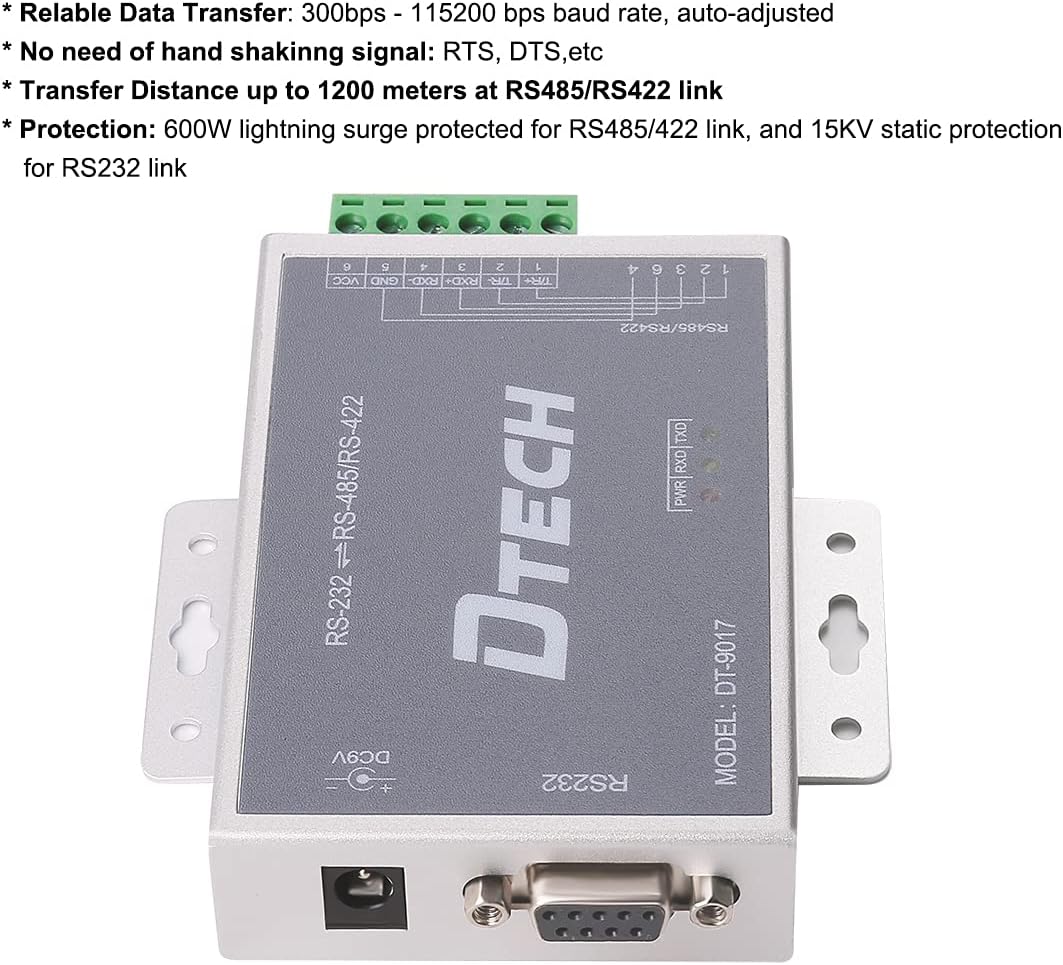
Figure 2.1: DTECH DT-9017 Bi-Directional RS232 to RS485/RS422 Serial Converter with key features highlighted.

Figure 2.2: DTECH DT-9017 Serial Converter illustrating four data communication methods: point-to-point 4-wire full duplex, point-to-multipoint 4-wire full duplex, point-to-point 2-wire half duplex, and point-to-multipoint 2-wire half duplex.
3. Technical Specifications
| Specification | Value |
|---|---|
| Model Number | DT-9017 |
| Connector Type | Serial Adapter (DB9, RJ45, Terminal Block) |
| Data Transfer Rate | Up to 115200 bps (auto-adjusted) |
| Surge Protection | 600W (RS485/RS422) |
| Static Protection | 15KV (RS232) |
| Power Supply | 9V-20V DC (110/240V AC to 9V DC adapter included) |
| Communication Modes | RS-485 2-wire half duplex, RS-422 4-wire full duplex |
| Network Topology | Point-to-point, point-to-multi-point (up to 32 devices) |
| Item Weight | 1.15 pounds |
| Package Dimensions | 9.53 x 5.51 x 2.32 inches |
4. Package Contents
Verify that all items are present in your package:
- DTECH DT-9017 Bi-Directional RS232 to RS485/RS422 Serial Converter
- 9V DC Power Adapter
- RS232 Cable (DB9 male to female)
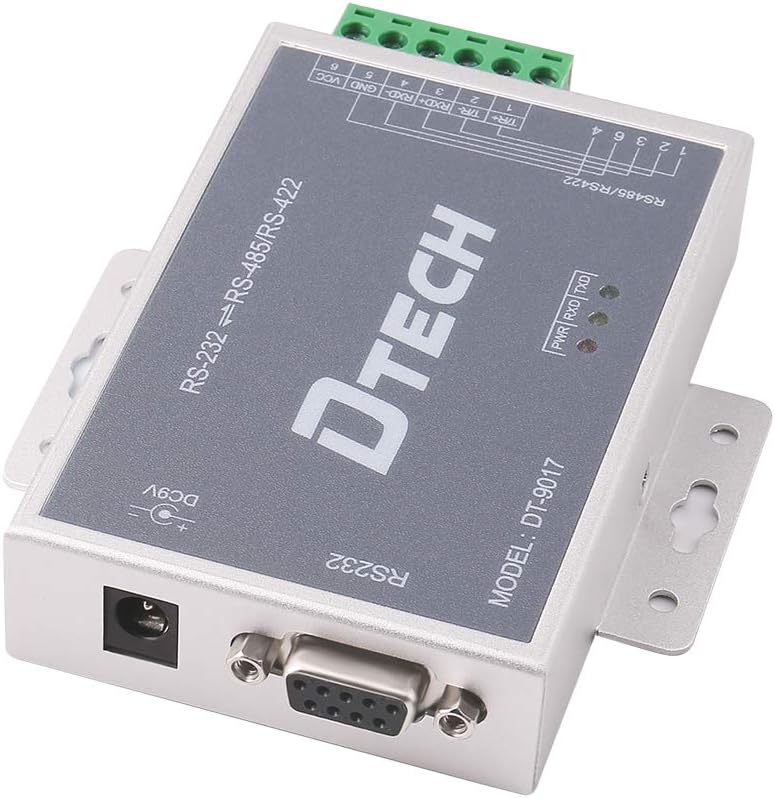
Figure 4.1: DTECH DT-9017 Converter with power input and RS232 port.
5. Setup Instructions
Follow these steps to set up your DTECH DT-9017 serial converter:
- Power Connection: Connect the included 9V DC power adapter to the converter's DC9V input port. Plug the adapter into a standard power outlet. The PWR LED should illuminate.
- RS232 Connection: Connect your RS232 device (e.g., computer, PLC) to the converter's DB9 port using an appropriate RS232 cable.
- RS485/RS422 Connection: Connect your RS485 or RS422 device(s) to the converter using either the RJ45 port or the 6-pin detachable terminal block. Ensure correct wiring for A(+), B(-), GND, and VCC (if applicable for your device).
- Network Connection (Optional): If using the RJ45 port for RS485/RS422, connect a standard Ethernet cable to your network.

Figure 5.1: Overview of DTECH DT-9017 ports and indicators.

Figure 5.2: Bottom view showing RJ45 and terminal block connections for RS485/RS422.
5.1. Video Guide: Unboxing and Physical Connections
Video 5.1: This video demonstrates the unboxing and initial physical connections of a dual-port serial server, similar in function and connection types to the DTECH DT-9017 converter. It shows how to connect power and network cables.
5.2. Video Guide: Software Configuration and Cloud Connection
Video 5.2: This video tutorial covers configuring a serial device server, including setting up network parameters (IP address, subnet mask) and connecting to a cloud platform for data monitoring. This process is applicable to the DTECH DT-9017 converter for advanced network integration.
6. Operating Instructions
Once the physical connections are made and the device is powered on, the DT-9017 converter operates automatically to facilitate data flow between the connected RS232 and RS485/RS422 devices.
- LED Indicators:
- PWR (Power): Indicates the device is powered on.
- TX (Transmit): Flashes when data is being transmitted.
- RX (Receive): Flashes when data is being received.
- Automatic Baud Rate: The converter automatically detects and adjusts to the baud rate of the connected devices, up to 115200 bps. No manual configuration is typically required for baud rate settings.
- Data Transparent Transmission: The converter ensures transparent data transmission, meaning it does not alter the data content.
For advanced network configurations or specific application requirements, refer to the software configuration video in Section 5.2.
7. Maintenance
To ensure the longevity and optimal performance of your DTECH DT-9017 converter, consider the following maintenance guidelines:
- Environmental Conditions: Operate the device within its specified temperature and humidity ranges. Avoid exposure to extreme temperatures, direct sunlight, or high moisture environments.
- Cleaning: Use a soft, dry cloth to clean the exterior of the device. Do not use liquid cleaners or solvents.
- Cable Management: Ensure all cables are securely connected and not under undue stress. Avoid bending cables sharply.
- Surge Protection: While the device has built-in surge protection, it is advisable to use external surge protectors for critical installations, especially in areas prone to electrical disturbances.
8. Troubleshooting
If you encounter issues with your DTECH DT-9017 converter, refer to the following common troubleshooting steps:
- No Power (PWR LED Off):
- Check if the power adapter is securely connected to the converter and the power outlet.
- Verify that the power outlet is functional.
- Ensure the power adapter is providing the correct voltage (9V DC).
- No Data Transmission (TX/RX LEDs Not Flashing):
- Confirm that both the RS232 and RS485/RS422 devices are powered on and configured correctly.
- Check all serial cable connections for proper seating and wiring (especially A(+), B(-), GND for RS485/RS422).
- Verify that the baud rate and other serial parameters (data bits, parity, stop bits) are consistent across all connected devices. The DT-9017 auto-adjusts, but external devices must be compatible.
- Ensure there are no software conflicts or incorrect port selections on your computer or control system.
- Intermittent Data Loss:
- Check for electromagnetic interference (EMI) from nearby equipment.
- Ensure cable lengths are within the recommended limits for RS485/RS422 (up to 1200 meters).
- Verify proper grounding of all devices in the network.
9. Warranty and Support
For warranty information and technical support, please refer to the documentation provided with your purchase or contact DTECH customer service. Keep your purchase receipt as proof of purchase.

