
Kenmore BC3005
Kenmore BC3005 Canister Vacuum Cleaner User Manual
Model: BC3005 | Brand: Kenmore
1. Setup and Assembly
The Kenmore BC3005 vacuum cleaner requires minimal assembly before first use. Please follow the steps below to ensure proper setup.
1.1 Unpacking
Carefully remove all components from the packaging. Verify that all parts listed in the packing list are present. Retain packaging materials for future storage or transport.
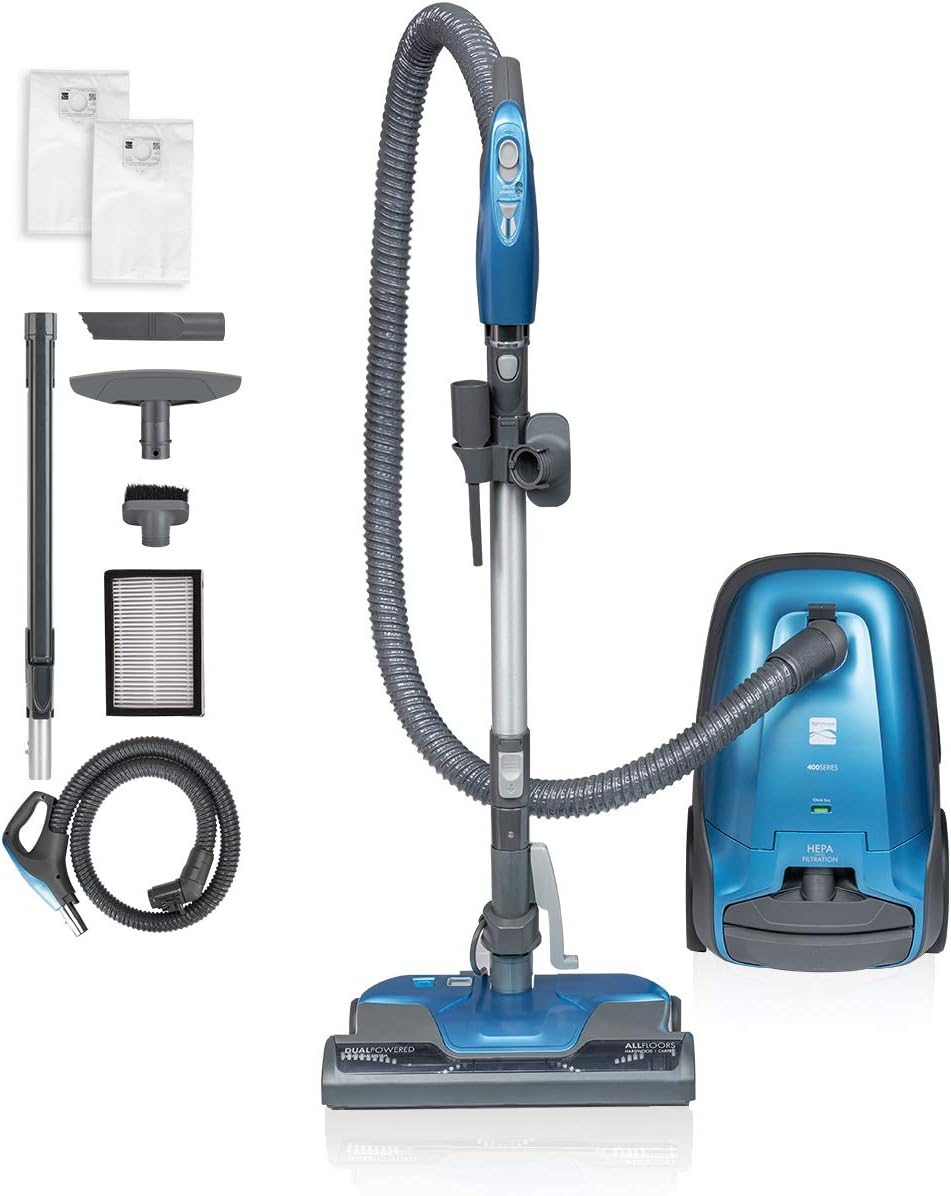
Figure 1: Kenmore BC3005 Canister Vacuum Cleaner with all included accessories, including the main unit, power nozzle, telescoping wand, hose, and various cleaning tools.
1.2 Initial Assembly Steps
- Attach the Hose: Insert the hose end into the suction inlet on the main canister unit until it clicks securely into place.
- Connect the Wand: Attach the telescoping wand to the hose handle. Ensure it locks firmly.
- Attach the Power Nozzle: Connect the power nozzle to the end of the telescoping wand.
- Install Dust Bag: Open the dust bag compartment and ensure a new HEPA dust bag is correctly installed.
For detailed visual instructions, please refer to the complete user manual PDF linked in the "Warranty & Support" section.
2. Operating Instructions
The Kenmore BC3005 is designed for efficient cleaning across various surfaces. Understand its features for optimal performance.
2.1 Power and Suction Control
The vacuum features a 2-motor system for powerful suction. Control the vacuum and adjust suction directly from the hose handle.
- Power On/Off: Press the main power button on the handle to start or stop the vacuum.
- Surface Selection: Use the switch on the handle to select between "Carpet" mode (activates brushroll) and "Floor" mode (brushroll off for hard surfaces).
- Suction Adjustment: A gradual power adjustment slider on the handle allows you to increase or decrease suction power based on cleaning needs.

Figure 2: The power nozzle features 4 height adjustments for optimal airflow and cleaning efficiency on different surfaces.
2.2 Cleaning Modes and Attachments
The Kenmore BC3005 offers versatile cleaning with its included tools:
- Main Power Nozzle: Ideal for carpets and rugs. The motorized brushroll effectively lifts dirt and debris.
- Telescoping Wand: Extends up to 9.5 feet for extended reach, allowing you to clean high areas like curtains or ceilings.
- Detachable Handle: The handle can be detached from the wand for cleaning furniture, car interiors, and tight spaces.
- On-board Tools: The vacuum includes a crevice tool, bare floor tool, and upholstery brush for specialized cleaning tasks.

Figure 3: The extended telescoping wand provides 9.5 feet of reach for above-floor cleaning, making it easy to clean curtains and high areas.

Figure 4: Included cleaning tools: Crevice Tool for tight spaces, Upholstery Brush for fabrics, and Bare Floor Tool for hard surfaces.
The 600 series model (which this BC3005 is part of) also includes a Pet PowerMate attachment, a small motorized brush specifically designed for removing pet hair from upholstery and stairs.
3. Maintenance
Regular maintenance ensures the longevity and optimal performance of your Kenmore BC3005 vacuum cleaner.
3.1 Dust Bag Replacement
The vacuum uses a bagged system. Replace the dust bag when the "Check Bag" indicator illuminates or when suction power decreases significantly. Always use genuine Kenmore replacement bags (20-53292 Q/C bag).

Figure 5: The dust bag compartment is easily accessible for quick and hygienic bag replacement.
3.2 HEPA Filter Maintenance
The Kenmore BC3005 features a Triple HEPA Filter System that traps 99.97% of debris, dander, and allergens. The HEPA filter should be checked periodically and replaced as recommended in the full user manual to maintain filtration efficiency.

Figure 6: The HEPA filtration system effectively captures fine particles, ensuring cleaner exhaust air.
3.3 Brushroll Cleaning
Regularly inspect the power nozzle's brushroll for tangled hair or debris. Clear any obstructions to ensure effective cleaning and prevent motor strain.
4. Troubleshooting
If your Kenmore BC3005 vacuum cleaner is not performing as expected, consult the following common issues:
- No Power:
- Check if the power cord is securely plugged into a working outlet.
- Ensure the power button on the handle is pressed.
- Loss of Suction:
- Check if the dust bag is full and needs replacement.
- Inspect the hose, wand, and power nozzle for blockages.
- Verify that the HEPA filter is clean and properly installed.
- Ensure the suction adjustment slider on the handle is set to a higher power level.
- Brushroll Not Spinning:
- Ensure the vacuum is in "Carpet" mode.
- Check the brushroll for obstructions (e.g., tangled hair).
- Verify the power nozzle is correctly attached to the wand.
For more comprehensive troubleshooting steps and solutions, please refer to the detailed guide in the official user manual.
5. Specifications
| Feature | Detail |
|---|---|
| Brand | Kenmore |
| Model Name | BC3005 |
| Special Feature | Lightweight, Maneuverable, Bagged, HEPA Filtration |
| Filter Type | HEPA Filter |
| Included Components | Crevice Tool, Bare Floor Tool, Upholstery Brush & 2pcs HEPA BAGS |
| Is Cordless? | No |
| Capacity | 20 Pounds |
| Wattage | 210 watts |
| Hose Length | 26 Feet |
| Cable Length | 26 Inches |
| Recommended Uses For Product | Curtain, Carpet, Bare floors |
| Form Factor | Canister |
| Color | Blue |
| Product Dimensions | 17"L x 13"W x 26"H |
| Noise Level | 78 dB |
| Amperage | 12 Amps |
| Item Weight | 19.29 pounds |
| Assembly required | Yes |
6. Warranty and Support
6.1 Product Warranty
The Kenmore BC3005 Canister Vacuum Cleaner is covered by a 1-year manufacturer's warranty. This warranty covers defects in materials and workmanship under normal use. Please retain your proof of purchase for warranty claims.
6.2 Customer Support
For further assistance, technical support, or warranty inquiries, please contact Kenmore customer service. You can also find additional resources and FAQs on the official Kenmore website.
Official User Manual: For a complete guide, including detailed diagrams, safety information, and comprehensive troubleshooting, please download the Kenmore BC3005 User Manual (PDF).
Related documentsBC3005


Ask a question about this manual
Ask about setup, troubleshooting, compatibility, parts, safety, or missing instructions. Manuals+ will review the question and use this page’s manual context to help answer it.