
1. Introduction
This manual provides detailed instructions for the installation, operation, and troubleshooting of your ELUTENG PCIe to USB 3.0 2-Port Expansion Card. This card allows you to add two high-speed USB 3.0 ports to your desktop computer, enhancing connectivity for various peripherals.
2. Product Features
- 2-Port USB 3.0 Expansion: Easily adds two USB 3.0 ports to your PCIe-compatible desktop computer.
- High-Speed 5Gbps Transmission: Supports a maximum theoretical transfer speed of 5Gbps, utilizing a high-quality main chip for stable and fast data transfer. Backward compatible with USB 2.0 devices.
- Wide PCIe Slot Compatibility: Supports PCI-E X1, X4, X8, and X16 sockets.
- Enhanced Stability: Each USB interface features a stable solid capacitor to ensure consistent power delivery, contributing to high stability and a long product lifespan.
- Comprehensive Protection: Individual overcurrent and short-circuit protection for each interface safeguards connected devices and your computer.
- UASP Support: Supports USB Attached SCSI Protocol for improved data transfer performance.

Image: The ELUTENG PCIe USB 3.0 card highlighting its 5Gbps maximum speed and compatibility with various USB devices.

Image: Detail of the card's main control chip, designed for efficient and high-speed data transmission.
3. Package Contents
Please check the package for the following items:
- ELUTENG USB 3.0 Expansion Card x 1
- Mounting Screw x 1
- Driver CD x 1
- Low-Profile Bracket x 1 (for small form factor PCs)
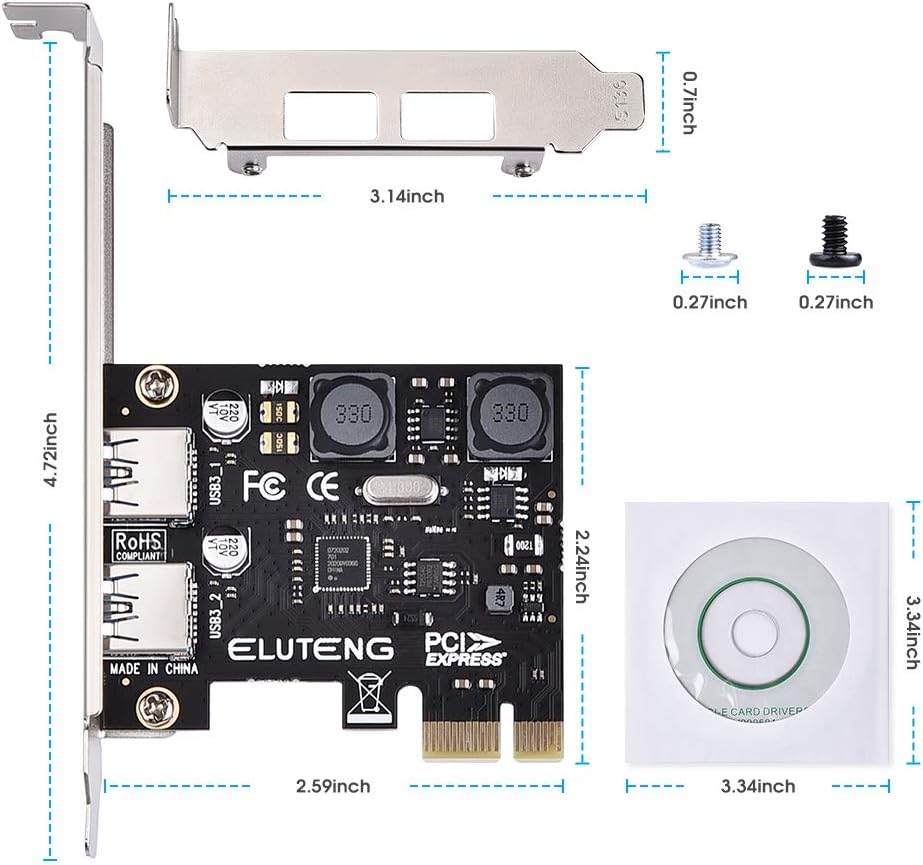
Image: The expansion card, mounting screws, and driver CD, illustrating the package contents and card dimensions.
4. System Requirements
- Operating System: Windows 10 / 8.1 / 8 / 7 / XP (64-bit and 32-bit), LINUX.
- Available Slot: One available PCI Express (PCIe) X1, X4, X8, or X16 slot. Note: Not compatible with older PCI slots.
- Form Factor: Compatible with standard size tower chassis. Not suitable for small form factor computers unless using the included low-profile bracket.
- Compatibility: Not compatible with MAC OS.
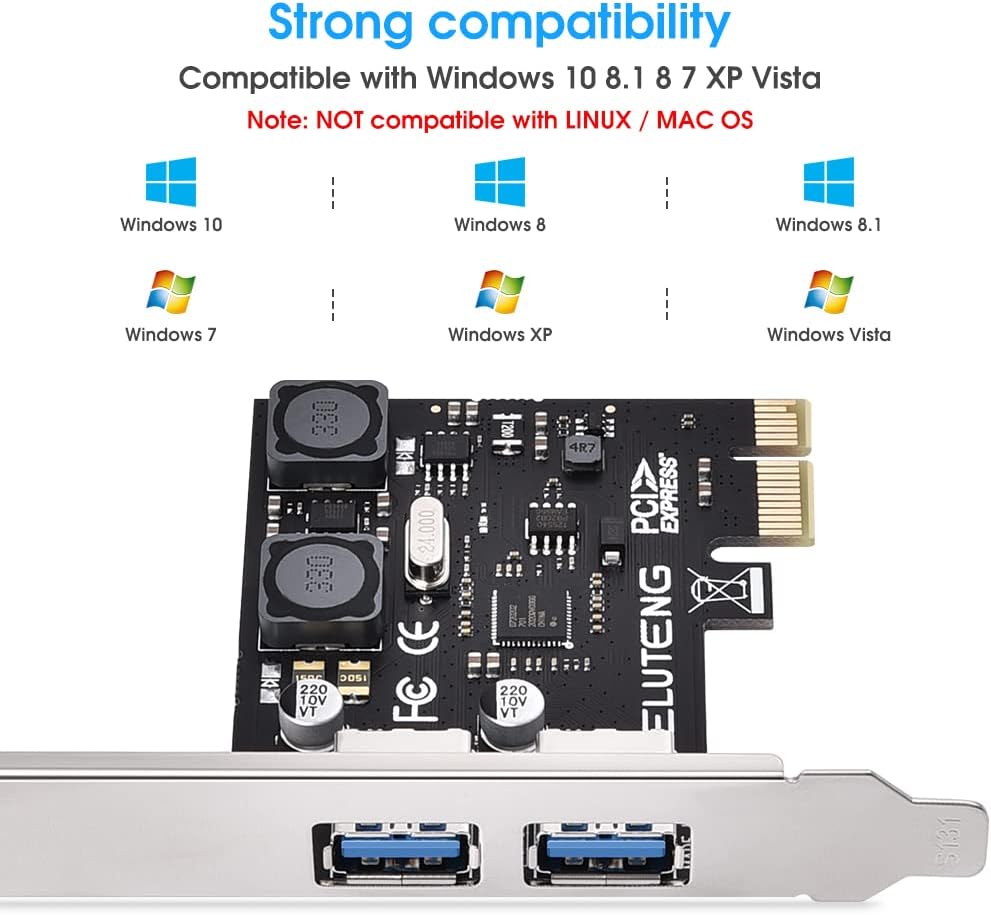
Image: Operating system compatibility, showing support for various Windows versions. Please note that while the image states 'NOT compatible with LINUX', the product description and user reviews indicate Linux compatibility.

Image: Supported Windows operating systems.
5. Installation Guide
Follow these steps to install the ELUTENG PCIe to USB 3.0 Expansion Card into your desktop computer:
- Power Off: Shut down your computer completely and disconnect the power supply cable from the wall outlet.
- Open Case: Remove the side panel of your computer case. Typically, this involves unscrewing two screws at the back of the chassis and sliding the cover out.
- Locate PCIe Slot: Identify an available PCI Express (PCIe) slot on your motherboard. Ensure it is a PCIe X1, X4, X8, or X16 slot. Do not attempt to install in an older PCI slot.
- Insert Card: Carefully align the expansion card with the chosen PCIe slot and firmly press it down until it is securely seated.
- Secure Card: Use a screw to fasten the card's metal bracket to the computer chassis.
- Close Case: Replace the computer's side panel and secure it with the screws.
- Power On: Reconnect the power supply cable and power on your computer.

Image: Visual steps for hardware installation, from opening the PC case to securing the card in a PCIe slot.

Image: Illustration of supported PCIe interface types (X1, X4, X8, X16) and a reminder to avoid PCI slots.
6. Driver Installation
Driver installation varies by operating system:
- Windows 10 / 8.1 / 8: These operating systems are typically plug-and-play. No driver installation is required. The card should be recognized automatically.
- Windows 7 / XP / Vista: For these systems, you will need to install the driver manually.
- Insert the provided Driver CD into your computer's optical drive.
- Navigate to the CD content and locate the driver setup file.
- Run the setup file and follow the on-screen instructions to complete the driver installation.
- Restart your computer after installation if prompted.
- Linux: The card is compatible with Linux systems and typically works out-of-the-box without additional driver installation.
If you encounter issues, try installing the card in a different PCIe slot and restarting your computer.
7. Operation
Once the ELUTENG PCIe to USB 3.0 Expansion Card is installed and drivers (if necessary) are in place, you can connect your USB 3.0 and USB 2.0 compatible devices to the newly added ports. The card supports simultaneous use of both ports at high speeds.
- Connect USB 3.0 devices (e.g., external hard drives, flash drives) to experience data transfer speeds up to 5Gbps.
- Connect USB 2.0 devices; the card is backward compatible and will operate them at their native speeds (up to 480Mbps).
- The individual power supply design for each port ensures stable power for connected devices.
8. Troubleshooting
- Card Not Detected:
- Ensure the card is fully seated in the PCIe slot.
- Try installing the card in a different PCIe slot.
- Verify that your motherboard's BIOS settings are configured to enable PCIe slots.
- Devices Not Recognized / Slow Speeds:
- For Windows 7/XP/Vista, ensure the correct drivers are installed.
- Ensure you are using high-quality USB 3.0 cables for USB 3.0 devices.
- Check if the connected device requires external power.
- The actual speeds may be limited by the operating system settings or the connected device/motherboard.
- Overcurrent / Short-Circuit Warnings:
- Disconnect all USB devices and reconnect them one by one to identify the faulty device.
- Ensure no foreign objects are in the USB ports.
9. Specifications
| Model Number | YDC-PEC2P-USB3-EU |
| Interface | PCI Express (PCIe) X1 / X4 / X8 / X16 |
| USB Ports | 2 x USB 3.0 |
| Max Transfer Speed | 5 Gbps (USB 3.0) |
| Backward Compatibility | USB 2.0 / 1.1 |
| Operating System Support | Windows 10 / 8.1 / 8 / 7 / XP (64-bit & 32-bit), LINUX |
| Compatible Devices | Personal Computer, Laptop (with available PCIe slot) |
10. Maintenance
The ELUTENG PCIe to USB 3.0 Expansion Card requires minimal maintenance. Keep the card free from dust and moisture. If cleaning is necessary, use a soft, dry cloth. Do not use liquid cleaners or solvents. Ensure proper airflow within your computer case to prevent overheating.
11. Important Notes
- The USB 3.0 expansion card does not support old PCI slots.
- The card is compatible with standard tower chassis. For small form factor computers, use the included low-profile bracket.
- Not compatible with MAC OS.
- To achieve optimal USB 3.0 transfer rates, use high-quality USB 3.0 cables.
12. Warranty and Support
For warranty information or technical support, please refer to the documentation provided with your purchase or contact ELUTENG customer service through their official website. Keep your purchase receipt for warranty claims.