
1. Introduction
Thank you for choosing the IDANCE MY DUO STAND. This versatile accessory is designed to enhance your content creation, live streaming, photography, and video recording experiences. It features an adjustable LED ring light, a universal phone holder, and a sturdy clamp for easy setup on various surfaces. Please read this manual carefully to ensure proper use and maintenance of your device.
2. Safety Information
- Do not expose the device to water or excessive moisture.
- Avoid placing the device near heat sources or in direct sunlight for prolonged periods.
- Use only the provided or recommended power sources (USB).
- Keep out of reach of children.
- Do not attempt to disassemble or repair the device yourself. Contact qualified service personnel if needed.
- Ensure the clamp is securely fastened to a stable surface before attaching your phone or adjusting the arms.
3. Product Overview and Components
The IDANCE MY DUO STAND consists of several key components designed for optimal functionality.
- LED Ring Light: A 9cm diameter light with adjustable brightness and color temperatures.
- Flexible Arm for LED Ring Light: A 25.6-inch flexible arm for positioning the light.
- Universal Phone Holder: Compatible with most smartphones, featuring 360-degree rotation.
- Flexible Arm for Phone Holder: A 14-inch flexible arm for positioning your phone.
- Easy Clamp Bracket: A sturdy clamp for secure attachment to tables or desks.
- USB Power Cable: Integrated cable for power supply.
- Wireless Remote Control: Bluetooth-enabled remote for camera activation.

Figure 3.1: Overview of the IDANCE MY DUO STAND, showing the LED ring light, phone holder, flexible arms, clamp, and the included wireless remote control.
4. Setup Instructions
-
Attach the Clamp: Securely fasten the Easy Clamp Bracket to the edge of a table, desk, or other stable surface. Ensure it is tight and stable to prevent accidental tipping.

Figure 4.1: The Easy Clamp Bracket securely attached to a table edge, providing a stable base for the stand.
-
Insert Phone: Gently expand the universal phone holder and insert your smartphone. Ensure the phone is seated firmly.

Figure 4.2: The versatile phone clip, designed to hold various cell phones, attached to its flexible goose neck arm.
- Connect Power: Plug the integrated USB power cable into a compatible USB power source (e.g., computer USB port, USB wall adapter, power bank).
-
Pair Wireless Remote Control:
- Turn on the wireless remote control.
- Enable Bluetooth on your smartphone.
- Search for available Bluetooth devices and select the remote control (e.g., "Camera 360" or similar).
- Once paired, you can use the remote to trigger your phone's camera shutter.

Figure 4.3: The wireless remote control, used to activate photo shooting from a distance, shown with the stand and phone.
5. Operating Instructions
-
Adjusting the LED Ring Light:
- The LED ring light offers 3 lighting modes: White light, Natural light, and Warm light.
- It also has 10 brightness levels.
- Use the controls on the integrated USB cable (or the Bluetooth regulator if applicable) to cycle through modes and adjust brightness.
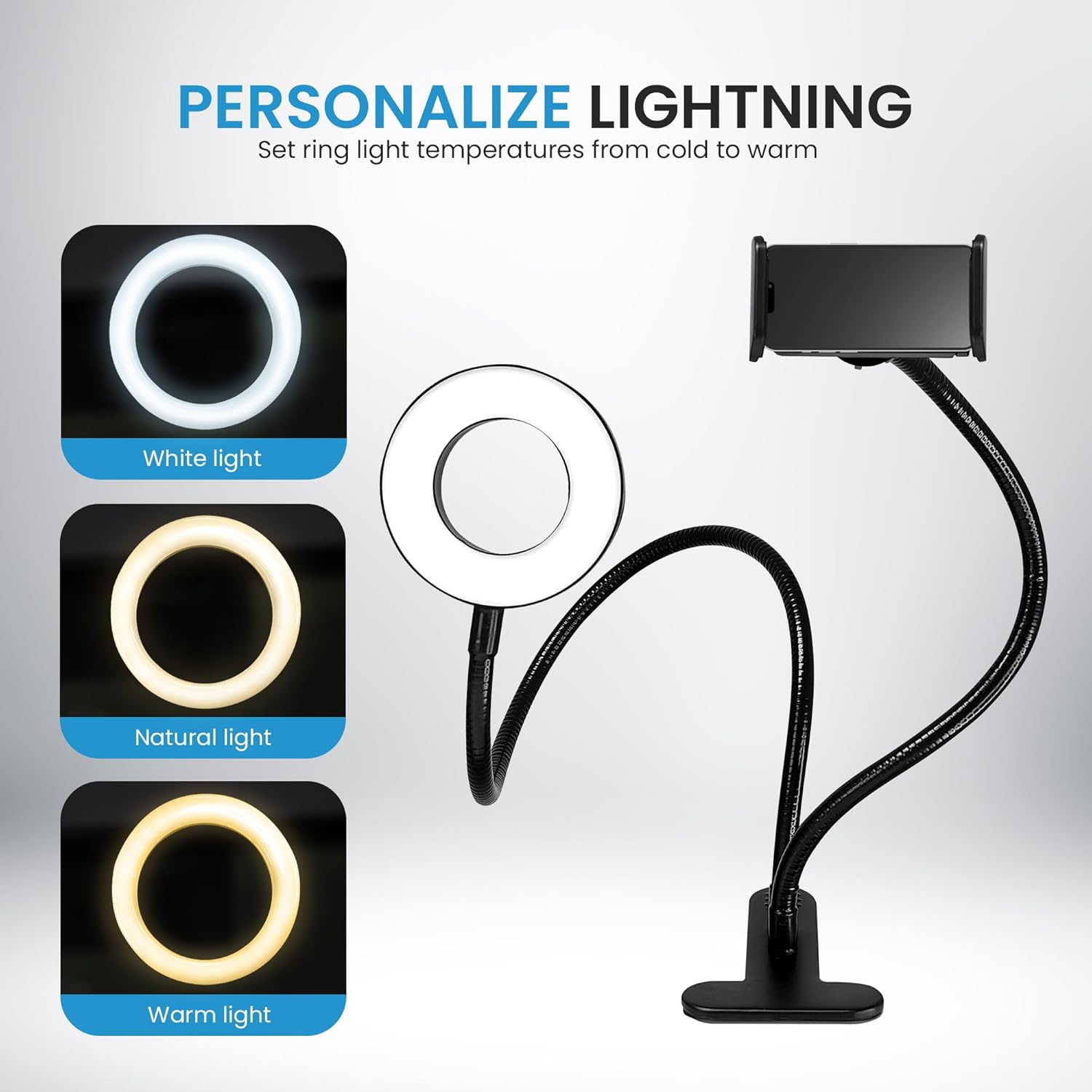
Figure 5.1: Personalize your lighting by setting ring light temperatures from cold (White light) to warm (Warm light), with a Natural light option in between.

Figure 5.2: Visual representation of the White, Natural, and Warm light modes available on the LED ring light.
-
Positioning the Light and Phone:
- Both the LED ring light and the phone holder are mounted on strong, flexible goose-neck arms.
- Carefully bend and adjust the arms to achieve your desired angle and height for optimal lighting and camera positioning.
- The phone holder allows 360-degree rotation for horizontal or vertical phone orientation.

Figure 5.3: The 3.5-inch adjustable LED ring light and phone holder can extend up to 26.77 inches (approximately 68 cm) in height, allowing for flexible positioning.

Figure 5.4: Example of the IDANCE MY DUO STAND in use for live streaming, demonstrating optimal phone and light positioning.
6. Maintenance
- Cleaning: Use a soft, dry cloth to clean the surface of the stand and light. Do not use abrasive cleaners or solvents.
- Storage: When not in use, store the stand in a cool, dry place away from direct sunlight.
- Cable Care: Avoid sharp bends or kinks in the USB cable to prevent damage.
7. Troubleshooting
| Problem | Possible Cause | Solution |
|---|---|---|
| LED light does not turn on. | No power supply or loose connection. | Ensure the USB cable is securely plugged into a working USB port or power adapter. Try a different USB port or power source. |
| Wireless remote control not pairing. | Bluetooth not enabled on phone, remote not in pairing mode, or battery low. | Ensure Bluetooth is enabled on your phone. Turn the remote off and on again to enter pairing mode. Check or replace the remote's battery. |
| Stand is unstable. | Clamp not securely fastened or surface is unsuitable. | Tighten the clamp firmly to a stable, flat surface. Avoid attaching to thin or uneven edges. |
8. Specifications
| Feature | Detail |
|---|---|
| Model Number | MS1808 |
| Brand | IDANCE |
| LED Ring Light Diameter | 9 cm (3.5 inches) |
| Lighting Modes | 3 (White, Natural, Warm) |
| Brightness Levels | 10 |
| Connectivity | USB (for light), Bluetooth (for remote) |
| Phone Holder Arm Length | 14 inches (approx. 35.5 cm) |
| LED Ring Light Arm Length | 25.6 inches (approx. 65 cm) |
| Max Height (Extended) | 66.5 cm (26.18 inches) |
| Product Dimensions (Compact Setup) | 10.5 cm (diameter) x 7.5 cm (width) x 66.5 cm (height) |
| Weight | 0.6 kg |
| UPC | 886898017135 |
Note: Product dimensions and weight may vary slightly due to manufacturing tolerances.
9. Warranty and Support
For warranty information and customer support, please refer to the documentation provided with your purchase or visit the official IDANCE website. Keep your proof of purchase for any warranty claims.
For further assistance, you may contact IDANCE customer service through their official channels.