Introduction
This manual provides essential information for the proper use and maintenance of your JBL Club Pro Plus True Wireless Headphones. Please read it thoroughly before using your device.
What's in the Box
Your JBL Club Pro Plus package includes the following items:
- 1 x JBL Club Pro+ TWS Earbuds
- 1 x Charging case
- 1 x Type-C to Type-A charging cable
- 3 x Sizes of eartips (S, M, L)
- 1 x Quick Start Guide / Safety Sheet
- 1 x Warranty / Warning

Image: The JBL Club Pro Plus earbuds are shown inside their open charging case, highlighting the compact design and the earbuds' placement.

Image: A USB-C to USB-A charging cable and three pairs of silicone eartips (small, medium, large) are displayed, which are included with the headphones.
Setup
1. Charging the Headphones
Before first use, fully charge your JBL Club Pro Plus headphones and charging case. The charging case provides an additional 24 hours of battery life, extending the earbuds' 8-hour charge.
- Connect the provided Type-C to Type-A charging cable to the charging port on the case and a power source.
- The charging time is approximately 2 hours for a full charge.
- The case also supports wireless charging.

Image: The bottom of the JBL Club Pro Plus charging case is shown, featuring the USB-C charging port and a small LED indicator.
2. Pairing with Your Device
The JBL Club Pro Plus headphones offer zero-hassle connectivity, allowing seamless pairing to your device as soon as you open the case.
- Open the charging case. The earbuds will automatically enter pairing mode.
- On your device (smartphone, tablet, etc.), go to Bluetooth settings.
- Select "JBL Club Pro Plus" from the list of available devices to connect.
- Once connected, you will hear an audio prompt, and the LED indicators on the earbuds will confirm successful pairing.
For seamless connectivity, ensure your device's Bluetooth is enabled.
3. Choosing the Right Eartips
Proper eartip fit is crucial for optimal sound quality and call performance, as well as for effective noise cancellation. The package includes three sizes of eartips (S, M, L).
- Experiment with different sizes to find the pair that provides the most snug and comfortable fit in your ear canals.
- A snug fit helps seal the ear, enhancing bass response and noise isolation.
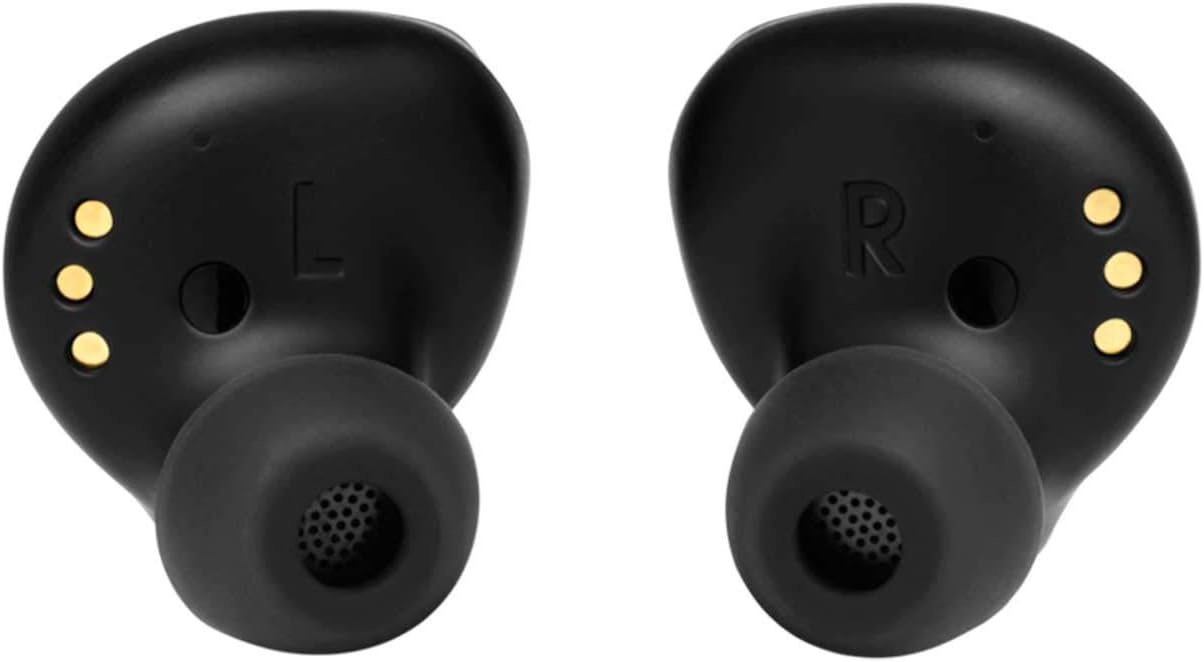
Image: The JBL Club Pro Plus earbuds are displayed with various sizes of eartips, illustrating the options for a customized fit.
Operating Instructions
1. Basic Controls
The JBL Club Pro Plus features touch controls for media playback and call management. Specific functions can often be customized via the JBL Headphones app.
- Play/Pause: Tap once on either earbud.
- Next Track: Double-tap the right earbud.
- Previous Track: Double-tap the left earbud.
- Answer/End Call: Tap once on either earbud.
- Reject Call: Press and hold either earbud.
The headphones also feature auto-pause when an earbud is removed from your ear.
2. Active Noise Cancelling (ANC) and Smart Ambient
Control how much of the outside world you want to let in with Adaptive Noise Cancelling and Smart Ambient features.
- Active Noise Cancelling (ANC): Reduces external noise for an immersive listening experience.
- Smart Ambient: Allows you to hear your surroundings while still enjoying your audio, useful for awareness in busy environments.
- These modes can typically be toggled through the JBL Headphones app or via customizable touch controls on the earbuds.
Video: This video demonstrates the JBL Club Pro Plus features, including Active Noise Cancelling and Smart Ambient modes, showing how they enhance the user's audio experience in various environments.
3. Voice Assistant Integration
Access your preferred voice assistant (Google Assistant or Amazon Alexa) directly from your headphones.
- Set up your preferred voice assistant through the JBL Headphones app.
- Activate the voice assistant using the designated touch control (often a press and hold gesture).
Maintenance
To ensure the longevity and optimal performance of your JBL Club Pro Plus headphones, follow these maintenance guidelines:
- Cleaning: Regularly clean the earbuds and charging case with a soft, dry cloth. Avoid using harsh chemicals or abrasive materials.
- Eartips: Remove and clean the eartips periodically with mild soap and water. Ensure they are completely dry before reattaching.
- Water Resistance: The headphones are water resistant, but not waterproof. Avoid submerging them in water. Dry them thoroughly if they get wet from sweat or light splashes.
- Storage: Store the headphones in their charging case when not in use to protect them and keep them charged.
Troubleshooting
If you encounter issues with your JBL Club Pro Plus headphones, try the following solutions:
- No Sound/Connectivity Issues:
- Ensure both earbuds are charged.
- Check that Bluetooth is enabled on your device and the headphones are paired.
- Try unpairing and re-pairing the headphones with your device.
- Restart your device.
- Poor Sound Quality:
- Ensure eartips are properly fitted to create a good seal in your ear.
- Clean any debris from the earbud nozzles.
- Check the audio source for quality issues.
- Earbuds Falling Out:
- Experiment with different eartip sizes (S, M, L) to find the most secure fit for your ears.
- Ensure the earbuds are inserted correctly and twisted gently to lock them in place.
- Charging Problems:
- Verify the charging cable is securely connected to both the case and the power source.
- If using wireless charging, ensure the case is correctly placed on a compatible wireless charger.
- Clean the charging contacts on both the earbuds and inside the case.
Specifications
| Feature | Detail |
|---|---|
| Model Name | JBL Club Pro Plus |
| Noise Control | Active Noise Cancellation |
| Connectivity Technology | Bluetooth, Wireless |
| Wireless Communication Technology | Bluetooth |
| Battery Life | 8 Hours (earbuds), 24 Hours (with charging case) |
| Charging Time | 2 Hours |
| Water Resistance Level | Water Resistant |
| Control Type | Media Control, Voice |
| Special Feature | Microphone Included, Noise Cancellation, Wireless Charging |
| Item Weight | 2.4 Ounces |
| Manufacturer | JBL |
Warranty and Support
Your JBL Club Pro Plus headphones come with a manufacturer's warranty. Please refer to the "Warranty / Warning" document included in your package for detailed terms and conditions.
For further support, product registration, or to download the JBL Headphones app, please visit the official JBL website or contact their customer service.
The JBL Headphones app is available on both Google Play and the Apple App Store, offering enhanced control and personalization of your listening experience.


