
1. Product Overview
The Aqonsie Solar Shed Light is a versatile indoor/outdoor lighting solution featuring 176 LEDs, motion sensing capabilities, and remote control. Designed for areas without direct power access, it utilizes a separate solar panel to charge during the day and provide illumination at night or even during the day in specific modes. Its split design allows for flexible placement of the light fixture and solar panel, making it ideal for sheds, gazebos, barns, garages, shops, and more.

Image 1.1: The Aqonsie Solar Shed Light installed in a pergola, chicken coop, tent, and patio, demonstrating its versatile application in different environments.
2. Safety Information
Please read all safety instructions carefully before installation and use. Failure to follow these instructions may result in electric shock, fire, or serious injury.
- Ensure the solar panel is installed in a location that receives maximum direct sunlight for optimal charging performance.
- Do not submerge the light fixture or solar panel in water. While the product is IP65 waterproof, it is designed to withstand rain and splashes, not submersion.
- Keep the product away from open flames or high heat sources.
- Do not attempt to disassemble or modify the product. Repairs should only be performed by qualified personnel.
- Keep out of reach of children.
- Clean the solar panel regularly to ensure efficient charging.
3. What's in the Box
Verify that all components are present before beginning installation:
- Solar Panel (with integrated cable)
- Pendant Light Fixture(s) (Quantity may vary based on package)
- Remote Control
- Mounting Screws and Anchors
- Instruction Manual (this document)
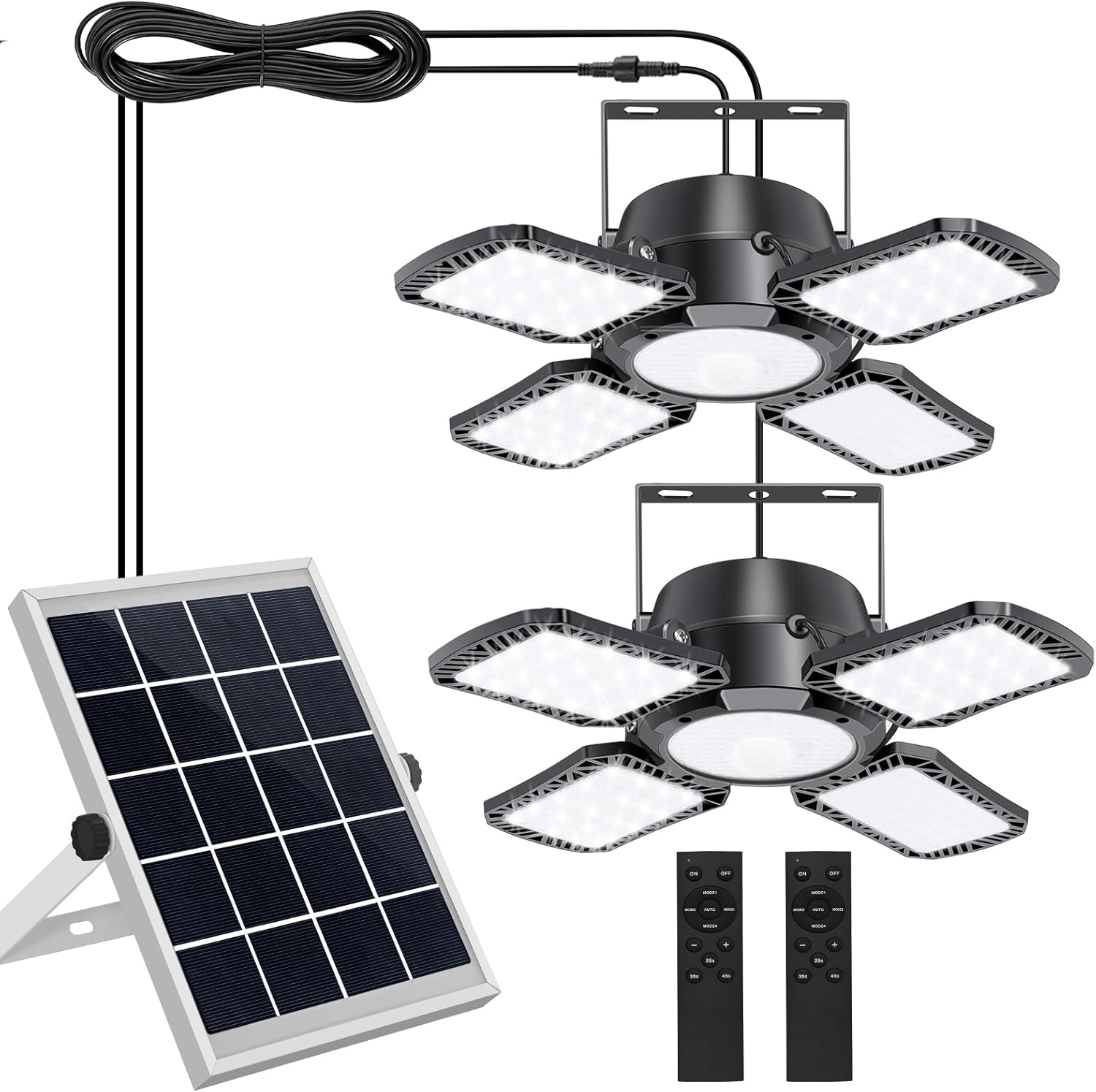
Image 3.1: All components included in the Aqonsie Solar Shed Light package, showing the solar panel, two pendant lights, and two remote controls.
4. Setup and Installation
The Aqonsie Solar Shed Light features a split design, allowing the solar panel and light fixture to be installed separately. The waterproof wire length is 16.5 feet, providing ample flexibility for placement.
4.1 Choosing an Installation Location
- Solar Panel: Select a location that receives direct sunlight for at least 6-8 hours daily. Avoid shaded areas from trees, buildings, or other obstructions. The panel can be mounted on a wall or placed on a flat surface using its adjustable stand.
- Light Fixture: The light can be hung or mounted directly on a wall or ceiling in your desired indoor or outdoor location (e.g., shed, garage, gazebo). Ensure the 16.5-foot cable can reach from the solar panel to the light fixture.
4.2 Installation Steps
- Mount the Solar Panel: Use the provided screws and anchors to securely mount the solar panel in your chosen sunny location. Adjust the angle of the panel to face the sun for maximum exposure.
- Mount the Light Fixture: Secure the light fixture to your desired surface using the appropriate mounting hardware. Ensure it is stable and positioned to illuminate the intended area.
- Connect the Cables: Connect the cable from the solar panel to the light fixture. Ensure the waterproof connector is securely fastened to prevent water ingress.
- Power On: Locate the ON/OFF switch on the light fixture and turn it to the 'ON' position. The light is now ready for operation via the remote control.

Image 4.1: Detailed diagram of the light fixture and solar panel, including dimensions, waterproof wire connector, tightness adjustment, ON/OFF switch, and LED count.

Image 4.2: Illustration of the waterproof wire connector, ensuring a secure and weather-resistant connection between the solar panel and the light fixture.
5. Operating Instructions
The Aqonsie Solar Shed Light offers 5 lighting modes and motion sensing functionality, controllable via the included remote.
5.1 Lighting Modes
Use the remote control to select your desired lighting mode:
- MODE 1 (Nighttime Motion Sensor - Dim to Bright): At night, the light stays dim and brightens to full intensity when motion is detected.
- MODE 2 (Nighttime Motion Sensor - Off to Bright): At night, the light remains off and turns on to full intensity when motion is detected.
- MODE 3 (Constant ON - Nighttime): The light stays constantly on at a set brightness level throughout the nighttime.
- MODE 4 (Daytime Motion Sensor - Off to Bright): During the daytime, the light remains off and turns on to full intensity for 15 seconds when motion is detected, then turns off.
- AUTO MODE 5 (Stays Light All Day): The light stays on all day. It automatically switches to MODE 4 when the battery level drops to 50%.
Note: Modes 1, 2, and 3 only function when the solar panel is covered or in darkness (at night). Modes 4 and AUTO MODE 5 are available for daytime use.

Image 5.1: Visual representation of the five distinct lighting modes, showing how the light behaves with and without motion detection during day and night.

Image 5.2: Examples of the solar light operating in daytime modes, such as in a garage or on a patio, highlighting its functionality beyond just nighttime use.
5.2 Remote Control Functions
The remote control allows you to manage the light's settings conveniently:
- ON/OFF: Turn the light on or off.
- MODE 1-5 Buttons: Directly select one of the five lighting modes.
- +/- Buttons: Adjust the brightness level of the light.
- 25s/35s/45s Buttons: Set the induction lighting delay time (how long the light stays on after motion is detected) for Modes 1, 2, and 4.

Image 5.3: The remote control, showing buttons for power, mode selection, brightness adjustment, and motion sensor delay time settings (25s, 35s, 45s).
5.3 Angle Adjustment
The four LED panels on the light fixture can be adjusted 120° up and down, allowing you to direct the light precisely where needed for optimal illumination.
6. Maintenance
Regular maintenance ensures optimal performance and longevity of your solar shed light.
- Clean the Solar Panel: Periodically wipe the surface of the solar panel with a soft, damp cloth to remove dust, dirt, leaves, or snow. A clean panel ensures maximum sunlight absorption and charging efficiency.
- Check Connections: Occasionally inspect the cable connections between the solar panel and the light fixture to ensure they remain secure and waterproof.
- Battery Care: While the battery is integrated, ensure the light is regularly exposed to sunlight to maintain battery health. Avoid prolonged periods of storage in a discharged state.
7. Troubleshooting
If you encounter issues with your Aqonsie Solar Shed Light, refer to the following common problems and solutions:
| Problem | Possible Cause | Solution |
|---|---|---|
| Light does not turn on at night. | Insufficient solar panel charging. | Ensure solar panel is in direct sunlight for 6-8 hours daily. Clean the solar panel surface. |
| Light is dim or flickers. | Low battery charge. | Allow the solar panel to charge for a full day in direct sunlight. |
| Motion sensor not working. | Sensor obstructed or incorrect mode selected. | Ensure sensor is clear of obstructions. Verify Mode 1, 2, 4, or 5 is selected. |
| Remote control not responding. | Battery in remote is dead or light is off. | Replace remote control battery. Ensure the light's main ON/OFF switch is in the 'ON' position. |
| Light constantly resets mode. | Possible internal issue or low battery. | Ensure full charge. If problem persists, contact customer support. |
If the issue persists after trying these solutions, please contact Aqonsie customer support for further assistance.
8. Specifications
| Feature | Specification |
|---|---|
| Brand | Aqonsie |
| Model Number | 751300920771 |
| Color | Black |
| Material | Acrylonitrile Butadiene Styrene (ABS) |
| Light Fixture Form | Pendant |
| Indoor/Outdoor Usage | Indoor / Outdoor |
| Power Source | Solar Powered |
| Control Method | Remote Control |
| Light Source Type | LED (176 LEDs) |
| Light Color | White |
| Brightness | 1000 Lumen |
| Water Resistance Level | IP65 Waterproof |
| Cable Length | 16.5 feet |
| Adjustability | 120° adjustable LED panels |
| Batteries | 1 Lithium Polymer battery (included) |
| Item Weight | 4.06 pounds |
| Package Dimensions | 12.6 x 7.76 x 6.26 inches |
9. Warranty and Support
For warranty information or technical support, please refer to the product packaging or contact Aqonsie customer service directly. Keep your purchase receipt as proof of purchase.
Additional accessories such as extension cords (ASIN: B0DKXD5MCL) and replacement remote controls (ASIN: B0DNYL1GTQ) may be available for purchase separately.