
Cooler Master V850 SFX Gold
Cooler Master V850 SFX Gold 850W Modular Power Supply User Manual
Model: V850 SFX Gold (MPY-8501-SFHAGV-3U1)
Introduction
The Cooler Master V850 SFX Gold is an 850-watt modular power supply designed for small form factor (SFX) systems. It features 80 Plus Gold efficiency, a fluid dynamic bearing (FDB) fan, and full-modular cabling, including a 90° 12VHPWR PCIe 5.1 connector. This manual provides essential information for the proper installation, operation, and maintenance of your power supply unit.
Safety Information
Please read and understand the following safety precautions before installing or operating the power supply:
- Ensure the power supply is disconnected from the AC power outlet before installation or maintenance.
- Do not open the power supply unit. High voltages are present inside, and opening the unit will void the warranty.
- Install the power supply in a well-ventilated area, away from heat sources and moisture.
- Use only the modular cables provided with the power supply. Using incompatible cables can cause damage to the PSU and connected components.
- Ensure all connectors are securely seated before powering on the system.
- This product is designed for use in computer systems only. Do not use it for any other purpose.
Package Contents
Verify that all items are present in your package:
- Cooler Master V850 SFX Gold Power Supply Unit
- Modular Cable Set (MB 24-pin, CPU 4+4-pin, CPU 8-pin, PCI-e 6+2-pin, Peripheral 4-pin, SATA 15-pin, 12V-2x6)
- SFX to ATX Bracket
- Mounting Screws
- AC Power Cord
- User Manual (this document)
Setup and Installation
1. Physical Installation
The V850 SFX Gold is designed for small form factor (SFX) cases. An included SFX to ATX bracket allows installation into standard ATX cases if desired.
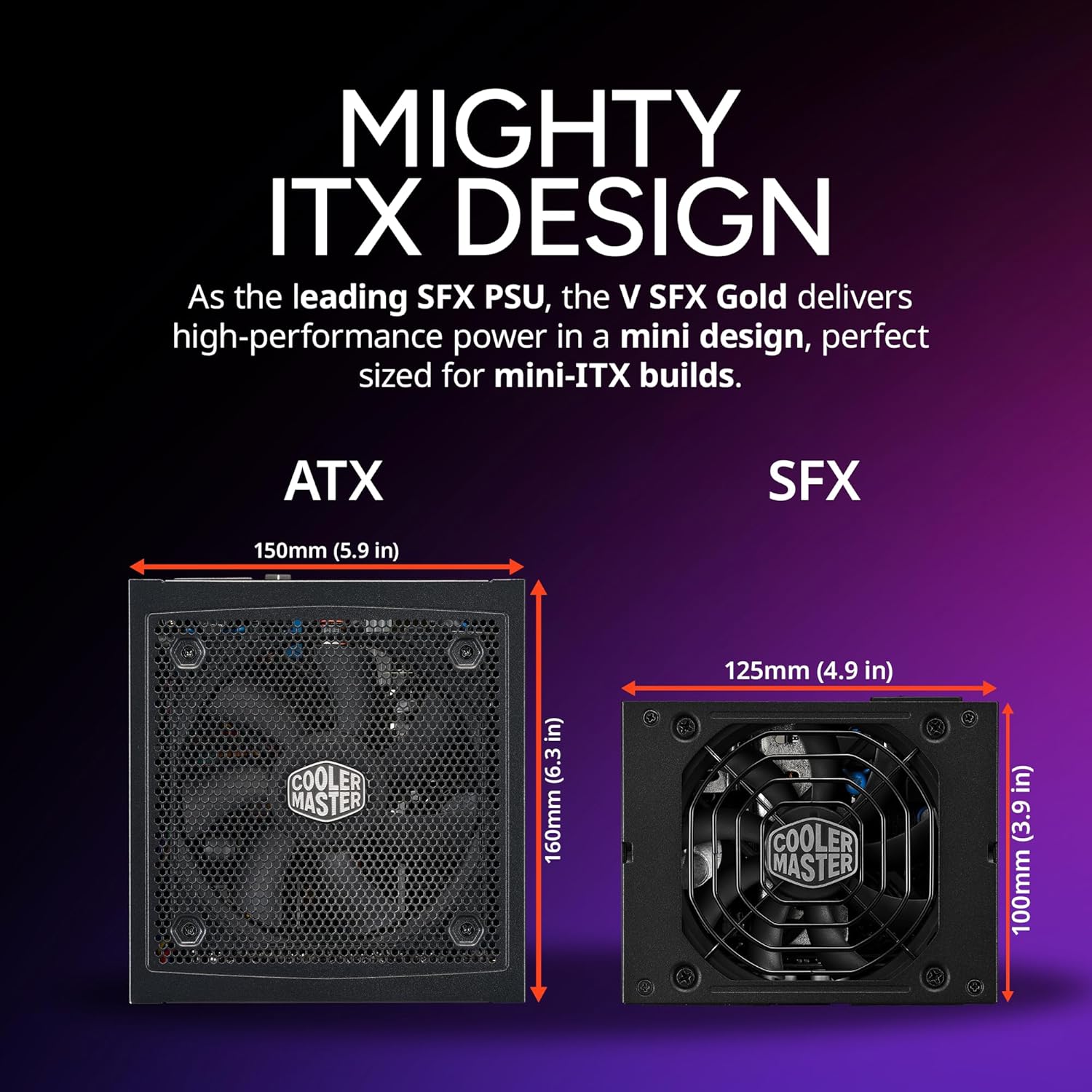
Image: Comparison of ATX and SFX power supply dimensions. The SFX unit measures 125mm (4.9 in) x 100mm (3.9 in).
- Ensure your computer case is compatible with SFX power supplies. If installing in an ATX case, attach the SFX to ATX bracket to the power supply using the provided screws.
- Slide the power supply into the designated PSU bay in your computer case.
- Secure the power supply to the case using the mounting screws.
2. Modular Cable Connection
The V850 SFX Gold is fully modular, allowing you to connect only the cables necessary for your system, reducing clutter and improving airflow.

Image: Top view of the Cooler Master V850 SFX Gold power supply, highlighting the modular cable connection ports.

Image: Illustration of the various modular cables and their lengths provided with the V850 SFX Gold power supply.
- Identify the necessary cables for your motherboard, CPU, graphics card(s), and storage devices.
- Connect the appropriate cables to the labeled ports on the power supply. Ensure a firm connection.
- Route the cables neatly within your case to their respective components.
- Connect the cables to your motherboard (24-pin ATX, 4+4-pin/8-pin EPS), graphics card(s) (PCI-e 6+2-pin or 12V-2x6), and storage devices (SATA, Peripheral).
3. 12VHPWR PCIe 5.1 Connector
The V850 SFX Gold includes a 90° 12VHPWR PCIe 5.1 connector, designed for improved electrical durability and safety with modern high-power graphics cards.

Image: Detailed view of the 90° 12VHPWR PCIe 5.1 connector, emphasizing its design for enhanced durability.
When connecting the 12VHPWR cable to your graphics card, ensure it is fully seated and there is no bending or strain near the connector. The 90° design helps manage cable routing in compact spaces.
4. Power Connection
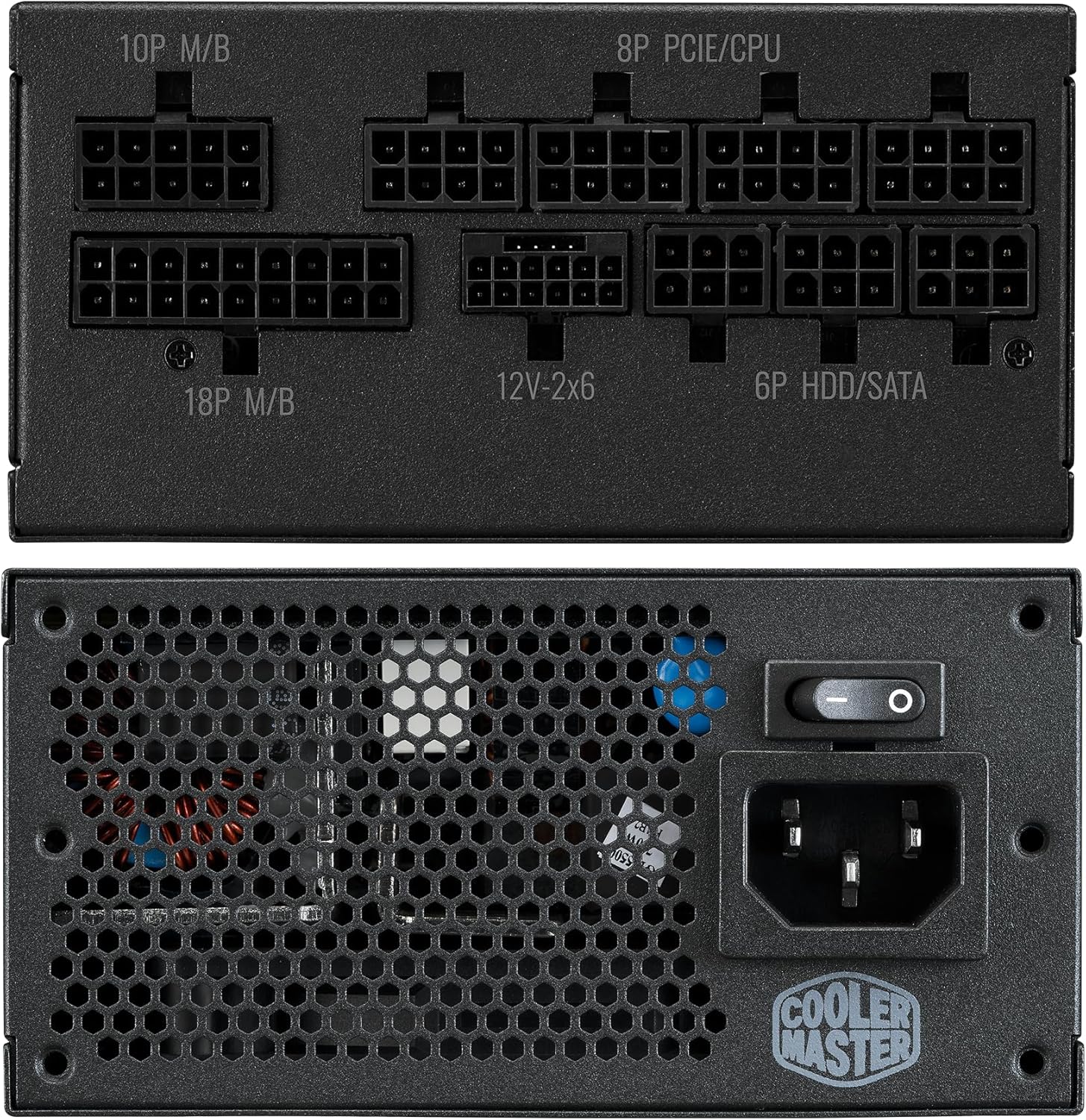
Image: Rear panel of the power supply, showing the AC power input and the main power switch.
- After all internal connections are made, connect the AC power cord to the power supply's inlet.
- Plug the other end of the AC power cord into a grounded wall outlet.
- Ensure the power switch on the back of the power supply is in the "OFF" (O) position before plugging into the wall.
- Once all connections are secure, flip the power switch to the "ON" (I) position.
Operating Instructions
The Cooler Master V850 SFX Gold is designed for reliable and efficient operation.
Powering On/Off
- To power on your system, ensure the PSU switch is in the "ON" (I) position, then press the power button on your computer case.
- To power off, shut down your operating system normally. For complete power disconnection, flip the PSU switch to the "OFF" (O) position and unplug the AC cord.
Efficiency and Cooling
This power supply features 80 Plus Gold efficiency, meaning it operates at 90% efficiency at typical loads (50% load at 230V). This reduces wasted heat and lowers operating costs.
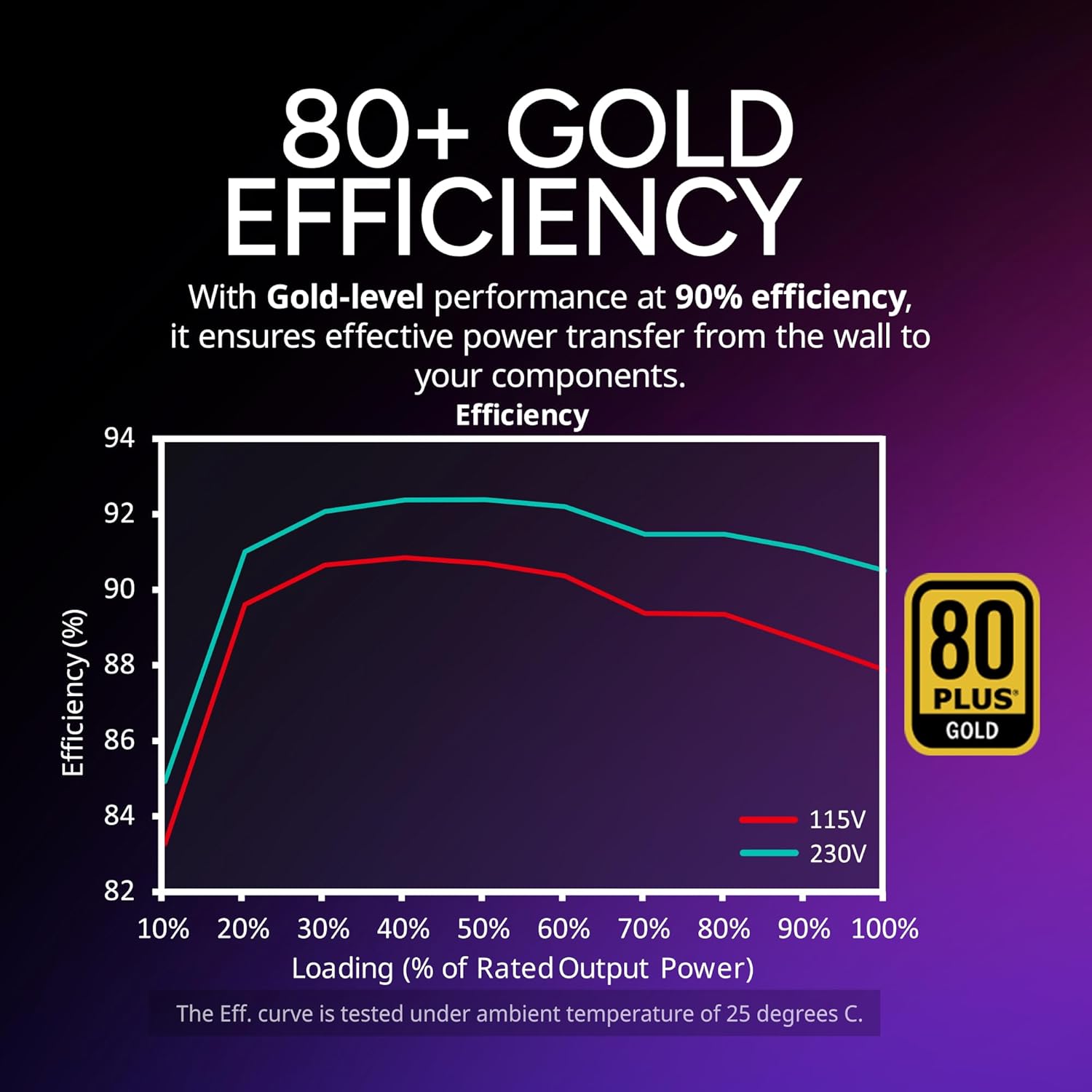
Image: Efficiency curve demonstrating the 80 Plus Gold performance of the power supply.
The integrated 92mm Fluid Dynamic Bearing (FDB) fan provides efficient and quiet cooling. FDB fans are known for their longevity and low noise output.

Image: Details of the Fluid Dynamic Bearing (FDB) fan, including its specifications.
Maintenance
Minimal maintenance is required for the V850 SFX Gold power supply.
- Cleaning: Periodically inspect the power supply's fan and vents for dust accumulation. Use compressed air to gently clear any dust, ensuring the system is powered off and unplugged before cleaning. Do not use liquid cleaners.
- Fan: The Fluid Dynamic Bearing fan is designed for long-term, low-maintenance operation. No lubrication or disassembly is required.
Troubleshooting
If you encounter issues with your power supply, refer to the following common troubleshooting steps:
- No Power:
- Ensure the AC power cord is securely plugged into both the wall outlet and the power supply.
- Verify the power switch on the back of the PSU is in the "ON" (I) position.
- Check all modular cable connections to the PSU and components (motherboard, CPU, GPU) for secure seating.
- Test the wall outlet with another device to confirm it has power.
- System Instability/Crashes:
- Ensure your system's power requirements do not exceed the 850W capacity of the PSU.
- Verify all power connectors are correctly and firmly attached. Loose connections can cause instability.
- Check for proper ventilation within your computer case to prevent overheating of components, including the PSU.
- Unusual Noises:
- A slight fan noise is normal under load. Excessive or grinding noises may indicate a fan issue.
- "Coil whine" can sometimes occur in power supplies, often due to specific load conditions or electrical interference. While generally harmless, if persistent and bothersome, contact support.
If problems persist after following these steps, please contact Cooler Master customer support for further assistance.
Specifications
Detailed specifications for the Cooler Master V850 SFX Gold power supply:
| Feature | Specification |
|---|---|
| Model Name | V850 SFX Gold |
| Model Number | MPY-8501-SFHAGV-3U1 |
| Output Wattage | 850 Watts |
| Efficiency Rating | 80 Plus Gold |
| Form Factor | SFX (with ATX bracket included) |
| Dimensions (L x W x H) | 100 x 125 x 63.5 mm (3.94 x 4.92 x 2.5 inches) |
| Fan Type | 92mm Fluid Dynamic Bearing (FDB) Fan |
| Modular | Fully Modular |
| PFC | Active PFC |
| Protections | OVP, OPP, SCP, OCP, UVP, OTP |
| Operating Temperature | 0-50°C |
| MTBF | >100,000 Hours |
| Input Voltage | 100-240V |
| Input Frequency | 50-60Hz |
| Input Current | 12-6A |
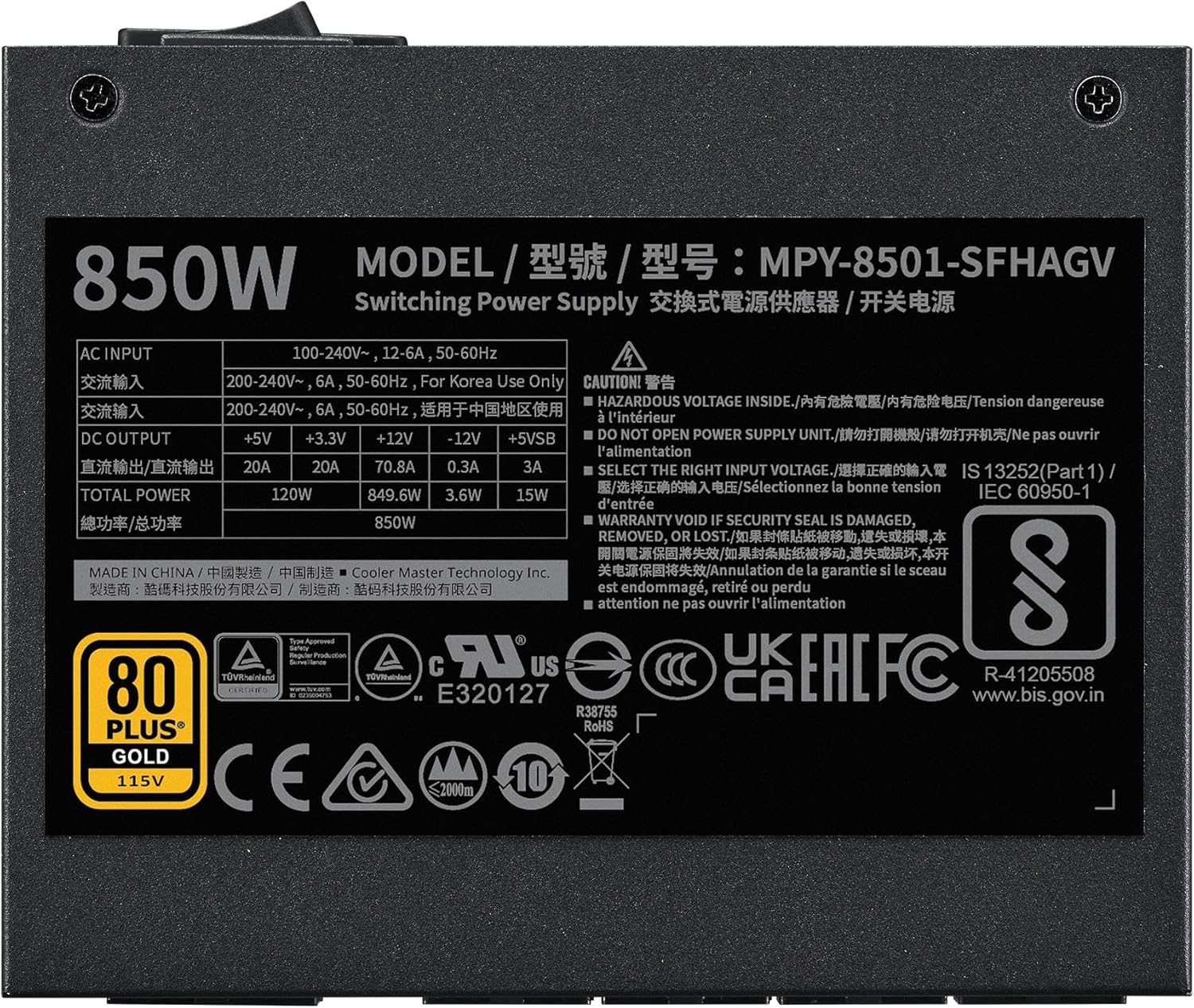
Image: Product label displaying electrical specifications and certifications.
Warranty and Support
The Cooler Master V850 SFX Gold power supply comes with a 10-year limited warranty from the date of purchase. This warranty covers defects in materials and workmanship under normal use.
For warranty claims, technical support, or further inquiries, please visit the official Cooler Master support website:
Please retain your proof of purchase for warranty validation.
Related documentsV850 SFX Gold


Ask a question about this manual
Ask about setup, troubleshooting, compatibility, parts, safety, or missing instructions. Manuals+ will review the question and use this page’s manual context to help answer it.