1. Introduction
Thank you for choosing the Cecotec Ready Warm 1200 Thermal Connected Electric Heater. This advanced heating solution is designed to provide efficient and comfortable warmth for rooms up to 10 m². Featuring 6 heating elements and 900 W of power, it ensures rapid heating. With its intuitive LED display, programmable timer, and convenient Wi-Fi control via your smartphone, managing your home's temperature has never been easier. This manual provides essential information for safe operation, installation, maintenance, and troubleshooting.
2. Important Safety Instructions
Please read all safety warnings and instructions carefully before using this appliance to prevent electric shock, fire, injury, or property damage. Keep this manual for future reference.
- Always ensure the heater is placed on a stable, level surface or securely mounted to a wall.
- Do not cover the heater or block any air vents. Overheating can occur if the heater is covered.
- Keep combustible materials such as furniture, curtains, and paper at least 1 meter (3 feet) away from the front and sides of the heater.
- Do not use the heater in bathrooms, laundry areas, or similar indoor locations where water may be present.
- Unplug the heater when not in use or before cleaning.
- This appliance is equipped with an overheating protection system to ensure safety.
- Activate the child lock function to prevent accidental changes to settings by children.
- Do not operate any heater with a damaged cord or plug, or after the heater malfunctions or has been dropped or damaged in any manner.
- Do not insert or allow foreign objects to enter any ventilation or exhaust opening as this may cause an electric shock or fire, or damage the heater.
3. Product Components
The Cecotec Ready Warm 1200 heater consists of the main unit and detachable feet for floor standing.

Figure 3.1: Front view of the Cecotec Ready Warm 1200 Thermal Connected Electric Heater, showcasing its slim design and control panel on the right side.
- Heating Elements: 6 internal elements for efficient heat distribution.
- Control Panel: Integrated LED display and touch buttons for operation.
- Power Switch: Located on the side or bottom for main power control.
- Power Cord: For connecting to an electrical outlet.
- Feet (optional): Two detachable feet for stable floor placement.
- Wall Mounting Brackets (optional): For secure wall installation.
4. Setup and Installation
The Ready Warm 1200 heater offers flexible installation options: it can be used as a freestanding unit with its feet or securely mounted to a wall.

Figure 4.1: Close-up view of the sturdy feet attached to the base of the heater, providing stability for floor standing.

Figure 4.2: The Cecotec Ready Warm 1200 heater positioned in a living room setting, demonstrating its compact size and aesthetic integration into a home environment.
4.1. Floor Standing Installation
- Carefully unpack the heater and all accessories.
- Attach the two provided feet to the base of the heater using the screws. Ensure they are securely fastened.
- Place the heater on a firm, level surface, ensuring adequate clearance from walls and furniture as per safety instructions.
- Plug the power cord into a suitable electrical outlet.
4.2. Wall Mounting Installation
(Note: Wall mounting hardware and specific instructions may vary. Refer to the separate wall mounting kit instructions if included.)
- Identify a suitable wall location, ensuring it is clear of electrical wiring, plumbing, and combustible materials.
- Mark the drilling points on the wall according to the provided wall mounting bracket template.
- Drill holes and insert appropriate wall plugs.
- Secure the wall mounting brackets to the wall.
- Carefully hang the heater onto the wall mounting brackets, ensuring it is securely locked in place.
- Plug the power cord into a suitable electrical outlet.
5. Operating Instructions
5.1. Control Panel Overview
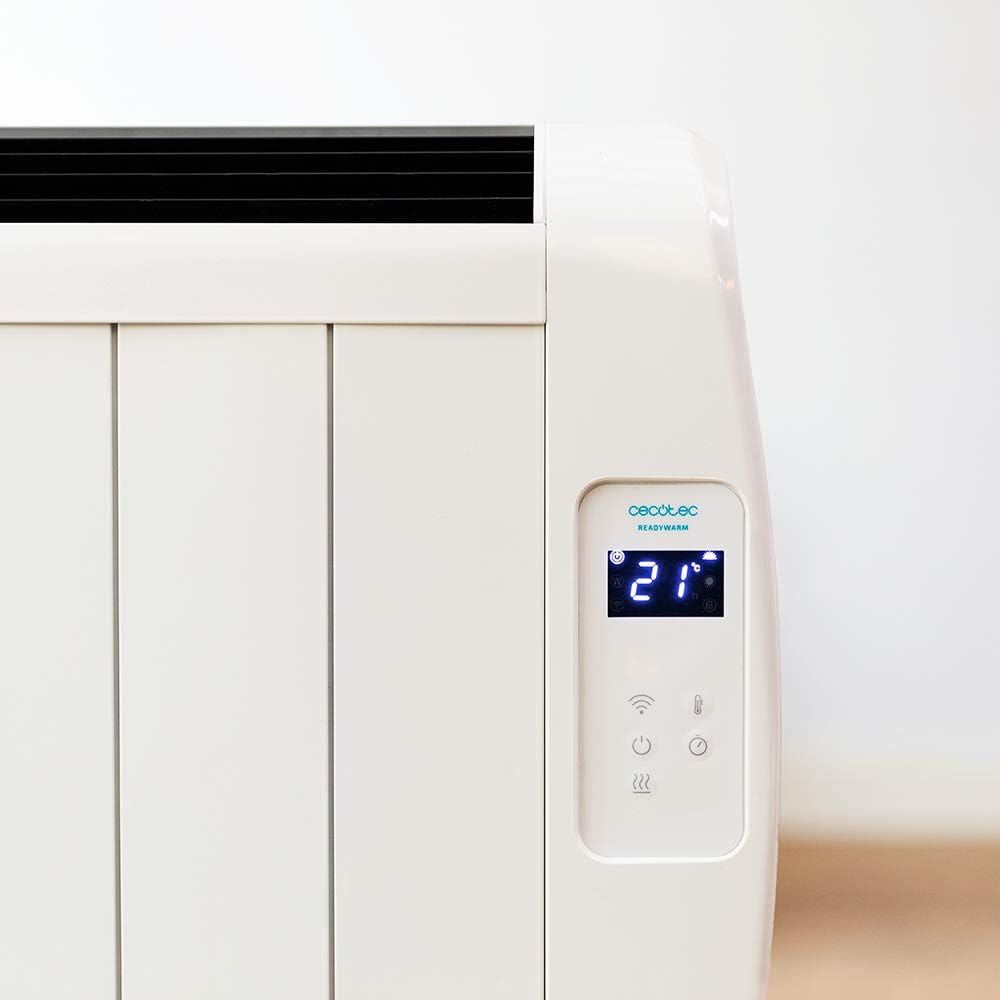
Figure 5.1: Detailed view of the heater's LED display, showing the current room temperature (21°C) and various control icons.

Figure 5.2: Detailed view of the heater's LED display, showing the timer function set to 4 hours, along with power and Wi-Fi indicators.
The control panel features an LED display and touch-sensitive buttons for easy operation.
- Power Button (⏻): Turns the heater ON/OFF.
- Mode Button (M): Cycles through available heating modes.
- Temperature/Timer Adjustment Buttons (+ / -): Adjusts desired temperature or timer settings.
- Wi-Fi Indicator: Shows Wi-Fi connection status.
- Child Lock Button: Activates/deactivates child lock.
5.2. Basic Operation
- Ensure the heater is plugged in and the main power switch (if present, usually on the side/bottom) is ON.
- Press the Power Button (⏻) on the control panel to turn on the heater. The LED display will illuminate.
- The display will show the current room temperature.
5.3. Temperature Setting
- While the heater is ON, use the + or - buttons to adjust the desired temperature.
- The temperature can be set between 5°C and 40°C.
- The heater will automatically maintain the set temperature, turning on and off as needed.
5.4. Mode Selection
The heater features 3 operating modes. Press the Mode Button (M) to cycle through them. Specific mode details are typically found in the full product manual, but common modes include:
- Comfort Mode: Maintains a comfortable, user-defined temperature.
- Eco Mode: Operates at a lower power setting to save energy while still providing warmth.
- Anti-freeze Mode: Maintains a minimum temperature (e.g., 5°C) to prevent pipes from freezing.
5.5. Timer Function
The programmable timer allows you to set specific times for the heater to turn ON or OFF.
- Press the Timer Button (often integrated with mode or a dedicated icon).
- Use the + or - buttons to set the desired operating duration or delay.
- Confirm the setting. The heater will operate according to the programmed schedule.
5.6. Wi-Fi Control (Smartphone App)
Control your heater remotely using the dedicated smartphone application.

Figure 5.3: A hand holding a smartphone displaying the Cecotec ReadyWarm app interface, showing temperature control and other settings for the heater.
- Download the official Cecotec ReadyWarm app from your smartphone's app store (iOS or Android).
- Register an account and log in.
- Follow the in-app instructions to add your Ready Warm 1200 heater. This typically involves putting the heater into pairing mode (refer to the heater's display or specific app instructions).
- Once connected, you can control all functions, including power, temperature, modes, and timer, from your smartphone.
6. Maintenance and Care
Regular cleaning and proper care will ensure the longevity and efficient operation of your heater.
- Before Cleaning: Always unplug the heater from the power outlet and allow it to cool down completely before cleaning.
- Exterior Cleaning: Wipe the exterior surfaces with a soft, damp cloth. Do not use abrasive cleaners, waxes, or polishes as they may damage the finish.
- Dust Removal: Use a vacuum cleaner with a brush attachment to remove dust from the air intake and exhaust vents.
- Storage: If storing the heater for an extended period, unplug it, clean it thoroughly, and store it in a cool, dry place, preferably in its original packaging.
- Do not immerse the heater in water or any other liquid.
7. Troubleshooting
If you encounter any issues with your Cecotec Ready Warm 1200 heater, please refer to the table below for common problems and solutions.
| Problem | Possible Cause | Solution |
|---|---|---|
| Heater does not turn on. | Not plugged in; main power switch OFF; power outage. | Ensure power cord is securely plugged in. Check main power switch. Verify power supply. |
| Heater stops working unexpectedly. | Overheating protection activated; timer expired. | Unplug, allow to cool for 30 minutes, remove any obstructions. Check timer settings. |
| Heater not heating effectively. | Temperature setting too low; room too large; vents blocked. | Increase desired temperature. Ensure heater is appropriate for room size. Clear any obstructions from vents. |
| Wi-Fi connection issues. | Incorrect Wi-Fi password; router too far; app not updated. | Re-enter Wi-Fi password. Move heater closer to router. Update app to latest version. Restart router and heater. |
| Display shows an error code. | Internal malfunction. | Note the error code and contact customer support. Do not attempt to repair. |
8. Specifications
Technical specifications for the Cecotec Ready Warm 1200 Thermal Connected Electric Heater (Model: 05373).
| Feature | Detail |
|---|---|
| Model Number | 05373 |
| Brand | Cecotec |
| Power | 900 W |
| Heating Elements | 6 |
| Recommended Room Size | Up to 10 m² |
| Dimensions (L x W x H) | 62.5 x 11 x 67.5 cm |
| Weight | 4.3 kg |
| Control | LED Display, Touch Buttons, Wi-Fi App Control, Wireless Remote Control |
| Temperature Range | 5°C - 40°C |
| Safety Features | Overheating Protection, Child Lock |
| Installation Options | Wall-mounted or Floor-standing (with included feet) |
9. Warranty and Support
For information regarding warranty coverage, technical support, or service, please refer to the warranty card included with your product or visit the official Cecotec website. Do not attempt to repair the appliance yourself.
For further assistance, please contact Cecotec customer service.


