1. Introduction
This manual provides detailed instructions for the proper installation, usage, and maintenance of your Suptek MD6YG120 1200mm Extender Mounting Pole. Please read this manual thoroughly before installation to ensure safe and correct operation. Keep this manual for future reference.
2. Product Overview
The Suptek MD6YG120 is a heavy-duty extender pole designed to increase the height and versatility of compatible Suptek monitor mounts. Constructed from high-quality steel, this pole allows for a sit-stand work style by extending the reach of your monitor setup. It is compatible with all Suptek series monitor mounts.
- Compatibility: Designed for use with all Suptek series monitor mounts.
- Dimensions: 1200mm (47.24 inches) total length, composed of three 400mm segments.
- Diameter: 35mm (1.375 inches).
- Material: High-quality steel for durability and stability.

Image 2.1: The Suptek MD6YG120 extender pole, illustrating its three 400mm segments that combine to a total length of 1200mm (47.24 inches).
3. Package Contents
Verify that all components are present before beginning installation. The package for the MD6YG120 extender pole typically includes:
- Three (3) Pole Segments (each 400mm in length)
- Necessary connecting hardware (e.g., screws, couplers)
If any parts are missing or damaged, please contact Suptek customer support immediately.
4. Specifications
| Feature | Specification |
|---|---|
| Brand | Suptek |
| Model Number | MD6YG120 |
| Total Length | 1200mm (47.24 inches) |
| Pole Diameter | 35mm (1.375 inches) |
| Material | Alloy Steel |
| Item Weight | 3.87 pounds |
| Compatible Devices | Monitor Mounts (Suptek series) |
5. Setup and Installation
Follow these steps to assemble and install the extender pole with your existing Suptek monitor mount.
5.1 Assembling the Pole Segments
- Unpack all pole segments and connecting hardware.
- Identify the threaded ends of the pole segments. One end of each segment will have external threading, and the other will have internal threading or a coupler.
- Carefully screw the first pole segment into the base of your existing Suptek monitor mount. Ensure it is tightened securely to prevent wobbling.
- Attach the second pole segment to the first by screwing the threaded ends together. Ensure a firm connection.
- Attach the third pole segment to the second in the same manner.
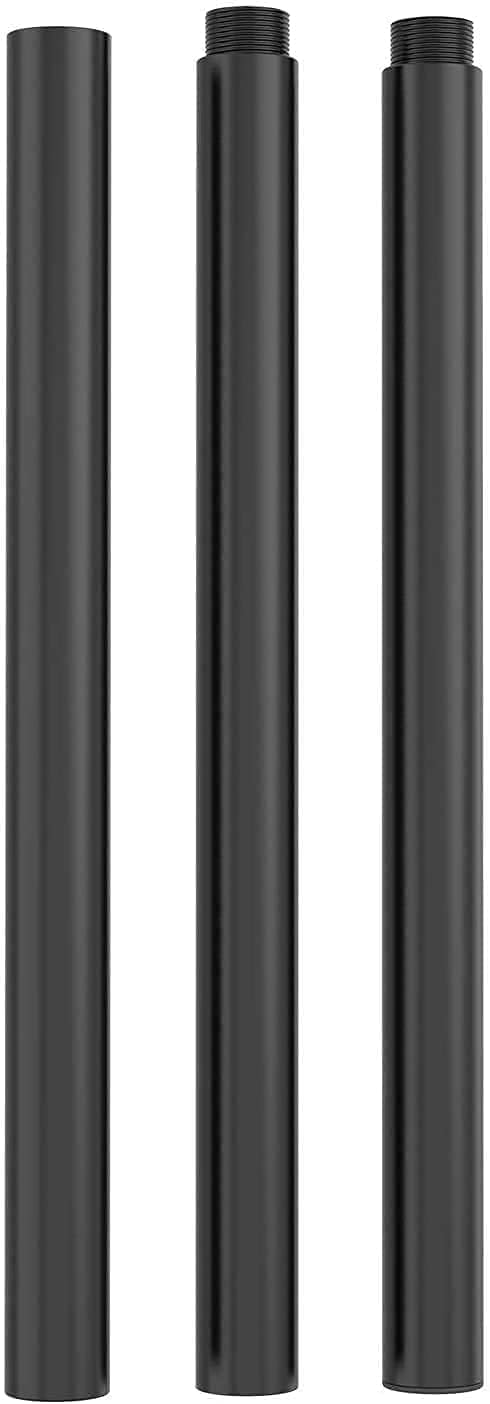
Image 5.1: Close-up view of the pole segments, highlighting the threaded connections for secure assembly.
5.2 Attaching Monitor Arms
Once the extender pole is fully assembled and securely attached to the base, you can reattach or install your monitor arms at the desired height along the pole. Ensure all clamps and fasteners are tightened according to your monitor mount's instructions to prevent monitors from slipping.

Image 5.2: An example of the Suptek extender pole integrated into a multi-monitor setup, demonstrating its capability to support multiple monitor arms at various heights.
6. Usage and Adjustment
The extended pole allows for greater vertical adjustment of your monitors, facilitating ergonomic setups including sit-stand workstations. Adjust the height of your monitor arms along the pole to achieve optimal viewing angles and comfort. Always ensure that the monitor arms are securely clamped to the pole after adjustment.
7. Maintenance
To ensure the longevity and safe operation of your Suptek extender pole, perform the following maintenance:
- Regular Inspection: Periodically check all connections, including the pole segments and where the pole attaches to the mount base and monitor arms, for tightness. Tighten any loose fasteners.
- Cleaning: Wipe the pole with a soft, damp cloth to remove dust and debris. Avoid abrasive cleaners or solvents that could damage the finish.
- Weight Capacity: Do not exceed the weight capacity of your monitor mount system, even with the extender pole installed.
8. Troubleshooting
If you encounter issues with your extender pole, consider the following:
- Wobbling/Instability: Ensure all pole segments are fully tightened. Verify that the pole is securely attached to the monitor mount base and that monitor arms are firmly clamped.
- Compatibility Issues: This pole is designed for Suptek series monitor mounts. If you are using a non-Suptek mount, compatibility cannot be guaranteed.
- Difficulty Assembling: Ensure you are aligning the threaded ends correctly before twisting. Do not force connections.
For persistent issues or concerns not addressed here, please contact Suptek customer support.
9. Warranty and Support
Suptek products are manufactured to high-quality standards. For warranty information or technical support, please refer to the documentation provided with your original Suptek monitor mount or visit the official Suptek website. You may also contact Suptek customer service directly for assistance with the MD6YG120 extender pole.


