
1. Introduction
This manual provides essential instructions for the safe and efficient use of your EMOS P3180 ULTIBRIGHT 80 rechargeable LED flashlight. Please read this manual thoroughly before operating the device and retain it for future reference.
2. Package Contents
Verify that all items listed below are included in your package:
- EMOS P3180 ULTIBRIGHT 80 Flashlight
- Li-ion Battery (2600 mAh)
- USB Charging Cable
- Wrist Strap
- Textile Pouch

3. Product Features
The EMOS P3180 ULTIBRIGHT 80 flashlight is designed for durability and high performance, offering versatile illumination for various applications.
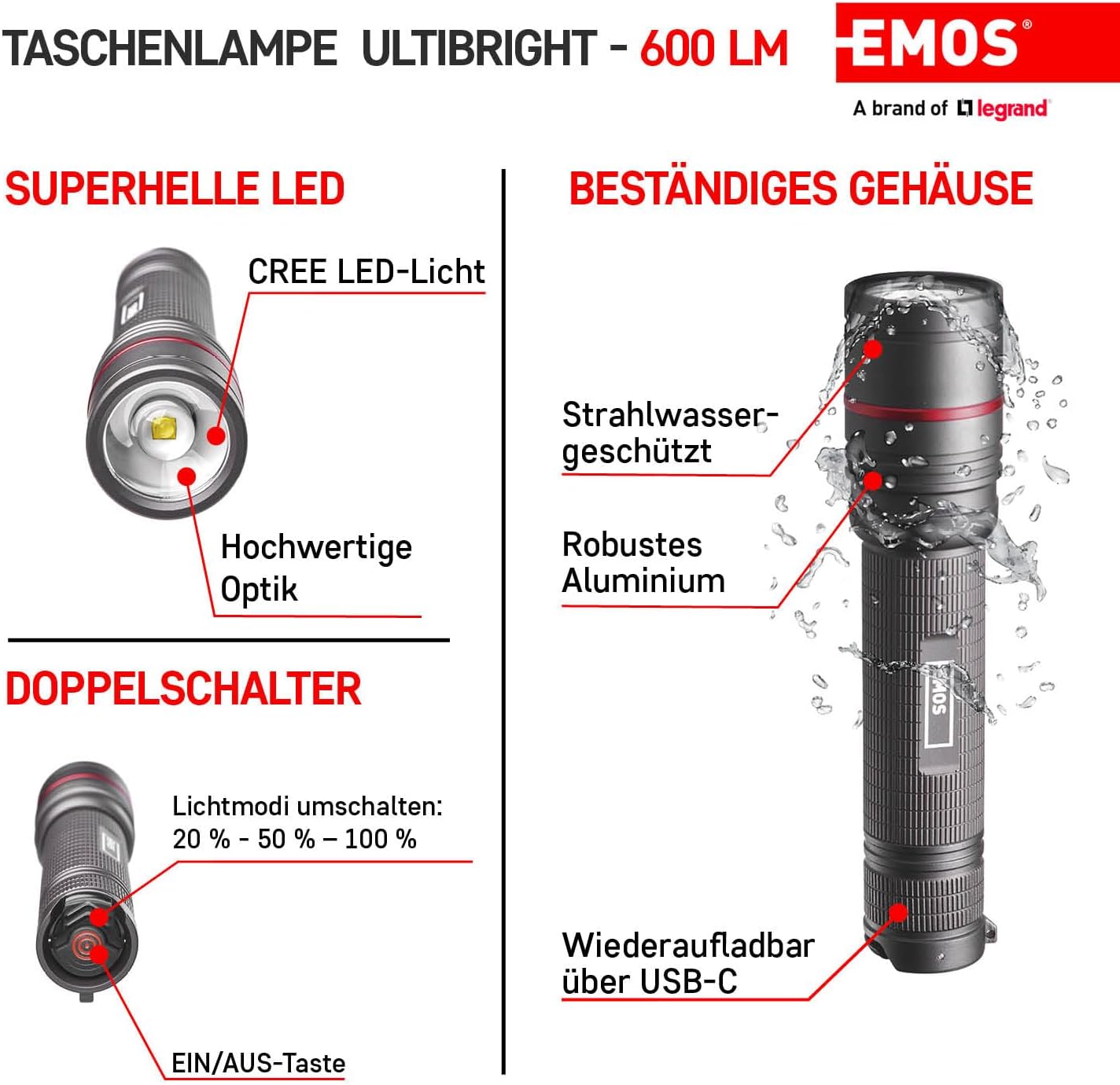
- Powerful Brightness: Delivers up to 600 lumens with a beam range of up to 230 meters.
- Adjustable Focus: Features a focusable beam, allowing adjustment from a narrow spot (15°) to a wide floodlight (140°).
- Multiple Lighting Modes: Offers three distinct lighting modes: High, Medium, and Low.
- Long-lasting Battery: Equipped with a 2600 mAh Li-ion battery, providing up to 12 hours of operation on low mode.
- Rechargeable: Convenient USB-C charging with an integrated LED charge indicator and battery protection functions.
- Extreme Durability: Constructed from high-quality aluminum alloy, IP65 water-resistant, and shock-resistant (up to 1-meter drop).
- Ergonomic Design: Features a comfortable non-slip grip and a removable wrist strap for secure handling.


4. Setup
4.1 Battery Installation
- Unscrew the tail cap of the flashlight.
- Insert the provided 2600 mAh Li-ion battery with the positive (+) terminal facing towards the head of the flashlight.
- Screw the tail cap back on securely.
4.2 Initial Charging
Before first use, fully charge the flashlight battery.
- Locate the USB-C charging port, typically hidden under a rotating collar or cover on the flashlight body.
- Connect the included USB charging cable to the flashlight's USB-C port.
- Connect the other end of the USB cable to a compatible USB power source (e.g., computer, wall adapter, power bank).
- The LED indicator will show charging status. Charge until the indicator signals a full charge.
- Once fully charged, disconnect the cable and ensure the USB-C port cover is securely closed to maintain water resistance.
5. Operating Instructions
5.1 Power On/Off
Press the main power button (usually located on the tail cap or side) to turn the flashlight on or off.
5.2 Changing Lighting Modes
With the flashlight on, press the mode switch (often a secondary button or a quick press of the main button) to cycle through the available lighting modes: High → Medium → Low.
5.3 Adjusting Focus
To adjust the beam focus, slide the head of the flashlight forward or backward. Sliding it forward typically narrows the beam for a longer throw, while sliding it backward widens the beam for broader area illumination.

| Mode | Luminous Flux | Runtime | Beam Range |
|---|---|---|---|
| High | 600 lm | 3.5 h | 230 m |
| Medium | 300 lm | 5.5 h | 150 m |
| Low | 130 lm | 12 h | 100 m |
6. Maintenance
6.1 Cleaning
- Wipe the flashlight body with a soft, damp cloth.
- Do not use abrasive cleaners or solvents.
- Clean the lens gently with a lens cloth to avoid scratches.
6.2 Storage
- Store the flashlight in a cool, dry place away from direct sunlight.
- For long-term storage, charge the battery to approximately 50% and recharge every 3-6 months to maintain battery health.
7. Safety Information
- Do not shine the flashlight directly into eyes, as the powerful beam can cause temporary vision impairment.
- Keep out of reach of children.
- Do not disassemble the flashlight or attempt to modify it, as this may void the warranty and pose safety risks.
- Use only the specified battery type (1 Lithium-ion) and charging cable.
- Avoid exposing the flashlight to extreme temperatures or open flames.
- Ensure the USB-C port cover is sealed when not charging to maintain IP65 water resistance.
8. Specifications
| Feature | Detail |
|---|---|
| Brand | EMOS |
| Model Number | P3180 (ULTIBRIGHT 80) |
| Light Source Type | CREE LED |
| Luminous Flux | 600 Lumens (max) |
| Beam Range | 230 meters (max) |
| Battery Type | 1 x 2600 mAh Lithium-ion (included) |
| Voltage | 3.7 Volts |
| Charging | USB-C |
| Material | Aluminum |
| Color | Black |
| IP Rating | IP65 (Water-resistant) |
| Shock Resistance | Up to 1 meter drop |
| Product Dimensions (L x W x H) | 15.1 x 3.4 x 3.4 cm |
| Item Weight | 189 g |
| Included Components | USB charging cable, Wrist strap, Flashlight, Pouch |
| Origin | Germany |
9. Troubleshooting
- Flashlight not turning on: Ensure the battery is correctly installed with the correct polarity. Check if the battery is charged.
- Dim light output: The battery may be low. Recharge the flashlight.
- Charging issue: Ensure the USB cable is securely connected to both the flashlight and the power source. Try a different USB port or power adapter.
- Water ingress: If the flashlight has been exposed to water and is malfunctioning, ensure all caps and covers are tightly sealed. Allow the flashlight to dry completely before attempting to use it again. If issues persist, contact customer support.
10. Warranty and Support
EMOS products are designed for reliability and performance. For warranty information, please refer to the documentation provided with your purchase or visit the official EMOS website. For technical support or service inquiries, please contact EMOS customer service through their official channels.