
Sofucor 5247BKDCHTM
Sofucor 52-Inch Low Profile Ceiling Fan User Manual
Model: 5247BKDCHTM
Product Overview
The Sofucor 52-inch Low Profile Ceiling Fan with Lights and Remote Control is designed to provide optimal airflow and lighting for various indoor and outdoor spaces. Featuring three modern wood blades and a noiseless DC motor, it offers quiet operation and energy efficiency. The integrated LED lights are dimmable and offer multiple color temperature options to suit your preference.
This manual provides detailed instructions for the setup, operation, and maintenance of your Sofucor ceiling fan.
Setup and Installation
Proper installation is crucial for the safe and efficient operation of your ceiling fan. Please follow these steps carefully.
Unboxing and Component Check
Carefully unbox your ceiling fan and verify all components are present according to the packing list. The package includes the DC Motor, LED and Lampshade, and 3 Fan Blades, along with a user manual and remote.

Figure 1: Sofucor 52-inch Low Profile Ceiling Fan with included remote control and various downrod lengths.
Figure 2: Detailed view of the fan's internal components and accessories, including the motor, remote, and light kit.
Installation Video Guide
For a comprehensive visual guide, please refer to the official installation video provided by Sofucor. This video covers step-by-step instructions for mounting and wiring.
Video 1: Official Sofucor Wood Ceiling Fan Installation Instructions. This video demonstrates the complete installation process, from mounting the bracket to attaching the blades and light kit.
Installation is straightforward and typically takes about 30 minutes. Ensure power is turned off at the circuit breaker before beginning any electrical work.

Figure 3: A person installing the fan, highlighting the ease of setup with proper guidance.
The fan includes three downrods (5", 10", 24") to accommodate various ceiling heights and can be installed on ceilings with a maximum slope of 15 degrees.

Figure 4: Visual representation of fan dimensions and suitability for different room sizes and ceiling types (low, medium, high, sloped).
Operating Instructions
Your Sofucor ceiling fan is operated using the included multi-functional remote control.
Remote Control Functions
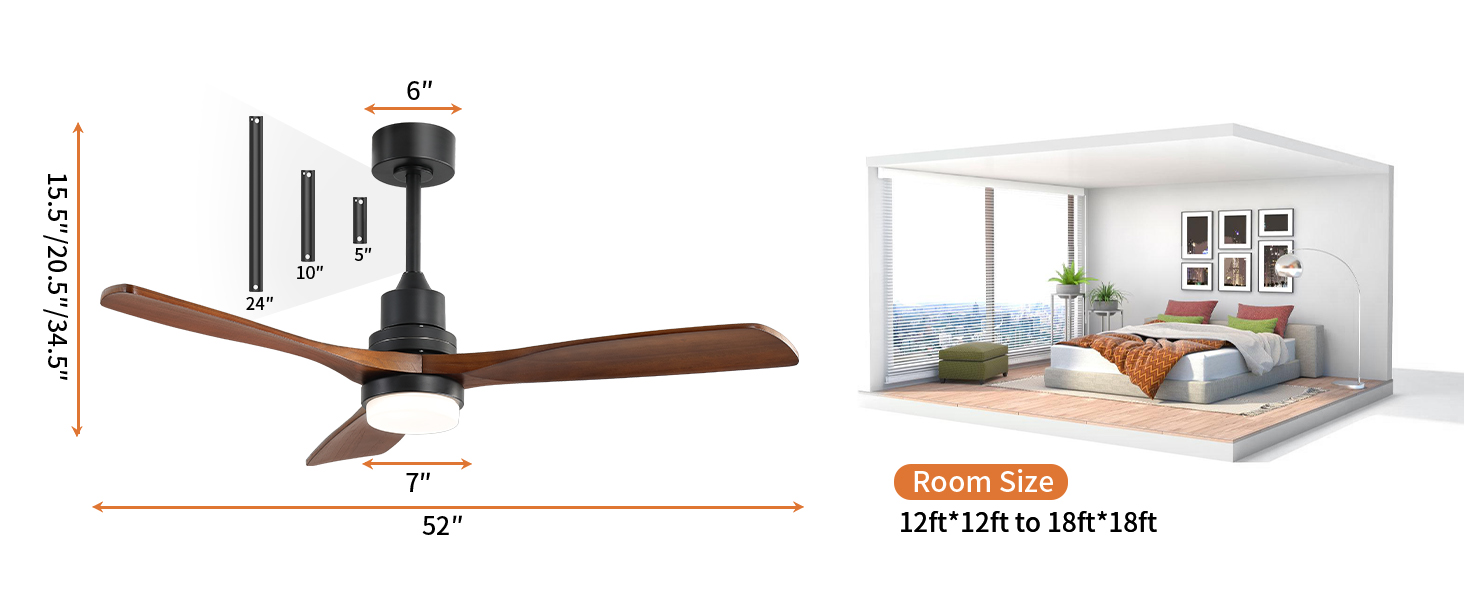
Figure 5: Layout of the remote control with labeled buttons for various functions.
- Power On/Off: Use the power button to turn the fan and light on or off.
- Fan Speed: Select from 6 adjustable speeds (low/medium/high) for optimal comfort.
- Light Control:
- Adjust light color temperature: Choose between 3000K (warm yellow), 4500K (bright daylight), and 6000K (cool white).
- Dimmable: Adjust brightness from 0% to 100%.
- Timer Settings: Set the fan to turn off automatically after 1, 4, or 8 hours.
- Reverse Airflow Function: Switch between summer mode (downward airflow for cooling) and winter mode (upward airflow for air circulation and energy saving).
- Natural Wind Mode: Activates a fluctuating fan speed to simulate natural breeze.

Figure 6: Illustration of the fan's reversible airflow function, demonstrating air movement for both summer and winter seasons.

Figure 7: The fan's customizable light feature, showing options for warm white, daylight white, and cool white, with dimmable functionality.
Maintenance
Regular maintenance ensures the longevity and optimal performance of your Sofucor ceiling fan.
- Cleaning: Dust the fan blades and motor housing regularly with a soft, damp cloth. Avoid using harsh chemicals or abrasive cleaners.
- Blade Inspection: Periodically check that all blade screws are tight. Loose screws can cause wobbling and noise.
- Light Kit: The fan features a replaceable LED light kit, ensuring long-term usability without worrying about frequent replacements.
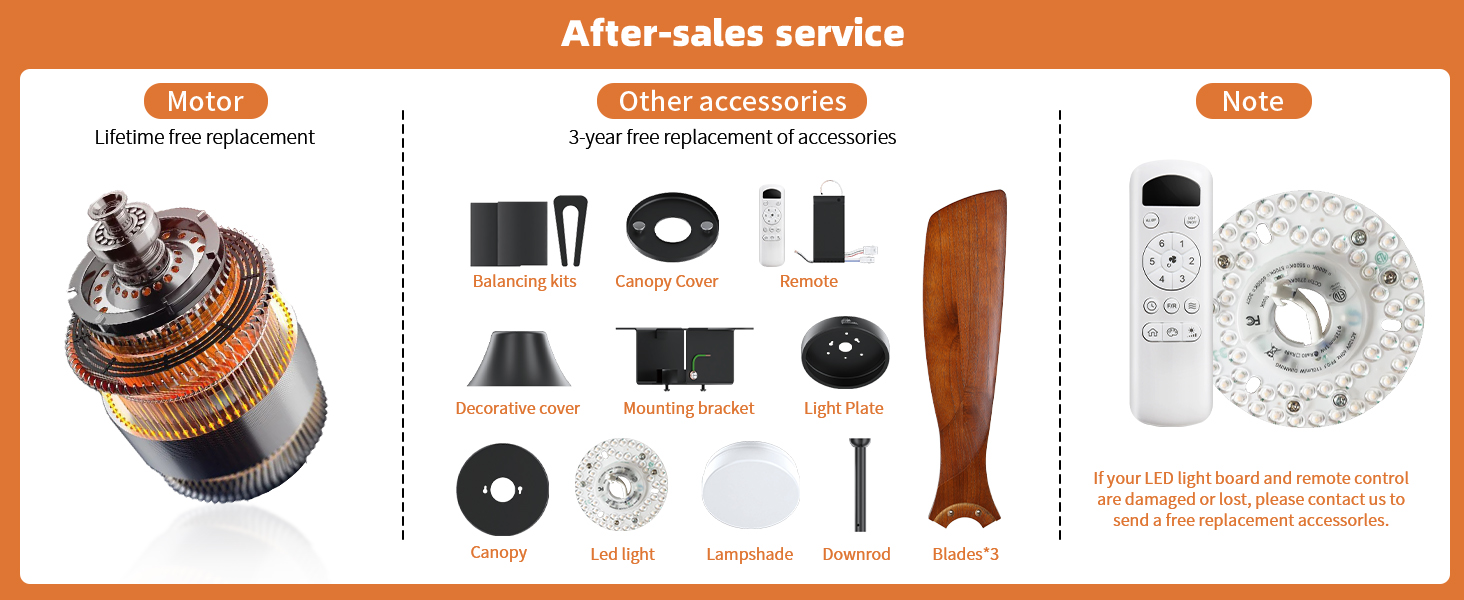
Figure 8: Overview of fan components and details on after-sales service for motor and accessories.
Troubleshooting
If you encounter any issues with your Sofucor ceiling fan, refer to the common problems and solutions below.
| Problem | Possible Cause | Solution |
|---|---|---|
| Fan does not operate | No power, loose wiring, remote control issue. | Check circuit breaker. Ensure all wire connections are secure. Verify remote control batteries and pairing. |
| Fan wobbles or makes noise | Loose blade screws, unbalanced blades, improper mounting. | Tighten all blade screws. Check for bent blades. Ensure mounting bracket is securely installed. |
| Light does not work | Loose light kit connection, faulty LED. | Check connections to the LED light kit. If LED is faulty, contact support for a replacement. |
If issues persist, please contact Sofucor customer support for assistance.
Specifications
- Brand: Sofucor
- Model Name: Sofucor ceiling fan (5247BKDCHTM)
- Color: black+walnut+with light
- Product Dimensions: 52"D x 52"W x 12"H
- Item Weight: 14.92 pounds
- Power Source: Corded Electric
- Voltage: 120 Volts
- Wattage: 35 watts
- Noise Level: 30 dB
- Number of Blades: 3
- Blade Material: light-weight solid wood
- Light Type: LED (3000K, 4500K, 6000K, Dimmable)
- Control Method: Remote (6 speeds, timer, reverse airflow)
- Air Flow Capacity: 5800 CFM
- Indoor/Outdoor Usage: Outdoor, Indoor (Not exposed to direct rain)
- Energy Efficiency: Typically 75% more energy-efficient than AC fans.
Warranty and Support
Sofucor is committed to providing high-quality products and excellent customer service.
- Motor Warranty: Lifetime maintenance for the motor.
- Product Warranty: 3-year protection plan for the ceiling fan.
- Technical Support: Dedicated 24-hour technical team available to assist with any issues.
- Replacement Parts: If your LED light board or remote control are damaged or lost, contact Sofucor for free replacement accessories.
For support, please refer to the contact information provided in your product packaging or visit the official Sofucor store on Amazon.
Related documents5247BKDCHTM


Ask a question about this manual
Ask about setup, troubleshooting, compatibility, parts, safety, or missing instructions. Manuals+ will review the question and use this page’s manual context to help answer it.