
1. Introduction
Thank you for choosing the Cargoplay K7PRO Digital Wireless Reversing Camera System. This manual provides essential information for the proper installation, operation, and maintenance of your device. Please read it thoroughly before use to ensure optimal performance and safety.
2. Product Overview
The K7PRO system is designed to enhance driving safety by providing a clear view of the area behind your vehicle. It features a 5-inch HD monitor and a wireless camera with stable digital transmission.
2.1. Package Contents
Verify that all items listed below are included in your package:
- 5-inch HD Monitor
- Wireless Reversing Camera
- Suction Cup Mount
- Car Charger (3.65m)
- Power Cable (2.05m)
- Straps and Clamps
- User Manual

Figure 2.1: The package includes the 5-inch monitor, wireless reversing camera, suction cup mounting bracket, straps and clamps for installation, a user manual, a car charger (3.65m), and a power cable (2.05m).
2.2. Key Features
- Dual Camera Support: The system supports up to two camera inputs, allowing for an additional camera (sold separately) to be connected and switched between views.
- Stable Digital Wireless Transmission: Utilizes 2.4G digital radio technology for a clear, interference-free image, superior to analog signals. Effective for vehicles up to 10 meters long.
- 5-inch HD Monitor: A color display with 800x480 resolution provides a clear and vivid rear view.
- Enhanced Night Vision: The 1/3-inch CMOS sensor ensures good visibility in low-light conditions, improving safety during night parking.
- Adjustable Parking Lines: Offers 6 different auxiliary parking lines to suit various vehicle types.
- Image Customization: Allows switching between mirror and normal image views, and vertical image adjustment (up/down).
- IP68 Waterproof Camera: The camera is rated IP68 for water resistance, ensuring durability in diverse weather conditions.
- Easy Installation: Wireless design eliminates complex wiring between the camera and monitor.
3. Setup and Installation
Follow these steps for proper installation of your K7PRO system.
3.1. Monitor Installation
- Attach the suction cup mount to the monitor.
- Mount the monitor on your vehicle's windshield or dashboard in a position that does not obstruct your view.
- Connect the monitor to the car charger and plug the charger into your vehicle's cigarette lighter socket.
3.2. Camera Installation
The camera is typically mounted near the license plate. Ensure the camera lens is clean and unobstructed.
- Secure the camera to the vehicle, often using the license plate bracket or an appropriate mounting location. If the license plate and tailgate handle are too close, the camera can be mounted below the license plate.
- Connect the camera's power cable to the vehicle's reverse light (12V) and ground (iron part of the vehicle). This ensures the camera powers on automatically when reversing.

Figure 3.1: The wireless design simplifies installation, eliminating the need for complex wiring between the camera and the monitor. The camera connects to the reverse light for power, and the monitor plugs into the car's cigarette lighter.
4. Operation
Once installed, the system is ready for use.
4.1. Powering On/Off
- The monitor will automatically power on when the vehicle is put into reverse (if wired to the reverse light).
- To manually power on/off the monitor, use the power button located on the side of the monitor.
4.2. Switching Between Cameras (if applicable)
If a second camera is connected, you can switch between CAM1 and CAM2 views.
- Press and hold the button at the bottom of the monitor for 3 seconds to switch between the two camera views.

Figure 4.1: The K7PRO system supports two camera inputs, allowing users to connect an additional camera (sold separately) and switch between views for comprehensive monitoring.
4.3. Image Settings
The K7PRO allows for various image adjustments through the monitor's menu.
- Parking Lines: Select from 6 different auxiliary lines to match your vehicle and preference.
- Mirror/Normal Image: Switch between mirror image (standard for rear view) and normal image (recommended for front camera use).

Figure 4.2: The K7PRO allows users to switch between mirror and normal image views, useful for rear or front camera applications.
- Image Up/Down Adjustment: If the camera is mounted in an inverted position (e.g., below the license plate), the image can be flipped vertically through the menu.

Figure 4.3: The image can be adjusted vertically (up and down) through the menu, providing flexibility for various mounting positions, such as below the license plate.
4.4. Night Vision
The K7PRO camera automatically adjusts to low light conditions, providing a clear image for safe parking at night.
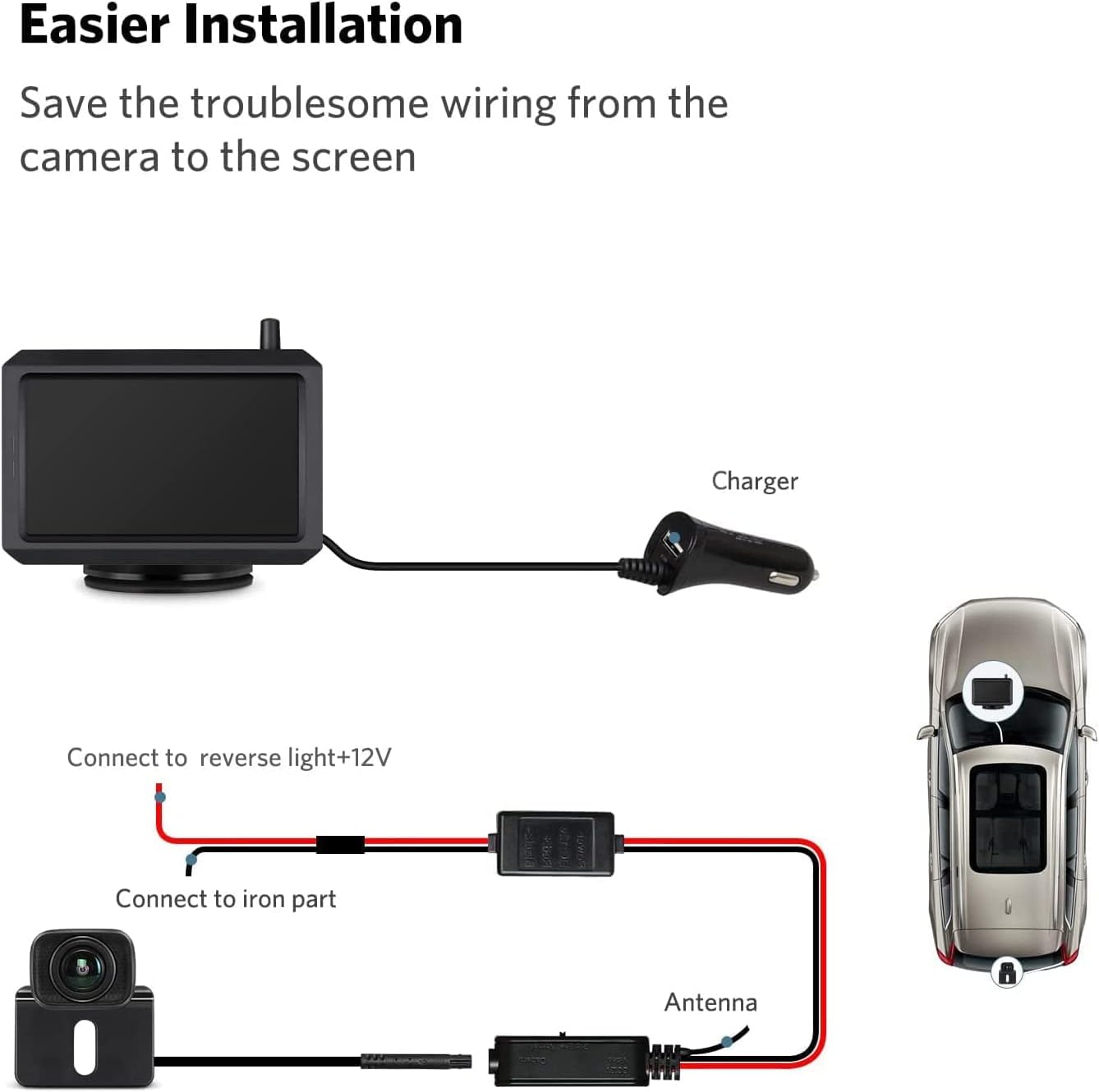
Figure 4.4: Equipped with a 1/3 inch CMOS sensor, the K7PRO camera provides excellent night vision, significantly enhancing safety during parking in dark conditions.
5. Maintenance
To ensure the longevity and optimal performance of your K7PRO system, follow these maintenance guidelines:
- Cleaning: Regularly clean the camera lens and monitor screen with a soft, damp cloth. Avoid abrasive cleaners that could scratch surfaces.
- Cable Connections: Periodically check all cable connections to ensure they are secure and free from damage.
- Environmental Protection: The camera is IP68 waterproof, but avoid prolonged submersion or high-pressure water jets directly on the lens.

Figure 5.1: The camera boasts an IP68 waterproof rating, ensuring reliable operation in various weather conditions, including rain and car washes.
6. Troubleshooting
If you encounter issues with your K7PRO system, refer to the following common problems and solutions:
| Problem | Possible Cause | Solution |
|---|---|---|
| No image on monitor | Loose power connection; Camera not powered; Signal interference. | Check monitor and camera power connections. Ensure camera is receiving power from reverse light. Verify no strong signal interference sources nearby. |
| Image flickering or unstable | Weak signal; Electrical interference. | Ensure camera and monitor are within effective range. Check for other electronic devices causing interference. |
| Incorrect image orientation | Image settings not configured. | Access the monitor menu to adjust mirror/normal view or flip the image vertically. |
| Night vision unclear | Camera lens dirty; Insufficient ambient light. | Clean the camera lens. Ensure there is some ambient light for the sensor to function optimally. |
If the problem persists after attempting these solutions, please contact customer support.
7. Specifications
Technical specifications for the Cargoplay K7PRO Digital Wireless Reversing Camera System:
| Feature | Detail |
|---|---|
| Brand | Cargoplay |
| Model Number | K7PRO |
| Screen Size | 5 Inches |
| Monitor Resolution | 800 x 480 pixels |
| Installation Type | Wireless |
| Voltage | 12 Volts |
| Optical Sensor Technology | CMOS (1/3 inch) |
| Lens Type | Wide-angle |
| Actual Viewing Angle | 118 Degrees |
| Field of View | 150 Degrees |
| Waterproof Rating | IP68 |
| Minimum Illumination | 0.1 Lux |
| Operating Temperature | -20°C to +65°C (-4°F to +149°F) |
| Storage Temperature | -30°C to +80°C (-22°F to +176°F) |
| UPC | 788413822975 |
8. Warranty and Support
The Cargoplay K7PRO Digital Wireless Reversing Camera System comes with a 1-year manufacturer's warranty.
For technical assistance, warranty claims, or any product-related inquiries, please contact our professional technical support team. We aim to provide a response within 12 hours before and after sales.
Please refer to your purchase documentation or the seller's contact information for specific support channels.