
Qidoe GSG2019-A1
Instruction Manual for Qidoe Quick Charge 3.0 Dual 12V USB Car Charger
Model: GSG2019-A1
1. Introduction
This manual provides detailed instructions for the installation, operation, and maintenance of your Qidoe Quick Charge 3.0 Dual 12V USB Car Charger. This aluminum-bodied charger features a red digital voltmeter and a waterproof design, making it suitable for various vehicles including marine boats, motorcycles, trucks, and golf carts. Please read this manual thoroughly before use to ensure proper functionality and safety.

Figure 1: Qidoe Quick Charge 3.0 Dual 12V USB Car Charger
2. Safety Information
Please observe the following safety guidelines to prevent damage to the product or injury:
- For vehicles, it is recommended to draw power from the fuse box.
- For motorcycles, it is advisable to connect to the wires of the key switch.
- Ensure correct polarity when connecting wires: red wire to positive (+), black wire to negative (-).
- Do not exceed the specified input voltage of 12 Volts.
- Avoid exposing the product to extreme temperatures or harsh chemicals.
- Keep out of reach of children.
3. Product Features
- Non-Slip Button Switch: Features a well-designed non-slip button switch for stable control. This switch can control the LED digital display, preventing battery drain from constant light when the engine is off, and extending product lifespan.
- All Metal Material Body: Constructed from advanced aluminum alloy, offering superior sturdiness, better texture, and enhanced high-temperature resistance compared to traditional plastic models, ensuring safer operation.
- Efficient Quick Charging: Equipped with dual ports providing a total output of 36W. Utilizes QC 3.0 Charging Technology for up to 4x faster charging than conventional methods, delivering the fastest possible charge to all compatible devices.
- Red Digital Display: An integrated digital voltmeter automatically monitors the battery and electrical system, displaying the car's voltage on the screen. This allows you to conveniently monitor battery health while driving. The voltage display remains visible even when the dust-proof sealing cover is closed.
- Universal Compatibility: Designed to fit most 12V-24V vehicles and boats' dash panels.
- Upgraded Full-Thread Design: The product now features a full-thread design for easier and more secure installation in thicker panels, addressing previous customer feedback.

Figure 2: Non-Slip Button Switch and Detachable Cap

Figure 3: Superior Safety with All-Metal Body

Figure 4: High-Speed Charging Capability
4. Package Contents
The package includes the following items:
- 1 x Qidoe Quick Charge 3.0 Dual 12V USB Car Charger
- 1 x 60cm (23.6 inches) power wire with pre-attached terminals and built-in 10A fuse
- Necessary installation accessories (e.g., mounting ring)

Figure 5: Included Components
5. Specifications
| Attribute | Value |
|---|---|
| Brand | Qidoe |
| Model | GSG2019-A1 |
| Input Voltage | 12 Volts |
| Output Wattage | 36 Watts (Total) |
| Output Amperage | 1.5 Amps (per port, Quick Charge 3.0) |
| Connectivity Technology | USB |
| Connector Type | USB Type A |
| Material | Aluminum Alloy |
| Special Features | Waterproof, Non-Slip Button Switch, Digital Voltmeter |
| Item Weight | 1.16 ounces |
| Package Dimensions | 4.25 x 3.03 x 1.57 inches |
6. Installation Guide
Follow these steps to properly install your Qidoe USB Car Charger:
- Drill a Hole: Using a hole opener, drill a hole approximately 1.18 inches (3 cm) in diameter at your desired installation location on the dash panel.
- Insert the Charger: Remove the mounting ring from the charger. Insert the charger body into the drilled hole from the front.
- Secure the Charger: Screw the mounting ring tightly onto the back of the charger to secure it in place.
- Connect Wiring: Connect the red wire (positive, +) to the positive terminal of your vehicle's power source and the black wire (negative, -) to the negative terminal. The charger's bottom has positive and negative markings.
- For vehicles, it is recommended to obtain power from the fuse box.
- For motorcycles, it is best to connect to the wires of the key switch.
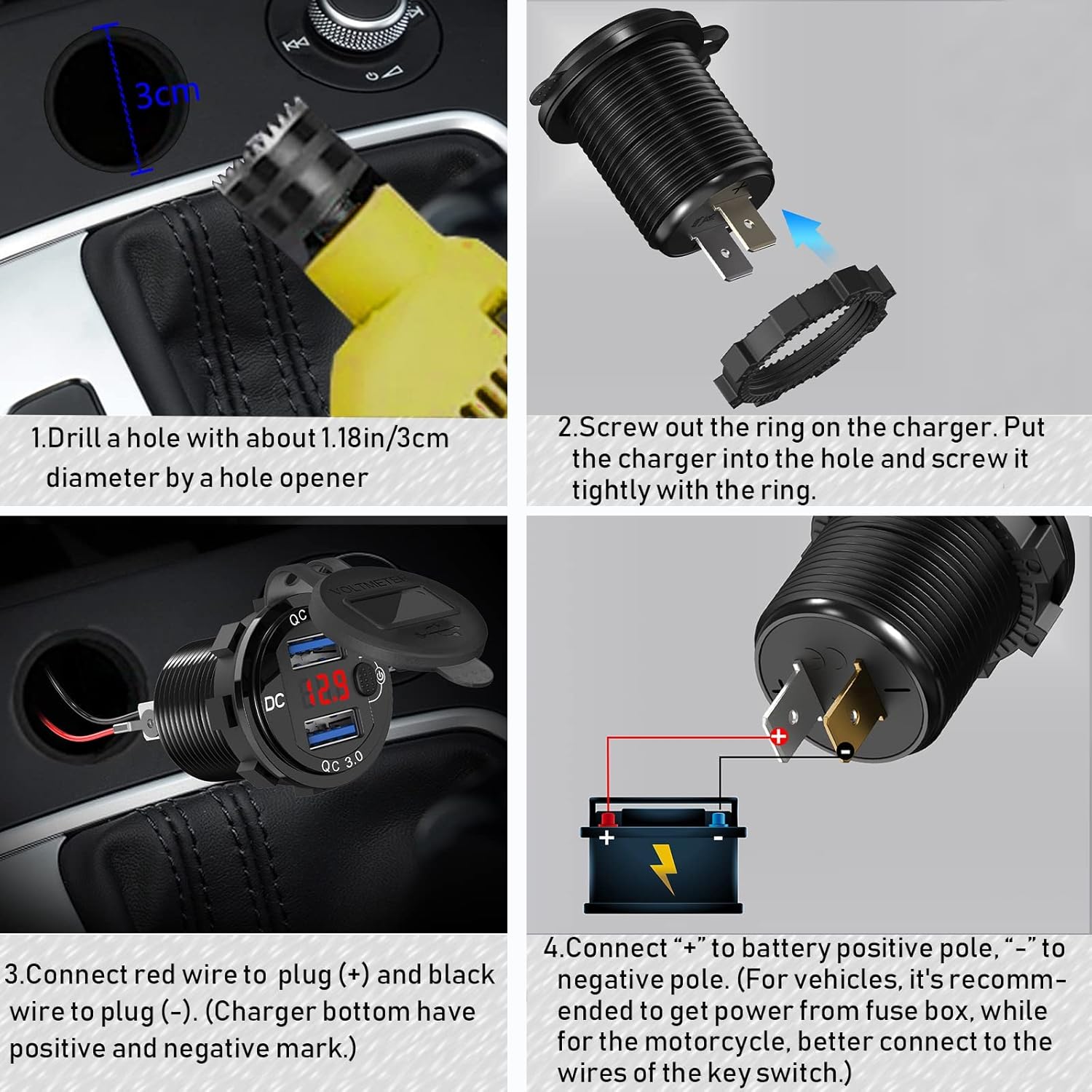
Figure 6: Step-by-Step Installation Diagram
For a visual demonstration of the installation process, please watch the official video below:
Video 1: How to Install the 12 Volt USB Outlet
7. Operating Instructions
- Power On/Off: Press the non-slip button switch to turn the charger and its digital voltmeter display on or off. This feature helps conserve battery power when the charger is not in use.
- Voltage Monitoring: When powered on, the red digital display will show the current voltage of your vehicle's battery. A stable voltage reading indicates a healthy battery.
- Charging Devices: Insert your USB charging cables into the dual QC 3.0 ports. The charger will automatically detect your device and deliver the optimal charging speed.
- Waterproof Cap: Ensure the waterproof cap is securely closed when the charger is not in use or when exposed to moisture to protect the ports.
8. Maintenance
To ensure the longevity and optimal performance of your Qidoe USB Car Charger, follow these maintenance tips:
- Regularly inspect the wiring for any signs of wear, fraying, or corrosion. Replace damaged wires immediately.
- Keep the USB ports clean and free from dust and debris. Use a soft, dry cloth to wipe the surface.
- Ensure the waterproof cap is always properly sealed when the charger is not in use, especially in marine or outdoor environments.
- Avoid using abrasive cleaners or solvents on the charger's surface.
9. Troubleshooting
If you encounter issues with your Qidoe USB Car Charger, consider the following:
| Problem | Possible Cause | Solution |
|---|---|---|
| Charger not powering on / No digital display |
|
|
| Slow charging or no charging |
|
|
| Inaccurate voltage reading |
|
|
10. Warranty and Support
This Qidoe product comes with a worry-free 60-Day refund Guarantee and LIFETIME friendly customer service. If you encounter any issues or have questions, please contact us directly for a satisfying solution.
For further assistance, please visit the official Qidoe Store: Qidoe Store on Amazon
Ask a question about this manual
Ask about setup, troubleshooting, compatibility, parts, safety, or missing instructions. Manuals+ will review the question and use this page’s manual context to help answer it.