
ZIYOU LANG 20201029MK
ZIYOU LANG Mechanical Gaming Keyboard User Manual
Model: 20201029MK
1. Product Overview
The ZIYOU LANG Mechanical Gaming Keyboard is an 87-key compact keyboard designed for PC gamers, featuring vibrant Chroma RGB LED backlighting, durable Blue mechanical switches, and anti-ghosting technology for precise input. It includes dedicated multimedia controls and a convenient scroll wheel for volume adjustment.

2. Setup Guide
This keyboard is designed for plug-and-play functionality, requiring no additional drivers for basic operation.
- Connect the USB Cable: Locate the Type-C port on the keyboard and connect one end of the provided USB cable.
- Connect to Computer: Plug the other end of the USB cable into an available USB port on your computer.
- System Recognition: Your operating system should automatically detect and install the necessary drivers. The keyboard will be ready for use once recognized.
The independent Type-C interface ensures easy connection and portability.
3. Operating Instructions
3.1. Chroma RGB Backlight Control
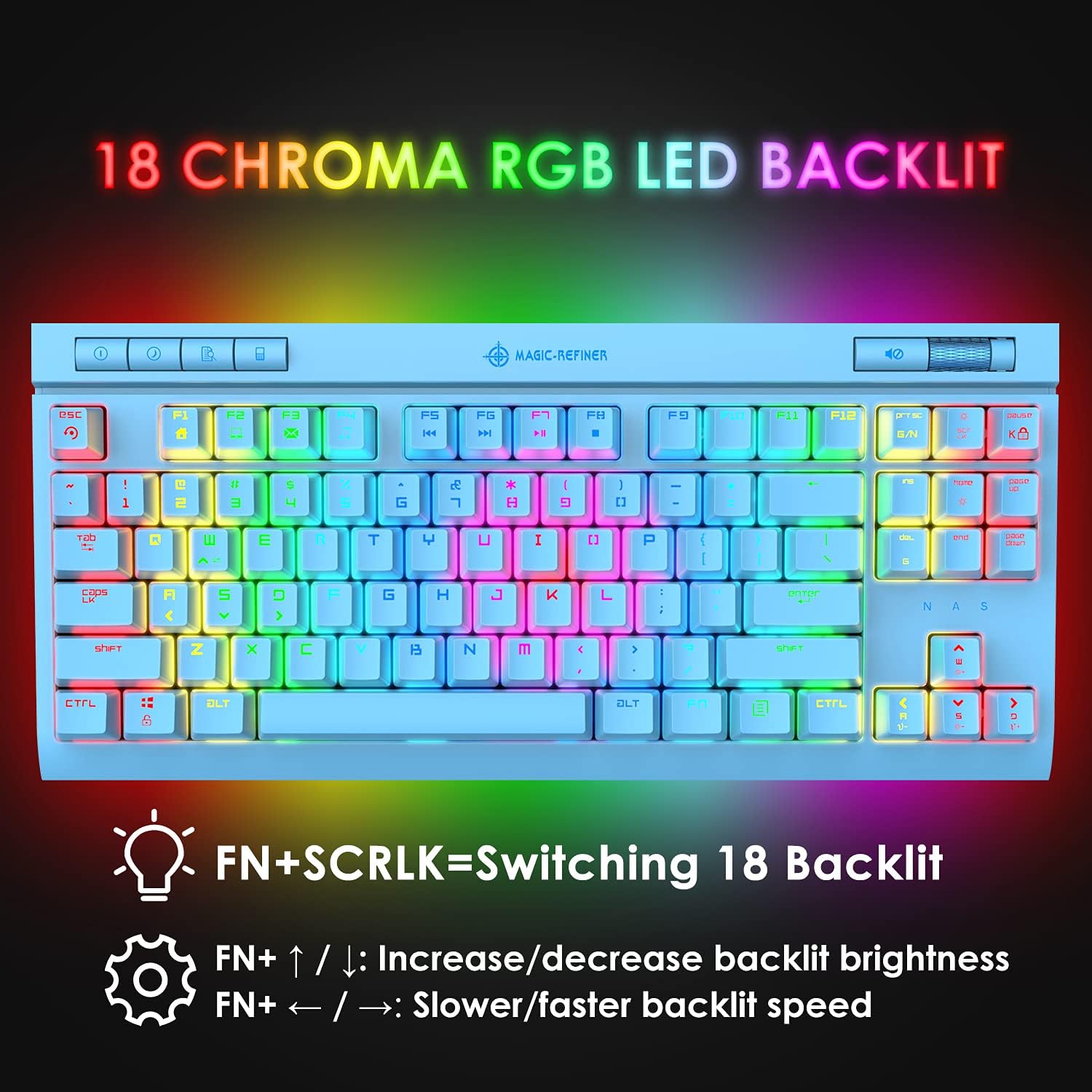
The keyboard features 18 distinct RGB backlight modes. You can cycle through these modes and adjust their effects using the following key combinations:
- Switch Backlight Modes: Press FN + SCRLK to cycle through the 18 available backlight modes.
- Adjust Brightness: Press FN + ↑ (Up Arrow) to increase brightness, and FN + ↓ (Down Arrow) to decrease brightness.
- Adjust Speed: Press FN + ← (Left Arrow) to slow down the backlight effect speed, and FN + → (Right Arrow) to speed up the backlight effect.
3.2. Function Combination Buttons
The keyboard includes several FN key combinations to enhance productivity and gaming experience:
- FN + ESC: Resets keyboard settings.
- FN + PRTSC: Toggles between all keys anti-ghosting and 6-key anti-ghosting mode.
- FN + PAUSE: Locks the keyboard. Press again to unlock.
Additionally, there are 8 Function Combination Buttons for quick access to common applications and media controls:
- FN + F1: Homepage
- FN + F2: My Computer
- FN + F3: E-mail
- FN + F4: Music Player
- FN + F5: Previous Song
- FN + F6: Next Song
- FN + F7: Play/Pause
- FN + F8: Stop

3.3. Dedicated Multimedia Controls
The keyboard features a dedicated scroll wheel and button for convenient audio control without interrupting your game or work:
- Volume Scroll Wheel: Rotate the scroll wheel upwards to increase volume, and downwards to decrease volume.
- Mute/Unmute Button: Press the button located to the left of the scroll wheel to mute or unmute audio.

3.4. Anti-Ghosting Technology
The ZIYOU LANG keyboard features full N-key rollover (NKRO) anti-ghosting, meaning each key is controlled by an independent switch. This ensures that every keystroke is registered accurately, even when multiple keys are pressed simultaneously, preventing input conflicts during intense gaming sessions.

3.5. Mechanical Blue Switches
This keyboard is equipped with classic Blue mechanical switches, known for their tactile bump and audible click sound. These switches provide clear feedback and a sensitive response, making them ideal for both typing and gaming. Each switch is tested for a durability of 50 million keystrokes.

3.6. System Compatibility
The ZIYOU LANG Mechanical Gaming Keyboard is broadly compatible with various operating systems:
- Perfectly matches Windows series.
- Compatible with Android, Linux, and iOS operating systems.
Note: Multimedia key combinations (FN + F1-F8) are only applicable to Windows systems.

4. Maintenance and Care
To ensure the longevity and optimal performance of your ZIYOU LANG Mechanical Gaming Keyboard, follow these maintenance guidelines:
- Regular Cleaning: Use a soft, dry cloth to wipe down the keycaps and keyboard surface. For deeper cleaning, use compressed air to remove dust and debris from between the keys.
- Avoid Liquids: Do not spill liquids on the keyboard. If accidental spillage occurs, immediately disconnect the keyboard from your computer and allow it to dry completely before reconnecting.
- Handle with Care: Avoid dropping the keyboard or subjecting it to strong impacts, as this can damage internal components or mechanical switches.
- Storage: When not in use for extended periods, store the keyboard in a cool, dry place away from direct sunlight.
5. Troubleshooting
If you encounter any issues with your ZIYOU LANG Mechanical Gaming Keyboard, please refer to the following common troubleshooting steps:
- Keyboard Not Responding:
- Ensure the USB cable is securely connected to both the keyboard and your computer.
- Try plugging the keyboard into a different USB port on your computer.
- Restart your computer.
- If using a USB hub, try connecting directly to the computer.
- Backlight Not Working/Incorrect:
- Ensure the keyboard is properly powered.
- Cycle through backlight modes using FN + SCRLK.
- Adjust brightness using FN + ↑ / ↓.
- Perform a keyboard reset using FN + ESC.
- Keys Not Registering / Ghosting:
- Ensure the keyboard is clean and free of debris under the keycaps.
- Try toggling the anti-ghosting mode using FN + PRTSC.
- Multimedia Keys Not Working (Windows Only):
- Confirm you are using a Windows operating system, as these functions are specific to Windows.
- Ensure no other software is conflicting with the multimedia key functions.
If the issue persists after trying these steps, please contact customer support for further assistance.
6. Specifications
| Feature | Detail |
|---|---|
| Product Dimensions | 15.55 x 7.87 x 2.13 inches |
| Item Weight | 2.7 pounds |
| Manufacturer | Mamba Snake |
| ASIN | B08LK4QR61 |
| Item Model Number | 20201029MK |
| Brand | ZIYOU LANG |
| Compatible Devices | PC (Windows, Android, Linux, iOS) |
| Connectivity Technology | USB Type-C (Wired) |
| Keyboard Description | Mechanical Gaming Keyboard |
| Recommended Uses | Desk, Gaming |
| Special Feature | Chroma RGB Lighting, Anti-Ghosting, Multimedia Controls |
| Color | Blue |
| Number of Keys | 87 |
| Keyboard Backlighting | RGB (18 modes) |
| Switch Type | Mechanical Blue Switch |
| Key Life | 50 Million Times |
| What's in the Box | Keycap Puller, USB Cable |

7. Warranty and Support
For warranty information and technical support, please refer to the documentation provided with your purchase or contact the manufacturer directly. You can also visit the official ZIYOU LANG store on Amazon for more information and contact options:
Ask a question about this manual
Ask about setup, troubleshooting, compatibility, parts, safety, or missing instructions. Manuals+ will review the question and use this page’s manual context to help answer it.